































Table of Contents
- Key Points
- The Ultimate AI Coding Guide with Claude Code
- Advanced Claude Code Shortcuts for Efficiency
- How to Use Claude Code for Optimal Performance
- Claude Code Pricing
- Pros and Cons
- Core Features of Claude Code
- Claude Code Use Cases
- FAQ
- Related Questions


The Ultimate AI Coding Guide with Claude Code
Setting Up Claude Code and Integration
The initial step is to download and install your AI coding tool. While options like Cursor AI and Winsurf AI exist, Claude Code stands out as a powerful alternative. It can be installed easily using npm: npm install -g @anthropic-ai/claude-code. Once installed, you can run Claude from your terminal or, for Visual Studio Code users, download the VS Code extension. A Claude icon will appear, enabling you to run Claude directly within your IDE
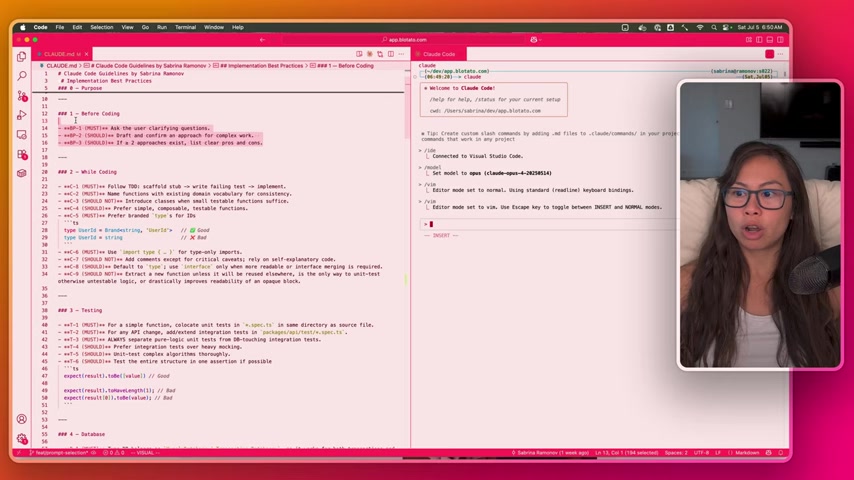
. The advantage of using the VS Code extension is that Claude Code becomes aware of the files you have open in your IDE. By typing /IDE, you can connect to an IDE for integrated development features.
Leveraging an AI Coding Rules File (claude.md)
Central to effective AI-assisted coding is a well-defined set of rules. For Claude Code, this takes the form of a claude.md file, akin to a cursor rules file in Cursor AI. This file outlines the best practices and coding guidelines that the AI should adhere to. The purpose of this file, and its best practices is to ensure, maintainability, safety, and velocity
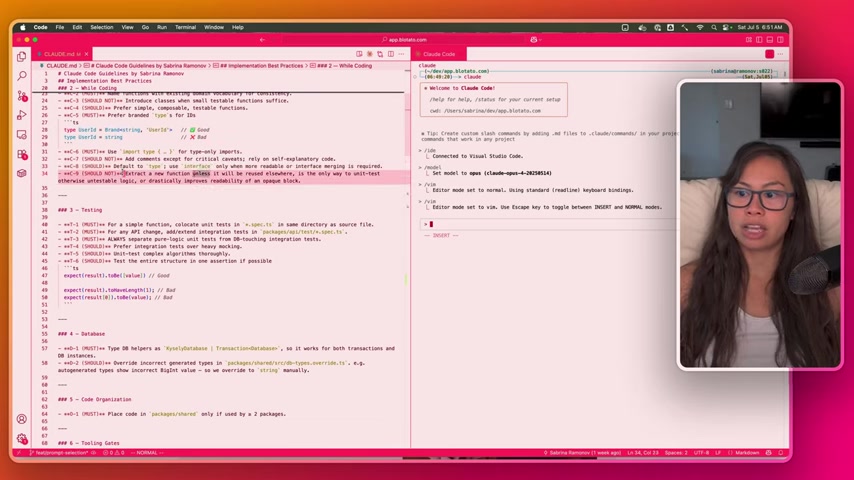
. This file provides direction for different software engineering processes.
These include aspects of software engineering such as:
- Before Coding: Ask clarifying questions and confirm approaches for complex work.
- While Coding: This includes test-driven development principles and name conventions with existing domain vocabulary for consistency .
- Type Safety: Branded types in Typescript is highly recommended for IDs.
- Rely on self-explanatory code and judicious comments. Extract a new function unless it will be reused elsewhere, is the only way to unit-test otherwise untestable logic, or drastically improves readability of an opaque block .
- Testing: For API changes and testing pure logic units .
It is important to update this file based on your specific software project.
Choosing the Right Model and Settings
When setting up Claude Code, you will be prompted to choose a model. While the default model is good, the Opus model is preferred. When running the process it is important to clear the context and allow the AI model to reread the claude.md for it to know all best practices and coding implementations. There is also Vim mode that can be selected for people who use Vim.
Implementing a Feature: A Step-by-Step Example
The best way to implement Claude is with a real-world implementation. When using it is important to:
- Branch out in a new branch that can provide a code name.
- Clear the context, by typying “/clear”.
- Setting up Vim can easily be done by typing “/Vim”
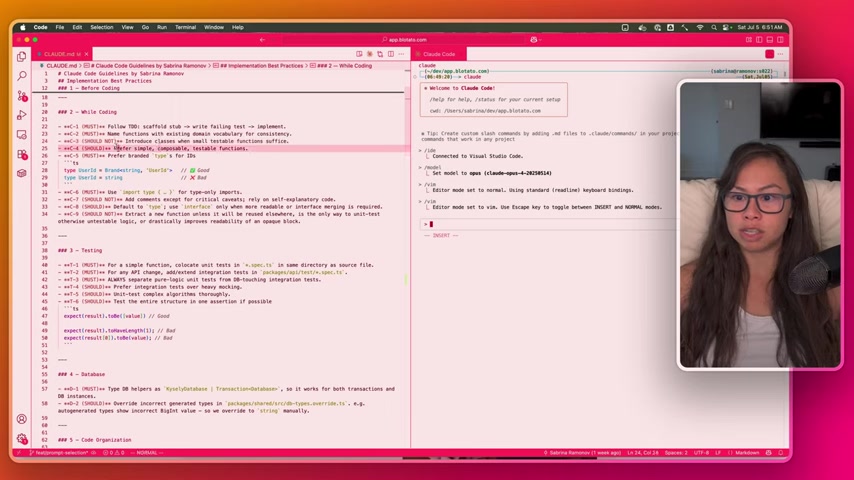
.
It is import to also have an ergonomic keyboard such as Glove80 or Kinesis to prevent strain. To start its important to let Claude know its the start of its new coding session by typing /new for new . You can find all these shortcuts in your claude.md file . Here's an example of what this claude.md file might include:
---code
Under ALL best PRACTICES listed in CLAUDE.md.
Your code SHOULD ALWAYS follow these best practices
---
After, if it seems like everything is clear to you based on what you read on claude.md, you need to set a plan using the command: /plan
Hands-on Code Check with This Detailed List
Here's a set of critical steps when developing a function:
- Ensure readability for straightforward understanding.
- Assess complexity and identify components if the function is similar to a proxy.
- Note the presence of parameters.
- Evaluate the function's testability and compatibility with core elements like external queries or database integration.
- Determine if any dependencies can influence arguments or be factored into them.
- Assess hidden non-trivial dependencies.
- Better notation of functions and the best coding methods, which are consistent with the rest of codebase.
Best Ways to Check Test Quality and Final Stages
Review should be conducted on test quality, and there is a requirement to have test descriptions exactly what final expect verifies. Reviewers should
- Avoid relying on hard-coded cases and unexpected literals.
- Assure test descriptions match real data and expectations.
- Express all Code implementation with safety and style rule following.
Advanced Claude Code Shortcuts for Efficiency
Streamlining Workflow with Custom Shortcuts
To further enhance the coding workflow, custom shortcuts are implemented for repetitive tasks:
| Shortcut | Meaning |
|---|---|
| QNEW | Understand all best practices listed in claude.md. |
| QPLAN | Analyze codebase and the base determine whether plan is consistent with code and existing. |
| QCODE | Ensure and implement your plan while setting the newest tests in place. |
| QCHECK | You are a SKEPTICAL Senior software engineer; perform analysis for edits and changes. |
| QUX | Envision as the main tester and output testing with high prioritys. |
| QGIT | Stage what you have now on git, and push to main. |
By implementing the above shortcuts, Claude Code can help you accelerate your processes and improve code quality
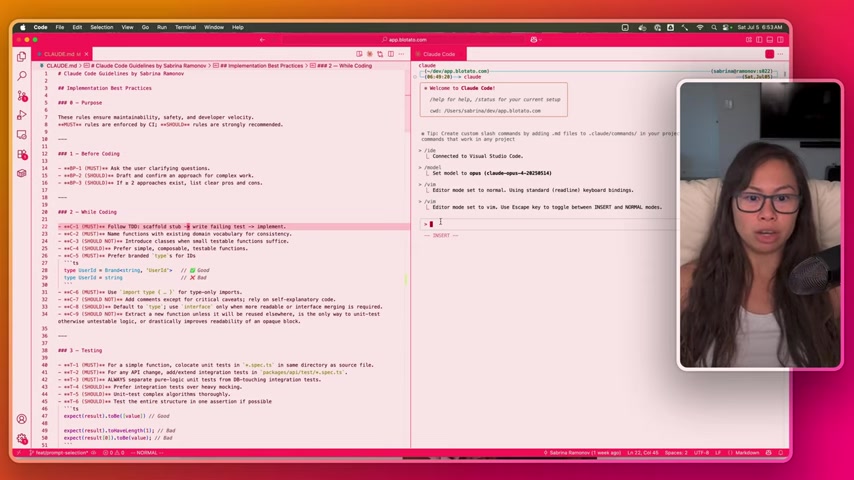
.








Most people like



































Report
Please select a reason for reporting
- 13 Reasons to Switch from Snapchat to Text Messaging
- 7 Powerful Speech to Text Apps to Boost Productivity
- 10 Best Speech to Text Tools for Effortless Transcription
- 13 Free Tools to Easily Transcribe Audio to Text
- 15 Surprising Ways Google's Speech-to-Text Boosts Productivity
- 7 Best Free Online Audio to Text Transcription Tools
- 9 Tips to Transcribe Speech to Text Faster and Better
- 13 Best Speech to Text Software for Windows 10 in 2023
- 7 Tips for Choosing the Best Transcriber for Audio to Text
- 11 Reasons Why Dragon Speech-to-Text Apps are Game-Changers
- 6 Secrets to Enhance Your Speech to Text Transcription
- 6 Brilliant Ways to Boost Productivity with Talk-to-Text on Your MacBook
- 6 Ways Transcription Software Converts Audio to Text
- 8 Tips to Transcribe Speech to Text Like a Pro
- 6 Reasons IBM Watson Speech to Text is a Game-Changer
- 14 Powerful Ways Talk-to-Text Improves Your Workflow
- 12 Top Windows Speech-to-Text Software for Efficient Transcription
- 12 Game-Changing Benefits of Apple's Speech to Text Technology
- 9 Powerful Use Cases for AWS Speech to Text Technology
- 10 Easy Steps to Transcribe YouTube Videos to Text
- transcription audio en texte
- online audio transcription
- free audio file transcription
- free ai audio transcription
- audio transcription service
- audio transcription online free
- audio transcription free online
- audio to transcription software
- audio and transcript
- ai audio transcription free
- voice recording to text converter
- translate voice recording to text
- record voice to text
- audio recording to text converter
- voice recording and transcription
- chatgpt voice to text
- gmail voice to text
- speech to text reader
- speech to text ai free
- speech to talk
- How SEO and Marketing Dashboards Empower Agencies to Drive Results
- How to Use AI Tools to Find Internal Linking Opportunities Across a Business Website
- Discover Your Perfect Haircut with AI Hairstyle Apps
- Free Reputation Calculator Tools: How They're Adapting to Score AI Visibility, Not Just Rankings
- Design Professional Flyers for Free on Your Phone
- Best Free Flyer Maker Apps for Android: Design Like a Pro
- How to Know If Your Business Is Ready for an AI Customer Service Agent
- Revolutionizing Storytelling: From Novels to Screenplays with AI
- Create Engaging Animated Explainer Videos with a Free AI Tool
- Stop Multi-Subscribing: Benchmark Top AI Visual Models in One Canvas
- My Brand New Logo: AI-Powered Logo Design for Startups
- Create Stunning Logos with Free AI Logo Generator!
- AI Logo Maker: Design a Stunning Logo in Minutes
- Elevate Your Zoom Experience with Enhanced Name Tags by Warmly
- Top 5 AI Logo Makers in 2025: Design a Stunning Brand
- Creative Fabrica's AI Tools: Flow, Studio, and Font Generator
- Create Stunning Logos with Canva's Free AI Logo Generator
- Create Professional and Memorable Logos with LogoMaker.ai
- Design Your Own Font: A Step-by-Step Guide with Vectornator Pro
- AI Font Generator: Revolutionizing Typeface Design with AI

Copyright ©2026 toolify