































Table of Contents
- Key Points
- Understanding AI Face Detection Technology
- Setting Up Face Detection With VIP Vision
- Maximizing Face Detection Features
- Benefits and Limitations of AI Face Detection
- RhinoCo Technology Products With Face Detection
- Frequently Asked Questions
- Related Questions


Understanding AI Face Detection Technology
What is Face Detection?
AI face detection, also known as face capture technology, is a powerful function available on select VIP Vision AI-based network video recorders (NVRs) and AI-based IP cameras. The technology's primary function is to capture an image of a face or multiple faces within a live video feed.
It's crucial to distinguish between face detection and face recognition. Face detection simply identifies the presence of a human face without identifying the individual. In contrast, face recognition identifies who the person is by comparing the detected face against a database of known individuals. Facial recognition is a separate and more advanced function that can be built upon initial face detection features. This article focuses exclusively on the practical applications and setup of face detection capabilities.
Why Use Face Detection if There's No Facial Recognition?
You might ask, "If I'm capturing a face, what's the point if I'm not going to recognize it afterwards?" While face recognition offers advanced identification capabilities, face detection alone provides significant value.
One of the most common and valuable uses of face detection is for streamlining video review. Imagine aiming a camera at the front entrance of a building. Instead of sifting through hours of footage, one can perform smart searches based on faces. With this type of function, the cumbersome process of manually searching through videos is avoided. This can save valuable time when investigating security events. This approach can significantly reduce the time and resources required to review video footage.
Face detection also facilitates proactive security measures. Alerts and triggers can be configured, so that if a face is detected, notifications can be sent to phones or PC-based clients. An example might be instead of setting up a tripwire, one can activate alerts when a face is present in the video. This provides a more reliable alert system, because triggering is now possible based on detecting the presence of a human. For example, this can help prevent false alarms triggered by animals or water flowing, rather than a person.
By triggering from faces, users can customize security protocols. With this function, alerts can be activated, saving time and resources, while creating more accurate triggers for important actions.
Setting Up Face Detection With VIP Vision
Navigating The User Interface
Let's walk through the process of setting up face detection using the VIP Vision interface. It's worth noting that the UI may vary. If your NVR matches the models mentioned earlier, updating the firmware ensures compatibility. Check the RhinoCo website for the latest firmware updates for your specific recorder model.
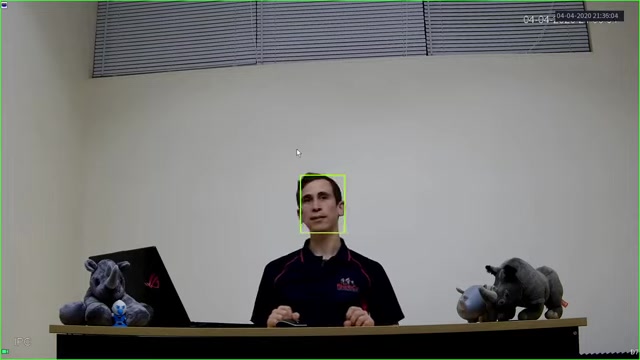
In general, there are three main sections: Smart Search, Parameters, and Database.
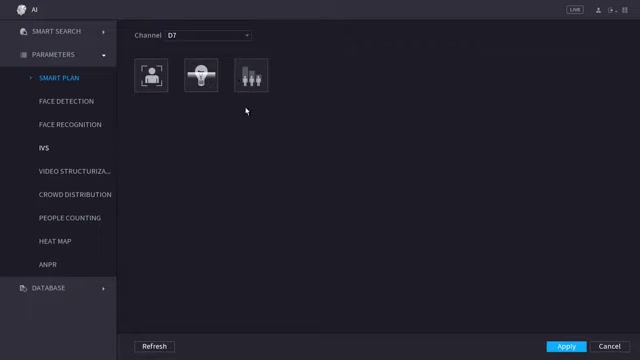
The Smart Search function helps to review the faces that we detect later on, but we need to set the parameters to enable this function. To configure the face detection, we need to navigate to the AI menu. From there, click on parameters to configure the face detection settings. Select the appropriate channel. We are going to use channel 7. Then, we need to select the box to enable face detection. From there, click apply. To view what we are seeing through the AI lens, we can right click and click on Preview Mode. Then, click AI Mode.
This is how to get an AI system set up, and allows for face detection.
Now, let's dive a bit deeper and talk about how the settings can be applied to AI by Camera, AI by Device and setting smart plans to get the most out of your VIP vision system.
AI by Camera
When using AI by Camera, you do not need to update your recorders. It's best to use an AI-based camera with a relatively modern VIP Vision recorder for seamless integration. The AI processing occurs at the camera level, offloading the processing burden from the recorder. Here are the key steps to activate this function.
- Enable Face Detection: Check the "Enable" box within the parameters section for the chosen camera channel. This activates face detection on that specific camera feed.
- Set a Smart Plan: If you are using AI by camera, the recorders AI setting will not be available. A smart plan can be used to help make face detection easier to use. More specific setup may be required by camera based off of their type, resolution, and Recording specs.
AI By Device
With an AI by Device configuration, you leverage the processing power of the NVR for AI functionalities. Here's how to set it up:
- Upgrade the Firmware: Make sure your recorder firmware is up to date. You'll need the correct firmware version to run this. See RhinoCo for information on your recorder.
- Add Your Smart Camera: With AI by Device, smart plans are set using an AI enhanced network video recorder. To set up, first make sure you have your camera added and selected as the appropriate channel.
Maximizing Face Detection Features
Enhancing Face Image Quality with Face ROI Tracking
One of the additional functions of AI enabled cameras, is its ability to help enhance face detection. To do this with a VIP vision camera, is the Face ROI (region of interest) tracking. This process enhances image of detected faces, optimizing video quality.
When a face comes into shot, the system enhances that image by using what is called region of interest tracking. This technique automatically allocates more data to the area around the face, ensuring more facial detail is recorded. By increasing data usage in the region of the face, quality is preserved, and detection and future recognition is enhanced.
This ROI optimization is especially valuable at lower bitrates. When bandwidth is limited, prioritizing facial detail ensures critical information is captured without sacrificing storage capacity. For example, the area with the most data allocated will be kept higher resolution. Setting up region of tracking and interest also helps to increase the detection.
This function balances efficiency and effectiveness, optimizing face capture in various network environments. It's a method for capturing the face, and not performing facial recognition.
Smart Playback Features
In order to perform playback, follow the directions below.
-
You want to click into your AI menu.
-
Click the "smart search" option
-
Then, select the appropriate channel on the left hand pane.
-
Set the gender, age, and mask, and glasses that you would like to select. Leaving these options at "all" means the system will search for every face.
-
From there, click Smart Search, and let the AI filter faces for you.
Setting triggers
In order to set triggers to enhance security, follow the directions below.
- You want to click into your AI menu.
- Click the "Parameters" option.
- Select the appropriate camera, or AI option that you want to select. For example, AI by Camera or AI by Device.
- Configure buzzer, voice prompts, record channel or Tour.
RhinoCo Technology Products With Face Detection
VIP Vision AI Network Surveillance Products
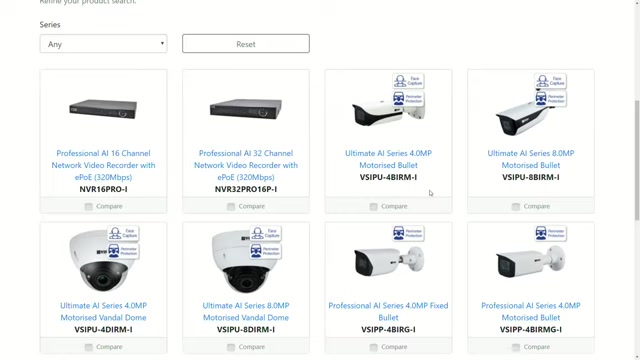
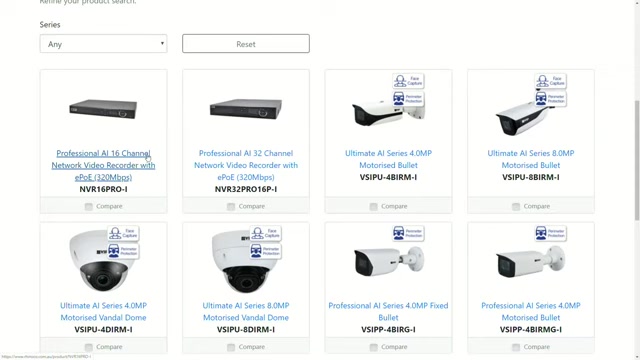
RhinoCo Technology offers a range of VIP Vision AI network video cameras and recorders. These devices are AI-based and offer face capture capabilities for advanced AI technology. When browsing the RhinoCo website, you can easily identify supported products. A "Face Capture" icon next to a camera indicates its compatibility with the face detection features we're about to describe.
Here are some of the products offered by RhinoCo with Face Capture technology:
- Professional AI 16 Channel Network Video Recorder with ePoE
- Professional AI 32 Channel Network Video Recorder with ePoE
- Ultimate AI Series 4.0MP Motorised Bullet
- Ultimate AI Series 8.0MP Motorised Bullet
- Ultimate AI Series 4.0MP Motorised Vandal Dome
- Ultimate AI Series 8.0MP Motorised Vandal Dome
- Professional AI Series 4.0MP Fixed Motorised Bullet
- Professional AI Series 4.0MP Fixed Motorised Bullet
- Ultimate AI Series 8.0MP Motorised Fixed Motorised Bullet
- Ultimate AI Series 4.0MP Fixed Motorised Turret
- Ultimate AI Series 8.0MP Motorised Turret
These products allow users to access AI-powered features, making security monitoring more reliable and efficient.








Most people like
































Report
Please select a reason for reporting
- 13 Reasons to Switch from Snapchat to Text Messaging
- 7 Powerful Speech to Text Apps to Boost Productivity
- 10 Best Speech to Text Tools for Effortless Transcription
- 13 Free Tools to Easily Transcribe Audio to Text
- 15 Surprising Ways Google's Speech-to-Text Boosts Productivity
- 7 Best Free Online Audio to Text Transcription Tools
- 9 Tips to Transcribe Speech to Text Faster and Better
- 13 Best Speech to Text Software for Windows 10 in 2023
- 7 Tips for Choosing the Best Transcriber for Audio to Text
- 11 Reasons Why Dragon Speech-to-Text Apps are Game-Changers
- 6 Secrets to Enhance Your Speech to Text Transcription
- 6 Brilliant Ways to Boost Productivity with Talk-to-Text on Your MacBook
- 6 Ways Transcription Software Converts Audio to Text
- 8 Tips to Transcribe Speech to Text Like a Pro
- 6 Reasons IBM Watson Speech to Text is a Game-Changer
- 14 Powerful Ways Talk-to-Text Improves Your Workflow
- 12 Top Windows Speech-to-Text Software for Efficient Transcription
- 12 Game-Changing Benefits of Apple's Speech to Text Technology
- 9 Powerful Use Cases for AWS Speech to Text Technology
- 10 Easy Steps to Transcribe YouTube Videos to Text
- transcription audio en texte
- online audio transcription
- free audio file transcription
- free ai audio transcription
- audio transcription service
- audio transcription online free
- audio transcription free online
- audio to transcription software
- audio and transcript
- ai audio transcription free
- voice recording to text converter
- translate voice recording to text
- record voice to text
- audio recording to text converter
- voice recording and transcription
- chatgpt voice to text
- gmail voice to text
- speech to text reader
- speech to text ai free
- speech to talk
- How SEO and Marketing Dashboards Empower Agencies to Drive Results
- How to Use AI Tools to Find Internal Linking Opportunities Across a Business Website
- Discover Your Perfect Haircut with AI Hairstyle Apps
- Free Reputation Calculator Tools: How They're Adapting to Score AI Visibility, Not Just Rankings
- Design Professional Flyers for Free on Your Phone
- Best Free Flyer Maker Apps for Android: Design Like a Pro
- How to Know If Your Business Is Ready for an AI Customer Service Agent
- Revolutionizing Storytelling: From Novels to Screenplays with AI
- Create Engaging Animated Explainer Videos with a Free AI Tool
- Stop Multi-Subscribing: Benchmark Top AI Visual Models in One Canvas
- Why do so many AI tools underdeliver for online stores?
- My Brand New Logo: AI-Powered Logo Design for Startups
- Create Stunning Logos with Free AI Logo Generator!
- AI Logo Maker: Design a Stunning Logo in Minutes
- Elevate Your Zoom Experience with Enhanced Name Tags by Warmly
- Top 5 AI Logo Makers in 2025: Design a Stunning Brand
- Creative Fabrica's AI Tools: Flow, Studio, and Font Generator
- Create Stunning Logos with Canva's Free AI Logo Generator
- Create Professional and Memorable Logos with LogoMaker.ai
- Design Your Own Font: A Step-by-Step Guide with Vectornator Pro

Copyright ©2026 toolify