































Table of Contents
- Key Points
- Building Your AI Resume Analyzer with Python
- Benefits of Using AI for Resume Analysis
- How to use this for your future applications
- FAQ
- Related Questions


Building Your AI Resume Analyzer with Python
Project Overview and Benefits
The project involves creating an AI-powered tool that analyzes resumes and provides actionable feedback to job seekers. By comparing the resume content against a specific job description, the analyzer identifies missing skills, suggests improvements, and highlights key areas that need attention. This helps job seekers craft targeted resumes that are more likely to catch the eye of recruiters and hiring managers. The key benefit is the ability to fine-tune your resume, increasing its relevance and impact for each job application. This process is designed to improve match score and overall Resume appeal.
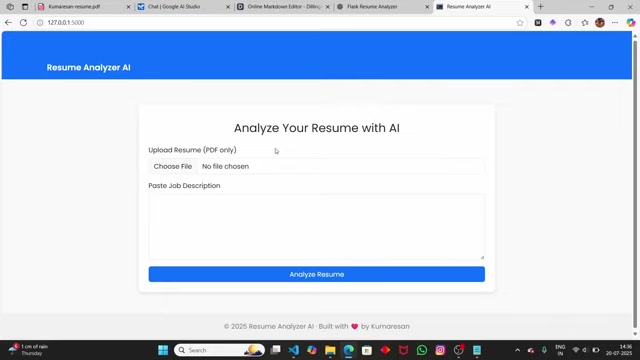
The advantages of using an ai Resume analyzer include:
- Personalized feedback: Get insights tailored to specific job descriptions.
- Efficiency: Quickly identify areas for improvement.
- Improved job prospects: Increase your chances of landing interviews.
- Cost-effectiveness: Build your own analyzer for free using readily available tools.
This detailed guide will give you the knowledge and the technical skills to create a sophisticated and professional resume analysis tool, all powered by the flexibility of Python and the power of AI.
Essential Python Libraries and Setup
To begin building your AI resume analyzer, you'll need the following Python libraries:
- Google Generative AI (Gemini AI): For natural language processing and content analysis. This is essential for understanding both the job description and resume content.
- PyMuPDF (fitz): For extracting text from PDF documents. Resumes are often submitted in PDF format, so this library allows you to convert the PDF into usable text.
- .env: To securely manage API keys and other sensitive information. Keeping API keys separate from your code helps to protect your credentials.
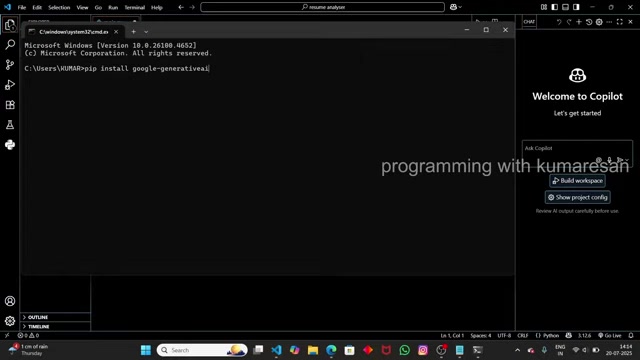
Here's how to install these libraries using pip:
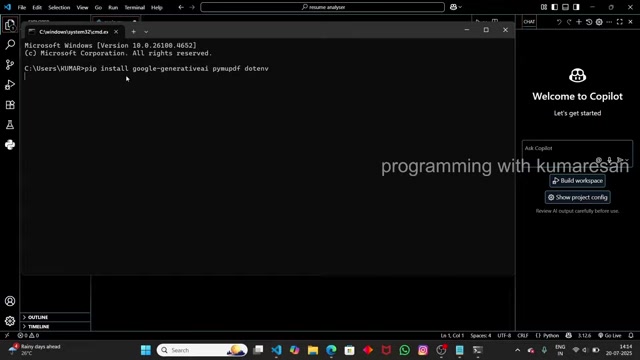
pip install google-generativeai pymupdf python-dotenvAfter installing, create a .env file to store your Gemini AI API key. This step is crucial for security. You'll obtain the API key from the Google AI Studio website, which we'll cover shortly. The code will be accessing this API key from the .env file instead of hardcoding it into the program. Now let's add code into our Python editor
Step 1: Extracting Text from PDF Resumes
The first step is to create a function that can extract text from the uploaded PDF resume. This involves using the PyMuPDF library (also known as fitz within the code) to open the PDF file, iterate through its pages, and extract the text content. This function encapsulates all that logic.
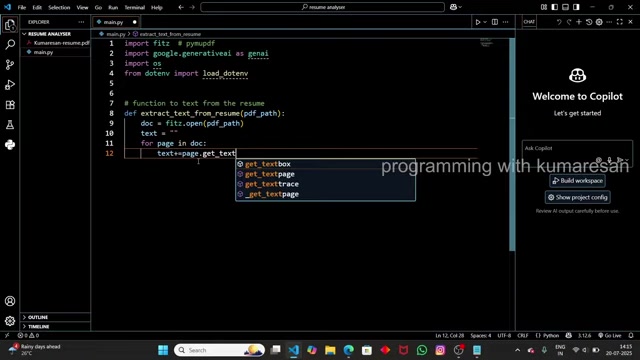
Below is an example to show you how you can extract texts from a PDF Resume:
import fitz # pymupdf

def extract_text_from_resume(pdf_path):
    text = ""
    doc = fitz.open(pdf_path)
    for page in doc:
        text += page.get_text()
    return text

# Usage
pdf_path = "kumaresan-resume.pdf" # example resume pdf path. Must be placed in the same directory as the main.py file
resume_text = extract_text_from_resume(pdf_path)
print(resume_text)
This code does the following:
- Imports the necessary
fitzlibrary. - Defines a function
extract_text_from_resumethat takes the path to the PDF file as input. - Opens the PDF file using
fitz.open(). - Iterates through each page of the PDF.
- Extracts the text content from each page using
page.get_text()and appends it to a string variable calledtext. - Returns the complete extracted text.
Remember to place your resume, 'kumaresan-resume.pdf', in the same working directory as your Python script. This allows you to specify it using relative paths as above instead of absolute paths. When you run this file, you'll notice that it outputs the extracted text from our resume pdf.
Step 2: Configuring Gemini AI and Setting up the Prompt
Next, set up Gemini AI for analyzing the extracted resume text. This involves configuring the API key and defining the prompt that instructs Gemini AI on how to analyze the resume and job description. The Prompt acts as the central directive for the AI, specifying how the inputs should be processed and what kind of output is expected.
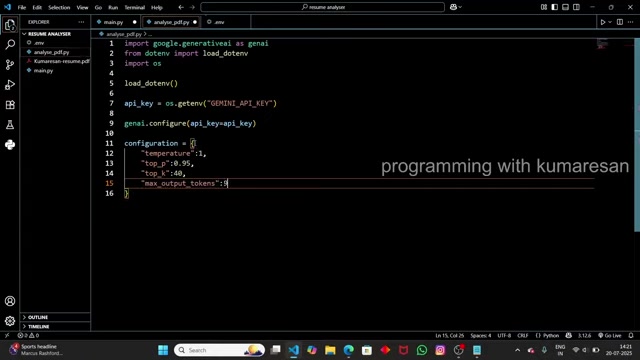
Here’s how to configure Gemini AI:
import google.generativeai as genai
import os
from dotenv import load_dotenv

load_dotenv()

#Configure the Gemini AI
genai.configure(api_key=os.getenv('GEMINI_API_KEY'))
To analyze content effectively with Gemini AI, it is necessary to set up specific configurations for the responses it will generate. You are defining the behavior and scope of the AI interaction. This can be implemented using the code below:
configuration = {
    "temperature": 1,
    "top_p": 0.95,
    "top_k": 40,
    "max_output_tokens": 8192,
    "response_mime_type": "text/plain"

}

model = genai.GenerativeModel(model_name="gemini-1.5-flash-002",generation_config=configuration)
Next, set up your prompt, including instructions for analyzing the resume and job description. Here’s an example prompt:
prompt = f"""
You are a professional resume analyzer.\
Resume: {resume_content}\
Job Description: {job_description}\
Task:\
- Analyze the resume against the job description.\
- Give a match score out of 100.\
- Highlight missing skills or experiences.\
- Suggest improvements.\
Return the result in structured format:\
Match Score: XX/100\
Missing Skills: ...\
Suggestions: ...\
Summary: ...\
"""
This code defines a prompt that instructs the AI to analyze the resume, give a match score, highlight missing skills, and suggest improvements . Make sure the API key is stored securely and called into the code to configure your application.
Step 3: Analyzing the Resume with Gemini AI
With the resume text extracted and the prompt defined, you can now use Gemini AI to analyze the resume against the job description. This involves calling the Gemini AI API and passing the prompt, resume text, and job description as inputs. The AI will then process this information and provide a structured response, outlining the resume's strengths and weaknesses. The quality of the Gemini AI response will heavily rely on how detailed your prompt is.
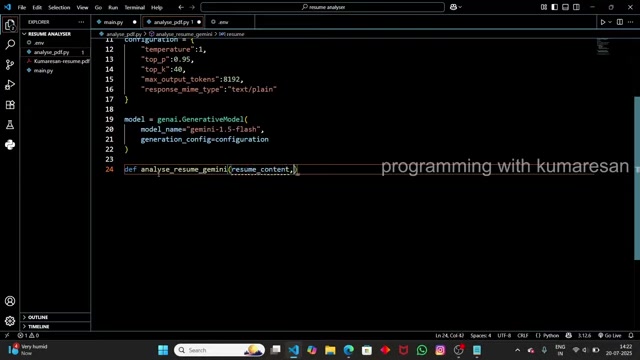
Here is the Python code to set it up:
def analyse_resume_gemini(resume_content, job_description):
  prompt = f"""
You are a professional resume analyzer.\
Resume: {resume_content}\
Job Description: {job_description}\
Task:\
- Analyze the resume against the job description.\
- Give a match score out of 100.\
- Highlight missing skills or experiences.\
- Suggest improvements.\
Return the result in structured format:\
Match Score: XX/100\
Missing Skills: ...\
Suggestions: ...\
Summary: ...\
"""
  response = model.generate_content(prompt)
  return response.text

# Use the function to retrieve the resume content, as well as the job description and send it to the analyse resume gemini function.

result = analyse_resume_gemini(resume_content, job_description)

print(f"Resume Analysis:
{result}")
Benefits of Using AI for Resume Analysis
Enhanced Efficiency and Accuracy
Traditional resume screening processes can be time-consuming and prone to human bias. AI-powered resume analysis offers a more efficient and objective approach. AI algorithms can quickly scan through hundreds or thousands of resumes, identifying candidates who meet specific criteria based on keywords, skills, and experience. This automated screening process significantly reduces the workload for HR professionals, allowing them to focus on more strategic tasks. Furthermore, AI can minimize the risk of overlooking qualified candidates due to subjective preferences, ensuring a more fair and equitable hiring process.
- Increased Speed: AI can analyze resumes much faster than humans, accelerating the initial screening process.
- Objective Evaluation: AI algorithms provide unbiased assessments, reducing the risk of overlooking qualified candidates.
- Reduced Workload: AI automates repetitive tasks, freeing up HR professionals to focus on strategic initiatives.
- Improved Accuracy: AI identifies the best candidates by analyzing the required keywords.
Quantifiable Improvements with AI Resume Analysis
AI has the possibility of providing a significant improvement in your resume analysis. AI can streamline recruitment to boost work flow.
| Measurement | with AI |
|---|---|
| Screening Time | Reduced by 50-70% |
| Qualified Candidates | Increased by 20-30% |
| Workload | Reduced by 40-50% |
These quantifications show the benefits of applying AI. It increases the chance of success.





Most people like

































Report
Please select a reason for reporting
- 13 Reasons to Switch from Snapchat to Text Messaging
- 7 Powerful Speech to Text Apps to Boost Productivity
- 10 Best Speech to Text Tools for Effortless Transcription
- 13 Free Tools to Easily Transcribe Audio to Text
- 15 Surprising Ways Google's Speech-to-Text Boosts Productivity
- 7 Best Free Online Audio to Text Transcription Tools
- 9 Tips to Transcribe Speech to Text Faster and Better
- 13 Best Speech to Text Software for Windows 10 in 2023
- 7 Tips for Choosing the Best Transcriber for Audio to Text
- 11 Reasons Why Dragon Speech-to-Text Apps are Game-Changers
- 6 Secrets to Enhance Your Speech to Text Transcription
- 6 Brilliant Ways to Boost Productivity with Talk-to-Text on Your MacBook
- 6 Ways Transcription Software Converts Audio to Text
- 8 Tips to Transcribe Speech to Text Like a Pro
- 6 Reasons IBM Watson Speech to Text is a Game-Changer
- 14 Powerful Ways Talk-to-Text Improves Your Workflow
- 12 Top Windows Speech-to-Text Software for Efficient Transcription
- 12 Game-Changing Benefits of Apple's Speech to Text Technology
- 9 Powerful Use Cases for AWS Speech to Text Technology
- 10 Easy Steps to Transcribe YouTube Videos to Text
- transcription audio en texte
- online audio transcription
- free audio file transcription
- free ai audio transcription
- audio transcription service
- audio transcription online free
- audio transcription free online
- audio to transcription software
- audio and transcript
- ai audio transcription free
- voice recording to text converter
- translate voice recording to text
- record voice to text
- audio recording to text converter
- voice recording and transcription
- chatgpt voice to text
- gmail voice to text
- speech to text reader
- speech to text ai free
- speech to talk
- How to Use AI Tools to Find Internal Linking Opportunities Across a Business Website
- Discover Your Perfect Haircut with AI Hairstyle Apps
- Free Reputation Calculator Tools: How They're Adapting to Score AI Visibility, Not Just Rankings
- Design Professional Flyers for Free on Your Phone
- Best Free Flyer Maker Apps for Android: Design Like a Pro
- How to Know If Your Business Is Ready for an AI Customer Service Agent
- Revolutionizing Storytelling: From Novels to Screenplays with AI
- Create Engaging Animated Explainer Videos with a Free AI Tool
- Stop Multi-Subscribing: Benchmark Top AI Visual Models in One Canvas
- Best Seedance 2.5 API Provider: Every Price on the Market, Checked at Source
- Top AI Social Media Management Tools: Automate Your Content Strategy
- Free AI Text to Video Generator: Create Stunning Videos from Text
- Discover 17 ChatGPT Alternatives: A Comprehensive Comparison
- Character.AI vs. Janitor AI: Which AI Chat Platform Reigns Supreme?
- Top Virtual Assistant Companies in 2026: Reviews, Pricing, and Plans Compared
- Unveiling FaceCheck.ID: Revolutionizing Reverse Image Searches with AI
- 11 Best AI Dialers in 2026: Features, Pricing, Pros and Cons
- How I Direct Consistent AI Clips: A Hands-On Guide to Multi-Model Generation
- A Realistic Review of the Photo Generator Image Tool
- Playwright MCP Server: Automated Web Testing with Agent Mode

Copyright ©2026 toolify