































Table of Contents
- Key Points
- Getting Started with AI-Assisted Python Coding
- Project Examples: AI-Assisted Python Coding in Action
- How to Use AI to Code and Create Interactive and Complex Apps?
- Advantages and Disadvantages of AI-Assisted Coding
- FAQ
- Related Questions



Getting Started with AI-Assisted Python Coding
Choosing the Right Programming Language: Python
The first step in your coding journey is selecting the right programming language.
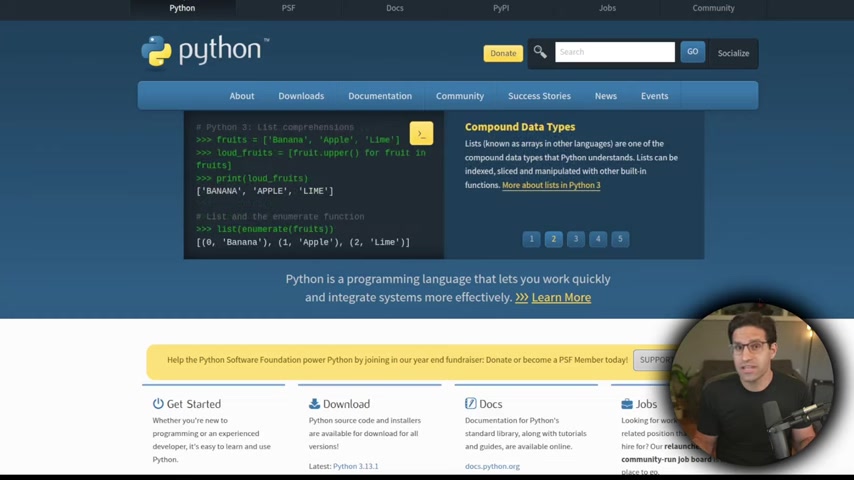
For beginners, Python stands out as the clear choice. Python is renowned for its readability, making it easier to understand and learn than many other languages. Its simple syntax resembles plain English, reducing the initial learning curve. Furthermore, Python has a massive and supportive community, providing a wealth of resources, tutorials, and libraries to assist you along the way. The popularity of Python also means that AI models have been extensively trained on Python code, making them highly effective at generating and understanding it. Choosing Python ensures you have access to a wealth of support and resources, making your coding journey smoother and more successful. Whether you aim to automate tasks, analyze data, or build web applications, Python offers a versatile foundation.
Key advantages of Python for beginners:
- Easy to Read and Learn: Python's syntax is designed to be intuitive and straightforward, resembling plain English.
- Extensive Resources: A vast community and numerous libraries provide ample support and tools.
- AI Compatibility: AI models are well-versed in Python, enabling efficient code generation and comprehension.
- Versatile Applications: Python can be used for a wide range of tasks, from automation to web development. Python's ease of use and robust support make it an excellent choice for anyone starting their coding adventure.
Setting Up Your Coding Environment: Google Colab
Once you've chosen Python, you'll need a place to write and execute your code.

While there are many options, Google Colab (Colaboratory) offers an exceptionally user-friendly and accessible environment, especially for beginners. Google Colab is a free, cloud-based service that provides a Jupyter Notebook environment. This means you can write and run Python code directly in your web browser, without needing to install any software on your computer. All you need is a Google account.
Google Colab's advantages for beginners:
- No Installation Required: Run Python code directly in your browser without installing anything.
- Free to Use: Access powerful computing resources at no cost.
- Jupyter Notebook Environment: Organize your code with text and explanations in a single document.
- Easy Sharing and Collaboration: Share your notebooks with others for feedback and collaboration.
To get started with Google Colab, simply go to the Google Colab website and sign in with your Google account. You can then create a new notebook and begin writing and executing Python code immediately. Google Colab simplifies the setup process, allowing you to focus on learning and experimenting with code.
Leveraging AI for Code Generation: ChatGPT and Claude
Now that you have your coding environment set up, it's time to explore the power of AI.
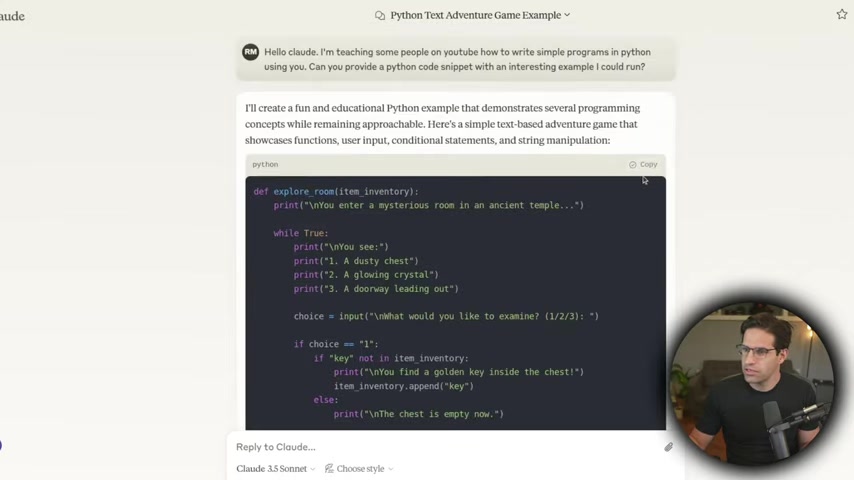
Several AI models are capable of generating code, but ChatGPT and Claude are two of the most popular and effective options. These Large Language Models have been trained on vast amounts of code and can generate Python code snippets or entire programs based on your prompts. They can provide code snippets and even debug existing code. By leveraging AI, you can dramatically speed up the coding process and overcome initial hurdles.
ChatGPT and Claude’s capabilities:
- Code Generation: Generate Python code snippets or entire programs based on natural language prompts.
- Code Debugging: Identify and suggest fixes for errors in your existing code.
- Code Explanation: Understand the functionality and purpose of different code segments.
To use ChatGPT or Claude for code generation, simply provide a clear and concise Prompt describing what you want the code to do. The AI model will then generate the corresponding Python code, which you can copy and paste into your Google Colab notebook or local Python environment.
Here are two amazing products to create the AI Python codes:
- ChatGPT: The ultimate chatbot to help you create codes, debug errors, write essays, Resume and more!
- Claude: Perfect platform for generating code and solving tough problems. Claude’s the friend that always help you fix any computer issues.
While both ChatGPT and Claude are powerful tools, it's essential to remember that AI-generated code may not always be perfect. It's crucial to review the code carefully, understand its functionality, and make any necessary adjustments. AI should be used as a tool to assist you in coding, not as a replacement for your own understanding and skills.
Project Examples: AI-Assisted Python Coding in Action
Project 1: Building a Data Scraper with ChatGPT

Imagine your boss asks you to gather information from a website and organize it into a spreadsheet-like format. This is where a data scraper comes in handy. A data scraper is a program that automatically extracts data from websites, saving you the time and effort of manually copying and pasting information. AI can significantly simplify the process of creating a data scraper. Using ChatGPT, you can simply describe the task you want to accomplish, specifying the website you want to scrape and the data you want to extract. ChatGPT will then generate the Python code needed to create the data scraper, including the necessary libraries like requests for fetching the web page and BeautifulSoup for parsing the HTML. The resulting data can then be saved into a CSV file, which can be easily opened and analyzed in spreadsheet software like Microsoft Excel or Google Sheets. These features create a streamlined workflow for data extraction. You will need a Python programming software as well, and we suggest you download Python from Python.org.
Here's how you can use ChatGPT to build a data scraper:
- Define the Task: Clearly describe the website and data you want to scrape to ChatGPT.
- Generate the Code: Copy the generated Python code into your Google Colab notebook or local Python environment.
- Execute the Code: Run the code and verify that it correctly extracts the desired data.
- Save the Data: Save the extracted data into a CSV file for further analysis.
In the demonstration, we can see ChatGPT generating code to extract all of the titles from the Hacker News website, a project that would have taken several hours can be completed in less than 20 minutes with a couple prompts to ChatCPT to tweak the code. After getting all the information, use google colab notebook so you save and organize all the data.
Project 2: Automating Image Editing with Claude
Let's say you have a large folder of images that you need to reformat, add watermarks to, or perform other editing tasks. Manually editing each image would be incredibly time-consuming. This is where AI can help automate the process. Using Claude, you can describe the image editing tasks you want to perform, such as resizing, cropping, converting file formats, or adding watermarks. Claude will then generate the Python code needed to process all of the images in the folder automatically.
Here's how to automate image editing with Claude:
- Describe the Task: Clearly describe the image editing tasks you want to perform to Claude.
- Generate the Code: Copy the generated Python code into a Python file on your computer.
- Run the Code: Execute the code locally, specifying the input and output folders.
- Verify the Results: Check the output folder to ensure that the images have been processed correctly.
As was demonstrated in the video, the AI model can provide code to adjust for things like input sources, output data sources, watermarks, transparency, rotation, and a host of other factors. The demonstration shows how just a couple of tweaks can add a watermark to a number of files with very little time investment. If it was your job to do something tedious like this and you didn't know how to write a program to do it automated, just with a few queries with ChatGPT and a little bit of tweaking you are set.
Project 3: Creating an Interactive Data Dashboard with Cursor
Data analysis is becoming increasingly important in various fields, and creating interactive dashboards is a powerful way to explore and visualize data. Building dashboards from scratch can be challenging, but AI can simplify the process. With Cursor, you can create a Python script that generates an interactive dashboard for exploring data from a CSV file, enhancing productivity at the same time. Cursor is an IDE software, designed to generate all the code, import the data, and analyze the information to show what the model needs to show.
Here's how to build an interactive data dashboard with Cursor:
- Describe the Data: Provide Cursor with the details of your CSV file and the data you want to explore.
- Generate the Code: Copy the generated Python code into your Cursor IDE.
- Run the Code: Execute the code, which will create a local web server hosting the interactive dashboard.
- Explore the Data: Access the dashboard in your web browser and explore the data through interactive charts and tables. Now you don't need to spend hours working on those tedious problems, because with Cursor and some simple code from a large language model. In the demonstration, data about different rollercoasters are added to a database, and that data are added in charts for a simple to understand and easy to use dashboard. By simply requesting that a graph be changed, or data be pulled into a different chart, a full interactive dashboard can be completed with relatively little interaction with the code itself. By asking a couple of models in example project, a full dashboard can be generated quickly.





Most people like


































Report
Please select a reason for reporting
- 13 Reasons to Switch from Snapchat to Text Messaging
- 7 Powerful Speech to Text Apps to Boost Productivity
- 10 Best Speech to Text Tools for Effortless Transcription
- 13 Free Tools to Easily Transcribe Audio to Text
- 15 Surprising Ways Google's Speech-to-Text Boosts Productivity
- 7 Best Free Online Audio to Text Transcription Tools
- 9 Tips to Transcribe Speech to Text Faster and Better
- 13 Best Speech to Text Software for Windows 10 in 2023
- 7 Tips for Choosing the Best Transcriber for Audio to Text
- 11 Reasons Why Dragon Speech-to-Text Apps are Game-Changers
- 6 Secrets to Enhance Your Speech to Text Transcription
- 6 Brilliant Ways to Boost Productivity with Talk-to-Text on Your MacBook
- 6 Ways Transcription Software Converts Audio to Text
- 8 Tips to Transcribe Speech to Text Like a Pro
- 6 Reasons IBM Watson Speech to Text is a Game-Changer
- 14 Powerful Ways Talk-to-Text Improves Your Workflow
- 12 Top Windows Speech-to-Text Software for Efficient Transcription
- 12 Game-Changing Benefits of Apple's Speech to Text Technology
- 9 Powerful Use Cases for AWS Speech to Text Technology
- 10 Easy Steps to Transcribe YouTube Videos to Text
- transcription audio en texte
- online audio transcription
- free audio file transcription
- free ai audio transcription
- audio transcription service
- audio transcription online free
- audio transcription free online
- audio to transcription software
- audio and transcript
- ai audio transcription free
- voice recording to text converter
- translate voice recording to text
- record voice to text
- audio recording to text converter
- voice recording and transcription
- chatgpt voice to text
- gmail voice to text
- speech to text reader
- speech to text ai free
- speech to talk
- ChatGPT Knows Ford. It Just Doesn't Quote Ford
- Meshy AI: How to Create 3D Models from Text and Images
- How SEO and Marketing Dashboards Empower Agencies to Drive Results
- How to Use AI Tools to Find Internal Linking Opportunities Across a Business Website
- Discover Your Perfect Haircut with AI Hairstyle Apps
- Free Reputation Calculator Tools: How They're Adapting to Score AI Visibility, Not Just Rankings
- Design Professional Flyers for Free on Your Phone
- Best Free Flyer Maker Apps for Android: Design Like a Pro
- How to Know If Your Business Is Ready for an AI Customer Service Agent
- Revolutionizing Storytelling: From Novels to Screenplays with AI
- Your Business Data Could Be Worth Up to $4M. Find Out Without Uploading a Single File.
- Can an eSIM Plan Save You Time During Travel Setup?
- AI Video Editor Review: A Hands-On Look at Prompt-Based Video Editing
- Keep Characters Consistent Across Scenes With Image-to-Video AI
- How to Convert BTC to HNT
- ProxyWing DuckDuckGo Proxy Review: Plans, Setup and Who It Is For
- ChatGPT Knows Ford. It Just Doesn't Quote Ford
- Automate Lead Generation: A Comprehensive Guide with AI Agents
- Revideo.io: The Future of Reverse Video Search Technology
- Revolutionizing Email Marketing Agency with AI

Copyright ©2026 toolify