































Table of Contents
- Key Points
- Unlocking the Power of AI-Driven Presentations with Gamma App
- Gamma App Key Features and Benefits
- How to Create a PowerPoint Presentation with Gamma App
- Gamma App Pricing
- Evaluate Gamma App: Pros and Cons
- Gamma App Core Features
- Gamma App Use Cases
- Frequently Asked Questions About Gamma App
- Related Questions About AI Presentation Tools



Unlocking the Power of AI-Driven Presentations with Gamma App
What is Gamma App?
Gamma App is a revolutionary AI-powered presentation tool designed to streamline and simplify the process of creating stunning slideshows, documents, and webpages.
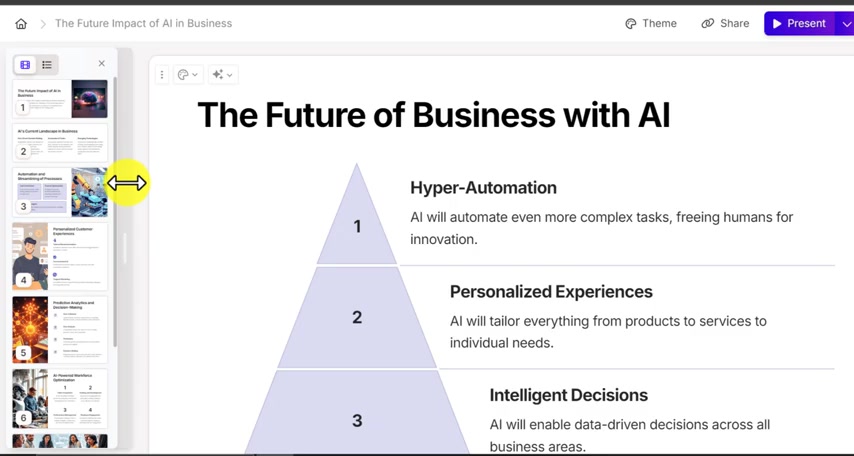
This platform empowers users to transform their ideas into visually appealing and informative content with minimal effort. Whether you're a business professional looking to impress clients, an educator aiming to engage students, or simply someone who wants to present information effectively, Gamma App offers a user-friendly solution. The core value proposition of Gamma App lies in its ability to automate the design process, allowing users to focus on the content and message they want to convey. By leveraging advanced AI algorithms, Gamma App generates outlines, selects relevant images, and arranges layouts, all based on a single line of direction. This means that users can create professional-quality presentations without any prior design experience. The platform provides users with the tools they need to communicate effectively and efficiently, making it an invaluable asset in today's fast-paced world. Gamma App is more than just a presentation tool; it's a comprehensive communication platform that enables users to create, share, and present their ideas with confidence. Its intuitive interface and powerful AI capabilities make it accessible to users of all skill levels, from beginners to experienced presenters.
Gamma App Key Features and Benefits
Automated Presentation Creation with AI
One of the primary benefits of Gamma App is its ability to automate the presentation creation process. Using AI, Gamma App can create a professional-looking slideshow by using a single line of text or direction from the user.
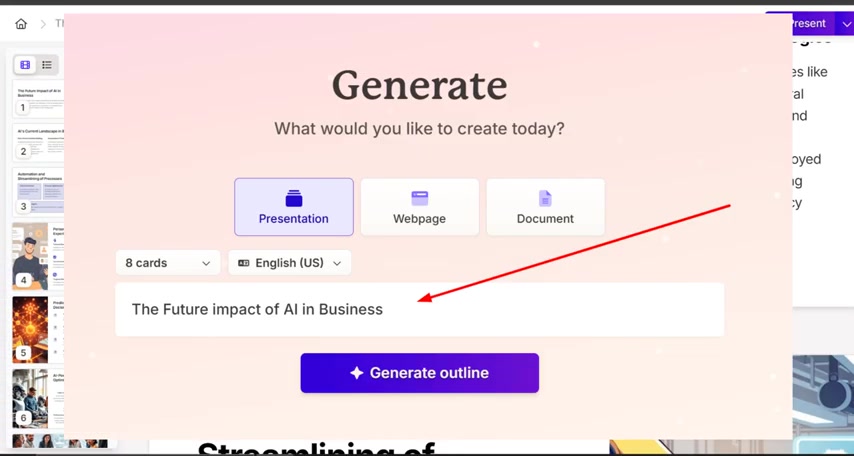
This AI is able to create images, elements and graphs for the user. The single line direction is the only thing the user needs to provide to make an engaging presentation. This feature can be a huge time saver for users, enabling them to focus on the content, and allowing AI to handle the design elements of the presentation. This is extremely beneficial for users with limited design or technical skills. With Gamma App, anyone can create professional quality presentations, regardless of their background. The automated presentation creation features ensures consistency in design and layout, which can be hard to achieve when manually creating presentations. This consistency helps to reinforce the user's message and maintain a professional image. The automated presentation creation feature is invaluable for improving the quality of presentations.
Multiple Methods of Presentation Creation
The Gamma App offers multiple methods of creation for the user.
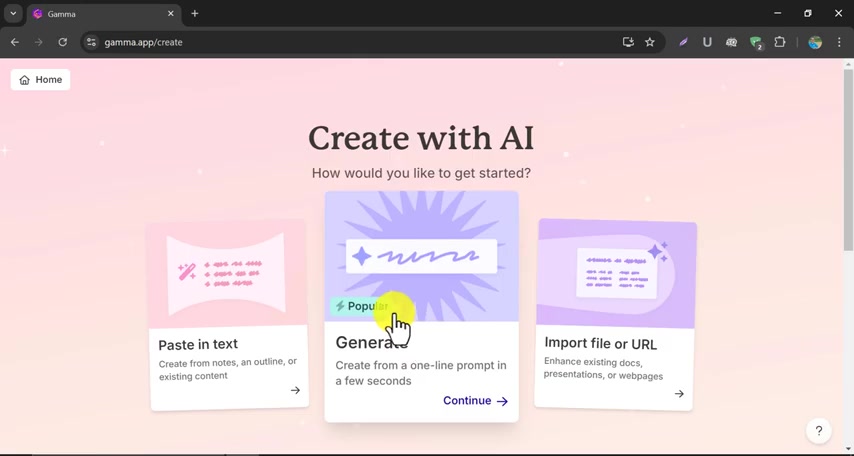
This allows users to create presentations in a way they see fit and are more comfortable with. These include the following:
-
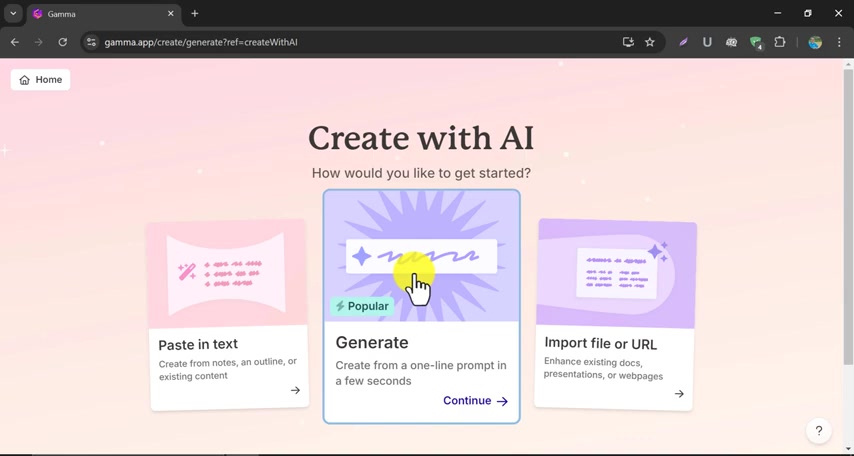
Paste in Text: Allows the user to create a presentation by directly copying and pasting text. This method is useful when the user has already created an outline, written content, or has existing material that they want to incorporate into the presentation.
-
Generate: Allows the user to generate a presentation from a simple one-line prompt. The AI takes the Prompt and creates a presentation with an outline, images, and text.
-
Import File or URL: Allows the user to upload a document, presentation, or webpage so that the AI can generate a presentation from it. This is useful to enhance existing documents and create professional looking presentations from existing materials. This is a very helpful tool for busy users looking to create a presentation from material they already have.
Simplified Sign-Up Process
To get started, Gamma App provides a straightforward and user-friendly sign-up process.
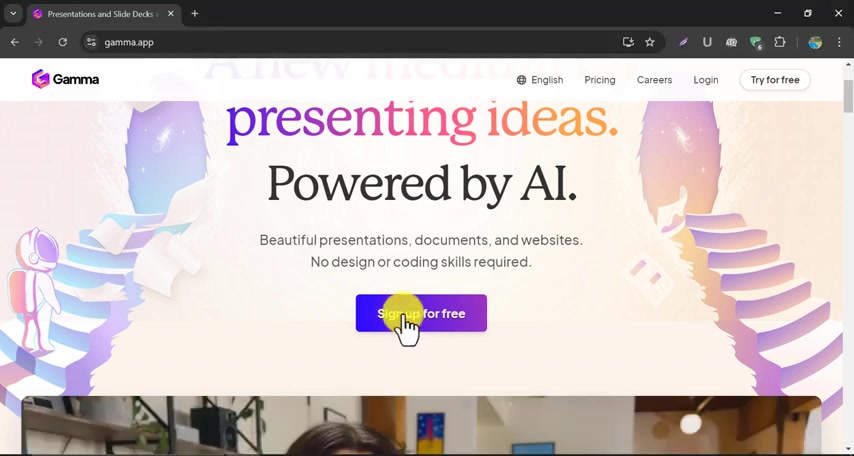
You can easily create an account by signing up for free on their website. The sign-up is free and offers 200 credits for the user to use. You can also sign up through your google account for quick sign up. After you sign-up, you can fill out the questions as to how you will be using the gamma app. Then, you are ready to go and create your presentation! The user-friendly sign up ensures all users have easy access to the tool.
How to Create a PowerPoint Presentation with Gamma App
Step-by-Step Guide
Gamma App can be used by following these steps.
- Sign Up/Sign In: To use gamma.app, you must sign up for a free account. Once you sign-up, you can sign in to gamma.app with your email.
- Create with AI: After signing in, you should be on a page to create your presentation. You will see 3 options for creation: Paste in text, Generate, and Import File or URL. Click the Generate button to create an ai presentation from a single title.
- Presentation Title: Under the presentation section, enter your presentation title into the prompt and hit "Generate outline". An outline will be generated for you to edit.
- Edit: Gamma.app allows you to edit the outline in case it does not match what you are looking for. Edit the outline if you would like or just continue.
- Theme: Choose a Theme that you want your presentation to be. There are multiple themes to choose from with different color schemes and Font styles. Once selected, click "Generate".
- Generated Presentation: Your presentation will now be generated. It may take some time for the images and text to fully load. Once generated, you can modify and edit it as much as you like!
Gamma App Pricing
Gamma App Provides Free Credit to Start
Gamma App operates on a credit-based system, where users consume credits to access and use the AI-powered features. Upon signing up, Gamma App provides free credits to start.
This allows you to familiarize yourself with the features and create a few presentations before committing to a paid plan. The Gamma App operates on a credit system, with users consuming credits to access the different features.
| Plan | Description | Credits | Cost |
|---|---|---|---|
| Free | Initial Credits to get started. | 400 | Free |
| Pro | Monthly subscription. | Unlimited | $8/Month |
| Team | Monthly Subscription. | Unlimited | $12/Month |
Pricing may vary, check the Gamma App site for current pricing.







Most people like






























Report
Please select a reason for reporting
- 13 Reasons to Switch from Snapchat to Text Messaging
- 7 Powerful Speech to Text Apps to Boost Productivity
- 10 Best Speech to Text Tools for Effortless Transcription
- 13 Free Tools to Easily Transcribe Audio to Text
- 15 Surprising Ways Google's Speech-to-Text Boosts Productivity
- 7 Best Free Online Audio to Text Transcription Tools
- 9 Tips to Transcribe Speech to Text Faster and Better
- 13 Best Speech to Text Software for Windows 10 in 2023
- 7 Tips for Choosing the Best Transcriber for Audio to Text
- 11 Reasons Why Dragon Speech-to-Text Apps are Game-Changers
- 6 Secrets to Enhance Your Speech to Text Transcription
- 6 Brilliant Ways to Boost Productivity with Talk-to-Text on Your MacBook
- 6 Ways Transcription Software Converts Audio to Text
- 8 Tips to Transcribe Speech to Text Like a Pro
- 6 Reasons IBM Watson Speech to Text is a Game-Changer
- 14 Powerful Ways Talk-to-Text Improves Your Workflow
- 12 Top Windows Speech-to-Text Software for Efficient Transcription
- 12 Game-Changing Benefits of Apple's Speech to Text Technology
- 9 Powerful Use Cases for AWS Speech to Text Technology
- 10 Easy Steps to Transcribe YouTube Videos to Text
- transcription audio en texte
- online audio transcription
- free audio file transcription
- free ai audio transcription
- audio transcription service
- audio transcription online free
- audio transcription free online
- audio to transcription software
- audio and transcript
- ai audio transcription free
- voice recording to text converter
- translate voice recording to text
- record voice to text
- audio recording to text converter
- voice recording and transcription
- chatgpt voice to text
- gmail voice to text
- speech to text reader
- speech to text ai free
- speech to talk
- How SEO and Marketing Dashboards Empower Agencies to Drive Results
- How to Use AI Tools to Find Internal Linking Opportunities Across a Business Website
- Discover Your Perfect Haircut with AI Hairstyle Apps
- Free Reputation Calculator Tools: How They're Adapting to Score AI Visibility, Not Just Rankings
- Design Professional Flyers for Free on Your Phone
- Best Free Flyer Maker Apps for Android: Design Like a Pro
- How to Know If Your Business Is Ready for an AI Customer Service Agent
- Revolutionizing Storytelling: From Novels to Screenplays with AI
- Create Engaging Animated Explainer Videos with a Free AI Tool
- Stop Multi-Subscribing: Benchmark Top AI Visual Models in One Canvas
- Top 5 Cold Email Software: Maximize Your Outreach in 2025
- Magic School AI: Revolutionizing Quiz & Assessment Generation
- Create Your Own Email Bot and Automate Your Email Tasks
- Beyond Pure Prompts: Optimizing Production with 'Text With Reference' Generation
- Stop Using Boring TTS: My Honest Deep Dive Into VideoAI and the Hunt for the Perfect Custom Voices
- AI & Elections: Defending Democracy Against Misinformation
- Navigating Political Discourse: AI, Deepfakes, and Reality Checks
- Detecting Political Bias in News Articles: A Powerful AI Algorithm
- AI Bias Unveiled: Political Leanings in ChatGPT & Beyond
- Revolutionize Learning: Discover Quizzes AI for Engaging Interactive Quizzes

Copyright ©2026 toolify