






















AI-Powered Summarization: Streamlining Webpage & PDF Analysis

Updated on Aug 05,2025

Table of Contents

In today's fast-paced digital landscape, the ability to quickly digest and synthesize large amounts of information is invaluable. Whether it's a lengthy webpage, a dense PDF document, or a sprawling research paper, the time investment required to extract key insights can be significant. Fortunately, artificial intelligence (AI) offers powerful solutions for summarizing content, enabling users to grasp essential details in a fraction of the time. This article explores how to leverage AI tools, such as Microsoft Copilot and Monica, to efficiently summarize webpages and PDFs, boosting productivity and enhancing comprehension.

Key Points

AI summarization tools streamline the process of extracting key information from lengthy documents and webpages.

Microsoft Copilot, integrated into Microsoft Edge, provides a convenient and free way to summarize content.

Monica is another AI tool that offers summarization capabilities, though Copilot is often preferred for its accessibility.

Using Copilot, users can generate document summaries, suggest questions, and gain key insights from the content.

Copilot allows users to specify the relevant sources for summarization, focusing on a specific page or the entire website.

AI-powered summarization significantly enhances productivity by reducing the time spent on reading and comprehension.

Copilot offers options to export or copy the generated summaries for easy integration into reports or other documents.

Understanding the key requirements for high-risk AI systems, as identified by AI tools, is crucial for responsible AI implementation.

Unlocking Efficiency: AI-Driven Summarization Techniques

The Challenge of Information Overload

In the modern era, individuals are constantly bombarded with vast amounts of information. The internet, while a treasure trove of knowledge, presents a challenge in filtering and understanding this information efficiently. Long articles, detailed reports, and extensive PDFs can consume significant time and effort to process. AI-powered summarization offers a promising solution by automating the extraction of crucial information, enabling users to quickly grasp the core concepts. This is invaluable for professionals, researchers, and students who need to stay informed without getting bogged down in the details.

Microsoft Copilot: Your Free AI Assistant for Summarization
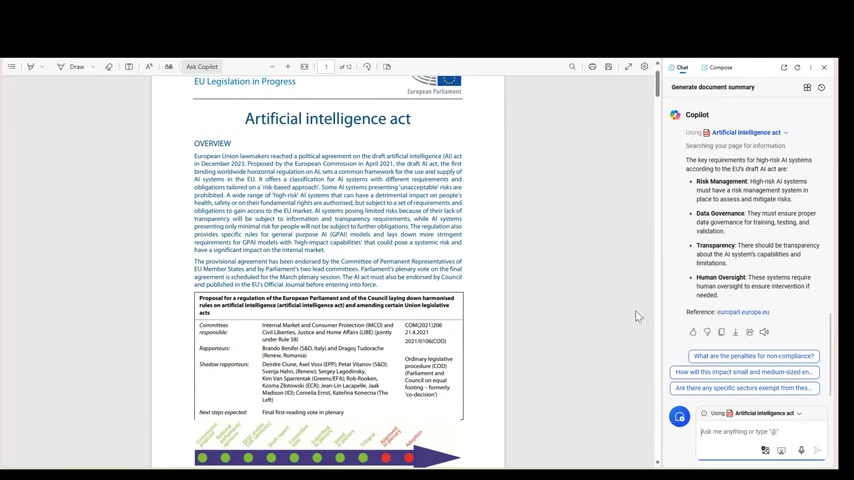
One of the most accessible and convenient AI Tools for summarization is Microsoft Copilot. Integrated directly into the Microsoft Edge browser, Copilot provides a free and seamless way to analyze and summarize webpages and PDFs. Its integration into the browser environment makes it readily available whenever you need to quickly digest content. Copilot distinguishes itself by offering a user-friendly interface and powerful summarization capabilities without the need for external software or subscriptions.

Because Copilot is already built into your browser, it’s very easy to use to summarize documents and webpages. Copilot is a practical solution for individuals seeking to enhance their reading efficiency and information retention. In cases where users receive a lot of questions related to summarizing long documents or webpages, Copilot can act as a quick assistant.

Alternative AI Tools: Monica and Beyond

While Microsoft Copilot stands out for its convenience and accessibility, other AI tools also offer summarization capabilities. One such tool is Monica, which provides AI-powered assistance for various tasks, including content summarization. However, Copilot's seamless integration with Microsoft Edge and its free availability often make it a preferred choice for many users. The key advantage of Copilot is its accessibility—it's already there, ready to use whenever you need it.

Enhancing Productivity: Practical Applications of AI Summarization

Use Cases Across Industries

AI-powered summarization has a wide range of applications across various industries. For researchers, it can streamline the process of reviewing academic Papers and extracting key findings. For journalists, it can expedite the analysis of news articles and reports. In the business world, it can help professionals quickly understand market trends, competitor strategies, and customer feedback. Students can benefit by efficiently summarizing textbooks and research materials, making studying more effective. The versatility of AI summarization makes it a valuable asset in any field that requires processing large amounts of information.

Tips for Maximizing AI Summarization Effectiveness

To get the most out of AI summarization tools, consider these tips:

  • Always Review Summaries: AI-generated summaries are not always perfect. It's crucial to review them carefully to ensure accuracy and completeness.
  • Use Follow-Up Questions: Take advantage of follow-up question suggestions to delve deeper into specific aspects of the content.
  • Adjust Source Settings: Experiment with the 'This Page' and 'This Site' settings to find the level of context that best suits your needs.
  • Combine with Other Tools: AI summarization works best when combined with other research and analysis techniques. Use it as a starting point and then explore the source material in more detail as needed.
  • Stay Updated: AI technology is constantly evolving. Stay informed about new features and updates to maximize the benefits of these tools.

The Future of AI in Information Processing

The future of AI in information processing looks promising. As AI technology continues to advance, we can expect even more sophisticated summarization tools that are capable of understanding nuances, identifying biases, and generating summaries that are tailored to specific needs. This will lead to further gains in productivity, improved decision-making, and a more informed society. Embracing AI summarization is not just about saving time; it's about unlocking the potential of information and empowering individuals to learn, innovate, and thrive in an increasingly complex world.

Step-by-Step Guide: Summarizing with Microsoft Copilot

Accessing Microsoft Copilot

There are two primary ways to access Microsoft Copilot for summarization:

  1. Through the Microsoft Edge Browser: Open the Microsoft Edge browser. Copilot is typically located in the sidebar on the right side of the screen.
  2. Directly from a Webpage or PDF: When viewing a webpage or PDF in Microsoft Edge, Copilot automatically becomes available in the sidebar. This integration allows for instant access to summarization tools.

Generating a Document Summary

  1. Open the Webpage or PDF: Navigate to the webpage or open the PDF document you want to summarize.
  2. Activate Copilot: Click on the Copilot icon in the Edge browser sidebar.
  3. Select 'Generate Document Summary': In the Copilot interface, you'll see options like 'Generate Document Summary,' 'Suggest Questions about this document', and 'Generate key insights from this document'.

  4. Choose 'Generate Document Summary': Copilot will then analyze the content and generate a concise summary. It may take a few moments, depending on the length of the document.

Refining Your Summarization with Relevant Sources

Copilot allows you to specify the sources it uses for summarization:

  1. Adjust the Source: Look for the 'Relevant Sources' option in the Copilot interface.
  2. Choose Your Scope: Select 'This Page' to summarize only the current page or 'This Site' to allow Copilot to browse the entire website for context.
  3. Customize for Precision: Selecting 'This Page' ensures the summary is focused on the specific content you’re viewing, while 'This Site' provides a broader understanding by incorporating related information.

Exporting and Utilizing the Summary

Once Copilot generates the summary, you have several options for using it:

  1. Export: Look for the 'Export' icon in the Copilot interface. This allows you to save the summary as a separate document.
  2. Copy and Paste: Use the 'Copy' icon to copy the summary to your clipboard. You can then paste it into any document, email, or note-taking application.
  3. Follow-Up Questions: Use the suggested follow-up questions to ask Copilot about specific parts of the document. This enables you to dive deeper into key areas without rereading the entire document.

These features make it easy to integrate Copilot’s summaries into your workflow, whether you're creating reports, sharing information with colleagues, or simply trying to understand a complex topic.

Copilot Pricing

Copilot Pro

The version used is a pro version of copilot however, Copilot has a free version that can be used as well. No need to pay for the functions of summarizing documents.

Microsoft Copilot: Weighing the Pros and Cons

👍 Pros

Accessibility: Integrated directly into Microsoft Edge, making it readily available without extra downloads.

Free Availability: The base version of Copilot offers robust summarization features at no cost.

Ease of Use: Simple and intuitive interface for generating summaries and asking follow-up questions.

Source Control: Ability to specify whether to summarize a single page or an entire website.

Export Options: Offers export and copy-paste functionalities for easy integration with other documents.

👎 Cons

Limited Advanced Features: The free version may lack some of the more advanced features found in paid AI summarization tools.

Dependency on Edge: Requires using the Microsoft Edge browser, which may not be the preferred browser for all users.

Potential Inaccuracies: AI-generated summaries may occasionally contain inaccuracies or miss important nuances.

Privacy Concerns: Users should be aware of Microsoft's data collection policies when using Copilot.

Frequently Asked Questions (FAQ)

Is Microsoft Copilot really free to use?
Yes, the base version of Microsoft Copilot is free and integrated into the Microsoft Edge browser. You don't need a subscription to use its summarization features.
Can Copilot summarize any webpage or PDF?
Copilot can summarize most webpages and PDFs, but there may be some compatibility issues with certain complex layouts or encrypted documents. It's always a good idea to test it with a variety of content to see how it performs.
How accurate are AI-generated summaries?
AI-generated summaries are generally accurate, but they may occasionally contain errors or miss important nuances. Always review the summaries carefully to ensure they align with the original content.
Does Copilot collect my data when I use it?
Yes, Microsoft collects data about your usage of Copilot. Be sure to review Microsoft's privacy policies to understand how your data is being used.

Related Questions

What are the key requirements for high-risk AI systems?
The key requirements for high-risk AI systems, according to the EU's draft AI act, include risk management, data governance, transparency, and human oversight. High-risk AI systems must have a risk management system in place to assess and mitigate risks. They must ensure proper data governance for training, testing, and validation. There should be transparency about the AI system’s capabilities and limitations. These systems require human oversight to ensure intervention if needed. By addressing these requirements, high-risk AI systems can be developed and deployed responsibly, mitigating potential harms and promoting trust.
What are the penalties for non-compliance with AI regulations?
Penalties for non-compliance with AI regulations can vary depending on the specific regulations and the severity of the violation. However, they typically include fines, legal repercussions, and reputational damage. Companies that fail to adhere to AI regulations may face significant financial penalties, as well as legal action from affected parties. Non-compliance can also lead to a loss of trust from customers and stakeholders, which can have long-term consequences for the business.
How will this impact research and development in AI?
AI regulations may have a mixed impact on research and development in AI. On one hand, they may create barriers to innovation by increasing the cost and complexity of developing and deploying AI systems. On the other hand, they may also foster more responsible and ethical AI development by encouraging researchers to prioritize safety, transparency, and fairness. The overall impact will likely depend on how the regulations are implemented and how researchers and developers adapt to the new environment. It is important for policymakers to strike a balance between promoting innovation and mitigating potential risks.

Most people like













