































Table of Contents
- Key Points
- Unlocking AI for YouTube Script Creation
- Prompt Engineering for AI Scriptwriting
- Step-by-Step Guide to AI-Powered Script Creation
- Perplexity AI Pricing: Free vs. Paid
- Pros and Cons of AI Scriptwriting
- Taja AI's Next Video Generator: Key Features
- Use Cases for AI-Powered YouTube Scripting
- Frequently Asked Questions
- Related Questions



Unlocking AI for YouTube Script Creation
The Time-Consuming Reality of Video Scripting
For many content creators, scripting their videos is a significant bottleneck.
While editing and filming demand attention, writing engaging and informative scripts can Consume hours, even days, depending on the complexity of the topic. This time drain often hinders consistent content creation, impacting Channel growth and audience engagement. Traditional scriptwriting involves extensive research, outlining key points, and crafting a narrative that resonates with viewers. Now imagine if those steps could be accelerated, it would allow creators to be more efficient at their work, and potentially even allow creators to have a better work-life balance.
Many creators turn to hiring writers but this can quickly become an unsustainable financial drain. What if I told you that AI is here to change that, and now it is possible to accelerate the process and create high-quality scripts without the need for high-cost writers?
Now, artificial intelligence tools offer a potent solution. By leveraging AI, creators can automate parts of the scriptwriting process, freeing up valuable time and resources to focus on other crucial elements of video production, such as filming, editing, and audience interaction.
Introducing the 3-Step AI Scriptwriting Method
This 3-step method streamlines YouTube script creation using the power of AI.
It focuses on efficiency and quality, enabling you to produce engaging scripts in a fraction of the traditional time. This method doesn't cut corners; rather, it intelligently uses technology to your advantage. The most important thing to remember is that you don't have to be a professional copywriter to do this, all you need is an idea, and the initiative to follow through.
Here's a breakdown of the three essential steps:
- Step 1: Research Outlier Videos: Identify high-performing videos in your niche to understand what resonates with your target audience.
- Step 2: Copy and Paste Transcripts: Gather transcripts from these successful videos to provide AI with valuable source material.
- Step 3: Prompt the AI to Write Your Script: Use the transcripts as inspiration to guide the AI in crafting a unique and engaging script for your own video.
By following these steps, creators can bypass the initial hurdles of research and brainstorming, quickly generating a solid foundation for their video content.
Essential AI Tools: Taja AI and Perplexity AI
This method leverages two powerful AI Tools: Taja AI and Perplexity AI.
While other AI platforms exist (like ChatGPT), Perplexity AI offers superior results for this specific application. Here's why these tools stand out:
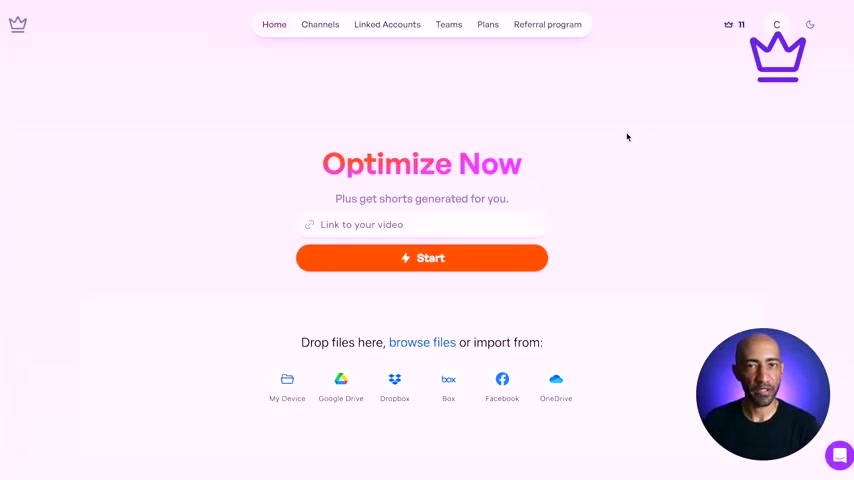
- Taja AI: Taja AI is a content creation tool with features specifically designed to help grow social media presence, including YouTube channels. The key is its 'Next Video Generator' feature, that does a majority of the heavy lifting for content creators.
- Perplexity AI: Perplexity AI provides quick and detailed responses. With both a free and paid version, offering various tiers to fit content needs.
While I have used ChatGPT in the past, Perplexity AI’s information is much better. Now, let's get into how the free and paid versions differ:
Perplexity AI Pricing: Free vs. Paid
Understanding Perplexity AI's Tiered Offerings
Perplexity AI offers a tiered pricing structure with both free and paid options, each catering to different levels of usage and feature requirements.
Understanding the nuances of each tier is crucial for selecting the best fit for your content creation needs.
Below is an overview of each plan:
| Feature | Free | Paid (Pro) |
|---|---|---|
| Cost | Free | $20/month or $200/year |
| Basic Quick Searches | Unlimited | Unlimited |
| Pro Searches | 5 per day, resets every 4 hours | 300+ per day |
| AI Model Access | Standard AI Model | Advanced AI Models |
| File Uploads | Basic (3 per day) | Unlimited |
| File Types Supported | Limited | PDF, WORD Documents, CSV |
| Use cases | Casual info & quick information | Professional researchers, students |
Taja AI's Next Video Generator: Key Features
Revolutionizing YouTube Content Creation
Taja AI’s Next Video Generator offers a range of features.
In the meantime, go into the description of this video, to try a 7-day free trial. Remember, you are going to need the Next Video Generator Feature.
| Feature | Description |
|---|---|
| Keyword Research | Quickly identify trending keywords and high-volume, low-competition opportunities in your niche, ensuring your videos target relevant and searchable topics. |
| Outlier Video Analysis | Analyze successful videos in your niche to understand their key elements, such as title optimization, content structure, and engagement strategies. |
| AI-Powered Scripting | Generate unique and engaging video scripts using AI, saving significant time and effort in the content creation process. |
| Competitor Analysis | Gain insights into your competitors' content strategies, identifying gaps and opportunities to differentiate your channel and attract a larger audience. |
| Performance Tracking | Monitor the performance of your videos, tracking key metrics such as views, watch time, and engagement to optimize your content and maximize your channel's growth potential. |






Most people like




































Report
Please select a reason for reporting
- 13 Reasons to Switch from Snapchat to Text Messaging
- 7 Powerful Speech to Text Apps to Boost Productivity
- 10 Best Speech to Text Tools for Effortless Transcription
- 13 Free Tools to Easily Transcribe Audio to Text
- 15 Surprising Ways Google's Speech-to-Text Boosts Productivity
- 7 Best Free Online Audio to Text Transcription Tools
- 9 Tips to Transcribe Speech to Text Faster and Better
- 13 Best Speech to Text Software for Windows 10 in 2023
- 7 Tips for Choosing the Best Transcriber for Audio to Text
- 11 Reasons Why Dragon Speech-to-Text Apps are Game-Changers
- 6 Secrets to Enhance Your Speech to Text Transcription
- 6 Brilliant Ways to Boost Productivity with Talk-to-Text on Your MacBook
- 6 Ways Transcription Software Converts Audio to Text
- 8 Tips to Transcribe Speech to Text Like a Pro
- 6 Reasons IBM Watson Speech to Text is a Game-Changer
- 14 Powerful Ways Talk-to-Text Improves Your Workflow
- 12 Top Windows Speech-to-Text Software for Efficient Transcription
- 12 Game-Changing Benefits of Apple's Speech to Text Technology
- 9 Powerful Use Cases for AWS Speech to Text Technology
- 10 Easy Steps to Transcribe YouTube Videos to Text
- transcription audio en texte
- online audio transcription
- free audio file transcription
- free ai audio transcription
- audio transcription service
- audio transcription online free
- audio transcription free online
- audio to transcription software
- audio and transcript
- ai audio transcription free
- voice recording to text converter
- translate voice recording to text
- record voice to text
- audio recording to text converter
- voice recording and transcription
- chatgpt voice to text
- gmail voice to text
- speech to text reader
- speech to text ai free
- speech to talk
- How SEO and Marketing Dashboards Empower Agencies to Drive Results
- How to Use AI Tools to Find Internal Linking Opportunities Across a Business Website
- Discover Your Perfect Haircut with AI Hairstyle Apps
- Free Reputation Calculator Tools: How They're Adapting to Score AI Visibility, Not Just Rankings
- Design Professional Flyers for Free on Your Phone
- Best Free Flyer Maker Apps for Android: Design Like a Pro
- How to Know If Your Business Is Ready for an AI Customer Service Agent
- Revolutionizing Storytelling: From Novels to Screenplays with AI
- Create Engaging Animated Explainer Videos with a Free AI Tool
- Stop Multi-Subscribing: Benchmark Top AI Visual Models in One Canvas
- Top 5 Cold Email Software: Maximize Your Outreach in 2025
- Magic School AI: Revolutionizing Quiz & Assessment Generation
- Create Your Own Email Bot and Automate Your Email Tasks
- Beyond Pure Prompts: Optimizing Production with 'Text With Reference' Generation
- Stop Using Boring TTS: My Honest Deep Dive Into VideoAI and the Hunt for the Perfect Custom Voices
- AI & Elections: Defending Democracy Against Misinformation
- Navigating Political Discourse: AI, Deepfakes, and Reality Checks
- Detecting Political Bias in News Articles: A Powerful AI Algorithm
- AI Bias Unveiled: Political Leanings in ChatGPT & Beyond
- Revolutionize Learning: Discover Quizzes AI for Engaging Interactive Quizzes

Copyright ©2026 toolify