































Table of Contents
- Key Points
- Understanding the AMD Driver Update and OpenGL Optimizations
- Testing Methodology and System Configuration
- Games and Emulators Tested
- AMD Driver OpenGL Update : Pros and Cons
- FAQ
- Related Questions


Understanding the AMD Driver Update and OpenGL Optimizations
What is OpenGL and Why Does It Matter?
OpenGL (Open Graphics Library) is a cross-language, cross-platform API for rendering 2D and 3D vector graphics. For years, it has been a staple in the gaming and emulation communities, providing a standardized way for software to interact with graphics hardware. Many older games and emulators rely heavily on OpenGL, making its performance crucial for smooth gameplay. The new AMD driver aims to optimize how AMD GPUs handle OpenGL instructions, leading to improved framerates and reduced stuttering.

OpenGL optimization is essential for maximizing the performance of older software on modern hardware. With these new optimizations, AMD aims to deliver a better experience across a wide range of titles, even those not built on the latest APIs.
This matters because many gamers enjoy playing retro games or rely on emulators to experience console titles on their PCs. By improving OpenGL performance, AMD effectively breathes new life into these older applications, making them more enjoyable and accessible. Moreover, OpenGL performance also impacts various professional applications that utilize the API for rendering and visualization.
The driver update incorporates changes that allow AMD graphics cards to process OpenGL commands more efficiently. These enhancements can reduce CPU overhead, improve shader compilation, and optimize memory management, all contributing to better performance. The key is understanding the nature of OpenGL and appreciating the effort involved in improving its efficiency in the face of newer graphics APIs like Vulkan and DirectX.
AMD's Commitment to OpenGL: A Significant Shift
In recent years, the focus in the graphics industry has largely shifted towards newer APIs like Vulkan and DirectX 12. These APIs offer closer-to-the-metal access to hardware, enabling developers to extract maximum performance. However, AMD's decision to invest in OpenGL optimizations demonstrates a continued commitment to supporting a wide range of applications, including those that predate the modern API era.
This is particularly important for users with older AMD graphics cards, as these optimizations are not limited to the latest GPU architectures. By improving OpenGL rendering, AMD is extending the lifespan of existing hardware and providing value to a broader customer base. The update signifies more than just a performance patch; it reflects a strategic decision to support diverse applications and hardware configurations. This is a refreshing approach in an industry often driven by the relentless pursuit of the newest technologies.
The 79% performance uplift that AMD are claiming is significant. Obviously due to testing and hardware differences, results are going to vary from user to user. For Minecraft for example, that is running at maximum setting, with 4k. Even if every application had even half the benefit of Minecraft, this would still be a really good improvement. That being said, the results should still provide an idea of what to expect.

Games and Emulators Tested
Doom (2016)
The tests were conducting using Doom (2016) using the OpenGL API. The average frame rate was improved significantly, there is an absence of Vulcan. This shows that openGL performance was significantly better. A demo version of the game was used for testing. The latest drivers are often best, but sometimes there may be bugs.
Average FPS with 22.2Q2 was 153, the 1% Low was 81 FPS Average FPS with the new 22.7.1 drivers was 166 FPS, the 1% Low was 83 FPS
OpenMW (Morrowind Engine)
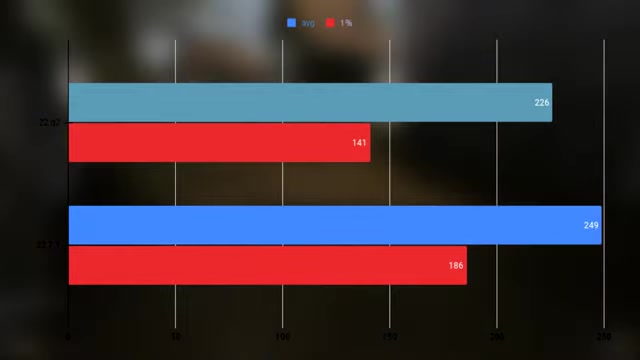
OpenMW is a modern open-source engine recreation for The Elder Scrolls III: Morrowind. The test was conducted on OpenMW reporting major changes in average. This shows that openGL performed very well with the new drivers.
Average FPS with 22.2Q2 was 226, the 1% Low was 141 FPS Average FPS with the new 22.7.1 drivers was 249 FPS, the 1% Low was 186 FPS
7 Days to Die
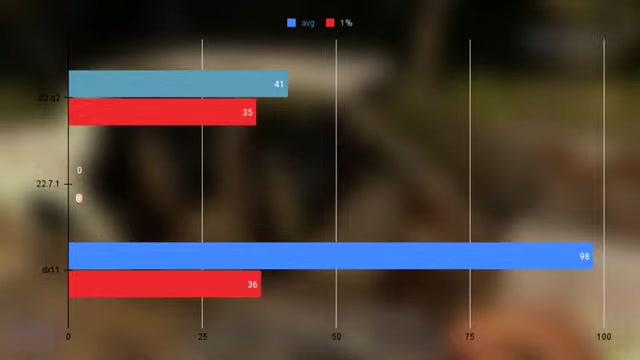
Tests were conducted on "7 days to die" on OpenGl where is refused to run with the new drivers, suggesting bugs are present. The directx11 (dx11) was tested instead, showing higher average FPS.
Average FPS with 22.2Q2 was 41 FPS, the 1% Low was 35 FPS Average FPS with the new 22.7.1 drivers (dx11) was 98 FPS, the 1% Low was 36 FPS
Wolfenstein: The New Order
Wolfenstein: The New Order with these new AMD drivers shows an overall boost in frames per second with a 60fps cap.
Average FPS with 22.2Q2 was 178, the 1% Low was 125 FPS Average FPS with the new 22.7.1 drivers was 212 FPS, the 1% Low was 167 FPS
Amnesia: The Dark Descent
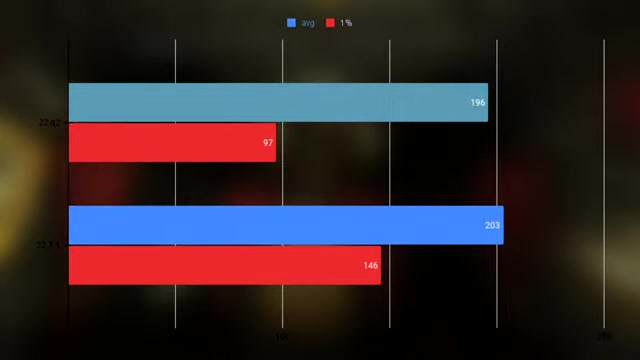
Amnesia: The Dark Descent shows very little improvements. While the minimums improved, averages had very little difference.
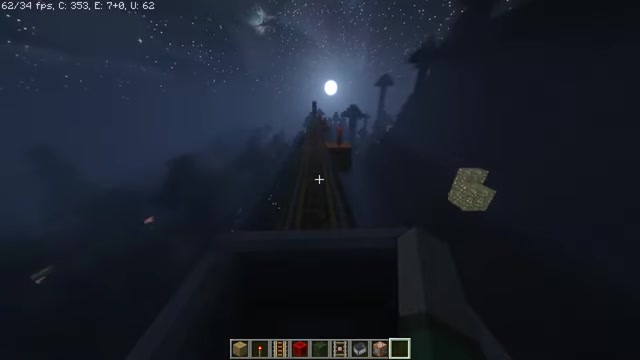
Average FPS with 22.2Q2 was 196, the 1% Low was 97 FPS Average FPS with the new 22.7.1 drivers was 203 FPS, the 1% Low was 146 FPS
Subnautica
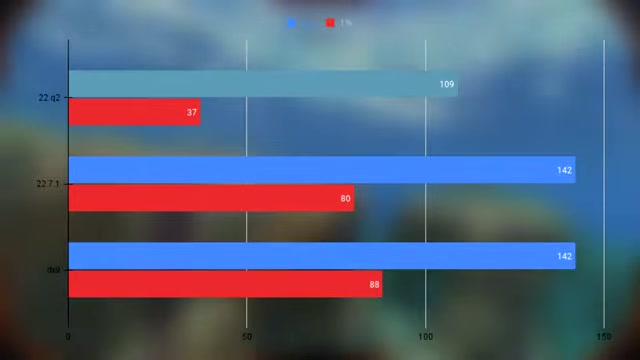
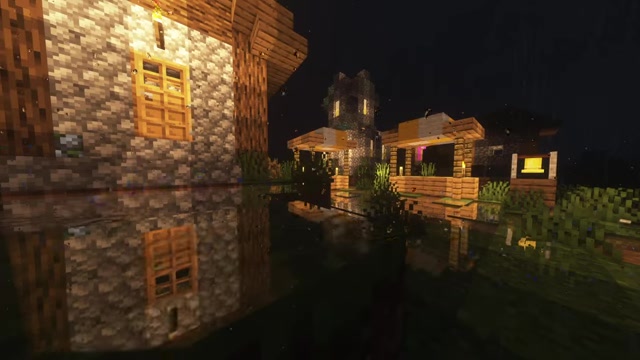
Average FPS with 22.2Q2 was 109, the 1% Low was 37 FPS Average FPS with the new 22.7.1 drivers DX9 was 142 FPS, the 1% Low was 88 FPS.
The game was also run with directx9 which overall provided very similar results in average, with about doubling the minimum FPS, giving it a more stable experience.
Killing Floor
Average FPS with 22.2Q2 was 95, the 1% Low was 58 FPS Average FPS with the new 22.7.1 drivers dx9 was 450 FPS, the 1% Low was 242 FPS.
These results are very high, since the game was ran under directx9 it could be determined it was better than older OpenGL Drivers.
Minecraft
Minecraft has shown to have some strange results. Bencmarking with 20 Chunks and fancy settings with the older drivers are actually consistently better than the newer drivers. The same area as tested over multiple times but the new one was still significantly better. A second Minecraft test was done with 8 chunks but was significantly worst on both the high setting and minimums.
A static camera angle was conducted for the last test since streaming issues where speculated. This last test still shows that the older driver was consistently better.
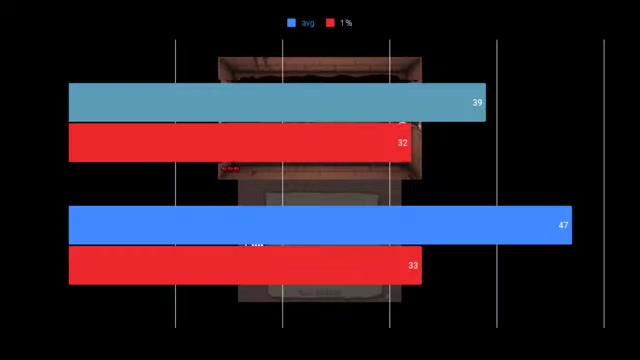
Average FPS with 22.2Q2 was 436, the 1% Low was 160 FPS Average FPS with the new 22.7.1 drivers was 355 FPS, the 1% Low was 152 FPS
Cemu(Wii U emulator
Cemu is a Wii U Emulator which was tested using The Legend of Zelda Breath of the Wild and as a result has performed really badly as the older driver did not reach the frame cap.
Average FPS with 22.2Q2 was 20, the 1% Low was 12 FPS Average FPS with the new 22.7.1 drivers was 30 FPS, the 1% Low was 13 FPS
Citra (3DS emulator)
Testing Citra with Pokemon sun has shown improvement by allowing it to run faster on the unlocked frames, making gameplay stable.
Average FPS with 22.2Q2 was 86, the 1% Low was 60 FPS Average FPS with the new 22.7.1 drivers was 142 FPS, the 1% Low was 90 FPS
RPCS3 (PlayStation 3 Emulator
In this test for RPCS3 we will use The Last of Us for testing since it had a significant problem. Due to the new driver there were graphics slightly broken that are not displaying correctly or flickering .This can cause issue in the gameplay since more effects are being displaye.
Average FPS with 22.2Q2 was 18, the 1% Low was 9 FPS Average FPS with the new 22.7.1 drivers was 27 FPS, the 1% Low was 17 FPS








Most people like





























Report
Please select a reason for reporting
- 13 Reasons to Switch from Snapchat to Text Messaging
- 7 Powerful Speech to Text Apps to Boost Productivity
- 10 Best Speech to Text Tools for Effortless Transcription
- 13 Free Tools to Easily Transcribe Audio to Text
- 15 Surprising Ways Google's Speech-to-Text Boosts Productivity
- 7 Best Free Online Audio to Text Transcription Tools
- 9 Tips to Transcribe Speech to Text Faster and Better
- 13 Best Speech to Text Software for Windows 10 in 2023
- 7 Tips for Choosing the Best Transcriber for Audio to Text
- 11 Reasons Why Dragon Speech-to-Text Apps are Game-Changers
- 6 Secrets to Enhance Your Speech to Text Transcription
- 6 Brilliant Ways to Boost Productivity with Talk-to-Text on Your MacBook
- 6 Ways Transcription Software Converts Audio to Text
- 8 Tips to Transcribe Speech to Text Like a Pro
- 6 Reasons IBM Watson Speech to Text is a Game-Changer
- 14 Powerful Ways Talk-to-Text Improves Your Workflow
- 12 Top Windows Speech-to-Text Software for Efficient Transcription
- 12 Game-Changing Benefits of Apple's Speech to Text Technology
- 9 Powerful Use Cases for AWS Speech to Text Technology
- 10 Easy Steps to Transcribe YouTube Videos to Text
- transcription audio en texte
- online audio transcription
- free audio file transcription
- free ai audio transcription
- audio transcription service
- audio transcription online free
- audio transcription free online
- audio to transcription software
- audio and transcript
- ai audio transcription free
- voice recording to text converter
- translate voice recording to text
- record voice to text
- audio recording to text converter
- voice recording and transcription
- chatgpt voice to text
- gmail voice to text
- speech to text reader
- speech to text ai free
- speech to talk
- How to Use AI Tools to Find Internal Linking Opportunities Across a Business Website
- Discover Your Perfect Haircut with AI Hairstyle Apps
- Free Reputation Calculator Tools: How They're Adapting to Score AI Visibility, Not Just Rankings
- Design Professional Flyers for Free on Your Phone
- Best Free Flyer Maker Apps for Android: Design Like a Pro
- How to Know If Your Business Is Ready for an AI Customer Service Agent
- Revolutionizing Storytelling: From Novels to Screenplays with AI
- Create Engaging Animated Explainer Videos with a Free AI Tool
- Stop Multi-Subscribing: Benchmark Top AI Visual Models in One Canvas
- Best Seedance 2.5 API Provider: Every Price on the Market, Checked at Source
- Top AI Social Media Management Tools: Automate Your Content Strategy
- Free AI Text to Video Generator: Create Stunning Videos from Text
- Discover 17 ChatGPT Alternatives: A Comprehensive Comparison
- Character.AI vs. Janitor AI: Which AI Chat Platform Reigns Supreme?
- Top Virtual Assistant Companies in 2026: Reviews, Pricing, and Plans Compared
- Unveiling FaceCheck.ID: Revolutionizing Reverse Image Searches with AI
- 11 Best AI Dialers in 2026: Features, Pricing, Pros and Cons
- How I Direct Consistent AI Clips: A Hands-On Guide to Multi-Model Generation
- A Realistic Review of the Photo Generator Image Tool
- Playwright MCP Server: Automated Web Testing with Agent Mode

Copyright ©2026 toolify