































Table of Contents
- Key Points
- Introduction to GitHub Models
- Automating Bug Report Analysis with GitHub Models
- How to Integrate GitHub Models into Your Projects
- Pros and Cons of Using GitHub Models
- FAQ
- Related Questions


Introduction to GitHub Models
What are GitHub Models?
GitHub Models provide a powerful way to integrate and iterate on AI features directly within your existing projects and workflows.
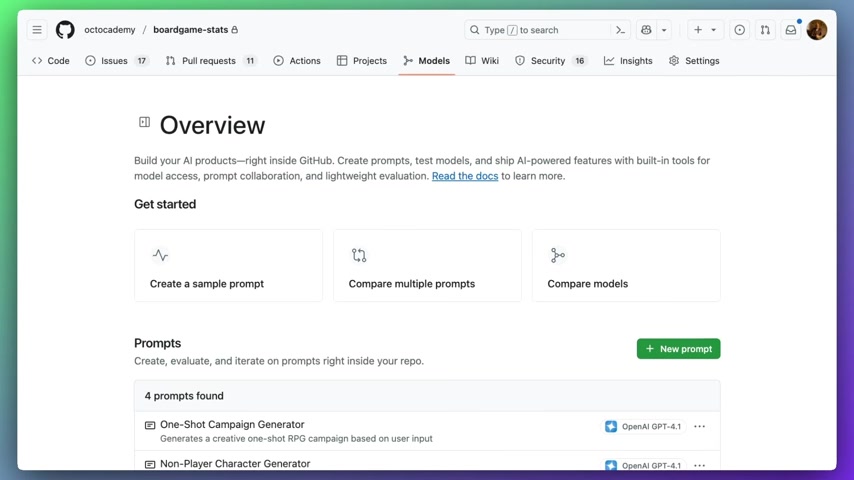
They offer a seamless experience for creating AI-powered products, enabling you to create prompts, test models, and ship AI-driven features with built-in tools for model access, prompt collaboration, and lightweight evaluation. This integration brings AI closer to your development processes, improving efficiency and productivity. Now, you can harness the capabilities of AI directly within GitHub Actions, unlocking new possibilities for automation and project enhancement. This tight integration enables developers to use AI to solve common development challenges, creating a more intelligent and efficient development lifecycle. By leveraging the power of GitHub Models, development teams can create innovative AI-driven solutions directly within their existing workflows, ensuring seamless integration and enhanced productivity. GitHub Models are designed to be flexible and adaptable, allowing developers to integrate a wide range of AI models into their projects. Whether you're looking to automate bug report analysis, generate release notes, or summarize weekly issues, GitHub Models provide the tools you need to streamline your development processes and enhance your team's productivity.
Why Use GitHub Models in Your Workflow?
Integrating GitHub Models into your workflows offers several compelling advantages. First and foremost, it streamlines the process of incorporating AI features into your projects. Instead of relying on external tools or complex integrations, you can access and utilize AI models directly within GitHub Actions. This simplifies development, reduces overhead, and accelerates time to market. Secondly, GitHub Models facilitate collaboration and knowledge sharing among team members. By centralizing AI model access and Prompt engineering within the GitHub ecosystem, developers can easily share, review, and improve AI-powered features. This fosters a collaborative environment and encourages innovation. Thirdly, GitHub Models empower you to automate repetitive tasks and gain deeper insights into your projects. By leveraging AI models to analyze bug reports, generate release notes, and summarize weekly issues, you can free up valuable time and resources. This allows your team to focus on more strategic initiatives and drive greater value for your organization. Finally, using GitHub Models provides enhanced control and flexibility. You can customize prompts, select from a range of leading AI models, and fine-tune the integration to meet your specific needs. This level of control ensures that the AI features you implement are tailored to your project's unique requirements and deliver optimal results.
Automating Bug Report Analysis with GitHub Models
Ensuring Bug Report Reproducibility
One compelling use case for GitHub Models is the automation of bug report analysis
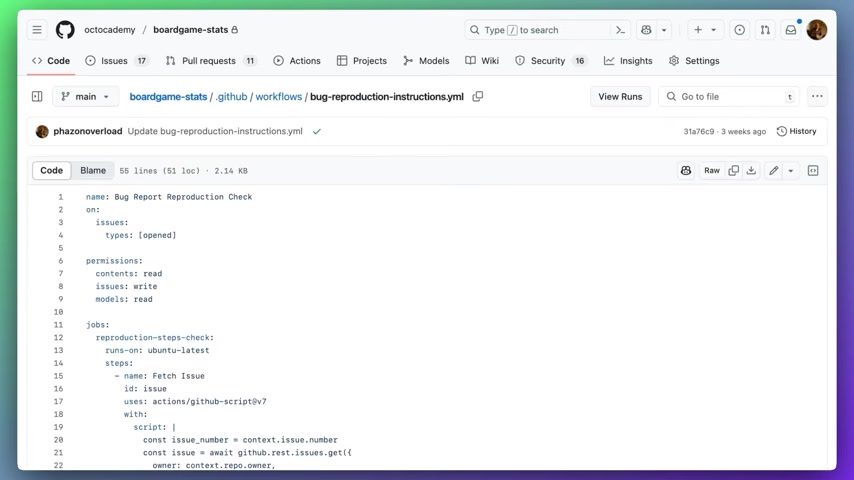
. When a new issue is opened, a workflow can be triggered to ensure that sufficient information is provided to reproduce the reported bug. This automated check enhances the quality of bug reports, saving developers time and improving the overall debugging process. To enable this functionality, you need to grant your workflow permission to access models. This is done by adding the models: read permission to your workflow file. This permission allows the workflow to call leading AI models for analysis. By granting this permission, you enable your workflow to leverage the power of AI to analyze bug reports and ensure that sufficient information is provided for reproduction. Without this permission, the workflow would be unable to access and utilize the AI models necessary for automated analysis. A typical workflow involves fetching the issue that triggered the workflow and then using an AI inference action to call a model. The AI inference action allows you to specify a system prompt that guides the model in its analysis. For instance, the system prompt could instruct the model to return the string 'pass' if enough detail has been provided in the bug report to reliably reproduce the issue. Otherwise, the prompt could generate a response asking for more information. This system prompt acts as a guide for the AI model, ensuring that it focuses on the most relevant aspects of the bug report and provides accurate feedback. The prompt's precision is key to effective automation. The process involves several key steps, including checking permissions, fetching issue details, and invoking AI models with custom prompts. By carefully configuring these steps, you can create a robust and reliable bug report analysis system. Furthermore, this automation reduces the workload on developers, allowing them to focus on resolving issues rather than gathering information.
Implementing AI-Powered Branching Logic for Bug Reports
In addition to analyzing bug reports, GitHub Models can enable AI-powered branching logic within your workflows
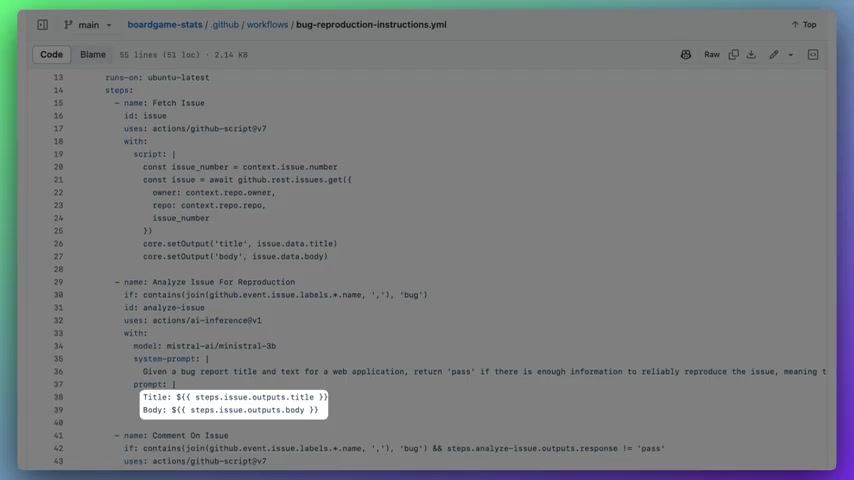
. This means that the outcome of a workflow can be determined by the response from an AI model. For example, if the response from the model is not 'pass', the workflow can comment on the issue, requesting additional information. This dynamic decision-making based on AI insights enhances the flexibility and intelligence of your automation. This capability allows for sophisticated automation scenarios where the workflow adapts its behavior based on the AI model's analysis. It effectively bridges the gap between traditional automation and AI-driven decision-making, making your workflows smarter and more responsive to project needs. This approach reduces manual intervention and accelerates the bug fixing process. By automating the initial analysis and information gathering, developers can focus on resolving the root cause of issues. It is important to select an appropriate AI model from the catalog for bug report analysis and configure the system prompt correctly to ensure accurate and relevant feedback. Regular monitoring and refinement of the system prompt can further improve the effectiveness of this automation, ensuring it adapts to evolving project requirements and reporting styles.





Most people like


































Report
Please select a reason for reporting
- 13 Reasons to Switch from Snapchat to Text Messaging
- 7 Powerful Speech to Text Apps to Boost Productivity
- 10 Best Speech to Text Tools for Effortless Transcription
- 13 Free Tools to Easily Transcribe Audio to Text
- 15 Surprising Ways Google's Speech-to-Text Boosts Productivity
- 7 Best Free Online Audio to Text Transcription Tools
- 9 Tips to Transcribe Speech to Text Faster and Better
- 13 Best Speech to Text Software for Windows 10 in 2023
- 7 Tips for Choosing the Best Transcriber for Audio to Text
- 11 Reasons Why Dragon Speech-to-Text Apps are Game-Changers
- 6 Secrets to Enhance Your Speech to Text Transcription
- 6 Brilliant Ways to Boost Productivity with Talk-to-Text on Your MacBook
- 6 Ways Transcription Software Converts Audio to Text
- 8 Tips to Transcribe Speech to Text Like a Pro
- 6 Reasons IBM Watson Speech to Text is a Game-Changer
- 14 Powerful Ways Talk-to-Text Improves Your Workflow
- 12 Top Windows Speech-to-Text Software for Efficient Transcription
- 12 Game-Changing Benefits of Apple's Speech to Text Technology
- 9 Powerful Use Cases for AWS Speech to Text Technology
- 10 Easy Steps to Transcribe YouTube Videos to Text
- transcription audio en texte
- online audio transcription
- free audio file transcription
- free ai audio transcription
- audio transcription service
- audio transcription online free
- audio transcription free online
- audio to transcription software
- audio and transcript
- ai audio transcription free
- voice recording to text converter
- translate voice recording to text
- record voice to text
- audio recording to text converter
- voice recording and transcription
- chatgpt voice to text
- gmail voice to text
- speech to text reader
- speech to text ai free
- speech to talk
- How SEO and Marketing Dashboards Empower Agencies to Drive Results
- How to Use AI Tools to Find Internal Linking Opportunities Across a Business Website
- Discover Your Perfect Haircut with AI Hairstyle Apps
- Free Reputation Calculator Tools: How They're Adapting to Score AI Visibility, Not Just Rankings
- Design Professional Flyers for Free on Your Phone
- Best Free Flyer Maker Apps for Android: Design Like a Pro
- How to Know If Your Business Is Ready for an AI Customer Service Agent
- Revolutionizing Storytelling: From Novels to Screenplays with AI
- Create Engaging Animated Explainer Videos with a Free AI Tool
- Stop Multi-Subscribing: Benchmark Top AI Visual Models in One Canvas
- AI Photo Generator Remove BG Review: My Experience Testing an AI Background Editing Tool
- Beyond Robotic Narration: My Honest Experience with VideoAI and Its Insane Character Voice Library
- Testing Super-Resolution: An In-Depth Look at Modern Image Upscaling
- AI CRM vs. Traditional CRM: Which Strategy Wins?
- Ultimate Guide: What To Do After Buying A Domain Name
- Non-Human Identities Became the Access-Management Problem Nobody Budgeted For
- Create Your Own Book Store Website for Free with Wordpress
- Why do so many AI tools underdeliver for online stores?
- Vintage Travel Poster Ideas With an AI Image Generator
- The Secret to Perfect Thumbnails: A YouTube Creator's Journey with AI Face Swapping

Copyright ©2026 toolify