































Table of Contents
- Key Points
- Understanding the AWS Schema Conversion Tool
- Supported Source and Target Databases
- Steps to Migrate Database Schema Using AWS SCT
- Understanding AWS RDS Pricing
- Evaluating the Pros and Cons of Using AWS SCT
- Key Features of the AWS Schema Conversion Tool
- Common Use Cases for the AWS Schema Conversion Tool
- Frequently Asked Questions
- Related Questions



Understanding the AWS Schema Conversion Tool
What is the AWS Schema Conversion Tool (SCT)?
The AWS Schema Conversion Tool (SCT)
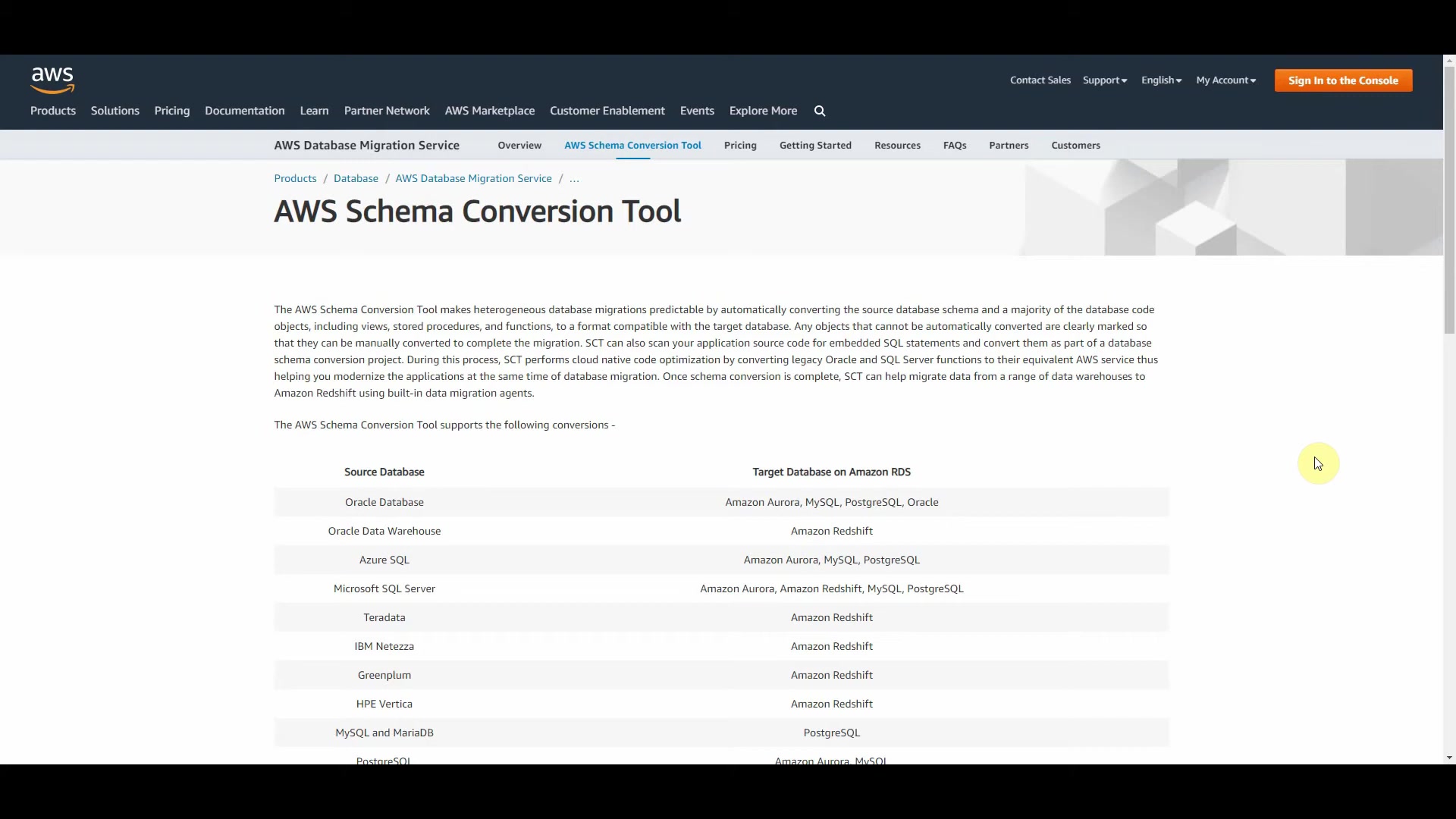
is a powerful tool provided by Amazon Web Services (AWS) designed to automate the conversion of database schemas and code objects from one database platform to another. It simplifies heterogeneous database migrations by automatically converting the source database schema, a majority of the database code objects (including views, stored procedures, and functions), to a format compatible with the target database.
Any objects that cannot be automatically converted are clearly marked to make manual conversions easier. SCT can scan your application source code for embedded SQL statements and convert them as part of a database schema conversion project. During this process, SCT performs cloud-native code optimization by converting legacy Oracle and SQL Server functions to their equivalent AWS service, thereby helping you modernize the application at the same time as database migration. Once schema conversion is complete, SCT can help migrate data from a range of data warehouses to Amazon Redshift using built-in data migration agents. The AWS Schema Conversion Tool supports various conversions, including moving schemas from Oracle, SQL Server, and other database platforms to Amazon RDS and Amazon Redshift.
The AWS Schema Conversion Tool is your ally in making database migrations smoother, predictable, and more cost-effective. It helps you move from legacy databases to modern, cloud-native solutions, thereby improving overall efficiency and scalability of your applications. SCT's capabilities extend to identifying and flagging compatibility issues between source and target databases, allowing for proactive remediation and risk mitigation. This leads to faster and more reliable database migrations, as well as reduced downtime and lower overall project costs. The process can often be broken down to several steps:
Key Benefits of Using AWS SCT
There are several reasons why companies are now choosing to use AWS SCT for their data migration purposes. Here are some key benefits when using AWS SCT:
- Reduced Migration Costs: By automating a significant portion of the schema conversion process, AWS SCT reduces the need for manual intervention, lowering overall migration costs.
- Simplified Migration Process: SCT simplifies the complexities of database migration, making it more accessible to organizations without deep database expertise.
- Improved Migration Speed: The automated conversion capabilities of SCT accelerate the migration timeline, allowing organizations to realize the benefits of cloud databases more quickly.
- Enhanced Database Compatibility: SCT ensures compatibility between the source and target databases, minimizing potential issues and ensuring smooth operation after migration.
- Cloud Native Optimization: SCT optimizes converted schemas and code objects for the AWS cloud environment, maximizing performance and scalability.
- Support for Multiple Databases: SCT supports a wide range of source and target databases, providing flexibility for different migration scenarios.
- Comprehensive Assessment Reports: SCT generates detailed assessment reports, identifying potential migration issues and providing recommendations for resolution.
Supported Source and Target Databases
Source Databases
The AWS Schema Conversion Tool supports a wide array of source databases, ensuring flexibility for various migration scenarios.
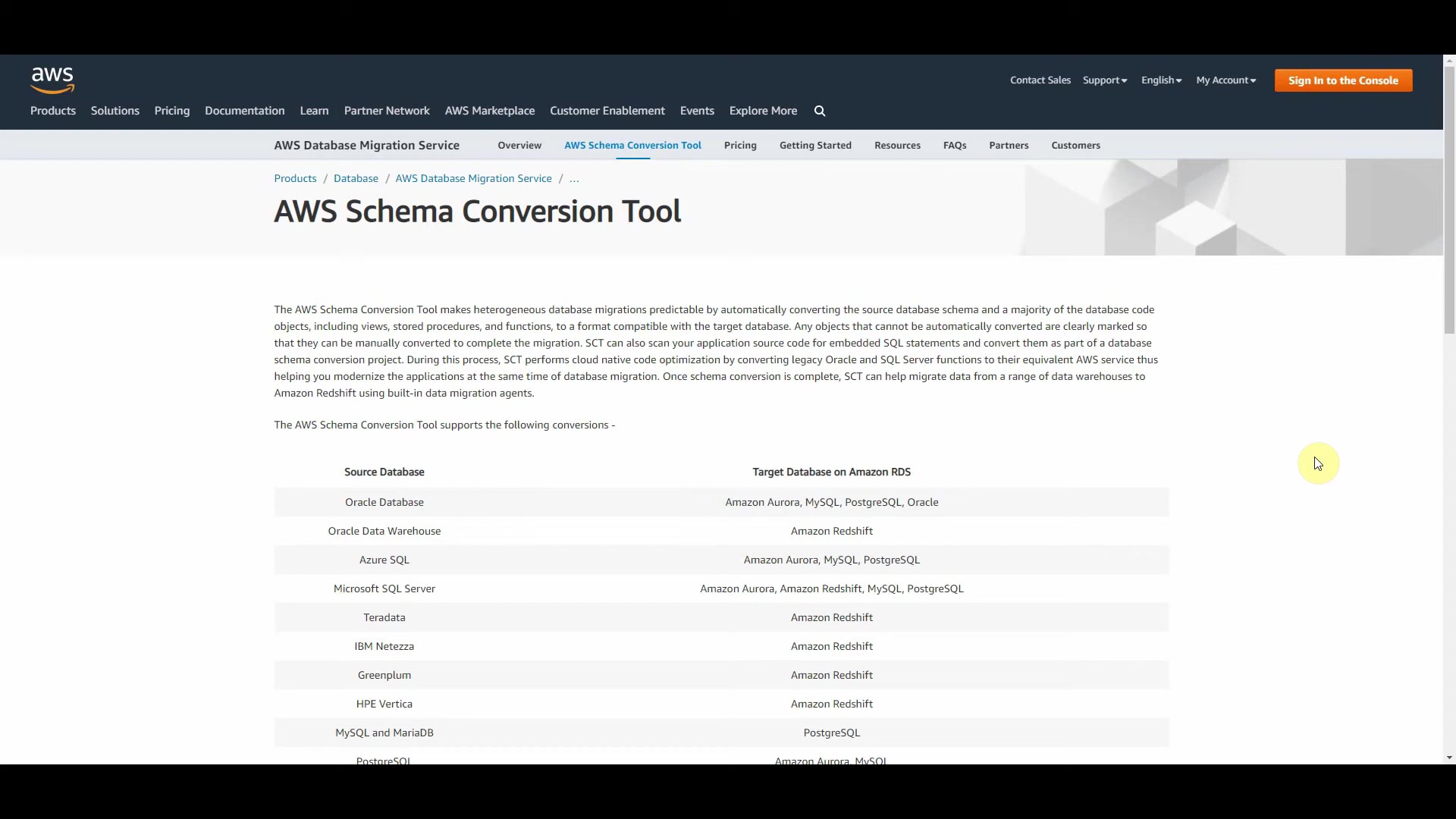
These include:
- Oracle Database
- Oracle Data Warehouse
- Azure SQL
- Microsoft SQL Server
- Teradata
- IBM Netezza
- Greenplum
- HPE Vertica
- MySQL and MariaDB
- PostgreSQL
- Amazon Aurora
- IBM DB2 LUW
- Apache Cassandra
- SAP ASE
Target Databases on Amazon RDS
When migrating to AWS, the Schema Conversion Tool provides support for these target databases on Amazon RDS:
- Amazon Aurora
- MySQL
- PostgreSQL
- Oracle
- Amazon Redshift
Homogeneous and Heterogeneous Database Migrations
AWS SCT supports both homogeneous and heterogeneous database migrations, providing flexibility for various migration scenarios:
- Homogeneous Migration: Involves migrating databases of the same type. For example, migrating from SQL Server to SQL Server on Amazon RDS. Homogeneous migrations are typically simpler because the schema and code objects are generally compatible.
- Heterogeneous Migration: Involves migrating databases of different types. For example, migrating from Microsoft SQL Server to MySQL RDS. Heterogeneous migrations require schema and code object conversion to ensure compatibility with the target database.
Understanding AWS RDS Pricing
Cost Comparison: SQL Server vs. MySQL on AWS RDS
When considering a database migration to AWS RDS, understanding the pricing differences between database engines is critical.
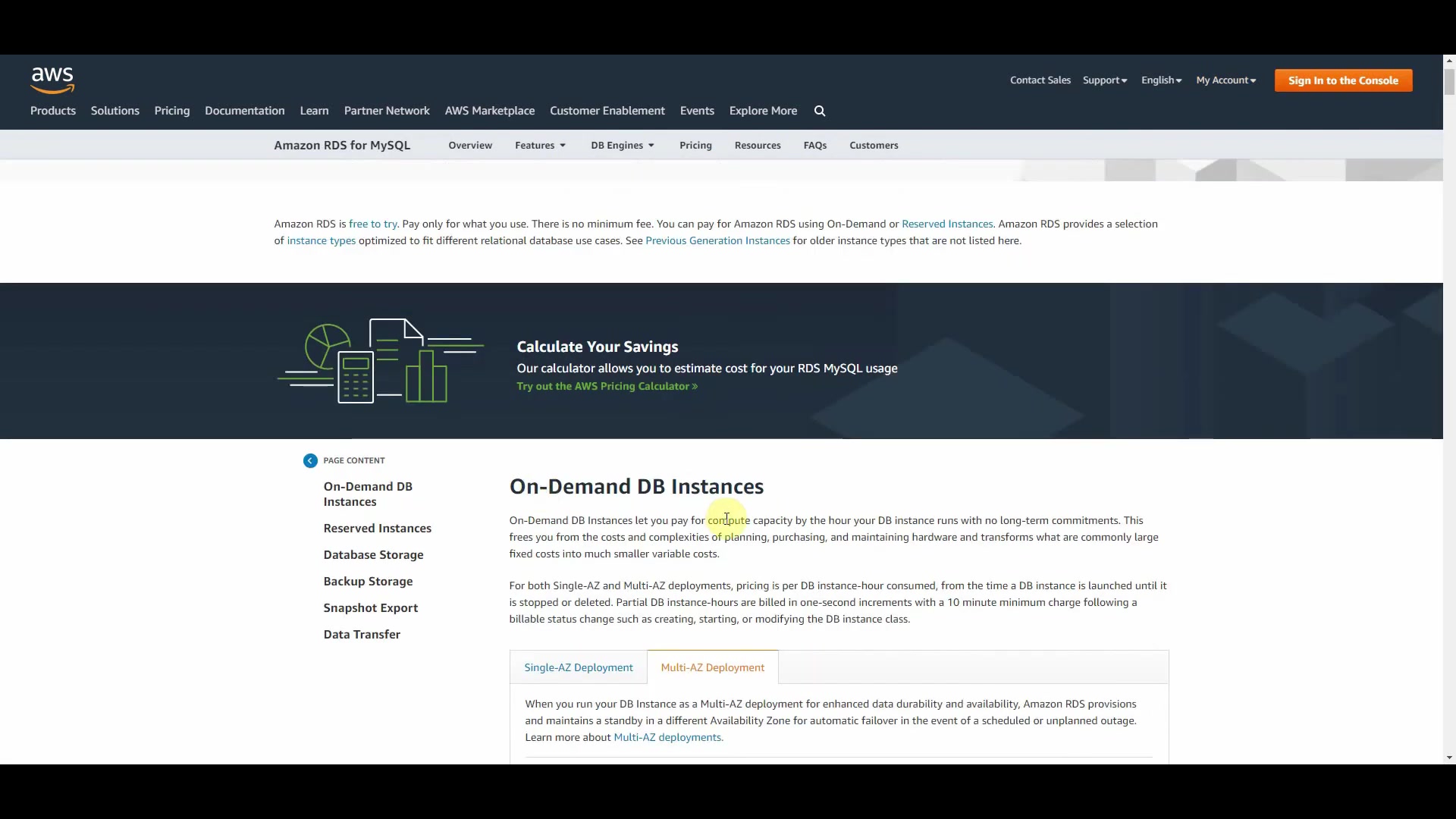
The presenter mentioned a scenario where migrating from Microsoft SQL Server to MySQL on AWS RDS could result in significant cost savings. SQL Server may be up to five times more expensive than MySQL.
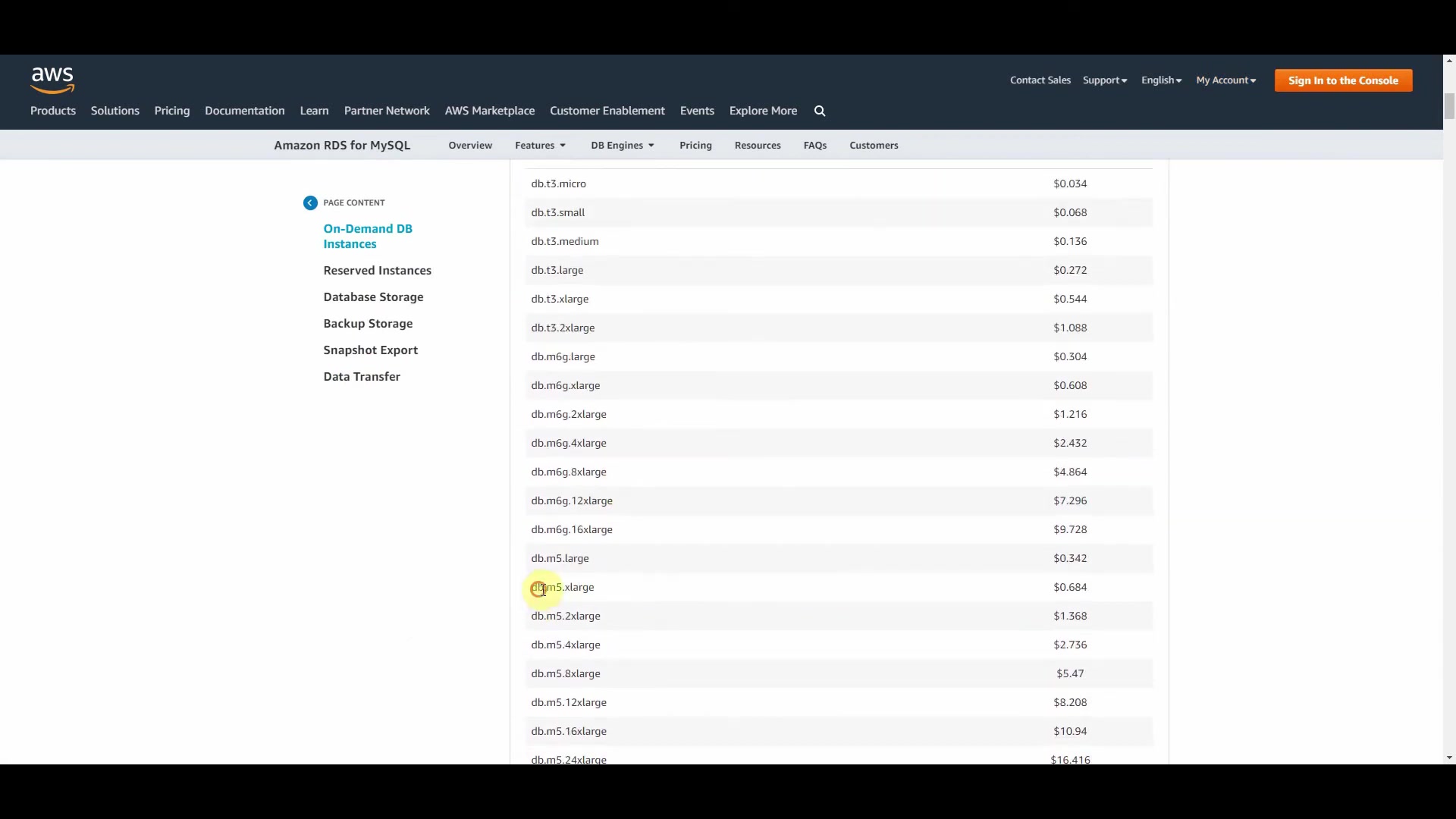
Here’s an explanation of potential cost savings, along with real numbers to help understand it. The pricing calculator and other tools can help estimate these numbers. By comparing the On-Demand DB Instance pricing for different database types, you can identify cost-effective migration options. This can often be broken down into the following areas:
Factors Influencing RDS Pricing
Several factors influence the pricing of AWS RDS instances. The key factors influencing Amazon RDS pricing include:
- Instance Type: Different instance types (e.g., db.t3.micro, db.m5.xlarge) offer varying compute, memory, and I/O resources, impacting the hourly cost.
- Database Engine: Different database engines (e.g., MySQL, PostgreSQL, SQL Server) have different pricing models.
- Deployment Option: Single-AZ deployments are typically cheaper than Multi-AZ deployments, which provide higher availability and fault tolerance.
- Storage: The amount and type of storage (e.g., General Purpose SSD, Provisioned IOPS SSD) affect the overall cost.
- Region: AWS Regions have different pricing structures.
- On-Demand vs. Reserved Instances: On-Demand Instances are pay-as-you-go, while Reserved Instances offer discounted rates for a commitment period.
Tools to Estimate RDS Costs
AWS provides several tools to help you estimate the cost of using different RDS instances.
These tools include:
- AWS Pricing Calculator: This tool allows you to estimate the monthly costs of AWS services based on your specific usage patterns.
- TCO Calculator: This tool helps you calculate the total cost of ownership (TCO) of running your applications on AWS compared to on-premises environments.
- Economics Resource Center: This resource provides additional insights and resources for switching to AWS.








Most people like
































Report
Please select a reason for reporting
- 13 Reasons to Switch from Snapchat to Text Messaging
- 7 Powerful Speech to Text Apps to Boost Productivity
- 10 Best Speech to Text Tools for Effortless Transcription
- 13 Free Tools to Easily Transcribe Audio to Text
- 15 Surprising Ways Google's Speech-to-Text Boosts Productivity
- 7 Best Free Online Audio to Text Transcription Tools
- 9 Tips to Transcribe Speech to Text Faster and Better
- 13 Best Speech to Text Software for Windows 10 in 2023
- 7 Tips for Choosing the Best Transcriber for Audio to Text
- 11 Reasons Why Dragon Speech-to-Text Apps are Game-Changers
- 6 Secrets to Enhance Your Speech to Text Transcription
- 6 Brilliant Ways to Boost Productivity with Talk-to-Text on Your MacBook
- 6 Ways Transcription Software Converts Audio to Text
- 8 Tips to Transcribe Speech to Text Like a Pro
- 6 Reasons IBM Watson Speech to Text is a Game-Changer
- 14 Powerful Ways Talk-to-Text Improves Your Workflow
- 12 Top Windows Speech-to-Text Software for Efficient Transcription
- 12 Game-Changing Benefits of Apple's Speech to Text Technology
- 9 Powerful Use Cases for AWS Speech to Text Technology
- 10 Easy Steps to Transcribe YouTube Videos to Text
- transcription audio en texte
- online audio transcription
- free audio file transcription
- free ai audio transcription
- audio transcription service
- audio transcription online free
- audio transcription free online
- audio to transcription software
- audio and transcript
- ai audio transcription free
- voice recording to text converter
- translate voice recording to text
- record voice to text
- audio recording to text converter
- voice recording and transcription
- chatgpt voice to text
- gmail voice to text
- speech to text reader
- speech to text ai free
- speech to talk
- How SEO and Marketing Dashboards Empower Agencies to Drive Results
- How to Use AI Tools to Find Internal Linking Opportunities Across a Business Website
- Discover Your Perfect Haircut with AI Hairstyle Apps
- Free Reputation Calculator Tools: How They're Adapting to Score AI Visibility, Not Just Rankings
- Design Professional Flyers for Free on Your Phone
- Best Free Flyer Maker Apps for Android: Design Like a Pro
- How to Know If Your Business Is Ready for an AI Customer Service Agent
- Revolutionizing Storytelling: From Novels to Screenplays with AI
- Create Engaging Animated Explainer Videos with a Free AI Tool
- Stop Multi-Subscribing: Benchmark Top AI Visual Models in One Canvas
- My Brand New Logo: AI-Powered Logo Design for Startups
- Create Stunning Logos with Free AI Logo Generator!
- AI Logo Maker: Design a Stunning Logo in Minutes
- Elevate Your Zoom Experience with Enhanced Name Tags by Warmly
- Top 5 AI Logo Makers in 2025: Design a Stunning Brand
- Creative Fabrica's AI Tools: Flow, Studio, and Font Generator
- Create Stunning Logos with Canva's Free AI Logo Generator
- Create Professional and Memorable Logos with LogoMaker.ai
- Design Your Own Font: A Step-by-Step Guide with Vectornator Pro
- AI Font Generator: Revolutionizing Typeface Design with AI

Copyright ©2026 toolify