































Table of Contents
- Key Points
- ChatGPT in Software Testing and Automation: An Overview
- Actionable Strategies for Integrating ChatGPT in Software Workflow
- Mastering Prompting Techniques: Essential Tips for Software Testers
- Understanding ChatGPT's Pricing: Choosing the Right Plan for Your Needs
- The Ups and Downs of Using ChatGPT for Software Testing
- Frequently Asked Questions (FAQ) About ChatGPT in Software Testing
- Related Questions


ChatGPT in Software Testing and Automation: An Overview
Why Use ChatGPT in Software Testing?
In the realm of software testing, time is often of the essence. By integrating ChatGPT into your workflow, you can significantly accelerate various testing tasks. ChatGPT can assist in tasks ranging from test case generation to code analysis, leading to faster and more efficient software development. This can drastically reduce the time spent on repetitive tasks, allowing software testers to focus on complex and critical areas of testing. Ultimately, leveraging ChatGPT can significantly enhance the quality and speed of software delivery. Moreover, ChatGPT can provide insights that might be missed through conventional testing methods, giving testers the ability to address problems proactively. This offers developers the chance to make critical adjustments early in the process, preventing significant problems later in production and improving software testing practices. As companies look for innovative ways to maintain a competitive edge, the use of ChatGPT in software testing offers a promising avenue for optimizing workflow, lowering costs, and enhancing software quality.
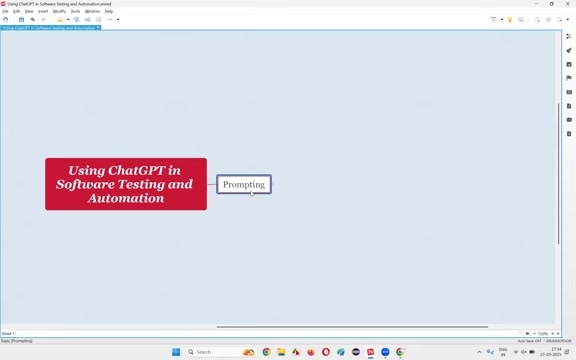
Prompting: The Key to Effective ChatGPT Usage
To harness the full potential of ChatGPT for software testing, mastering the art of prompting is crucial. Prompting involves crafting precise and clear instructions to guide ChatGPT in generating desired outputs. This means learning how to formulate specific requests for test cases, code analysis, and test plan creation. The quality of the response generated by ChatGPT directly correlates to the quality of the prompt. The more specific and well-defined the Prompt, the more targeted and accurate the results will be. Experimenting with different prompting techniques is vital to unlock ChatGPT's capabilities and tailoring the outputs to meet specific project needs. This includes using precise language, setting parameters, and defining output expectations in detail. Effective prompting increases the value of ChatGPT, allowing it to provide customized solutions to software testing needs.
Areas Where ChatGPT Can Revolutionize Software Testing
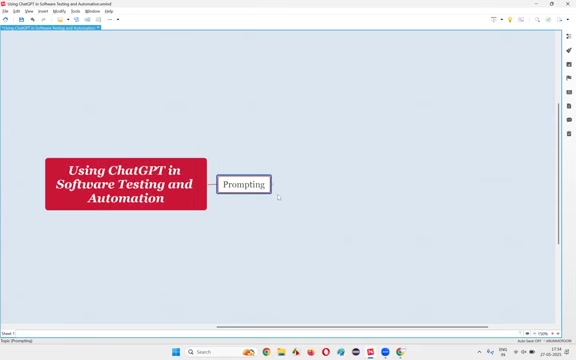
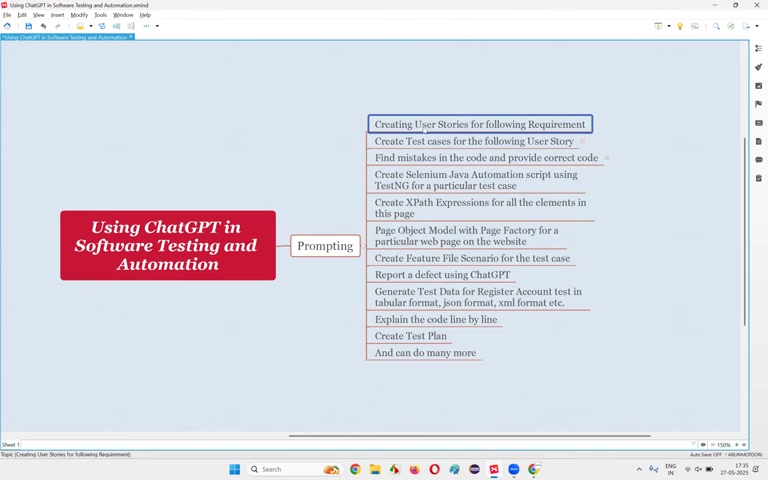
ChatGPT's abilities can be used in various critical tasks to improve software testing, including:
- **Creating User Stories
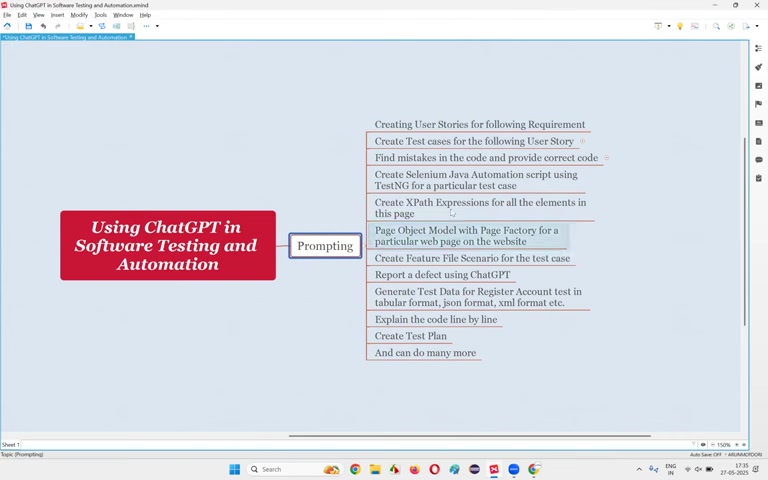
:** Turn high-level requirements into detailed user stories to guide the testing process.
- Test Case Generation : Automate the creation of test cases from user stories, significantly reducing manual effort.
- Mistake Identification and Code Correction : Pinpoint coding errors and provide suggestions for accurate and well-written code.
- Generating Selenium Automation Scripts : Quickly develop Selenium automation test scripts in Java using TestNG, reducing script creation time.
- XPath Expression Generation : Automate the creation of XPath expressions for all elements, a vital asset for webpage testing.
- Creating Page Object Models : Construct page object models using Page Factory design patterns for structured web page representation.
- Feature File Scenario Creation : Effortlessly generate Gherkin syntax scenarios for Behavior Driven Development (BDD).
- Defect Reporting : Prepare defect reports with rich descriptions and clear steps to reproduce.
- Test Data Generation : Produce comprehensive test data for register account tests in formats such as tabular, JSON, and XML.
- Line-by-Line Code Explanation : Increase comprehensibility by detailing any line of code, facilitating code reviews.
- Test Plan Creation : Expedite the process of devising a comprehensive test plan.
With the application of these tools, software testers are equipped to augment their abilities and quicken their testing process. The flexibility and precision afforded by these technological approaches can significantly boost the efficacy of the software testing practices, resulting in a decrease in development cycles and more efficient time usage for testing teams.
Actionable Strategies for Integrating ChatGPT in Software Workflow
Integrating ChatGPT-Generated Test Scripts and Test Cases.
Using the techniques of ChatGPT to improve test scripts and test cases comes with unique strategies. To keep things smooth and impactful, remember to take notes from the following guides: - When you create a new script, start by writing clear and focused prompts. When writing your prompts, it's essential to describe what the scripts or test cases are designed to achieve. - Using specific language when setting up instructions allows for a faster, more efficient generation process that minimizes the necessity for repeated feedback and refinement. This is one of the primary ways we're able to boost test coverage and catch defects, including boundary conditions. Always follow these procedures to keep your workflow running efficiently in automated processes. - Never let AI fully substitute the expertise of human reviewers, since AI-generated test plans and test steps can miss critical business rules. Having an experienced tester go over the work and validate test parameters guarantees that tests cover essential details of functionality to ensure that no vital aspects are omitted. This keeps tests reliable and customized to user needs. - Lastly, when integrating any new code into existing platforms, use modular building procedures to implement new tests without upsetting existing structures. Such action helps maintain existing data while allowing for innovative features with zero downtime. Be sure to apply these steps to keep a robust data integrity process as well as allow consistent improvements. ChatGPT has vast implications, especially when combined with modular testing methodologies.
Mastering Prompting Techniques: Essential Tips for Software Testers
Crafting Effective Prompts for Superior Results
The key to fully leveraging ChatGPT lies in the ability to craft effective prompts. These are several best practices to ensure optimal outcomes:
1. Be Clear and Concise: State your requests in straightforward language to avoid misinterpretations. 2. Specify the Format: Clearly define how you want the output to be structured, such as bullet points, tables, or code snippets. 3. Set Parameters: Define any limitations or conditions necessary for ChatGPT to adhere to during its output generation. 4. Provide Context: Give enough background information to aid ChatGPT in understanding the full scope and context of the task. 5. Include Examples: Offer example scenarios or formats to guide ChatGPT in generating more tailored responses.
With these guiding principles at the core of your prompts, ChatGPT has the potential to yield unparalleled value in software testing. A well-crafted prompt ensures clarity, efficiency, and precision, leading to outputs closely aligned with the intended goals of testing. Implementing structured and unambiguous language will enable the tool to process instructions accurately, delivering outputs more in line with your expectations. Incorporating parameters such as format types and boundary conditions gives ChatGPT the context needed to generate meaningful and actionable responses, which are essential for streamlining processes, optimizing testing, and improving software quality.
Understanding ChatGPT's Pricing: Choosing the Right Plan for Your Needs
ChatGPT's Free Tier vs. Paid Plans
The basic ChatGPT plan is completely free for all users, and there is also a paid version which is called ChatGPT Plus that requires $20USD. You can access the features in detail from the openAI website, make sure which plan fits your needs most:
| Features | Free | Plus |
|---|---|---|
| Cost | Free | $20 USD / month |
| GPT-4 Access | Limited to GPT-3.5, suitable for basic reasoning | Level up productivity and creativity with expanded access |
| Standard Voice Mode | Enabled | Enabled |
| Real-Time Data from the Web | Enabled | Enabled |
| Image Analysis & Generation | Limited to file uploads for data analysis, limited image generation | Access to deep research, multiple reasoning models (64-min, 64-high, and 0.3), and a research preview of GPT-4.5 |
| Advanced Data Analysis | Limited | Extended limits on messaging, file uploads, advanced data analysis, and image generation |
| Custom GPT Creation | Enabled | Enabled |
| Limited Access to Sora | Limited | Extended Access |
With its dual-plan offering, ChatGPT can accommodate both the occasional tester and the enterprise-level operation, tailoring services to a wide range of usage scenarios. When choosing a plan, consider what tasks the model will be performing, how detailed the output is required to be, and the necessary level of commitment.


Most people like




































Report
Please select a reason for reporting
- 13 Reasons to Switch from Snapchat to Text Messaging
- 7 Powerful Speech to Text Apps to Boost Productivity
- 10 Best Speech to Text Tools for Effortless Transcription
- 13 Free Tools to Easily Transcribe Audio to Text
- 15 Surprising Ways Google's Speech-to-Text Boosts Productivity
- 7 Best Free Online Audio to Text Transcription Tools
- 9 Tips to Transcribe Speech to Text Faster and Better
- 13 Best Speech to Text Software for Windows 10 in 2023
- 7 Tips for Choosing the Best Transcriber for Audio to Text
- 11 Reasons Why Dragon Speech-to-Text Apps are Game-Changers
- 6 Secrets to Enhance Your Speech to Text Transcription
- 6 Brilliant Ways to Boost Productivity with Talk-to-Text on Your MacBook
- 6 Ways Transcription Software Converts Audio to Text
- 8 Tips to Transcribe Speech to Text Like a Pro
- 6 Reasons IBM Watson Speech to Text is a Game-Changer
- 14 Powerful Ways Talk-to-Text Improves Your Workflow
- 12 Top Windows Speech-to-Text Software for Efficient Transcription
- 12 Game-Changing Benefits of Apple's Speech to Text Technology
- 9 Powerful Use Cases for AWS Speech to Text Technology
- 10 Easy Steps to Transcribe YouTube Videos to Text
- transcription audio en texte
- online audio transcription
- free audio file transcription
- free ai audio transcription
- audio transcription service
- audio transcription online free
- audio transcription free online
- audio to transcription software
- audio and transcript
- ai audio transcription free
- voice recording to text converter
- translate voice recording to text
- record voice to text
- audio recording to text converter
- voice recording and transcription
- chatgpt voice to text
- gmail voice to text
- speech to text reader
- speech to text ai free
- speech to talk
- Meshy AI: How to Create 3D Models from Text and Images
- How SEO and Marketing Dashboards Empower Agencies to Drive Results
- How to Use AI Tools to Find Internal Linking Opportunities Across a Business Website
- Discover Your Perfect Haircut with AI Hairstyle Apps
- Free Reputation Calculator Tools: How They're Adapting to Score AI Visibility, Not Just Rankings
- Design Professional Flyers for Free on Your Phone
- Best Free Flyer Maker Apps for Android: Design Like a Pro
- How to Know If Your Business Is Ready for an AI Customer Service Agent
- Revolutionizing Storytelling: From Novels to Screenplays with AI
- Create Engaging Animated Explainer Videos with a Free AI Tool
- Automate Lead Generation: A Comprehensive Guide with AI Agents
- Revideo.io: The Future of Reverse Video Search Technology
- Revolutionizing Email Marketing Agency with AI
- Breaking the Character Drift Dilemma: A Practical Test of Smart Shot
- Meshy AI: How to Create 3D Models from Text and Images
- ASOMobile Helps Teams Benchmark App Store Screenshots Against Competitors
- How to Match LMS Software With Your Organization's Training Plan
- How to Convert BTC to HNT
- Unleashing the Power of AI: Cognizant's Roadmap for Transformation
- Frame to Video Review: A Practical Look at Turning Two Still Frames Into Motion

Copyright ©2026 toolify