































Table of Contents
- Key Points
- Understanding the Core Components
- Setting Up Your Development Environment
- Building Your Real-Time AI Chatbot: Step-by-Step
- AssemblyAI Pricing
- Advantages and Disadvantages of Java for AI Chatbots
- Core Features of AssemblyAI for Chatbot Development
- Use Cases for AI Chatbots in Java
- Frequently Asked Questions
- Related Questions


Understanding the Core Components
What is AssemblyAI?
AssemblyAI is a leading platform for Speech-to-Text and audio intelligence. It offers a range of APIs and SDKs that allow developers to easily integrate powerful Speech Recognition and natural language understanding capabilities into their applications. AssemblyAI is used in a variety of applications from automated Transcription services to call analytics and chatbot development. Its advanced models and robust infrastructure make it an ideal choice for building real-time AI-powered solutions.
What is LeMUR?
LeMUR (Language Model Understanding and Reasoning) is AssemblyAI’s framework for working with Large Language Models (LLMs). It simplifies the process of integrating LLMs into your speech AI applications, providing a consistent and efficient way to generate intelligent responses.
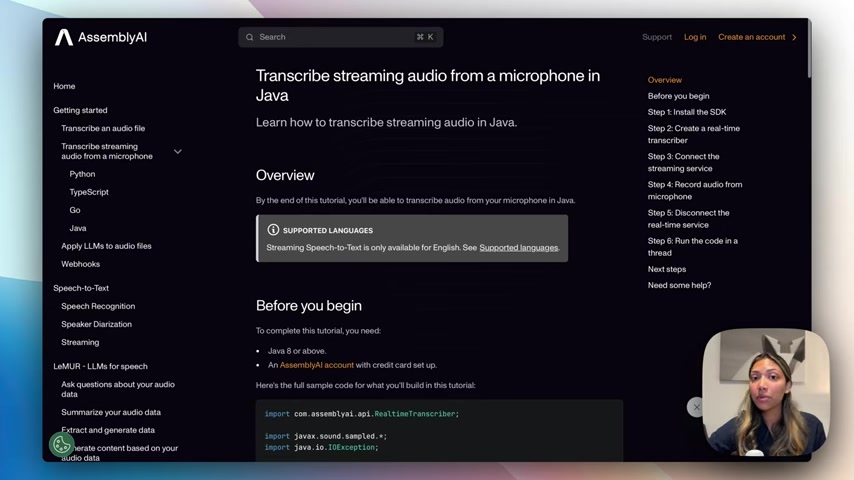
LeMUR is designed to understand and reason about audio data, making it perfect for creating AI chatbots that can engage in meaningful conversations. LeMUR allows users to interact in real-time with spoken language, and it can be used to ask question about audio data.
Benefits of Building AI Chatbots in Java
Java remains a popular and powerful language for building enterprise-grade applications. Its platform independence, scalability, and rich ecosystem make it a strong choice for AI Chatbot development. Java's robust support for multithreading is invaluable for handling real-time transcription and AI response generation concurrently. Using Java, developers can leverage a wide range of libraries and frameworks to build sophisticated and performant chatbot applications.
Setting Up Your Development Environment
Prerequisites
Before diving into the code, it's essential to have the necessary tools and dependencies set up. Here’s what you'll need:
- Java Development Kit (JDK): Java 8 or later is recommended. You can download the latest version from the Oracle website or use an open-source distribution like OpenJDK.
- Integrated Development Environment (IDE): IntelliJ IDEA or Eclipse are popular choices for Java development. Choose the one you're most comfortable with.
- AssemblyAI Account: You'll need an AssemblyAI account with a valid API key. You can create a free account on the AssemblyAI website. AssemblyAI's webhooks let you configure push notifications on task completion. Webhooks can be useful in many ways.
- Gradle: Make sure to add the implementation for AssemblyAI's Java SDK to the file. This Tutorial uses assemblyai-java-1.1.1 to enable real-time speech transcription.
Installing the AssemblyAI Java SDK
To begin, you'll need to install the AssemblyAI Java SDK. The easiest way to do this is by adding the dependency to your project's build.gradle file. Open your build.gradle file and add the following line to the dependencies block:
implementation group: 'com.assemblyai', name: 'assemblyai-java', version: '1.1.1'After adding the dependency, sync your Gradle project to download and install the SDK. This will provide you with access to AssemblyAI's speech-to-text and LeMUR APIs within your Java project.
Acquiring Your AssemblyAI API Key
To use AssemblyAI's services, you'll need an API key. Here’s how to obtain one:
- Sign Up: Go to the AssemblyAI website and create a free account.
- Access Dashboard: Once you've signed up, navigate to the dashboard.
- Retrieve API Key: You'll find your API key in the dashboard settings. Keep this key secure, as it's required to authenticate your requests to AssemblyAI's APIs.
Store this API key in a safe place, such as an environment variable, to prevent it from being exposed in your code.
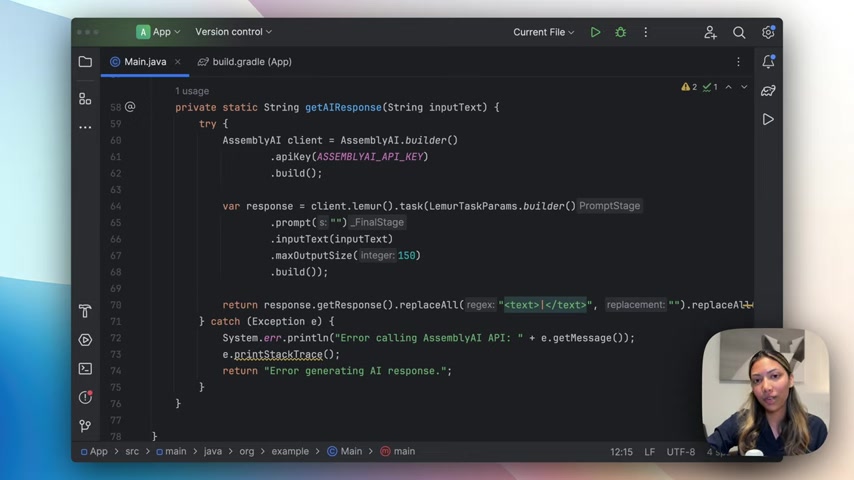
Make sure to insert your API key into the section titled YOUR_API_KEY.
Building Your Real-Time AI Chatbot: Step-by-Step
Step 1: Setting up the Basic Structure
Start by creating a new Java project in your IDE. Create a main class, e.g., Main.java, and set up the basic structure for handling real-time transcription and AI response generation. This will include importing the necessary libraries and setting up the AssemblyAI client.
import com.assemblyai.api.AssemblyAI;
import com.assemblyai.api.RealtimeTranscriber;

public class Main {
    public static void main(String[] args) {
        // Your code here
    }
}
Step 2: Implementing Real-Time Transcription
Use AssemblyAI's RealtimeTranscriber to transcribe audio in real-time. Create a new thread to handle the audio input from the microphone and send it to AssemblyAI for transcription. Implement methods to handle session start, partial transcripts, and final transcripts.
RealtimeTranscriber realtimeTranscriber = AssemblyAI.builder()
    .apiKey("YOUR_API_KEY")
    .sampleRate(16_000)
    .onSessionBegins(sessionBegins -> System.out.println("Session opened with ID: " + sessionBegins.getSessionId()))
    .onFinalTranscript(transcript -> System.out.println("Final: " + transcript.getText()))
    .onError(err -> System.out.println("Error: " + err.getMessage()))
    .build();

realtimeTranscriber.connect();
Step 3: Disabling Partial Transcripts and Setting Silence Threshold
To ensure you're only working with complete sentences, disable partial transcripts and set an appropriate silence threshold. This will help in generating more coherent AI responses.
.disablePartialTranscripts()
.endUtteranceSilenceThreshold(1000)
Setting the endUtteranceSilenceThreshold to 1000 milliseconds (1 second) ensures that the system waits for a brief pause before considering the sentence complete.
Step 4: Generating AI Responses with LeMUR
Integrate LeMUR to generate intelligent responses based on the transcribed text. Create a method, getAIResponse(), that takes the transcribed text as input and uses LeMUR to generate a response. This involves setting up the AssemblyAI client, configuring the LeMUR Prompt, and sending the request to the LeMUR API.
private static String getAIResponse(String text) {
    try {
        AssemblyAI client = AssemblyAI.builder()
            .apiKey("YOUR_API_KEY")
            .build();

        var response = client.lemur().task(
            LemurTaskParams.builder()
                .prompt("") // Prompt is blank, using the input text directly
                .inputText(text)
                .maxOutputSize(150)
                .build()
        ).getResponse();

        return response.replace("<text></text>", "").replace("\
", "");
    } catch (Exception e) {
        System.err.println("Error calling AssemblyAI API: " + e.getMessage());
        e.printStackTrace();
        return "Error generating AI response.";
    }
}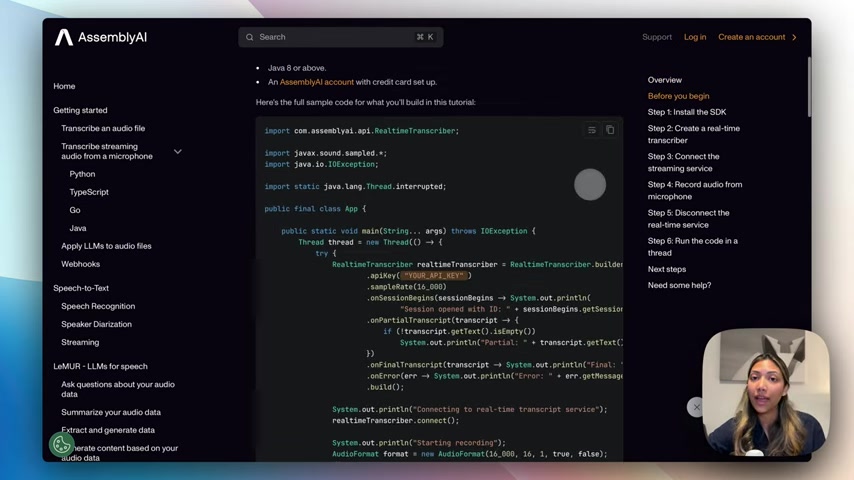
This step involves calling client.lemur, and if there are errors, error generating AI response.
Step 5: Displaying User Input and AI Response
Finally, display both the transcribed user input and the generated AI response in your console. This will provide a clear and interactive experience for the user.
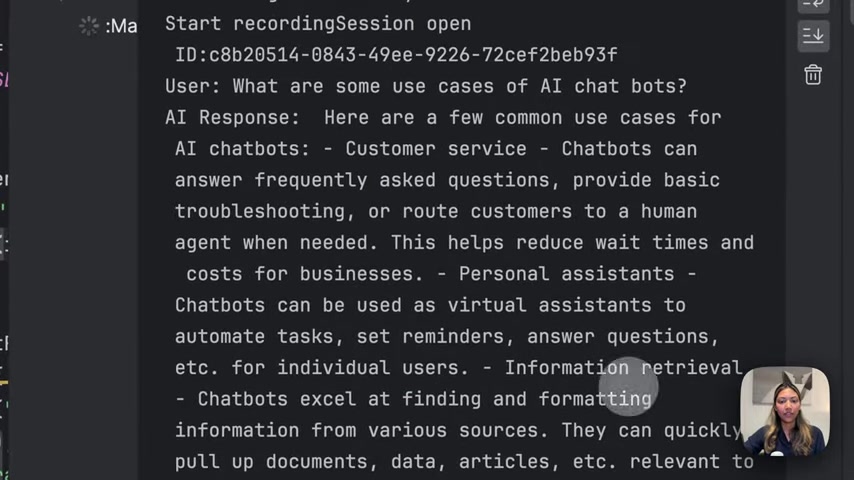
System.out.println("User: " + transcript.getText());
String aiResponse = getAIResponse(transcript.getText());
System.out.println("AI Response: " + aiResponse);






Most people like
































Report
Please select a reason for reporting
- 13 Reasons to Switch from Snapchat to Text Messaging
- 7 Powerful Speech to Text Apps to Boost Productivity
- 10 Best Speech to Text Tools for Effortless Transcription
- 13 Free Tools to Easily Transcribe Audio to Text
- 15 Surprising Ways Google's Speech-to-Text Boosts Productivity
- 7 Best Free Online Audio to Text Transcription Tools
- 9 Tips to Transcribe Speech to Text Faster and Better
- 13 Best Speech to Text Software for Windows 10 in 2023
- 7 Tips for Choosing the Best Transcriber for Audio to Text
- 11 Reasons Why Dragon Speech-to-Text Apps are Game-Changers
- 6 Secrets to Enhance Your Speech to Text Transcription
- 6 Brilliant Ways to Boost Productivity with Talk-to-Text on Your MacBook
- 6 Ways Transcription Software Converts Audio to Text
- 8 Tips to Transcribe Speech to Text Like a Pro
- 6 Reasons IBM Watson Speech to Text is a Game-Changer
- 14 Powerful Ways Talk-to-Text Improves Your Workflow
- 12 Top Windows Speech-to-Text Software for Efficient Transcription
- 12 Game-Changing Benefits of Apple's Speech to Text Technology
- 9 Powerful Use Cases for AWS Speech to Text Technology
- 10 Easy Steps to Transcribe YouTube Videos to Text
- transcription audio en texte
- online audio transcription
- free audio file transcription
- free ai audio transcription
- audio transcription service
- audio transcription online free
- audio transcription free online
- audio to transcription software
- audio and transcript
- ai audio transcription free
- voice recording to text converter
- translate voice recording to text
- record voice to text
- audio recording to text converter
- voice recording and transcription
- chatgpt voice to text
- gmail voice to text
- speech to text reader
- speech to text ai free
- speech to talk
- How SEO and Marketing Dashboards Empower Agencies to Drive Results
- How to Use AI Tools to Find Internal Linking Opportunities Across a Business Website
- Discover Your Perfect Haircut with AI Hairstyle Apps
- Free Reputation Calculator Tools: How They're Adapting to Score AI Visibility, Not Just Rankings
- Design Professional Flyers for Free on Your Phone
- Best Free Flyer Maker Apps for Android: Design Like a Pro
- How to Know If Your Business Is Ready for an AI Customer Service Agent
- Revolutionizing Storytelling: From Novels to Screenplays with AI
- Create Engaging Animated Explainer Videos with a Free AI Tool
- Stop Multi-Subscribing: Benchmark Top AI Visual Models in One Canvas
- My Brand New Logo: AI-Powered Logo Design for Startups
- Create Stunning Logos with Free AI Logo Generator!
- AI Logo Maker: Design a Stunning Logo in Minutes
- Elevate Your Zoom Experience with Enhanced Name Tags by Warmly
- Top 5 AI Logo Makers in 2025: Design a Stunning Brand
- Creative Fabrica's AI Tools: Flow, Studio, and Font Generator
- Create Stunning Logos with Canva's Free AI Logo Generator
- Create Professional and Memorable Logos with LogoMaker.ai
- Design Your Own Font: A Step-by-Step Guide with Vectornator Pro
- AI Font Generator: Revolutionizing Typeface Design with AI

Copyright ©2026 toolify