































Table of Contents
- Key Points
- Breaking Down Language Barriers with Technology
- Building Your Real-Time Language Translator
- How to use your custom real time translator
- Google Translate API Pricing
- Pros and Cons of Building Your Own Language Translator
- Key Features of the Python-Based Language Translator
- Applications of Real-Time Language Translation
- Frequently Asked Questions
- Related Questions


Building Your Real-Time Language Translator
Setting Up Your Development Environment
Before we begin, let's set up our development environment. The following steps will guide you through the process:
- Install Python: If you haven't already, download and install the latest version of Python from the official Python website.
- Install Required Libraries: Open a terminal or command Prompt and use pip, the Python Package installer, to install the necessary libraries:
pip install speech_recognitionpip install googletranspip install gTTS
- Obtain a Google Translate API Key: To access the Google Translate API, you'll need to create a project in the Google Cloud Console and enable the Translate API. Then, generate an API key to use in your Python code. Be sure to follow Google's guidelines and pricing structure for API usage. It's a very simple process, that only requires some google account verification.
Now that your environment is set up, you're ready to start coding!
Core Components of the Translator
Our real-time language translator consists of several core components that work together to achieve seamless translation:
- Speech Recognition: This component captures spoken audio and converts it into text using the
speech_recognitionlibrary. - Language Detection: The Google Translate API automatically detects the language of the input text. With this tool you won't have to explicitly declare to the application the language that you are using, allowing more versatility.
- Text Translation: Once the language is detected, the text is translated to the desired language using the
googletranslibrary, which interacts with the Google Translate API. Google offers a long list of supported languages with it's API. - Text-to-Speech Conversion: Finally, the translated text is converted back into spoken audio using the
gTTSlibrary, allowing the user to hear the translated message in real-time. This part allows you to hear the translations with an amazing and almost human accent. - Real-Time Processing: All these components work together in a continuous loop, providing a near real-time translation experience.
The Python Code: Step-by-Step Explanation
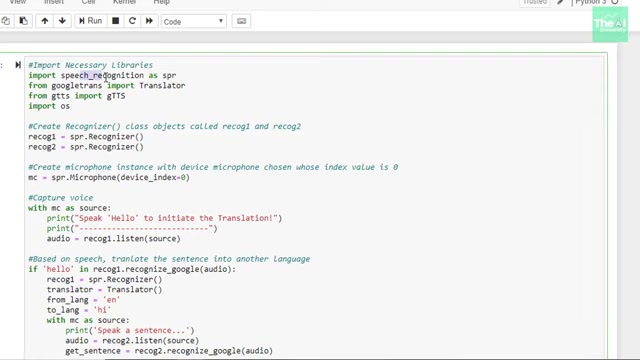
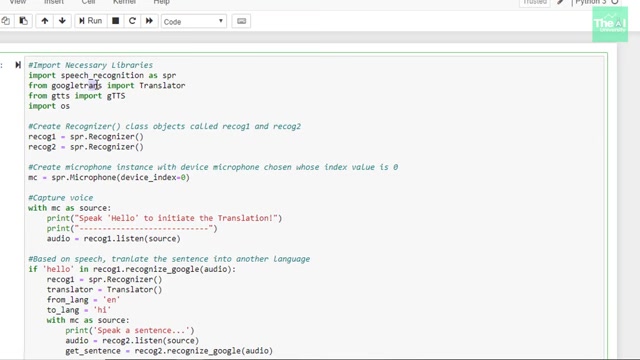
Let's dissect the Python code that brings our real-time language translator to life:
import speech_recognition as spr
from googletrans import Translator
from gtts import gTTS
import os

# Create Recognizer() class objects called recog1 and recog2
recog1 = spr.Recognizer()
recog2 = spr.Recognizer()

# Create microphone instance with device microphone chosen whose index value is 0
mc = spr.Microphone(device_index=0)

# Capture voice
with mc as source:
    print("Speak 'Hello !' to initiate the Translation !")
    print("-----------------------------------------")
    audio = recog1.listen(source)

# Based on speech, translate the sentence into another language
try:
    recog1.recognize_google(audio)
    Translator()
    from_lang = 'en'
    to_lang = 'hi'

    with mc as source:
        print("Speak a sentence...")
        audio = recog2.listen(source)
        get_sentence = recog2.recognize_google(audio)

        # Get translated language to 'to_lang'
        get_sentence
        text_to_translate = Translator().translate(get_sentence, src=from_lang, dest=to_lang)
        text = text_to_translate.text
        speak = gTTS(text=text, lang=to_lang, slow= False)

        # Using save() method to save the translated speech in capture_voice.mp3
        speak.save("captured_voice.mp3")

        # Playing the translated speech
        os.system("start captured_voice.mp3")

except spr.UnknownValueError:
    print("Unable to understand the input")

except spr.RequestError as e:
    print("Unable to provide required output format {0}".format(e))

# Speak 'Hello !' to initiate the Translation !-
Import Necessary Libraries: The code imports the required libraries:
speech_recognition,googletrans,gTTS, andos.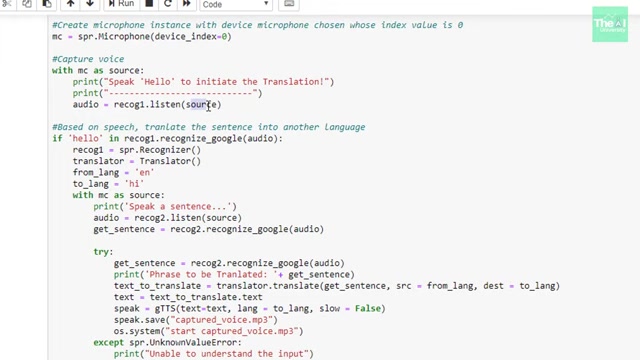
-
Create Recognizer Instances: Two
Recognizerobjects,recog1andrecog2, are created to handle Speech Recognition. -
Microphone Instance: A
Microphoneinstance,mc, is created to access the system's microphone. -
Capture Voice: The code captures the user's voice using the
listenmethod and stores it in theaudiovariable. -
Language Translation: The code then attempts to recognize the speech using Google's speech recognition service (
recognize_google). If successful, it translates the recognized text to Hindi using thegoogletranslibrary. -
Text-to-Speech Conversion: The translated text is converted into speech using the
gTTSlibrary, and the resulting audio is saved as a.mp3file. -
Play Translated Speech: The code uses the
osmodule to play the translated audio file, providing the user with real-time feedback. -
Error Handling: The code includes
try...exceptblocks to handle potential errors, such as the inability to understand the input or issues with the Google Translate API. This gives the application more stability.
How to use your custom real time translator
Steps to Run the Translator
- Ensure Dependencies are Installed: Double-check that all the required libraries (
speech_recognition,googletrans,gTTS) are installed in your Python environment. - Obtain a Google Translate API Key: Make sure you have a valid API key and have enabled the Translate API in your Google Cloud Console.
- Run the Python Code: Execute the Python code in your IDE.
- Speak the Trigger Word: When prompted, speak the trigger WORD “Hello!” into the microphone.
- Speak Your Sentence: After the code recognizes the trigger word, speak the sentence you want to translate.
- Listen to the Translation: The translated audio will be played back to you in real-time. If you didn't hear the audio or want to listen again simply press play on the custom audio player that appears after the voice capture
.








Most people like































Report
Please select a reason for reporting
- 13 Reasons to Switch from Snapchat to Text Messaging
- 7 Powerful Speech to Text Apps to Boost Productivity
- 10 Best Speech to Text Tools for Effortless Transcription
- 13 Free Tools to Easily Transcribe Audio to Text
- 15 Surprising Ways Google's Speech-to-Text Boosts Productivity
- 7 Best Free Online Audio to Text Transcription Tools
- 9 Tips to Transcribe Speech to Text Faster and Better
- 13 Best Speech to Text Software for Windows 10 in 2023
- 7 Tips for Choosing the Best Transcriber for Audio to Text
- 11 Reasons Why Dragon Speech-to-Text Apps are Game-Changers
- 6 Secrets to Enhance Your Speech to Text Transcription
- 6 Brilliant Ways to Boost Productivity with Talk-to-Text on Your MacBook
- 6 Ways Transcription Software Converts Audio to Text
- 8 Tips to Transcribe Speech to Text Like a Pro
- 6 Reasons IBM Watson Speech to Text is a Game-Changer
- 14 Powerful Ways Talk-to-Text Improves Your Workflow
- 12 Top Windows Speech-to-Text Software for Efficient Transcription
- 12 Game-Changing Benefits of Apple's Speech to Text Technology
- 9 Powerful Use Cases for AWS Speech to Text Technology
- 10 Easy Steps to Transcribe YouTube Videos to Text
- transcription audio en texte
- online audio transcription
- free audio file transcription
- free ai audio transcription
- audio transcription service
- audio transcription online free
- audio transcription free online
- audio to transcription software
- audio and transcript
- ai audio transcription free
- voice recording to text converter
- translate voice recording to text
- record voice to text
- audio recording to text converter
- voice recording and transcription
- chatgpt voice to text
- gmail voice to text
- speech to text reader
- speech to text ai free
- speech to talk
- How to Use AI Tools to Find Internal Linking Opportunities Across a Business Website
- Discover Your Perfect Haircut with AI Hairstyle Apps
- Free Reputation Calculator Tools: How They're Adapting to Score AI Visibility, Not Just Rankings
- Design Professional Flyers for Free on Your Phone
- Best Free Flyer Maker Apps for Android: Design Like a Pro
- How to Know If Your Business Is Ready for an AI Customer Service Agent
- Revolutionizing Storytelling: From Novels to Screenplays with AI
- Create Engaging Animated Explainer Videos with a Free AI Tool
- Stop Multi-Subscribing: Benchmark Top AI Visual Models in One Canvas
- Best Seedance 2.5 API Provider: Every Price on the Market, Checked at Source
- Top AI Social Media Management Tools: Automate Your Content Strategy
- Free AI Text to Video Generator: Create Stunning Videos from Text
- Discover 17 ChatGPT Alternatives: A Comprehensive Comparison
- Character.AI vs. Janitor AI: Which AI Chat Platform Reigns Supreme?
- Top Virtual Assistant Companies in 2026: Reviews, Pricing, and Plans Compared
- Unveiling FaceCheck.ID: Revolutionizing Reverse Image Searches with AI
- 11 Best AI Dialers in 2026: Features, Pricing, Pros and Cons
- How I Direct Consistent AI Clips: A Hands-On Guide to Multi-Model Generation
- A Realistic Review of the Photo Generator Image Tool
- Playwright MCP Server: Automated Web Testing with Agent Mode

Copyright ©2026 toolify