































Table of Contents
- Key Points
- Getting Started with prsaw
- Creating Different Types of Chatbots
- How to Use prsaw Effectively
- Pricing of Services
- Pros and Cons of Using prsaw for AI Chatbots
- Key Features of prsaw
- Use Cases for prsaw
- Frequently Asked Questions
- Related Questions


Getting Started with prsaw
What is prsaw?
prsaw, which stands for Python Random Stuff API Wrapper, is a Python library designed to simplify interactions with the Random Stuff API. This API provides various functionalities, including AI-driven responses, jokes, and other random content. prsaw acts as a wrapper, making it easier to integrate these functionalities into your Python projects without dealing with complex HTTP requests or API authentication procedures. It’s perfect for quickly adding some fun or dynamic content to your applications. This library is open source and designed to be user-friendly, which makes it accessible for both beginner and experienced Python developers.
Installation
Before diving into the code, you need to install the prsaw library. This is easily done using pip, Python’s package installer. Open your terminal or command Prompt and run the following command: pip install prsaw This command downloads and installs the latest stable release of prsaw from the Python Package Index (PyPI). Once the installation is complete, you can start using the library in your Python scripts.
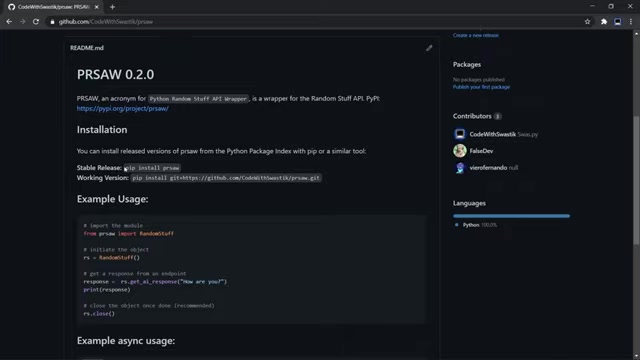
Alternatively, for the working version directly from GitHub, use: pip install git+https://github.com/CodeWithSwastik/prsaw.git
Example Usage: A Basic Chatbot
With prsaw installed, you can now create a simple AI Chatbot with just a few lines of Python code. Here’s the basic setup:
from prsaw import RandomStuff

rs = RandomStuff()
response = rs.get_ai_response("How are you?")
print(response)
rs.close()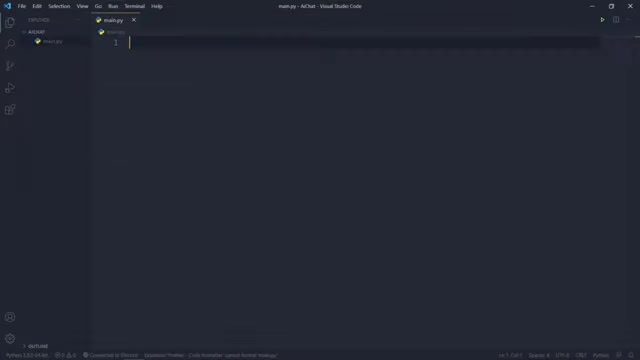
This code imports the RandomStuff class from the prsaw library, initializes an instance of the class, gets an AI response to the query "How are you?", prints the response to the console, and then closes the connection. Let’s break down each line:
from prsaw import RandomStuff: This line imports theRandomStuffclass, which is the main interface for interacting with the Random Stuff API.rs = RandomStuff(): This line creates an instance of theRandomStuffclass. This instance is used to make requests to the API.response = rs.get_ai_response("How are you?"): This line calls theget_ai_responsemethod, passing the query "How are you?" as an argument. This method sends the query to the Random Stuff API and returns the AI-generated response.print(response): This line prints the AI-generated response to the console.rs.close(): This line closes the connection to the Random Stuff API. It is recommended to close the connection after you are done using it to free up resources.
Creating Different Types of Chatbots
Console-Based Chatbot
A console-based chatbot interacts with the user through the command line interface. To create one using prsaw, you can modify the basic chatbot example to continuously prompt the user for input and display the AI-generated responses.
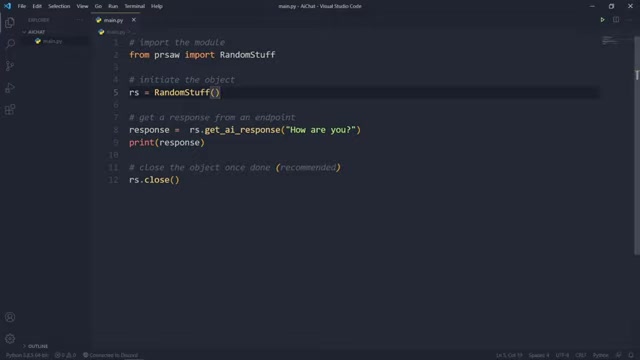
Here's how you can do it:
from prsaw import RandomStuff

rs = RandomStuff()

while True:
    user_input = input("> ")
    response = rs.get_ai_response(user_input)
    print(response)

rs.close()
In this enhanced version, the while True loop continuously prompts the user for input using the input() function. The AI-generated response is then printed to the console. This creates an interactive chatbot that can respond to any query entered by the user. Remember to handle exceptions and add a way to break out of the loop (e.g., by typing 'exit') to make the chatbot more robust.
Discord Chatbot
A Discord chatbot integrates AI functionalities into a Discord server, allowing users to interact with the bot through text commands. Creating a Discord chatbot with prsaw involves using the Discord.py library to handle Discord interactions and integrating prsaw to provide the AI-driven responses. Here's the basic structure:
import discord
from discord.ext import commands
from prsaw import RandomStuff

bot = commands.Bot(command_prefix="!")
rs = RandomStuff(async_mode=True)

@bot.event
async def on_message(message):
    if message.author == bot.user:
        return
    if message.channel.id == YOUR_CHANNEL_ID:
        response = await rs.get_ai_response(message.content)
        await message.reply(response)

bot.run('YOUR_DISCORD_BOT_TOKEN')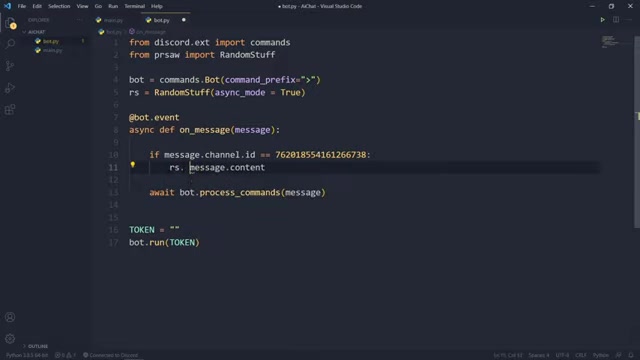
Key components:
- Import Necessary Libraries:
discordfor Discord functionality,commandsfromdiscord.extfor creating bot commands, andRandomStufffromprsawfor AI responses. - Initialize the Bot: Create a
commands.Botinstance with a command prefix (e.g., "!"). This prefix is used to trigger bot commands. - Enable Async Mode: When initializing
RandomStuff, setasync_mode=True. Discord bots require asynchronous operations, and enabling async mode ensures that the API requests are handled properly. - Event Listener: The
on_messageevent listener is triggered whenever a message is sent in the Discord server. This function checks if the message is from the bot itself (to avoid self-loops) and then retrieves the AI-generated response usingrs.get_ai_response(message.content). - Reply to the Message: The
message.reply(response)function sends the AI-generated response back to the Channel where the message was sent.
This example focuses on a specific channel ID to control where the bot operates. Replace YOUR_CHANNEL_ID with the actual channel ID of the Discord channel where you want the chatbot to function.








Most people like


































Report
Please select a reason for reporting
- 13 Reasons to Switch from Snapchat to Text Messaging
- 7 Powerful Speech to Text Apps to Boost Productivity
- 10 Best Speech to Text Tools for Effortless Transcription
- 13 Free Tools to Easily Transcribe Audio to Text
- 15 Surprising Ways Google's Speech-to-Text Boosts Productivity
- 7 Best Free Online Audio to Text Transcription Tools
- 9 Tips to Transcribe Speech to Text Faster and Better
- 13 Best Speech to Text Software for Windows 10 in 2023
- 7 Tips for Choosing the Best Transcriber for Audio to Text
- 11 Reasons Why Dragon Speech-to-Text Apps are Game-Changers
- 6 Secrets to Enhance Your Speech to Text Transcription
- 6 Brilliant Ways to Boost Productivity with Talk-to-Text on Your MacBook
- 6 Ways Transcription Software Converts Audio to Text
- 8 Tips to Transcribe Speech to Text Like a Pro
- 6 Reasons IBM Watson Speech to Text is a Game-Changer
- 14 Powerful Ways Talk-to-Text Improves Your Workflow
- 12 Top Windows Speech-to-Text Software for Efficient Transcription
- 12 Game-Changing Benefits of Apple's Speech to Text Technology
- 9 Powerful Use Cases for AWS Speech to Text Technology
- 10 Easy Steps to Transcribe YouTube Videos to Text
- transcription audio en texte
- online audio transcription
- free audio file transcription
- free ai audio transcription
- audio transcription service
- audio transcription online free
- audio transcription free online
- audio to transcription software
- audio and transcript
- ai audio transcription free
- voice recording to text converter
- translate voice recording to text
- record voice to text
- audio recording to text converter
- voice recording and transcription
- chatgpt voice to text
- gmail voice to text
- speech to text reader
- speech to text ai free
- speech to talk
- How to Use AI Tools to Find Internal Linking Opportunities Across a Business Website
- Discover Your Perfect Haircut with AI Hairstyle Apps
- Free Reputation Calculator Tools: How They're Adapting to Score AI Visibility, Not Just Rankings
- Design Professional Flyers for Free on Your Phone
- Best Free Flyer Maker Apps for Android: Design Like a Pro
- How to Know If Your Business Is Ready for an AI Customer Service Agent
- Revolutionizing Storytelling: From Novels to Screenplays with AI
- Create Engaging Animated Explainer Videos with a Free AI Tool
- Stop Multi-Subscribing: Benchmark Top AI Visual Models in One Canvas
- Best Seedance 2.5 API Provider: Every Price on the Market, Checked at Source
- Top AI Social Media Management Tools: Automate Your Content Strategy
- Free AI Text to Video Generator: Create Stunning Videos from Text
- Discover 17 ChatGPT Alternatives: A Comprehensive Comparison
- Character.AI vs. Janitor AI: Which AI Chat Platform Reigns Supreme?
- Top Virtual Assistant Companies in 2026: Reviews, Pricing, and Plans Compared
- Unveiling FaceCheck.ID: Revolutionizing Reverse Image Searches with AI
- 11 Best AI Dialers in 2026: Features, Pricing, Pros and Cons
- How I Direct Consistent AI Clips: A Hands-On Guide to Multi-Model Generation
- A Realistic Review of the Photo Generator Image Tool
- Playwright MCP Server: Automated Web Testing with Agent Mode

Copyright ©2026 toolify