































Table of Contents
- Key Points
- AI Answer Engine: An Overview
- Implementation Details: Code Walkthrough
- How to Interact with the AI Chatbot
- Cost Considerations
- Advantages and Disadvantages
- Key Components and Technologies Used
- Real-World Use Cases
- Frequently Asked Questions
- Related Questions



AI Answer Engine: An Overview
Introduction to AI-Powered Chatbots
AI-powered chatbots are revolutionizing how we interact with information, offering a conversational interface to access data and insights. By combining the capabilities of AI with real-time data retrieval, these chatbots can provide informed and contextually relevant responses. The key challenge lies in ensuring the trustworthiness and accuracy of the information presented, which can be addressed by integrating Web Scraping and caching mechanisms.
This project, an AI answer engine, aims to solve this challenge by allowing users to ask questions and receive answers based on specific URLs, articles, or news sources. It utilizes web scraping to gather information, caches the content for faster responses, and always cites its references to ensure transparency and trustworthiness. This approach significantly reduces the risk of hallucinations often observed in LLMs, providing a more reliable user experience.
Core Features and Functionality
The AI answer engine boasts several core features designed to enhance its performance and reliability. Here’s a detailed look:
- Web Scraping:

The engine utilizes web scraping to extract information from specified URLs. This allows it to answer questions based on the content of articles, news, or other web resources.
- Caching: To improve response times and reduce the load on external websites, the engine caches scraped content. This ensures that frequently accessed information is readily available.
- Source Citation: Every answer provided by the engine is accompanied by a citation of the source URL. This enhances trustworthiness and allows users to verify the information.
- Rate Limiting: To prevent abuse and ensure fair usage, the engine implements rate limiting. This restricts the number of requests that can be made within a specific time frame.
- LLM Integration:

The engine integrates with LLMs via Groq, leveraging state-of-the-art models for natural language processing and response generation.
These features work together to create a robust and reliable AI-powered chatbot that can provide accurate and trustworthy answers based on real-time web data.
Implementation Details: Code Walkthrough
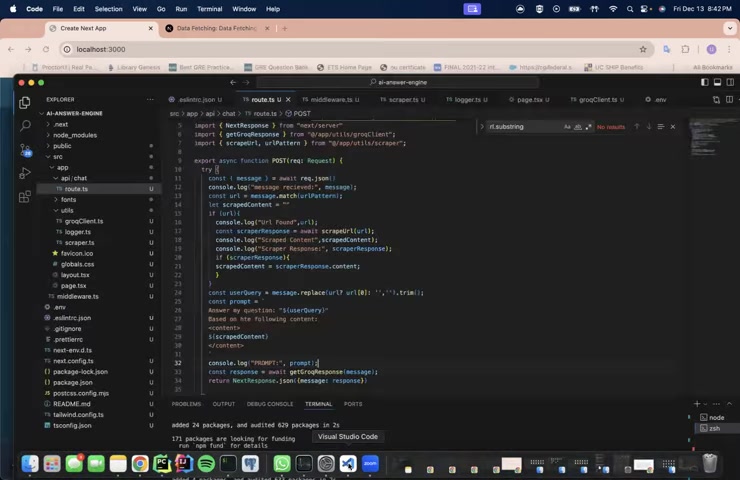
Route Definition: route.ts
The route.ts file defines the API endpoint for the chatbot
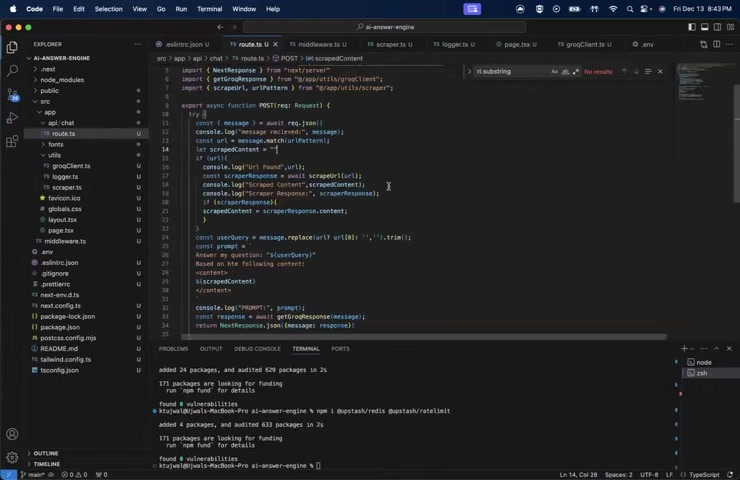
. It handles incoming POST requests, extracts the message content, and orchestrates the web scraping and LLM interaction. Here’s a breakdown of the key steps:
- Receiving the Message: The endpoint receives a POST request containing the user's message.
- URL Extraction: The engine attempts to extract a URL from the message. If a URL is found, it proceeds to scrape the content.
- Web Scraping: The
scrapeUrlfunction is called to retrieve content from the specified URL. - Prompt Construction: A prompt is constructed, combining the user's query with the scraped content. This Prompt is then passed to the LLM.
- LLM Interaction: The engine interacts with the LLM via the
getGroqResponsefunction, which sends the prompt and receives a response. - Response Formatting: The LLM's response is formatted and returned to the user.
The code includes error handling to gracefully manage issues such as scraping failures or LLM errors.
Web Scraping with scraper.ts
The scraper.ts file implements the web scraping functionality
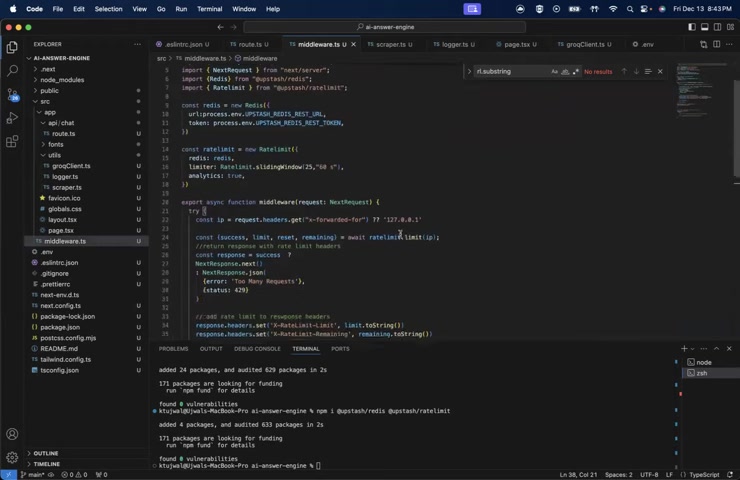
. It uses libraries like axios and cheerio to retrieve and parse HTML content from web pages. Here’s a breakdown of the key components:
- Redis Integration: The scraper integrates with Redis for caching scraped content. This reduces the need to repeatedly scrape the same web pages.
- Cache Management: The code defines cache TTL (Time To Live) to manage the duration for which content is stored in the cache.
- Content Extraction: The scraper extracts relevant information from HTML pages, including titles, headings, meta descriptions, and content.
- Text Cleaning: The scraper cleans the extracted text to remove unnecessary characters and formatting.
- Rate Limiting: The scraper implements rate limiting to avoid overwhelming websites with requests.
The scraper prioritizes retrieving content from the cache. If the content is not found in the cache, it proceeds to scrape the web page, store the content in the cache, and return the scraped content.
Rate Limiting with Middleware
The project employs middleware to implement rate limiting, ensuring that the AI answer engine is not overwhelmed by excessive requests
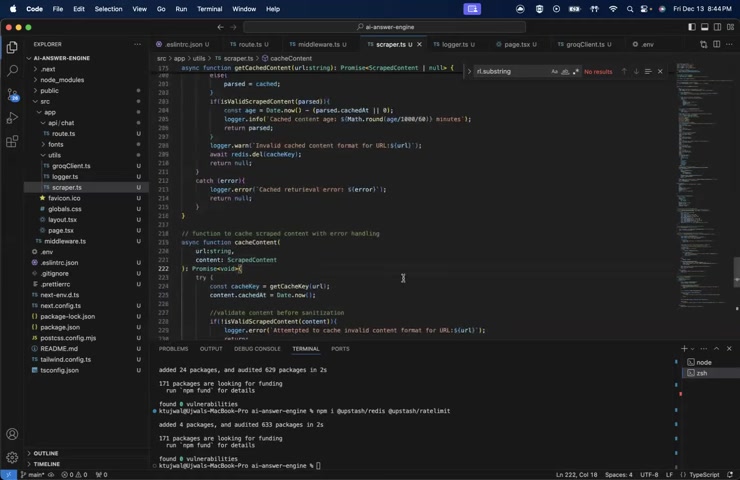
. This is crucial for maintaining the stability and performance of the application. Here’s how rate limiting is implemented:
- Redis Integration: Redis is used to store request counts and timestamps for each IP address.
- Rate Limit Check: The middleware checks the request count for each IP address against a defined limit.
- Request Processing: If the request count is within the limit, the request is allowed to proceed. Otherwise, an error response is returned.
- Response Headers: The middleware adds response headers to indicate the remaining requests and the time until the rate limit resets.
This approach ensures that each user has fair access to the AI answer engine, preventing abuse and maintaining a high level of service quality.
How to Interact with the AI Chatbot
User Interface and Interaction
The AI Chatbot features a user-friendly interface for easy interaction
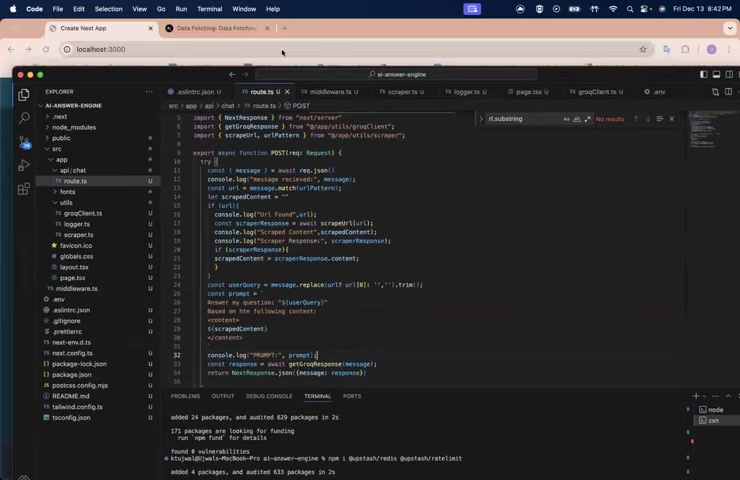
. To use the chatbot:
- Access the Chat Interface: Navigate to the chatbot's web page.
- Enter Your Message: Type your question or request in the message input field.
- Include a URL (Optional): If your question pertains to a specific web page, include the URL in your message.
- Submit Your Message: Press the send button to submit your message.
- Review the Response: The chatbot will process your message and display a response, along with a citation of the source URL (if applicable).
For example, you can ask, 'Explain data fetching and caching in Next.js https://nextjs.org/docs/app/building-your-application/data-fetching/fetching'.'
Key Components and Technologies Used
Essential Technologies
The AI chatbot relies on several key components and technologies
:
- Next.js: A React framework for building server-rendered and statically generated web applications.
- Groq: An AI inference platform for fast and efficient LLM integration.
- Redis: An in-memory data store for caching scraped content.
- Axios: An HTTP client for making requests to external websites.
- Cheerio: A fast and flexible library for parsing and manipulating HTML content.
These technologies work together to provide a seamless and efficient user experience, from receiving user input to delivering AI-powered responses.
Real-World Use Cases
AI-Powered Chatbot Applications
AI-powered chatbots have a wide range of use cases across various industries:
- Customer Support: Providing instant answers to customer inquiries, resolving issues, and escalating complex cases to human agents.
- Information Retrieval: Answering questions based on a collection of documents, articles, or web pages.
- Education:

Providing personalized learning experiences, answering student questions, and generating educational content.
- Research: Assisting researchers in gathering information, analyzing data, and generating insights.
- Content Creation: Generating articles, blog posts, and other types of content based on user prompts.
By combining AI with real-time data retrieval, these chatbots can provide accurate, relevant, and trustworthy information, enhancing user experiences and driving business outcomes.





Most people like


































Report
Please select a reason for reporting
- 13 Reasons to Switch from Snapchat to Text Messaging
- 7 Powerful Speech to Text Apps to Boost Productivity
- 10 Best Speech to Text Tools for Effortless Transcription
- 13 Free Tools to Easily Transcribe Audio to Text
- 15 Surprising Ways Google's Speech-to-Text Boosts Productivity
- 7 Best Free Online Audio to Text Transcription Tools
- 9 Tips to Transcribe Speech to Text Faster and Better
- 13 Best Speech to Text Software for Windows 10 in 2023
- 7 Tips for Choosing the Best Transcriber for Audio to Text
- 11 Reasons Why Dragon Speech-to-Text Apps are Game-Changers
- 6 Secrets to Enhance Your Speech to Text Transcription
- 6 Brilliant Ways to Boost Productivity with Talk-to-Text on Your MacBook
- 6 Ways Transcription Software Converts Audio to Text
- 8 Tips to Transcribe Speech to Text Like a Pro
- 6 Reasons IBM Watson Speech to Text is a Game-Changer
- 14 Powerful Ways Talk-to-Text Improves Your Workflow
- 12 Top Windows Speech-to-Text Software for Efficient Transcription
- 12 Game-Changing Benefits of Apple's Speech to Text Technology
- 9 Powerful Use Cases for AWS Speech to Text Technology
- 10 Easy Steps to Transcribe YouTube Videos to Text
- transcription audio en texte
- online audio transcription
- free audio file transcription
- free ai audio transcription
- audio transcription service
- audio transcription online free
- audio transcription free online
- audio to transcription software
- audio and transcript
- ai audio transcription free
- voice recording to text converter
- translate voice recording to text
- record voice to text
- audio recording to text converter
- voice recording and transcription
- chatgpt voice to text
- gmail voice to text
- speech to text reader
- speech to text ai free
- speech to talk
- Meshy AI: How to Create 3D Models from Text and Images
- How SEO and Marketing Dashboards Empower Agencies to Drive Results
- How to Use AI Tools to Find Internal Linking Opportunities Across a Business Website
- Discover Your Perfect Haircut with AI Hairstyle Apps
- Free Reputation Calculator Tools: How They're Adapting to Score AI Visibility, Not Just Rankings
- Design Professional Flyers for Free on Your Phone
- Best Free Flyer Maker Apps for Android: Design Like a Pro
- How to Know If Your Business Is Ready for an AI Customer Service Agent
- Revolutionizing Storytelling: From Novels to Screenplays with AI
- Create Engaging Animated Explainer Videos with a Free AI Tool
- Automate Lead Generation: A Comprehensive Guide with AI Agents
- Revideo.io: The Future of Reverse Video Search Technology
- Revolutionizing Email Marketing Agency with AI
- Breaking the Character Drift Dilemma: A Practical Test of Smart Shot
- Meshy AI: How to Create 3D Models from Text and Images
- ASOMobile Helps Teams Benchmark App Store Screenshots Against Competitors
- How to Match LMS Software With Your Organization's Training Plan
- How to Convert BTC to HNT
- Unleashing the Power of AI: Cognizant's Roadmap for Transformation
- Frame to Video Review: A Practical Look at Turning Two Still Frames Into Motion

Copyright ©2026 toolify