































Table of Contents
- Key Points
- Democratizing AI: The Power of Visual, Low-Code AI Workflows
- Future Trends in Low-Code AI Development
- A Step-by-Step Guide: Building a Lead Qualifier Flow with BuildShip
- BuildShip's Transparent Pricing Structure
- BuildShip Pros and Cons: A Balanced Perspective
- Core Features of BuildShip
- Real-World Use Cases: How Organizations are Using BuildShip
- Frequently Asked Questions about BuildShip
- Exploring Related Concepts


Democratizing AI: The Power of Visual, Low-Code AI Workflows
The Universal Desire to Leverage AI
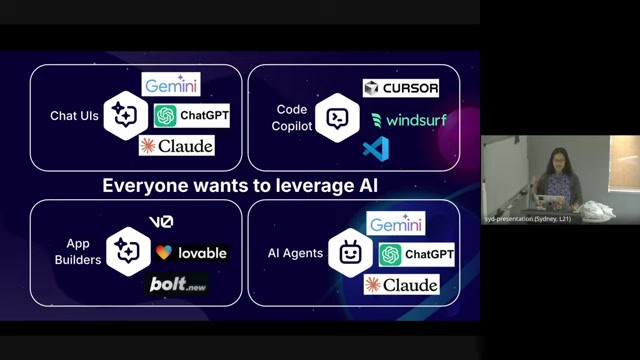
The allure of artificial intelligence is undeniable. Businesses across all sectors are eager to integrate AI into their operations, seeking improvements in efficiency, innovation, and decision-making. This widespread interest has fueled the exploration of various AI Tools and platforms, each offering unique capabilities and levels of complexity. From chatbot interfaces to code co-pilots, the AI landscape continues to evolve at a rapid pace, creating both opportunities and challenges for organizations aiming to stay ahead of the curve.
There's been an explosion of AI-powered products and services. From Gemini to ChatGPT, to Claude, to Cursor to Windsor, to V0, to lovable, to Bolt.new. Organizations can benefit from AI UIs or explore code co-pilots.
According to recent market data, 83% of companies claim that AI is a top priority in their business plans, reflecting the growing recognition of AI's strategic importance. However, a significant portion – 77% – are still in the exploratory phases of AI adoption, highlighting the complexities and uncertainties involved. What's more, 74% of companies are reportedly not capturing sufficient value from their initial AI initiatives, underscoring the need for more effective strategies and tools.
The fundamental question remains: how can organizations transition from merely experimenting with AI to successfully integrating it into their core workflows to generate tangible business value? This article explores practical solutions and a powerful platform to address these challenges.
Addressing the Core Challenges of AI Adoption
The path to successful AI integration is often fraught with challenges.
Several key hurdles can impede an organization's ability to effectively leverage AI, including:
- Development Skills Gap: Many companies lack the in-house expertise required to build and maintain sophisticated AI systems. Limited developer skills can significantly hinder progress, making it difficult to translate ai concepts into tangible applications.
- Compliance and Security Concerns: Integrating AI into existing systems raises concerns about data privacy, security, and regulatory compliance. Ensuring that AI solutions adhere to relevant standards and protect sensitive information is crucial.
- Complexity of AI Concepts: The rapidly evolving nature of AI and its underlying technologies can be daunting for organizations unfamiliar with the field. Understanding the nuances of different AI models and algorithms can be challenging, hindering effective decision-making. Complexities will likely arise during scaling.
These challenges often create a barrier to entry for many organizations, limiting their ability to fully realize the potential of AI. Overcoming these hurdles requires a strategic approach that addresses the skills gap, prioritizes compliance and security, and simplifies the complexities of AI adoption.
BuildShip: Bridging the Gap with Low-Code AI Workflows
BuildShip emerges as a powerful solution to address these challenges.
As a low-code AI workflow platform, BuildShip bridges the gap between no-code simplicity and the power of code and artificial intelligence. It empowers users to visually construct complex AI workflows without requiring extensive programming knowledge. This approach makes AI more accessible to a wider range of users, including developers, makers, and creators, enabling them to bring their ideas to life more efficiently.
The BuildShip platform operates on the principles of simplicity, flexibility, and control. It provides a visual canvas where users can drag and drop pre-built components, connect them logically, and define the flow of data. This intuitive interface eliminates the need for writing complex code, allowing users to focus on the core logic of their AI workflows.
BuildShip is a platform that bridges the gap between no code simplicity and the power of code and AI. The platform aims to help:
- Developers make
- Makers
- Creators
bring ideas to life.
But the power of BuildShip doesn't stop at simplicity. The platform also offers access to the underlying code for each component, enabling experienced developers to customize and extend the functionality as needed. This hybrid approach combines the ease of visual development with the flexibility of code, providing the best of both worlds. Visual workflows are quickly built with Buildship.
Harnessing Gemini and Google Cloud for Production-Grade AI
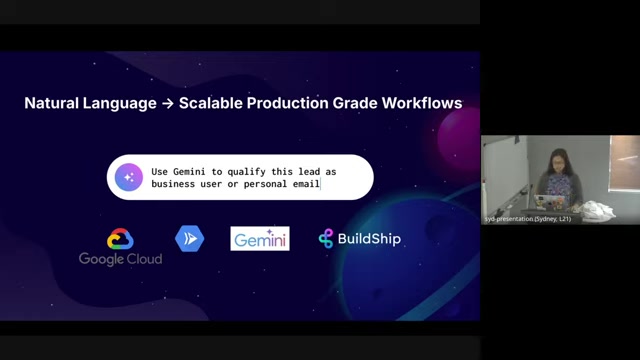
BuildShip seamlessly integrates with Google Cloud, leveraging the power of Gemini and other Google Cloud services to deliver production-grade AI capabilities. Google Cloud provides the essential ingredients for building robust and scalable AI workflows, including:
- Gemini: Google's state-of-the-art LLM (Large Language Model) offers advanced natural language processing capabilities, enabling tasks such as text generation, sentiment analysis, and information extraction.
- Cloud Run: A serverless execution environment that enables users to deploy and run containerized applications without the need for managing infrastructure. This ensures scalability and reliability for AI workflows.
- Databases: A robust database to store the relevant information.
By combining BuildShip's visual workflow platform with Google Cloud's comprehensive AI services, organizations can accelerate the development and deployment of AI-powered solutions, and not start from a blank screen.
AI Agents: Automating Tasks in the Background
Beyond simple chatbot interfaces, BuildShip empowers users to create sophisticated AI agents that operate in the background, seamlessly integrating with existing tools and databases. These agents can automate repetitive tasks, extract insights from data, and trigger actions based on predefined rules.
For example, an AI agent can be configured to monitor incoming customer emails, identify urgent requests, and automatically route them to the appropriate support team. This frees up human agents to focus on more complex and strategic tasks, improving overall efficiency. Similarly, AI agents can be used to automate data extraction from various sources, streamline reporting processes, and personalize customer interactions.
Leveraging AI agents in the background connects your tools and databases to do work for you, "almost like someone you're hiring."
A Step-by-Step Guide: Building a Lead Qualifier Flow with BuildShip
Step 1: Setting Up Your Google Cloud Project
To embark on your BuildShip journey, the first step is ensuring a seamlessly integrated Google Cloud environment.
Here's what happens behind the scenes:
- Automatic Project Creation: When you sign up for a BuildShip account, a Google Cloud project is automatically generated for you.
- No Manual Console Setup: Skip the complexities of navigating the Google Cloud Console for configurations, billing setup, and intricate project settings. It’s all pre-configured to get you started right away.
- Immediate Access: Gain instant access to a free project to begin your explorations without any initial setup hurdles. This rapid deployment lets you focus on bringing your AI visions to life, quickly and efficiently.
Step 2: Creating a Workflow Visually
Creating a workflow in Buildship is a straightforward, visual process.
- From the BuildShip dashboard, click on 'Flows' then the + button.
- Select 'Start from Scratch' under 'Start from one of the pre-built templates'.
- Give a name to your new flow.
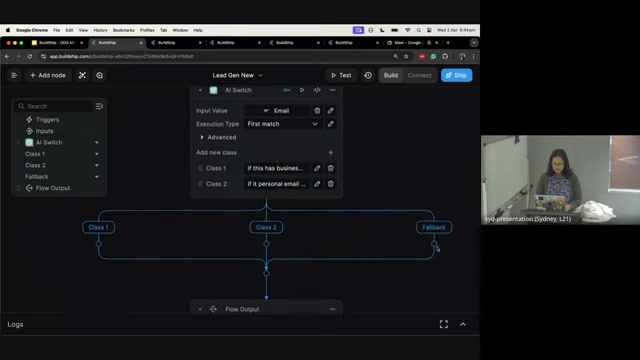
The new visual flow designer will load, a canvas for you to build your product. Here's how you can build your workflow:
- Inputs: You start with the inputs section. All workflows, whether visually built or coded, always begin with some input variables.
- Set the inputs. Click “Add Input” to create inputs of different types to your flow. String, Number, Boolean, Array, Object, Select, Multi Select, File, or Any.
- Add and Connect Nodes: Connect AI tools and create nodes for flow outputs, and all kinds of connectors.
- Flow Outputs: Choose what flow to output and configure.








Most people like































Report
Please select a reason for reporting
- 13 Reasons to Switch from Snapchat to Text Messaging
- 7 Powerful Speech to Text Apps to Boost Productivity
- 10 Best Speech to Text Tools for Effortless Transcription
- 13 Free Tools to Easily Transcribe Audio to Text
- 15 Surprising Ways Google's Speech-to-Text Boosts Productivity
- 7 Best Free Online Audio to Text Transcription Tools
- 9 Tips to Transcribe Speech to Text Faster and Better
- 13 Best Speech to Text Software for Windows 10 in 2023
- 7 Tips for Choosing the Best Transcriber for Audio to Text
- 11 Reasons Why Dragon Speech-to-Text Apps are Game-Changers
- 6 Secrets to Enhance Your Speech to Text Transcription
- 6 Brilliant Ways to Boost Productivity with Talk-to-Text on Your MacBook
- 6 Ways Transcription Software Converts Audio to Text
- 8 Tips to Transcribe Speech to Text Like a Pro
- 6 Reasons IBM Watson Speech to Text is a Game-Changer
- 14 Powerful Ways Talk-to-Text Improves Your Workflow
- 12 Top Windows Speech-to-Text Software for Efficient Transcription
- 12 Game-Changing Benefits of Apple's Speech to Text Technology
- 9 Powerful Use Cases for AWS Speech to Text Technology
- 10 Easy Steps to Transcribe YouTube Videos to Text
- transcription audio en texte
- online audio transcription
- free audio file transcription
- free ai audio transcription
- audio transcription service
- audio transcription online free
- audio transcription free online
- audio to transcription software
- audio and transcript
- ai audio transcription free
- voice recording to text converter
- translate voice recording to text
- record voice to text
- audio recording to text converter
- voice recording and transcription
- chatgpt voice to text
- gmail voice to text
- speech to text reader
- speech to text ai free
- speech to talk
- How SEO and Marketing Dashboards Empower Agencies to Drive Results
- How to Use AI Tools to Find Internal Linking Opportunities Across a Business Website
- Discover Your Perfect Haircut with AI Hairstyle Apps
- Free Reputation Calculator Tools: How They're Adapting to Score AI Visibility, Not Just Rankings
- Design Professional Flyers for Free on Your Phone
- Best Free Flyer Maker Apps for Android: Design Like a Pro
- How to Know If Your Business Is Ready for an AI Customer Service Agent
- Revolutionizing Storytelling: From Novels to Screenplays with AI
- Create Engaging Animated Explainer Videos with a Free AI Tool
- Stop Multi-Subscribing: Benchmark Top AI Visual Models in One Canvas
- ASOMobile Helps Teams Benchmark App Store Screenshots Against Competitors
- How to Match LMS Software With Your Organization's Training Plan
- Revolutionizing Email Marketing Agency with AI
- How to Convert BTC to HNT
- Unleashing the Power of AI: Cognizant's Roadmap for Transformation
- Frame to Video Review: A Practical Look at Turning Two Still Frames Into Motion
- NVIDIA NIM: Revolutionizing Supply Chain Data Analysis with AI
- Top AI Tools That Help Brands Stand Out Offline (Not Just Online)
- Top 5 Cold Email Software: Maximize Your Outreach in 2025
- Magic School AI: Revolutionizing Quiz & Assessment Generation

Copyright ©2026 toolify