































Table of Contents
- Key Points
- Introduction to Agentic AI and Vector Databases
- Building an Agentic AI Application with External Vector Databases
- Step-by-Step Guide to Using the Agentic AI Application
- Pricing Considerations
- Benefits and Drawbacks of Using Agentic AI with Vector Databases
- Core Features of Agentic AI Application
- Practical Use Cases for Agentic AI
- Frequently Asked Questions
- Related Questions



Introduction to Agentic AI and Vector Databases
What are Agentic AI Applications?
Agentic AI applications involve creating AI agents that can perform tasks autonomously. These agents can interact with various tools and data sources to achieve specific goals. A key aspect of these applications is the ability of the agents to reason, plan, and execute actions based on the information they Gather. This makes them highly versatile and capable of handling complex tasks. Integrating these with vector databases improves data handling, particularly when dealing with large volumes of unstructured data. This powerful combination allows for enhanced data processing and retrieval.
Agentic AI applications can be used in various fields, such as:
- Customer Service: AI agents can handle customer inquiries, provide support, and resolve issues without human intervention.
- Financial Analysis: Agents can analyze financial data, generate reports, and provide investment recommendations.

With data retrieval from external sources, these AI models can perform a variety of financial services.
- Content Creation: Agents can assist in writing articles, generating marketing copy, or creating other forms of content.
- Data Analysis: They assist in data processing and analysis, with added features like retrieval augmented generation(RAG).
Understanding Vector Databases
Vector databases are specialized databases designed to store and manage data represented as vectors. Unlike traditional databases that store structured data in rows and columns, vector databases focus on storing high-dimensional vectors that capture the semantic meaning of data. These vectors are often generated using embedding models, which transform text, images, and other types of data into numerical representations that can be easily compared and analyzed.

This is the main appeal of vector databases, since they are easy to use with AI models and are more dynamic that a regular sql database.
Key features of vector databases include:
- Semantic Similarity Search: Vector databases enable efficient similarity searches based on semantic meaning. By comparing the vectors, it’s possible to find data points that are semantically similar, even if they don't share exact keywords.
- High-Dimensional Data Support: Vector databases are designed to handle high-dimensional data, making them suitable for storing embeddings generated from complex models.
- Scalability and Performance: They are optimized for handling large volumes of vector data and providing fast query responses.
Building an Agentic AI Application with External Vector Databases
Setting Up the Development Environment
To begin, ensure that your development environment is properly set up. This involves installing the necessary libraries and tools, configuring API keys, and setting up a virtual environment to manage dependencies. A crucial step is to make sure you have Python 3.6 or higher installed, along with Docker Desktop for running vector databases locally.
Key steps for setting up the environment:
- Install Python and Pip: Verify that Python is installed correctly by running
python --version. Ensure Pip, the Python Package installer, is also available. - Set Up a Virtual Environment: Create a virtual environment to isolate project dependencies using
python -m venv venv. Activate it viasource venv/bin/activateon Linux/macOS orvenv\Scripts\activateon Windows. - Install Dependencies: Use
pip install -r requirements.txtto install required packages from arequirements.txtfile, which should include libraries likephidata,typer, and others related to AI agent development and vector database interaction.
This makes sure all the Relevant information to set up the app is available.
- Configure API Keys: Obtain necessary API keys, such as those for Groq, and set them as environment variables. This often involves modifying
.envfiles and ensuring the keys are securely accessed within the application code.
To properly set up, you will also need to know about some external tools for this app:
External Tools to Setup
When building a agentic ai application, there are some tools to consider and have properly setup for future use. Some are:
- Phidata
- Typer
- Python-Dotenv
- Postgresql
Building the AI Agents
The core of our agentic AI application involves creating AI agents that can communicate with vector databases. These agents need to be designed to perform specific tasks, such as searching for information, analyzing data, and generating responses.
Steps to build the AI agents:
- Define Agent Roles: Determine the roles each agent will play in the application. For example, create a web search agent to find information online and a financial analysis agent to analyze financial data.
- Implement Agent Logic: Implement the logic for each agent using libraries like
phidataandOpenAI. This involves defining functions that allow the agent to interact with external tools and data sources. - Integrate with Vector Databases: Configure the agents to communicate with vector databases to retrieve and store information. This typically involves using a vector database client library to connect to the database and perform queries.
Code Snippet:
from phi.agent import Agent

web_search_agent = Agent(
 name="Web Search Agent",
 role="Search the web for information",
 model=Groq(id="llama3-groq-70b-8192-tool-use-preview"),
 tools=[DuckDuckGo()],
 instructions="Always include sources",
 show_tool_calls=True,
 markdown=True,
)
This code snippet shows how to define a web search agent that uses DuckDuckGo to search the web and the Groq model for natural language processing.
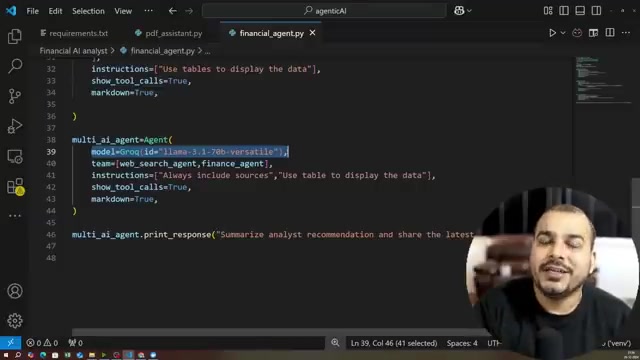
This will be the model running your tools.
Interacting with Vector Databases
To enable AI agents to interact with vector databases, we need to set up a database and configure the agents to store and retrieve data. This involves using a client library to connect to the vector database and defining functions to perform common operations.
Steps to interact with vector databases:
- Run Vector Database Locally: Utilize Docker to run a vector database locally. This provides a controlled environment for development and testing.
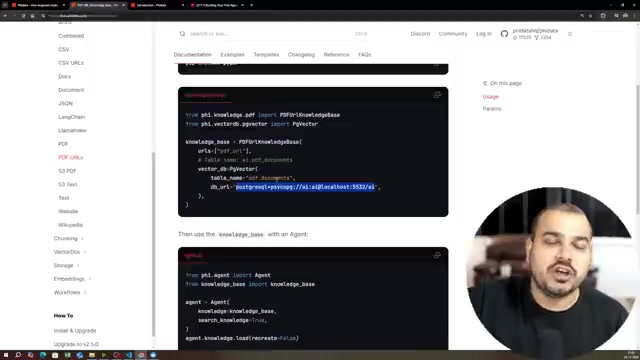
Since this AI model will retrieve information from data stored, having a docker that runs it will allow you to edit the data.
- Upload PDF Content: Use the Knowledge Base to upload content from PDF URLs into the vector database. This involves extracting text from PDFs and converting it into vector embeddings. It reads the content and tries to store that to the new vector database.
Code Snippet:
from phi.knowledge import PDFUrlKnowledgeBase

knowledge_base = PDFUrlKnowledgeBase(
 urls=["https://phi-public.s3.amazonaws.com/recipes/ThaiRecipes.pdf"],
)
knowledge_base.load()
This code snippet demonstrates how to load content from a PDF URL into the vector database, enabling the AI agent to retrieve and use this information.
Asking Queries and Generating Responses
Once the AI agents are set up and the vector database is populated with content, we can start asking queries and generating responses. This involves sending a query to the agent and retrieving relevant information from the vector database to construct a response.
Steps to ask queries and generate responses:
- Define a Query: Create a clear and specific query to ask the AI agent. For example, “List down all the dishes.”
- Retrieve Information: Use the agent to search the knowledge base and retrieve relevant information from the vector database.
- Generate a Response: Construct a response based on the retrieved information. This may involve summarizing, paraphrasing, or combining information from multiple sources.
Code Snippet:
assistant.cli_app(markdown=True)
Step-by-Step Guide to Using the Agentic AI Application
Step 1: Setup and Installation
Before diving into the application, setting up the foundation is essential. Ensure you have Python installed on your system. Create a virtual environment to manage dependencies, keeping your project organized and avoiding conflicts with other Python projects. Next, clone the repository containing the code, and install the necessary dependencies using pip. This ensures all the required libraries and tools are available for your application.
Step 2: Configure API Keys
Authentication is vital for secure operation. Obtain your Groq API key by signing up on their platform. Once you have the key, securely store it as an environment variable. This prevents accidental exposure of the key in your code and allows the application to access it safely during runtime.
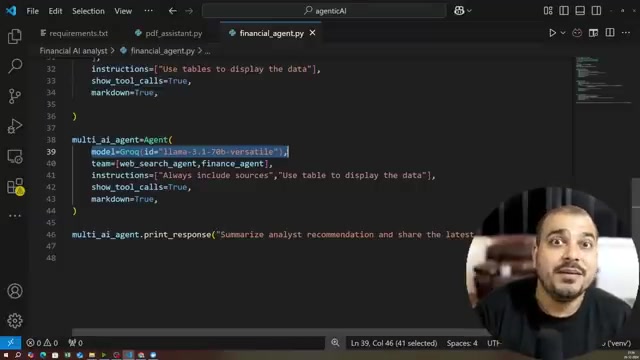
Without your API keys, the AI application is rendered useless since it would be unable to retrieve data.
Step 3: Run Vector Database Locally
A vector database needs to be running to hold and manage the data your agent will access. Use Docker Desktop to pull and run a compatible vector database image, such as PgVector. Docker streamlines the deployment process by encapsulating the database and its dependencies, making it easy to set up and manage. This helps maintain consistency across development and production environments.
Step 4: Upload PDF Content
With the database set up, populate it with your data. The next step involves writing script to extract content from PDF URLs and store it in your vector database. This process typically includes reading the PDFs, converting the text into vector embeddings, and loading them into the database.

When your AI agent retrieves relevant data to the users, they should be relevant and useful.
Step 5: Ask Queries and Generate Responses
With the data loaded, it's time to test the agent's capabilities. Use the provided command-line interface to interact with your agent. Construct queries that target specific information in the knowledge base. The agent then searches for relevant data, retrieves it from the vector database, and formulates a response. This interactive testing allows you to evaluate and refine the agent's accuracy and effectiveness. You can test all kinds of prompts and see which ones provide the optimal results.
Core Features of Agentic AI Application
Information Retrieval and Analysis
The core function of our agentic AI application is the ability to retrieve and analyze information from vector databases. This involves using semantic similarity searches to find relevant data and extracting key insights to answer user queries. By leveraging vector databases, the application can handle large volumes of unstructured data and provide targeted responses based on the semantic meaning of the data.
External API Integration
Our application integrates seamlessly with external APIs such as Groq, enabling it to access a wide range of resources and tools. This includes accessing pre-trained models, searching the web, and analyzing financial data. By integrating with external APIs, the application can leverage the capabilities of other systems and provide a more comprehensive and versatile solution.
Customizable AI Agents
The architecture of our application allows for the creation of customizable AI agents tailored to specific tasks. Each agent can be configured with a unique role, set of tools, and instructions, enabling it to perform its task efficiently.

This modular approach makes it easy to add new capabilities and adapt the application to changing needs.
Local Vector Database Support
Our application supports local vector databases, enabling users to run the database locally for development and testing purposes. This is particularly useful for users who want to maintain control over their data and avoid relying on external services. By providing local vector database support, we make it easier for users to get started with agentic AI and explore the capabilities of vector databases.








Most people like































Report
Please select a reason for reporting
- 13 Reasons to Switch from Snapchat to Text Messaging
- 7 Powerful Speech to Text Apps to Boost Productivity
- 10 Best Speech to Text Tools for Effortless Transcription
- 13 Free Tools to Easily Transcribe Audio to Text
- 15 Surprising Ways Google's Speech-to-Text Boosts Productivity
- 7 Best Free Online Audio to Text Transcription Tools
- 9 Tips to Transcribe Speech to Text Faster and Better
- 13 Best Speech to Text Software for Windows 10 in 2023
- 7 Tips for Choosing the Best Transcriber for Audio to Text
- 11 Reasons Why Dragon Speech-to-Text Apps are Game-Changers
- 6 Secrets to Enhance Your Speech to Text Transcription
- 6 Brilliant Ways to Boost Productivity with Talk-to-Text on Your MacBook
- 6 Ways Transcription Software Converts Audio to Text
- 8 Tips to Transcribe Speech to Text Like a Pro
- 6 Reasons IBM Watson Speech to Text is a Game-Changer
- 14 Powerful Ways Talk-to-Text Improves Your Workflow
- 12 Top Windows Speech-to-Text Software for Efficient Transcription
- 12 Game-Changing Benefits of Apple's Speech to Text Technology
- 9 Powerful Use Cases for AWS Speech to Text Technology
- 10 Easy Steps to Transcribe YouTube Videos to Text
- transcription audio en texte
- online audio transcription
- free audio file transcription
- free ai audio transcription
- audio transcription service
- audio transcription online free
- audio transcription free online
- audio to transcription software
- audio and transcript
- ai audio transcription free
- voice recording to text converter
- translate voice recording to text
- record voice to text
- audio recording to text converter
- voice recording and transcription
- chatgpt voice to text
- gmail voice to text
- speech to text reader
- speech to text ai free
- speech to talk
- How SEO and Marketing Dashboards Empower Agencies to Drive Results
- How to Use AI Tools to Find Internal Linking Opportunities Across a Business Website
- Discover Your Perfect Haircut with AI Hairstyle Apps
- Free Reputation Calculator Tools: How They're Adapting to Score AI Visibility, Not Just Rankings
- Design Professional Flyers for Free on Your Phone
- Best Free Flyer Maker Apps for Android: Design Like a Pro
- How to Know If Your Business Is Ready for an AI Customer Service Agent
- Revolutionizing Storytelling: From Novels to Screenplays with AI
- Create Engaging Animated Explainer Videos with a Free AI Tool
- Stop Multi-Subscribing: Benchmark Top AI Visual Models in One Canvas
- ASOMobile Helps Teams Benchmark App Store Screenshots Against Competitors
- How to Match LMS Software With Your Organization's Training Plan
- Revolutionizing Email Marketing Agency with AI
- How to Convert BTC to HNT
- Unleashing the Power of AI: Cognizant's Roadmap for Transformation
- Frame to Video Review: A Practical Look at Turning Two Still Frames Into Motion
- NVIDIA NIM: Revolutionizing Supply Chain Data Analysis with AI
- Top AI Tools That Help Brands Stand Out Offline (Not Just Online)
- Top 5 Cold Email Software: Maximize Your Outreach in 2025
- Magic School AI: Revolutionizing Quiz & Assessment Generation

Copyright ©2026 toolify