































Table of Contents
- Key Points
- Understanding ChatGPT Study Mode
- Sakana AI and Their CUDA Incident
- Getting Started with ChatGPT Study Mode
- Pricing
- Pros and Cons of Using ChatGPT Study Mode
- Exploring the Core Features of ChatGPT Study Mode
- Use Cases: How ChatGPT Study Mode Can Enhance Your Learning
- Frequently Asked Questions about ChatGPT Study Mode
- Related Questions and Advanced Tips


Understanding ChatGPT Study Mode
What is ChatGPT Study Mode?
ChatGPT Study Mode is a specialized feature within the ChatGPT platform designed to aid students in their learning journey.

It's more than just a chatbot; it's an AI-driven study companion that can help with Homework, explain complex topics, and even create practice Quizzes. This mode is tailored to provide relevant and helpful responses in an educational context, ensuring students get the support they need. The core principle behind Study Mode is to make learning more accessible and effective through personalized AI assistance. By understanding individual student needs and learning styles, ChatGPT Study Mode offers a unique and adaptive learning experience. It can help students by:
- Homework Assistance: Provides step-by-step guidance and explanations for homework problems.
- Topic Summarization: Condenses lengthy notes and articles into concise summaries.
- Practice Quizzes: Generates quizzes to test understanding and retention of material.
- Concept Explanation: Breaks down complex concepts into easy-to-understand terms.
This multifaceted approach makes it an invaluable asset for students across various disciplines. The goal is to help students not only find the right answer but to truly comprehend the material and be able to apply it in different contexts. This approach moves learning beyond rote memorization and into active, engaged comprehension.
The Role of AI in Transforming Education
Artificial intelligence is rapidly transforming various sectors, and education is no exception. AI in education is not about replacing teachers, but rather enhancing their capabilities and providing students with additional support. AI-powered tools like ChatGPT Study Mode can personalize learning experiences, identify knowledge gaps, and provide tailored feedback. This allows educators to focus on individualized attention and deeper engagement with their students. The integration of AI into education also promotes self-directed learning, empowering students to take control of their education and learn at their own pace. ChatGPT’s Study Mode enables students to learn at any given time and in any location. It can offer 24/7 support, overcoming the limitations of traditional classroom settings. This access can be particularly beneficial for students who may struggle with traditional learning environments or who need additional help outside of school hours. AI Tools such as ChatGPT Study Mode are set to revolutionize how students study and learn. As technology continues to develop, its influence on education is only set to expand. This makes it vital for students, educators, and institutions to embrace the possibilities that AI offers and integrate them thoughtfully into the education system.
Sakana AI and Their CUDA Incident
Understanding CUDA and its Relation to GPU
The video highlights Sakana AI and the engineer's CUDA incident.
CUDA (Compute Unified Device Architecture) is a parallel computing platform and programming model developed by Nvidia. It allows software developers to use a CUDA-enabled graphics processing unit (GPU) for general-purpose processing—an approach termed GPGPU (General-Purpose computing on Graphics Processing Units). This incident underscores the complex interplay between software engineering, GPU resources, and the challenges of AI development.
- Performance Bottlenecks: GPUs are designed for parallel processing, making them ideal for AI workloads involving large datasets and complex computations. However, efficient utilization requires optimized code. Performance bottlenecks in CUDA kernels can result in underutilization of GPU resources, leading to increased processing times and higher costs.
- Code Optimization: Optimizing CUDA code involves techniques like memory management, thread synchronization, and instruction Scheduling to maximize GPU throughput. Debugging and profiling CUDA kernels can be challenging due to their parallel nature and the lack of comprehensive debugging tools. The incident highlights the importance of thorough testing and validation to identify performance issues early in the development cycle.
- Resource Management: AI workloads can be resource-intensive, requiring careful allocation of GPU memory, CPU cores, and network bandwidth. The incident underscores the need for robust resource management strategies to ensure efficient utilization and prevent resource exhaustion.
The CUDA incident highlighted in the video highlights the challenges of AI software development. To be able to develop applications efficiently with AI, it is essential to not make critical errors.
Getting Started with ChatGPT Study Mode
Accessing Study Mode
To access ChatGPT Study Mode, follow these simple steps:
-
Log In: Access the ChatGPT platform using your existing account or create a new one.

-
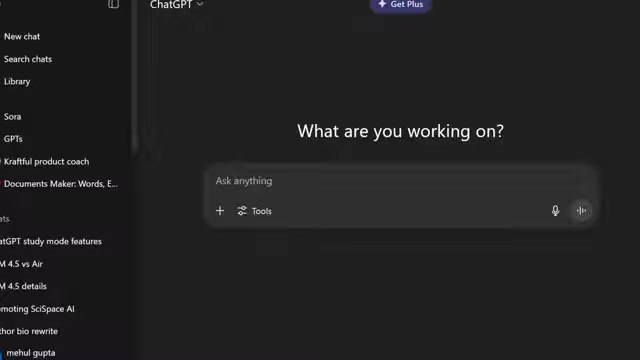
Navigate to Tools: Look for the “Tools” section within the ChatGPT interface.
-
Select Study and Learn: From the list of available tools, choose “Study and Learn.”
-
Start Learning: You are now in Study Mode and ready to start exploring its features.
Once in Study Mode, you'll notice a clean and intuitive interface designed for educational use. The main Prompt box is where you can enter your questions, homework problems, or topics you want to explore. There is a dedicated button for utilizing Study Mode, too. You will then see the response generated by ChatGPT, tailored to your specific needs. Each function, such as homework assistance, practice quizzes, and topic explanation, can be selected through the button at the bottom, allowing for a customized study session.
Effective Prompts for Optimal Results
To maximize the benefits of ChatGPT Study Mode, crafting effective prompts is key. Here are some tips to ensure you get the best results:
-
Be Specific: Clearly state your question or topic. Avoid vague prompts that can lead to generic answers.
-
Provide Context: Include any relevant background information to help ChatGPT understand your needs.
-
Use Keywords: Incorporate keywords related to the subject matter to focus the AI’s responses.
-
Ask for Step-by-Step Explanations: If you’re struggling with a problem, ask for a detailed, step-by-step solution.

-
Request Examples: Use examples to illustrate concepts and ensure clear understanding.
By employing these techniques, you can fine-tune your interactions with ChatGPT Study Mode and unlock its full potential for effective learning. An example prompt might be, "Explain the attention mechanism in transformers for someone with no prior knowledge."
Pricing
Cost and Accessibility
ChatGPT offers both free and paid subscription models.

The free version provides access to basic features, while the paid subscription unlocks additional functionalities and priority access during peak usage times. It is worth noting that the video mentions offering free access. A free option will grant the basic functions, while unlocking everything will require a subscription. This flexible model allows students to choose the option that best fits their budgets and learning needs.
Exploring the Core Features of ChatGPT Study Mode
Homework Help
One of the standout features of ChatGPT Study Mode is its ability to provide homework assistance.

Whether you're stuck on a math problem or need help understanding a complex concept, Study Mode can offer step-by-step guidance and explanations. Simply enter your homework problem or question, and ChatGPT will break it down into manageable steps, helping you understand the underlying principles and arrive at the correct solution. For instance, you can input a financial equation from your capital budgeting homework, and the AI will walk you through each variable, what they mean, and how to solve the problem. This feature can be a lifesaver when you’re struggling to understand difficult topics.
Practice Quizzes
Testing your knowledge is crucial for effective learning, and ChatGPT Study Mode makes it easy with its practice quiz feature. You can generate quizzes on various topics to assess your understanding and identify areas where you need additional review. The practice quizzes are adaptive, meaning they adjust to your skill level and provide targeted feedback to help you improve. ChatGPT can create a quiz covering the topic you provide.

After selecting your answer, the AI will notify you if you are correct or incorrect, further giving you insight into why the correct answer is correct. With immediate feedback, this allows for efficient learning.
Summarization of Notes and Articles
Another valuable feature is its ability to summarize lengthy notes and articles.
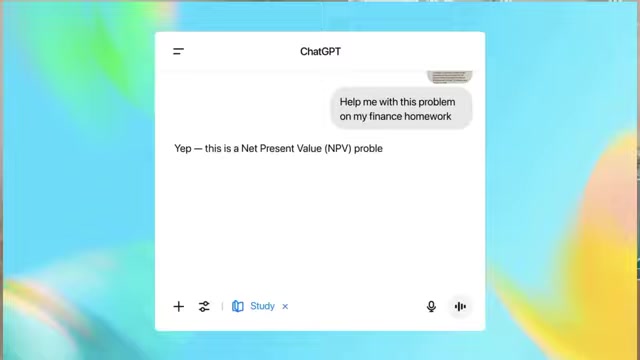
This can be incredibly helpful when you're trying to grasp the main points of a large amount of information. Simply input your notes or article, and ChatGPT will generate a concise summary highlighting the key concepts and arguments. By summarizing, you can save time and focus on understanding the most important information. This feature is perfect for preparing for exams, writing research Papers, or simply staying on top of your coursework.
Explanation of Topics
ChatGPT Study Mode excels at explaining complex topics in a clear and accessible manner. If you're struggling to understand a particular concept, simply ask ChatGPT to explain it, and it will break it down into easy-to-understand terms. The explanations are tailored to different learning levels, ensuring that even beginners can grasp the material. In short, if there is something that you do not understand, ChatGPT will explain the topic with your level in mind. It will help you to build on the core concepts and be more efficient in the learning process.





Most people like


































Report
Please select a reason for reporting
- 13 Reasons to Switch from Snapchat to Text Messaging
- 7 Powerful Speech to Text Apps to Boost Productivity
- 10 Best Speech to Text Tools for Effortless Transcription
- 13 Free Tools to Easily Transcribe Audio to Text
- 15 Surprising Ways Google's Speech-to-Text Boosts Productivity
- 7 Best Free Online Audio to Text Transcription Tools
- 9 Tips to Transcribe Speech to Text Faster and Better
- 13 Best Speech to Text Software for Windows 10 in 2023
- 7 Tips for Choosing the Best Transcriber for Audio to Text
- 11 Reasons Why Dragon Speech-to-Text Apps are Game-Changers
- 6 Secrets to Enhance Your Speech to Text Transcription
- 6 Brilliant Ways to Boost Productivity with Talk-to-Text on Your MacBook
- 6 Ways Transcription Software Converts Audio to Text
- 8 Tips to Transcribe Speech to Text Like a Pro
- 6 Reasons IBM Watson Speech to Text is a Game-Changer
- 14 Powerful Ways Talk-to-Text Improves Your Workflow
- 12 Top Windows Speech-to-Text Software for Efficient Transcription
- 12 Game-Changing Benefits of Apple's Speech to Text Technology
- 9 Powerful Use Cases for AWS Speech to Text Technology
- 10 Easy Steps to Transcribe YouTube Videos to Text
- transcription audio en texte
- online audio transcription
- free audio file transcription
- free ai audio transcription
- audio transcription service
- audio transcription online free
- audio transcription free online
- audio to transcription software
- audio and transcript
- ai audio transcription free
- voice recording to text converter
- translate voice recording to text
- record voice to text
- audio recording to text converter
- voice recording and transcription
- chatgpt voice to text
- gmail voice to text
- speech to text reader
- speech to text ai free
- speech to talk
- Meshy AI: How to Create 3D Models from Text and Images
- How SEO and Marketing Dashboards Empower Agencies to Drive Results
- How to Use AI Tools to Find Internal Linking Opportunities Across a Business Website
- Discover Your Perfect Haircut with AI Hairstyle Apps
- Free Reputation Calculator Tools: How They're Adapting to Score AI Visibility, Not Just Rankings
- Design Professional Flyers for Free on Your Phone
- Best Free Flyer Maker Apps for Android: Design Like a Pro
- How to Know If Your Business Is Ready for an AI Customer Service Agent
- Revolutionizing Storytelling: From Novels to Screenplays with AI
- Create Engaging Animated Explainer Videos with a Free AI Tool
- Automate Lead Generation: A Comprehensive Guide with AI Agents
- Revideo.io: The Future of Reverse Video Search Technology
- Revolutionizing Email Marketing Agency with AI
- Breaking the Character Drift Dilemma: A Practical Test of Smart Shot
- Meshy AI: How to Create 3D Models from Text and Images
- ASOMobile Helps Teams Benchmark App Store Screenshots Against Competitors
- How to Match LMS Software With Your Organization's Training Plan
- How to Convert BTC to HNT
- Unleashing the Power of AI: Cognizant's Roadmap for Transformation
- Frame to Video Review: A Practical Look at Turning Two Still Frames Into Motion

Copyright ©2026 toolify