































Table of Contents
- Key Points
- What is Codeium?
- Codeium Pricing: Free for Individuals, Competitive for Teams
- Codeium: Pros and Cons
- Core Features of Codeium
- Use Cases for Codeium: Boosting Productivity Across Development Tasks
- Frequently Asked Questions About Codeium
- Related Questions About AI Coding Assistants



What is Codeium?
Unveiling Codeium: The Modern Coding Superpower
Codeium is an AI-powered coding assistant designed to elevate the software development experience. It integrates seamlessly with popular Integrated Development Environments (IDEs) such as Visual Studio Code (VS Code), providing developers with intelligent suggestions, rapid code completion, and comprehensive assistance throughout the coding process.

Codeium aims to empower developers to type less, code more, and ship faster, making it a valuable asset for both individual developers and development teams.
Beyond just code completion, Codeium offers a suite of features designed to understand the context of your code and provide relevant suggestions. It supports a wide range of programming languages and IDEs, making it a versatile tool for various development projects. Its focus on data security and ethical code suggestions further solidifies its position as a reliable and trustworthy coding companion.
Codeium vs. Copilot: A Cost-Effective Alternative
Many developers find GitHub Copilot to be a powerful coding tool, but its subscription cost can be prohibitive for some.
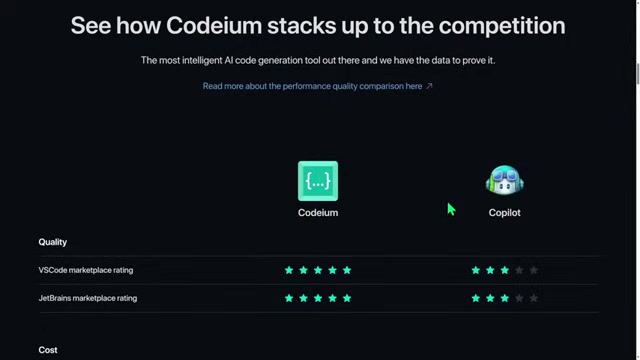
Codeium emerges as a viable alternative, offering many of the same features as Copilot, but with a free individual plan. This makes it an attractive option for students, hobbyists, and professional developers seeking to minimize their expenses while maintaining a high level of productivity.
While Codeium offers a free individual plan, it also provides team plans for organizations that require additional features and support. These plans are competitively priced compared to Copilot, making Codeium a cost-effective solution for businesses of all sizes.
Supported IDEs and Languages
Codeium's broad compatibility makes it accessible to developers across various platforms and programming languages.
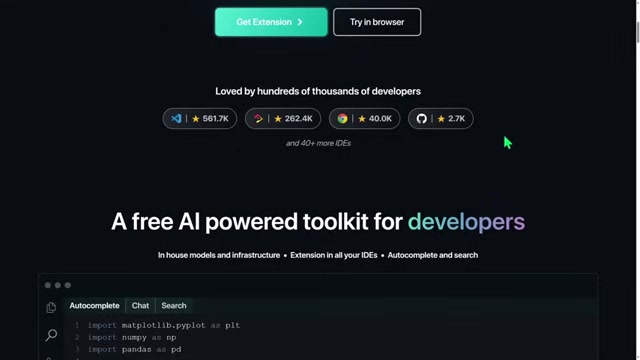
With support for over 40 IDEs, including VS Code, JetBrains IDEs, and Chrome DevTools, Codeium caters to a diverse range of development preferences. Additionally, it supports over 70 programming languages, ensuring that developers can leverage its AI-powered assistance regardless of their chosen technology stack.
Here’s a list of some of the IDEs that codeium support:
- Visual Studio Code (VS Code)
- JetBrains IDEs
- Chrome DevTools
- Jupyter Notebooks
- Vim
Some of the languages that Codeium supports includes:
- Python
- JavaScript
- TypeScript
- Go
- C++
- C#
- Java
- PHP
- Ruby
- Swift
Deployment Options and Data Security
Codeium offers flexible deployment options, catering to the specific needs of different organizations.

It can be deployed as a Software-as-a-Service (SaaS) solution, on-premises, or within a virtual private cloud (VPC), providing organizations with greater control over their data and infrastructure. This flexibility is particularly valuable for companies with proprietary code or strict data security requirements.
Data security is a top priority for Codeium. The platform is SOC 2 Type 2 compliant, demonstrating its commitment to maintaining the highest standards of data security and privacy. This compliance ensures that Codeium adheres to industry best practices for data protection, providing developers with peace of mind.
Codeium Pricing: Free for Individuals, Competitive for Teams
Individual vs. Team Plans
Codeium's pricing structure is designed to accommodate both individual developers and larger teams.

The individual plan is free forever, providing access to core features like rapid code autocomplete, an in-editor AI chat assistant, and unlimited usage. For teams that require additional features and support, Codeium offers competitive paid plans.
Here's a summary of the Codeium Pricing plans:
| Feature | Individual (Free) | Teams ($12/user/month) | Enterprise (Contact for Pricing) |
|---|---|---|---|
| Seats | 1 | Up to 200 | Unlimited |
| Rapid Code Autocomplete | ✓ | ✓ | ✓ |
| In-Editor AI Chat Assistant | ✓ | ✓ | ✓ |
| Unlimited Usage | ✓ | ✓ | ✓ |
| Trained on Permissive Data | ✓ | ✓ | ✓ |
| Support via Discord | ✓ | ✓ | ✓ |
| Encryption in Transit | ✓ | ✓ | ✓ |
| Admin Usage Dashboard | ✓ | ✓ | |
| Seat Management & Invites | ✓ | ✓ | |
| GPT-4 Support | ✓ | ✓ | |
| Organization-Wide Retention | ✓ | ✓ | |
| SaaS and Self-Hosted | ✓ |


Most people like




































Report
Please select a reason for reporting
- 13 Reasons to Switch from Snapchat to Text Messaging
- 7 Powerful Speech to Text Apps to Boost Productivity
- 10 Best Speech to Text Tools for Effortless Transcription
- 13 Free Tools to Easily Transcribe Audio to Text
- 15 Surprising Ways Google's Speech-to-Text Boosts Productivity
- 7 Best Free Online Audio to Text Transcription Tools
- 9 Tips to Transcribe Speech to Text Faster and Better
- 13 Best Speech to Text Software for Windows 10 in 2023
- 7 Tips for Choosing the Best Transcriber for Audio to Text
- 11 Reasons Why Dragon Speech-to-Text Apps are Game-Changers
- 6 Secrets to Enhance Your Speech to Text Transcription
- 6 Brilliant Ways to Boost Productivity with Talk-to-Text on Your MacBook
- 6 Ways Transcription Software Converts Audio to Text
- 8 Tips to Transcribe Speech to Text Like a Pro
- 6 Reasons IBM Watson Speech to Text is a Game-Changer
- 14 Powerful Ways Talk-to-Text Improves Your Workflow
- 12 Top Windows Speech-to-Text Software for Efficient Transcription
- 12 Game-Changing Benefits of Apple's Speech to Text Technology
- 9 Powerful Use Cases for AWS Speech to Text Technology
- 10 Easy Steps to Transcribe YouTube Videos to Text
- transcription audio en texte
- online audio transcription
- free audio file transcription
- free ai audio transcription
- audio transcription service
- audio transcription online free
- audio transcription free online
- audio to transcription software
- audio and transcript
- ai audio transcription free
- voice recording to text converter
- translate voice recording to text
- record voice to text
- audio recording to text converter
- voice recording and transcription
- chatgpt voice to text
- gmail voice to text
- speech to text reader
- speech to text ai free
- speech to talk
- ChatGPT Knows Ford. It Just Doesn't Quote Ford
- Meshy AI: How to Create 3D Models from Text and Images
- How SEO and Marketing Dashboards Empower Agencies to Drive Results
- How to Use AI Tools to Find Internal Linking Opportunities Across a Business Website
- Discover Your Perfect Haircut with AI Hairstyle Apps
- Free Reputation Calculator Tools: How They're Adapting to Score AI Visibility, Not Just Rankings
- Design Professional Flyers for Free on Your Phone
- Best Free Flyer Maker Apps for Android: Design Like a Pro
- How to Know If Your Business Is Ready for an AI Customer Service Agent
- Revolutionizing Storytelling: From Novels to Screenplays with AI
- AI Video Editor Review: A Hands-On Look at Prompt-Based Video Editing
- Keep Characters Consistent Across Scenes With Image-to-Video AI
- How to Convert BTC to HNT
- ProxyWing DuckDuckGo Proxy Review: Plans, Setup and Who It Is For
- ChatGPT Knows Ford. It Just Doesn't Quote Ford
- Automate Lead Generation: A Comprehensive Guide with AI Agents
- Revideo.io: The Future of Reverse Video Search Technology
- Revolutionizing Email Marketing Agency with AI
- Breaking the Character Drift Dilemma: A Practical Test of Smart Shot
- Meshy AI: How to Create 3D Models from Text and Images

Copyright ©2026 toolify