































Table of Contents
- Key Points
- Understanding the Comet Browser
- Integrating ChatGPT for a Personalized Search Experience
- Step-by-Step Guide to Setting Up ChatGPT as Default Search
- Pricing Structure of Comet Browser
- Pros and Cons of the Comet Browser
- Exploring the Core Features of Comet Browser
- Use Cases for the Comet Browser
- Frequently Asked Questions About the Comet Browser
- Related Questions



Understanding the Comet Browser
What is the Comet Browser?
The Comet browser is a next-generation web browser that prioritizes AI integration to improve search accuracy and browsing efficiency. Unlike traditional browsers that rely on conventional search engines like Google, Comet leverages AI models such as Perplexity to offer more contextually relevant and comprehensive search results. This focus on AI enhances the browser's ability to understand and respond to user queries, making it a powerful tool for research, information gathering, and everyday browsing.
Comet is designed to provide a seamless and intuitive user experience, with features like AI-driven content summarization, intelligent task automation, and customizable widgets. By integrating AI directly into the browser, Comet aims to streamline digital workflows and make web exploration more productive.
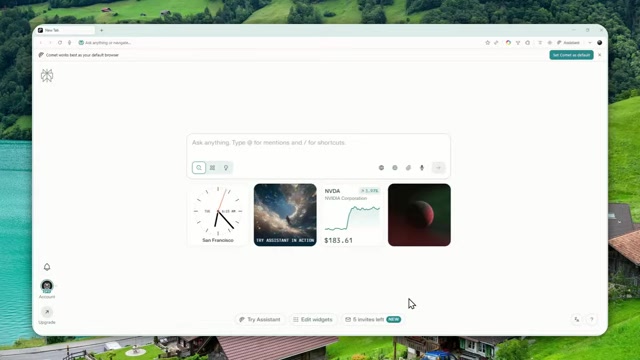
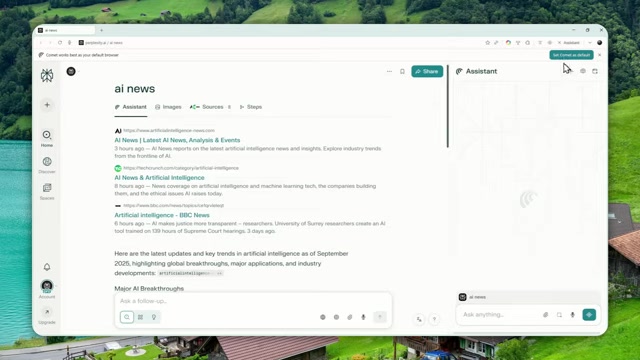
Enhanced Search with Perplexity AI The default search engine within the Comet browser is Perplexity AI, a cutting-edge AI model known for its ability to deliver accurate, concise, and context-aware search results. Perplexity analyzes user queries to provide relevant information sourced from across the web, ensuring that users receive high-quality, synthesized answers rather than just a list of links. This intelligent search capability saves time and reduces the need to sift through multiple sources, making information retrieval faster and more efficient. The Comet browser is also deeply integrated with Comet Assistant, an AI-driven tool designed to anticipate your needs and streamline your tasks.
Customization Options Beyond its AI-powered search, the Comet browser offers extensive customization options to tailor the browsing experience to individual preferences. Users can add widgets that provide quick access to frequently used tools and information, such as weather updates, stock prices, and to-do lists. The browser also supports extensions, allowing users to further enhance its functionality with features like ad blockers, password managers, and note-taking apps. These customization options make Comet a versatile browser that can adapt to a wide range of user needs and workflows.
Commitment to User Privacy and Security Comet prioritizes user privacy and security, implementing robust measures to protect user data and prevent online tracking. The browser includes built-in privacy features like ad blocking, tracker blocking, and secure browsing modes. Comet also adheres to strict data privacy policies, ensuring that user data is not collected, shared, or sold without explicit consent. This commitment to privacy and security makes Comet a trustworthy choice for users who value their online safety and anonymity.
Integrating ChatGPT for a Personalized Search Experience
Setting Up ChatGPT as Your Default Search Engine on Comet
While Perplexity AI is the default Search Engine on the Comet browser, users can configure it to use ChatGPT for a more personalized search experience. This setup allows users to leverage ChatGPT's conversational AI capabilities directly from their browser, enabling them to ask questions, generate content, and receive customized responses.
Step-by-Step Configuration To set up ChatGPT as your default search engine on the Comet browser, follow these steps:
- Access the Settings Menu: Open the Comet browser and click on the three-dot menu in the upper right corner to access the settings menu.
- Navigate to Search Engine Settings: In the settings menu, find and click on the 'Search Engine' option.
- Manage Search Engines: Click on 'Manage search engines and site search'.
- Add a New Site Search: In the 'Site search' section, click the 'Add' button.
- Enter ChatGPT Details: A dialog box will appear. Enter the following details:
- Name: ChatGPT
- Shortcut: @gpt (or any other shortcut you prefer)
- URL with %s in place of query:
https://chat.gpt.com/?q=%s&hints=search&ref=ext
- Save the Settings: Click the 'Add' button to save the settings.
- Make ChatGPT Default: Find ChatGPT in the list of search engines, click the three-dot menu next to it, and select 'Make default'.
Once these steps are completed, ChatGPT will be configured as your default search engine in the Comet browser.
Using the ChatGPT Shortcut
To use ChatGPT for your searches, simply type the shortcut (e.g., @gpt) followed by your query in the address bar. For example, if you want to ask ChatGPT about the latest AI news, type @gpt latest AI News and press Enter. The browser will then redirect you to ChatGPT with your query, allowing you to receive a personalized response from the AI model.
Limitations and Considerations While integrating ChatGPT into the Comet browser offers a unique search experience, there are a few limitations to consider:
- New Tab Page: The new tab page will still display the default Perplexity page. There is currently no way to customize the new tab page to display ChatGPT instead.
- Assistant Model: Changing the default search engine does not change the default assistant model. The Comet Assistant will still use Perplexity AI.
Despite these limitations, configuring ChatGPT as your default search engine can significantly enhance your browsing experience, providing you with access to conversational AI directly from your browser.
Step-by-Step Guide to Setting Up ChatGPT as Default Search
Detailed Steps for ChatGPT Integration
Here is a step by step guide to help you integrate ChatGPT into your Comet Browser
Step 1: Accessing the Settings Menu Begin by opening your Comet Browser. Look for the three vertical dots, usually located in the upper-right corner of the browser window. Click on these dots to open the browser’s main menu. This is your gateway to customizing the browser's settings.
Step 2: Navigating to Search Engine Preferences Once the main menu is open, scroll down until you find the 'Settings' option. Click on 'Settings', and a new tab will open, displaying various customization options for your browser. On the left sidebar, you’ll see a list of categories; look for and click on 'Search engine'. This section allows you to manage how searches are handled within your browser.

Step 3: Managing Search Engines and Site Search In the 'Search engine' settings, you’ll see a main option labeled 'Search engine' with a dropdown menu, which might currently display 'Perplexity' as the default. Below this, there’s a section titled 'Manage search engines and site search'. Click on this to proceed. This action takes you to a more detailed configuration page where you can add, edit, and set default search engines.
Step 4: Adding a New Site Search for ChatGPT On the 'Manage search engines and site search' page, scroll down to the 'Site search' section. Here, you’ll find a list of websites and search engines you can quickly access using shortcuts in the address bar. To add ChatGPT, click the 'Add' button located on the right side of the 'Site search' heading. This opens a dialog box where you can input the necessary information for ChatGPT.
Step 5: Inputting ChatGPT Details The dialog box requires you to fill in three fields:
- Name: Enter 'ChatGPT' to easily identify this search engine in your list.
- Shortcut: Choose a memorable and easy-to-type shortcut. For instance, you can use '@gpt'. This shortcut will be used in the address bar to trigger searches via ChatGPT.
-
URL with %s in place of query: This is where you need to enter the URL that tells the browser how to send your query to ChatGPT. Use the following URL:
https://chat.gpt.com/?q=%s&hints=search&ref=extHere,
%sis a placeholder that the browser will replace with your actual search query.
Double-check that you’ve entered the URL correctly, as any mistake here will prevent the search from working properly.
Step 6: Finalizing and Saving the Configuration After entering all the details, click the 'Add' button at the bottom of the dialog box to save your new ChatGPT configuration. You should now see 'ChatGPT' listed under the 'Site search' section with the shortcut you specified.
Step 7: Setting ChatGPT as the Default Search Engine To make ChatGPT the default search engine for your Comet Browser, locate the three vertical dots next to the ChatGPT entry under the 'Site search' section. Click on these dots to open a small menu. In this menu, select 'Make default'. This action sets ChatGPT as your go-to search engine, which will be used whenever you type a query into the address bar.
With these steps completed, your Comet Browser is now configured to use ChatGPT as the default search engine. You can quickly perform searches using ChatGPT by typing your chosen shortcut (e.g., @gpt) followed by your query in the address bar.
This detailed guide ensures you can seamlessly integrate ChatGPT into your Comet Browser, enhancing your browsing experience with AI-powered search capabilities.





Most people like



























Report
Please select a reason for reporting
- 13 Reasons to Switch from Snapchat to Text Messaging
- 7 Powerful Speech to Text Apps to Boost Productivity
- 10 Best Speech to Text Tools for Effortless Transcription
- 13 Free Tools to Easily Transcribe Audio to Text
- 15 Surprising Ways Google's Speech-to-Text Boosts Productivity
- 7 Best Free Online Audio to Text Transcription Tools
- 9 Tips to Transcribe Speech to Text Faster and Better
- 13 Best Speech to Text Software for Windows 10 in 2023
- 7 Tips for Choosing the Best Transcriber for Audio to Text
- 11 Reasons Why Dragon Speech-to-Text Apps are Game-Changers
- 6 Secrets to Enhance Your Speech to Text Transcription
- 6 Brilliant Ways to Boost Productivity with Talk-to-Text on Your MacBook
- 6 Ways Transcription Software Converts Audio to Text
- 8 Tips to Transcribe Speech to Text Like a Pro
- 6 Reasons IBM Watson Speech to Text is a Game-Changer
- 14 Powerful Ways Talk-to-Text Improves Your Workflow
- 12 Top Windows Speech-to-Text Software for Efficient Transcription
- 12 Game-Changing Benefits of Apple's Speech to Text Technology
- 9 Powerful Use Cases for AWS Speech to Text Technology
- 10 Easy Steps to Transcribe YouTube Videos to Text
- transcription audio en texte
- online audio transcription
- free audio file transcription
- free ai audio transcription
- audio transcription service
- audio transcription online free
- audio transcription free online
- audio to transcription software
- audio and transcript
- ai audio transcription free
- voice recording to text converter
- translate voice recording to text
- record voice to text
- audio recording to text converter
- voice recording and transcription
- chatgpt voice to text
- gmail voice to text
- speech to text reader
- speech to text ai free
- speech to talk
- Create Engaging Animated Explainer Videos with a Free AI Tool
- Stop Multi-Subscribing: Benchmark Top AI Visual Models in One Canvas
- Best Seedance 2.5 API Provider: Every Price on the Market, Checked at Source
- AI OnlyFans: How to Generate $30,000/Month (Legally)
- Transform Your Script into an Engaging Video with AI Video Maker!
- AI Marketing Automation: A Comprehensive Guide for Small Businesses
- Midjourney Alternative for Anime Art Creators: Why PixAI May Be Better for Character Workflows
- 10 Things Most People Get Wrong About AI Image Search
- AI Girlfriend Apps: Top Choices Redefining Relationships 2025
- How to Reduce Quoting Errors in Salesforce with AI-Assisted Quote Creation
- AI Resume Builders: EnhanceCV, ResumeNerd AI, & Teal Compared
- ResumeAI: Crafting ATS-Optimized Resumes with AI
- AI in Resume Writing: A New Era for Job Seekers
- AI Resume Tools: Streamline Your Job Search and Land Your Dream Role
- AI Resume Optimization: The Right Way to Land Interviews
- Crafting a Killer Resume with AI: A Step-by-Step Guide
- Crafting a Winning Resume: AI Tools and Expert Tips
- AI Job Search: Level Up Your Career with AI Automation
- Empower Your Career Journey: Dynamic Resumes with AI
- AI Resume Builder: Create Professional Resumes Effortlessly

Copyright ©2026 toolify