































Table of Contents
- Key Points
- Bringing Reallusion Characters to Life with AI
- Additional Reallusion Resources
- Using the Core Code Components for Lip-Sync
- Advantages and Disadvantages of this Approach
- Potential Use Cases for Interactive AI Characters
- FAQ
- Related Questions


Bringing Reallusion Characters to Life with AI
Welcome to the World of Interactive AI Characters
The creation of lifelike, interactive AI characters marks a significant leap forward in the realm of digital experiences. Imagine characters that not only respond to user input but also exhibit realistic behaviors and emotions. This Tutorial unveils the secrets to achieving this level of immersion, combining the artistic prowess of Reallusion characters with the analytical capabilities of artificial intelligence.
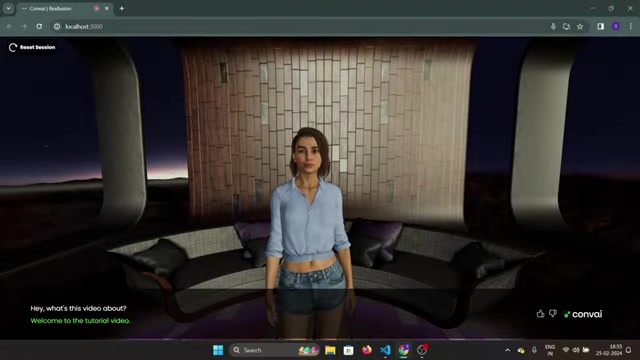
This integration allows for the creation of AI-powered metaverses that run directly in the browser, opening up a world of possibilities for gaming, education, and interactive storytelling. By leveraging tools like Three.js and React, developers can create engaging experiences that were once confined to high-end gaming consoles or specialized software. The democratization of AI Character creation is upon us, and this tutorial is your gateway to mastering this exciting new frontier.
The Essential Tools: Reallusion, Conval, Three.js, Blender, and React
Before diving into the creation process, it's crucial to understand the role of each tool in our arsenal. Each component plays a vital role in bringing our AI-powered characters to life:
-
Reallusion Character Creator: A powerful tool for designing and customizing realistic 3D characters, offering a vast library of assets and intuitive sculpting capabilities.
-
Conval: This is where the magic of AI happens, Conval provides the AI 'brain' that empowers the characters to talk, perceive their environment, and perform actions.
-
Three.js: A JavaScript library that allows you to display animated 3D computer graphics in a web browser
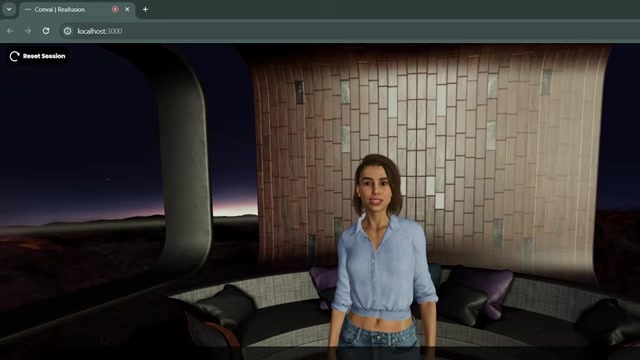
. It uses WebGL.
-
Blender: An open-source 3D creation suite, Blender is instrumental in refining and preparing the characters for integration into the browser-based environment.
-
React: A JavaScript library for building user interfaces, React is used to create interactive and dynamic front-end experiences.
Together, these tools form a synergistic ecosystem that enables the creation of truly immersive and interactive AI character experiences.
A Step-by-Step Guide to Integrating Reallusion Characters with Conval AI
Let’s walk through the detailed steps to turn Reallusion characters into interactive AI entities. This process will enable the characters to talk to you, perceive the environment, and perform actions.
-
Prepare Your Reallusion Character:
- Begin by creating or importing your character in Reallusion's Character Creator 4 (CC4). This tool offers extensive customization options.
- Export the character as an FBX file, ensuring compatibility with Blender.
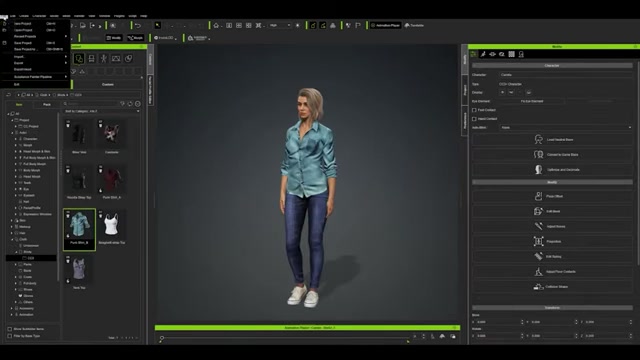
Select 'Blender' in the export settings, remove the 'Embed Textures' checkbox, and choose ‘Mesh’ in the FBX options.
-
Import and Refine in Blender:
- Import the exported FBX file into Blender. For best web compatibility, convert all materials to basic materials.
- Install the 'CC Blender Tools' and 'Baking Add-on' for blender, then, ensure the plugins have been enabled.
- Export model as gLTF 2.0, ensure that the model type is a
.glbfile.
-
Connect to Conval's AI Brain
- After preparing your character, you will need to create an account on the convai website to setup the AI character's brain.
- Sign in to Conval (https://www.convai.com/) and navigate to the dashboard.
- Set the back story, personality and avatar for the chatacter.
-
Integrate into Code:
- Use React Three Fiber to put a 3D world into a web browser, this is an adaptation of React that provides a number of tools.
- Use “gltfjsx” to import GLTF files into JSX components.
- Set your file paths and setup the useLipSync function for lip-syncing. The documentation for this can be found on the Conval page (https://github.com/Convu-AI/Threejs-World-Tutorial). By following these steps, you'll be well on your way to creating an impressive and interactive AI character experience. This will open the doors for other features such as action generation and scene perception.
Additional Reallusion Resources
Acquiring Reallusion Assets for Richer Experiences
To enhance the realism and diversity of your AI characters, explore Reallusion's ActorCore (https://actorcore.reallusion.com/)
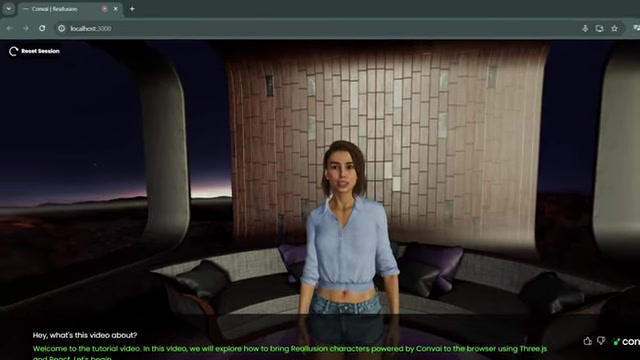
. This platform provides a vast library of pre-made characters and motions, ready to be imported into your projects.
-
Actor Packs: Browse diverse character packs tailored to various themes and scenarios, from modern professionals to fantasy creatures.
-
Motion Library: Access a comprehensive collection of animations and actions that bring your characters to life with realistic movements and expressions.
By leveraging these resources, you can significantly accelerate your character creation process and elevate the quality of your interactive AI experiences.








Most people like






























Report
Please select a reason for reporting
- 13 Reasons to Switch from Snapchat to Text Messaging
- 7 Powerful Speech to Text Apps to Boost Productivity
- 10 Best Speech to Text Tools for Effortless Transcription
- 13 Free Tools to Easily Transcribe Audio to Text
- 15 Surprising Ways Google's Speech-to-Text Boosts Productivity
- 7 Best Free Online Audio to Text Transcription Tools
- 9 Tips to Transcribe Speech to Text Faster and Better
- 13 Best Speech to Text Software for Windows 10 in 2023
- 7 Tips for Choosing the Best Transcriber for Audio to Text
- 11 Reasons Why Dragon Speech-to-Text Apps are Game-Changers
- 6 Secrets to Enhance Your Speech to Text Transcription
- 6 Brilliant Ways to Boost Productivity with Talk-to-Text on Your MacBook
- 6 Ways Transcription Software Converts Audio to Text
- 8 Tips to Transcribe Speech to Text Like a Pro
- 6 Reasons IBM Watson Speech to Text is a Game-Changer
- 14 Powerful Ways Talk-to-Text Improves Your Workflow
- 12 Top Windows Speech-to-Text Software for Efficient Transcription
- 12 Game-Changing Benefits of Apple's Speech to Text Technology
- 9 Powerful Use Cases for AWS Speech to Text Technology
- 10 Easy Steps to Transcribe YouTube Videos to Text
- transcription audio en texte
- online audio transcription
- free audio file transcription
- free ai audio transcription
- audio transcription service
- audio transcription online free
- audio transcription free online
- audio to transcription software
- audio and transcript
- ai audio transcription free
- voice recording to text converter
- translate voice recording to text
- record voice to text
- audio recording to text converter
- voice recording and transcription
- chatgpt voice to text
- gmail voice to text
- speech to text reader
- speech to text ai free
- speech to talk
- How SEO and Marketing Dashboards Empower Agencies to Drive Results
- How to Use AI Tools to Find Internal Linking Opportunities Across a Business Website
- Discover Your Perfect Haircut with AI Hairstyle Apps
- Free Reputation Calculator Tools: How They're Adapting to Score AI Visibility, Not Just Rankings
- Design Professional Flyers for Free on Your Phone
- Best Free Flyer Maker Apps for Android: Design Like a Pro
- How to Know If Your Business Is Ready for an AI Customer Service Agent
- Revolutionizing Storytelling: From Novels to Screenplays with AI
- Create Engaging Animated Explainer Videos with a Free AI Tool
- Stop Multi-Subscribing: Benchmark Top AI Visual Models in One Canvas
- ASOMobile Helps Teams Benchmark App Store Screenshots Against Competitors
- How to Match LMS Software With Your Organization's Training Plan
- Revolutionizing Email Marketing Agency with AI
- How to Convert BTC to HNT
- Unleashing the Power of AI: Cognizant's Roadmap for Transformation
- Frame to Video Review: A Practical Look at Turning Two Still Frames Into Motion
- NVIDIA NIM: Revolutionizing Supply Chain Data Analysis with AI
- Top AI Tools That Help Brands Stand Out Offline (Not Just Online)
- Top 5 Cold Email Software: Maximize Your Outreach in 2025
- Magic School AI: Revolutionizing Quiz & Assessment Generation

Copyright ©2026 toolify