































Table of Contents
- Key Points
- Understanding Deep Learning and Image Recognition
- Why Use Deep Learning for Image Recognition?
- Building an Image Recognition Model with Python: Step-by-Step Guide
- Deep Learning for Image Recognition: Pros and Cons
- FAQ
- Related Questions



Understanding Deep Learning and Image Recognition
What is Deep Learning?
Deep learning is a Game-changing subset of machine learning that has revolutionized fields like Image Recognition, natural language processing, and robotics. At its core, deep learning leverages algorithms modeled after the structure and function of the human brain –

specifically, artificial neural networks. These networks consist of interconnected layers of nodes (neurons) that process and transform data. What makes deep learning 'deep' is the presence of multiple layers, allowing the network to learn hierarchical representations of complex data.
Imagine teaching a computer to identify a cat in an image. A traditional machine learning approach might require manually defining features like 'whiskers,' 'pointed ears,' and 'fur.' Deep learning, on the other hand, can automatically learn these features from raw pixel data. The initial layers of the neural network might detect edges and textures, while subsequent layers combine these basic elements into more complex shapes and ultimately, the concept of a 'cat.'
Deep learning excels when dealing with massive amounts of data. The more data you feed into a deep learning model, the better it becomes at identifying patterns and making accurate predictions. This is why deep learning has become so prevalent in areas where large datasets are readily available.
The Power of Image Recognition
Image recognition is the capability of a computer system to identify objects, people, places, and actions in images.
It goes beyond simply detecting the presence of something; it's about understanding what that 'something' is. Image recognition has a wide range of applications, from self-driving cars to medical diagnosis.
Here are just a few examples of where image recognition is used today:
- Security Systems: Facial recognition software that unlocks your smartphone or grants access to secure facilities.
- Medical Imaging: Analyzing X-rays and MRIs to detect anomalies and assist in diagnosis.
- Agriculture: Identifying plant diseases and pests in crops.
- Manufacturing: Inspecting products for defects on the assembly line.
- E-commerce: Visual search, allowing users to find products by uploading an image.
Deep learning has become the dominant approach to image recognition due to its ability to automatically learn complex features from image data. This has led to significant improvements in accuracy and performance compared to traditional image recognition techniques.
Why Use Deep Learning for Image Recognition?
Feature Learning and High Accuracy
Deep learning offers several advantages over traditional machine learning methods for image recognition. Here are some key reasons to choose deep learning:
- Feature Learning: Deep learning models, especially CNNs, can automatically learn hierarchical features from images. This eliminates the need for manual feature engineering, a time-consuming and often challenging process.
Lower layers in a CNN might learn edges and textures, while higher layers learn more complex structures like shapes and objects.
- High Accuracy: Given sufficient data and computational resources, deep learning models typically achieve higher accuracy in image recognition tasks compared to traditional machine learning algorithms. The multi-layered architecture of deep learning allows it to capture intricate patterns that simpler models may miss.
The following table highlights the comparison:
| Feature | Traditional Machine Learning | Deep Learning |
|---|---|---|
| Feature Learning | Manual feature engineering required | Automatic feature learning |
| Data Requirement | Can work with smaller datasets | Requires large datasets for optimal performance |
| Accuracy | Generally lower accuracy | Typically higher accuracy |
| Complexity | Less complex models | More complex models |
Common Deep Learning Models for Image Recognition
Several deep learning models are commonly used for image recognition.
These include:
- Convolutional Neural Networks (CNNs): These are the most widely used deep learning models for image recognition. CNNs consist of layers like convolutional layers, pooling layers, and fully connected layers. These layers effectively capture spatial hierarchies in images.
- Pre-trained Models: These models, such as ResNet, VGG, and Inception, have been pre-trained on large datasets. Using these models can significantly reduce training time and improve accuracy, especially when dealing with limited data.
- Transfer Learning: This technique involves using a pre-trained model and fine-tuning it on a specific dataset. Transfer learning can be a very effective way to leverage existing knowledge and achieve good performance with limited data.
Building an Image Recognition Model with Python: Step-by-Step Guide
Step 1: Setting Up Your Environment
Before we start coding, you will need to set up your development environment. Make sure that you have Python installed on your machine.
Then, install essential Python libraries using pip:
pip install tensorflow keras split-folders opencv-pythonThis command will install the following packages:
- TensorFlow: An open-source machine learning framework.
- Keras: A high-level API for building and training neural networks, now integrated with TensorFlow.
- split-folders: A utility for splitting image datasets into training, validation, and test sets.
- opencv-python: A library for computer vision tasks, including image reading and processing.
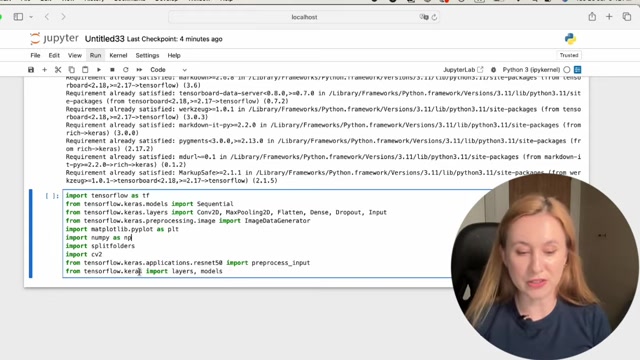
For this example, we are using Jupyter Notebooks which can handle a lot of computational power.
Step 2: Importing Libraries
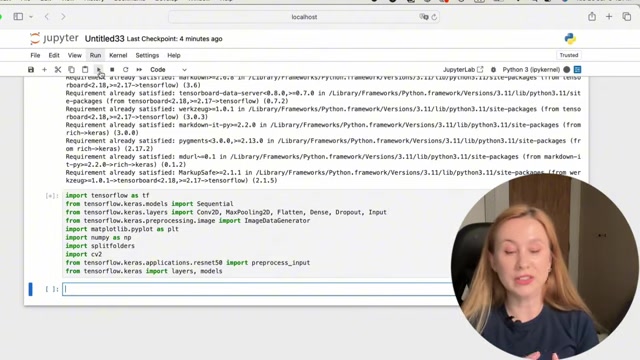
Now, let's import the necessary Python libraries into your script:
import tensorflow as tf
from tensorflow.keras.models import Sequential
from tensorflow.keras.layers import Conv2D, MaxPooling2D, Flatten, Dense, Dropout, Input
from tensorflow.keras.preprocessing.image import ImageDataGenerator
import matplotlib.pyplot as plt
import numpy as np
import splitfolders
import cv2
from tensorflow.keras.applications.resnet50 import ResNet50, preprocess_input
from tensorflow.keras import layers, models
These lines import the required modules from the libraries we installed, preparing us to build and train our model.
Step 3: Loading the Data
For this project, we'll use an agricultural crops dataset containing images of various plants. You can find this dataset at kaggle.com.
The data are in a folder with subfolders separated by their crop.
input_folder = '/Users/karinasamsonova/Downloads/Agricultural-crops'
output_folder = '/Users/karinasamsonova/Downloads/ImageRecognition'

split_ratio = (0.8, 0.1, 0.1)

splitfolders.ratio(input_folder, output=output_folder, seed=500, ratio=split_ratio, group_prefix=None)
Step 4: Preprocessing the Data
Before feeding the data into the model, we need to preprocess it. This involves resizing the images and scaling the pixel values.
img_size = (224, 224)
batch_size = 32

train_datagen = ImageDataGenerator(
 preprocessing_function=preprocess_input,
 rotation_range=20,
 width_shift_range=0.2,
 height_shift_range=0.2,
 shear_range=0.2,
 zoom_range=0.2,
 horizontal_flip=True,
 fill_mode='nearest'
)

test_datagen = ImageDataGenerator(preprocessing_function=preprocess_input)
valid_datagen = ImageDataGenerator(preprocessing_function=preprocess_input)
Step 5: Building the Model
We will leverage a pre-trained ResNet50 model as our base. This model has already learned features from a massive dataset, allowing us to fine-tune it for our specific task.
from tensorflow.keras.applications.resnet50 import ResNet50

base_model = ResNet50(weights='imagenet', include_top=False, input_shape=(img_size[0], img_size[1], 3))

base_model.trainable = False

model = models.Sequential([
 base_model,
 layers.GlobalAveragePooling2D(),
 layers.Dense(128, activation='relu'),
 layers.Dropout(0.5),
 layers.Dense(30, activation='softmax')
])
Step 6: Compiling and Training the Model
Now, compile the model, specifying the optimizer, loss function, and metrics:
model.compile(optimizer='adam', loss='categorical_crossentropy', metrics=['accuracy'])

model.fit(train_data, epochs=25, validation_data=valid_data)
Step 7: Evaluating the Model
After training, evaluate the model on the test data:
test_loss, test_accuracy = model.evaluate(test_data)
print('Test Accuracy: {:.2f}%'.format(test_accuracy * 100))
Step 8: Make Predictions
After training, predict on a new image:
def predict_img(image,model):
 test_img=cv2.imread(image)
 test_img=cv2.resize(test_img,img_size)
 test_img = np.expand_dims(test_img, axis=0)
 result=model.predict(test_img)
 r=np.argmax(result)
 print(class_names[r])

predict_img('/Users/karinasamsonova/Downloads/ImageRecognition/test/jowar/image (3).jpeg',model)





Most people like
































Report
Please select a reason for reporting
- 13 Reasons to Switch from Snapchat to Text Messaging
- 7 Powerful Speech to Text Apps to Boost Productivity
- 10 Best Speech to Text Tools for Effortless Transcription
- 13 Free Tools to Easily Transcribe Audio to Text
- 15 Surprising Ways Google's Speech-to-Text Boosts Productivity
- 7 Best Free Online Audio to Text Transcription Tools
- 9 Tips to Transcribe Speech to Text Faster and Better
- 13 Best Speech to Text Software for Windows 10 in 2023
- 7 Tips for Choosing the Best Transcriber for Audio to Text
- 11 Reasons Why Dragon Speech-to-Text Apps are Game-Changers
- 6 Secrets to Enhance Your Speech to Text Transcription
- 6 Brilliant Ways to Boost Productivity with Talk-to-Text on Your MacBook
- 6 Ways Transcription Software Converts Audio to Text
- 8 Tips to Transcribe Speech to Text Like a Pro
- 6 Reasons IBM Watson Speech to Text is a Game-Changer
- 14 Powerful Ways Talk-to-Text Improves Your Workflow
- 12 Top Windows Speech-to-Text Software for Efficient Transcription
- 12 Game-Changing Benefits of Apple's Speech to Text Technology
- 9 Powerful Use Cases for AWS Speech to Text Technology
- 10 Easy Steps to Transcribe YouTube Videos to Text
- transcription audio en texte
- online audio transcription
- free audio file transcription
- free ai audio transcription
- audio transcription service
- audio transcription online free
- audio transcription free online
- audio to transcription software
- audio and transcript
- ai audio transcription free
- voice recording to text converter
- translate voice recording to text
- record voice to text
- audio recording to text converter
- voice recording and transcription
- chatgpt voice to text
- gmail voice to text
- speech to text reader
- speech to text ai free
- speech to talk
- How to Use AI Tools to Find Internal Linking Opportunities Across a Business Website
- Discover Your Perfect Haircut with AI Hairstyle Apps
- Free Reputation Calculator Tools: How They're Adapting to Score AI Visibility, Not Just Rankings
- Design Professional Flyers for Free on Your Phone
- Best Free Flyer Maker Apps for Android: Design Like a Pro
- How to Know If Your Business Is Ready for an AI Customer Service Agent
- Revolutionizing Storytelling: From Novels to Screenplays with AI
- Create Engaging Animated Explainer Videos with a Free AI Tool
- Stop Multi-Subscribing: Benchmark Top AI Visual Models in One Canvas
- Best Seedance 2.5 API Provider: Every Price on the Market, Checked at Source
- Top AI Social Media Management Tools: Automate Your Content Strategy
- Free AI Text to Video Generator: Create Stunning Videos from Text
- Discover 17 ChatGPT Alternatives: A Comprehensive Comparison
- Character.AI vs. Janitor AI: Which AI Chat Platform Reigns Supreme?
- Top Virtual Assistant Companies in 2026: Reviews, Pricing, and Plans Compared
- Unveiling FaceCheck.ID: Revolutionizing Reverse Image Searches with AI
- 11 Best AI Dialers in 2026: Features, Pricing, Pros and Cons
- How I Direct Consistent AI Clips: A Hands-On Guide to Multi-Model Generation
- A Realistic Review of the Photo Generator Image Tool
- Playwright MCP Server: Automated Web Testing with Agent Mode

Copyright ©2026 toolify