






















Easy Face Swap Tutorial: Using Roop Unleashed for Beginners

Updated on Jun 19,2025

Table of Contents

Face swapping has never been easier! This tutorial will guide you through the simplest method for face swapping in videos using Roop Unleashed. Whether you're a beginner or an experienced user, this step-by-step guide covers everything from downloading and installing the software to performing your first face swap. Get ready to unleash your creativity and create fun and engaging content with ease.

Key Points

Learn how to download and install Roop Unleashed.

Understand the importance of pathing during installation.

See how to select source and target videos for face swapping.

Utilize post-processing for enhanced results.

Troubleshoot common installation issues.

Introduction to Roop Unleashed

What is Roop Unleashed?

Roop Unleashed is a powerful yet user-friendly tool that allows you to easily swap faces in videos. It's designed to be accessible for beginners, providing a straightforward interface for creating face swap content. This tool eliminates the complexity often associated with video editing, making it a perfect choice for both personal and professional use. Roop Unleashed is perfect for content creation, social media, and entertainment. With Roop Unleashed, you can swap faces in videos seamlessly, creating entertaining and engaging content. Whether you’re making funny videos to share with friends or creating marketing materials with a twist, Roop Unleashed offers a versatile solution. The software’s intuitive design means you don’t need to be a tech expert to get started, making it accessible to a broad audience.

By using Roop Unleashed, you can quickly produce high-quality face swap videos with minimal effort. The step-by-step process ensures that even those new to video editing can achieve impressive results. This can be particularly useful for creating unique content for social media platforms, where standing out from the crowd is essential. The possibilities are endless, from swapping your face with a celebrity to inserting yourself into a classic movie scene. Roop Unleashed provides the tools and flexibility to bring your creative ideas to life.

The video demonstrates the ease with which Roop Unleashed can be used to swap faces in videos, highlighting its beginner-friendly nature. The initial visuals display a before-and-after comparison, showcasing the impact of the face swap. This visual aid provides immediate Clarity on the tool’s capabilities and inspires users to try it out themselves. The promise of an easy-to-follow process is particularly appealing to those who may have previously been intimidated by the technical aspects of video editing. Overall, Roop Unleashed stands out as a reliable and efficient tool for face swapping. Its ease of use and robust features make it an excellent choice for both casual users and professional content creators.

Why Choose Roop Unleashed?

Choosing Roop Unleashed for your face swapping needs comes with several key advantages. Its simplicity and efficiency set it apart from more complex video editing software. You don't need to be a professional Video Editor to achieve high-quality results. Roop Unleashed is designed to streamline the entire process, making face swapping accessible to everyone. Moreover, the software is regularly updated to improve performance and add new features, ensuring you always have access to the best tools.

The user-friendly interface of Roop Unleashed makes it easy to navigate and understand, even for beginners. The straightforward workflow guides you through each step, from selecting your source and target videos to applying post-processing enhancements. This ease of use translates to significant time savings, allowing you to produce face swap videos quickly and efficiently. Additionally, Roop Unleashed supports a variety of video formats, giving you the flexibility to work with different types of media files. Its compatibility with both Windows and macOS further enhances its accessibility, catering to a wide range of users.

Another compelling reason to choose Roop Unleashed is its focus on quality. The software uses advanced algorithms to ensure that the face swap is seamless and natural-looking. Post-processing options, such as GPPGAN, allow you to further refine the results, ensuring a polished final product. This attention to detail is particularly important for creating professional-looking content. Finally, the active community surrounding Roop Unleashed provides valuable support and resources. You can find tutorials, tips, and troubleshooting advice from fellow users, making it easier to overcome any challenges you may encounter. All these factors combine to make Roop Unleashed an excellent choice for your face swapping needs.

Optimizing Performance for Roop Unleashed

Tips to Enhance Roop Unleashed Performance

To ensure Roop Unleashed runs smoothly and efficiently, consider optimizing your system. Upgrading your RAM to 16GB or more can significantly improve performance, especially when working with high-resolution videos. A dedicated GPU, such as an NVIDIA GeForce GTX 1060 or higher, can accelerate processing times and enhance the quality of face swaps. Additionally, closing unnecessary applications and background processes can free up system resources, allowing Roop Unleashed to operate more effectively. Keeping your operating system and drivers up-to-date is also crucial for maintaining optimal performance. Clearing your cache and temporary files regularly can prevent slowdowns and ensure that Roop Unleashed runs smoothly. By implementing these optimization tips, you can maximize the performance of Roop Unleashed and create high-quality face swap videos with minimal lag or errors. The key is to balance resource allocation and system maintenance to ensure a stable and efficient operating environment. With the appropriate hardware and software optimizations, you can fully harness the capabilities of Roop Unleashed.

Step-by-Step Guide to Face Swapping with Roop Unleashed

Downloading Roop Unleashed

The first step is to download Roop Unleashed from its official source. Ensure you're getting the latest version for optimal performance and security. Look for the link in the description, which will lead you to the official GitHub repository. Download the ZIP file of the latest version to your PC.
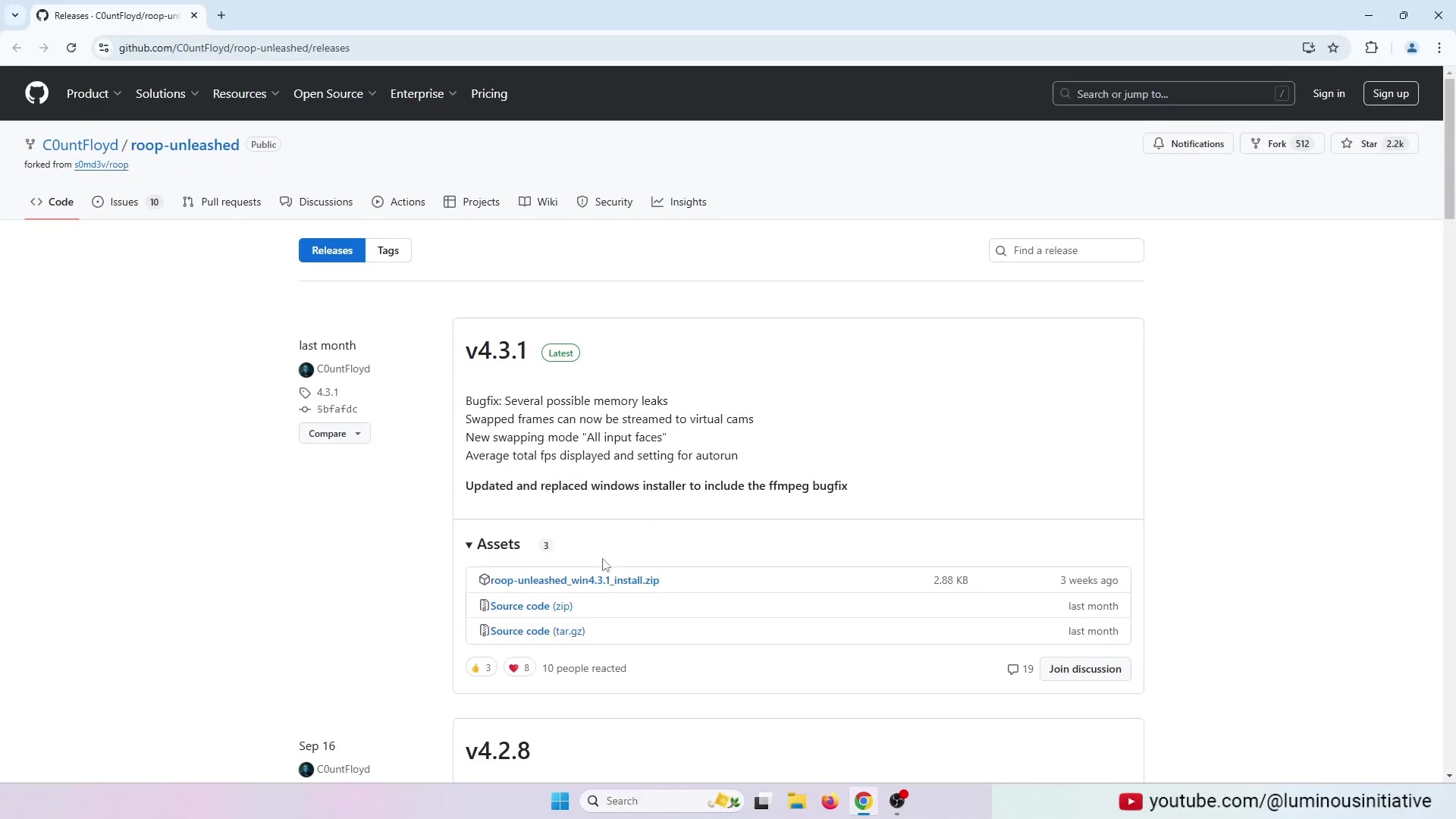
Download the latest version of Roop Unleashed from the provided link. This ensures you have the most up-to-date features and improvements.

Key Steps:

  • Find the Official Link: Navigate to the GitHub repository.
  • Download the ZIP File: Locate and download the ZIP file corresponding to the latest version.
  • Verify the Download: Ensure the file is completely downloaded before proceeding.

Installing Roop Unleashed

After downloading, extract the ZIP file to a drive with ample storage space. This is crucial, as Roop Unleashed requires significant disk space to operate efficiently. Be mindful of the path you choose for extraction, as spaces in the path can cause installation issues. Once extracted, proceed to install the software by opening the batch file.
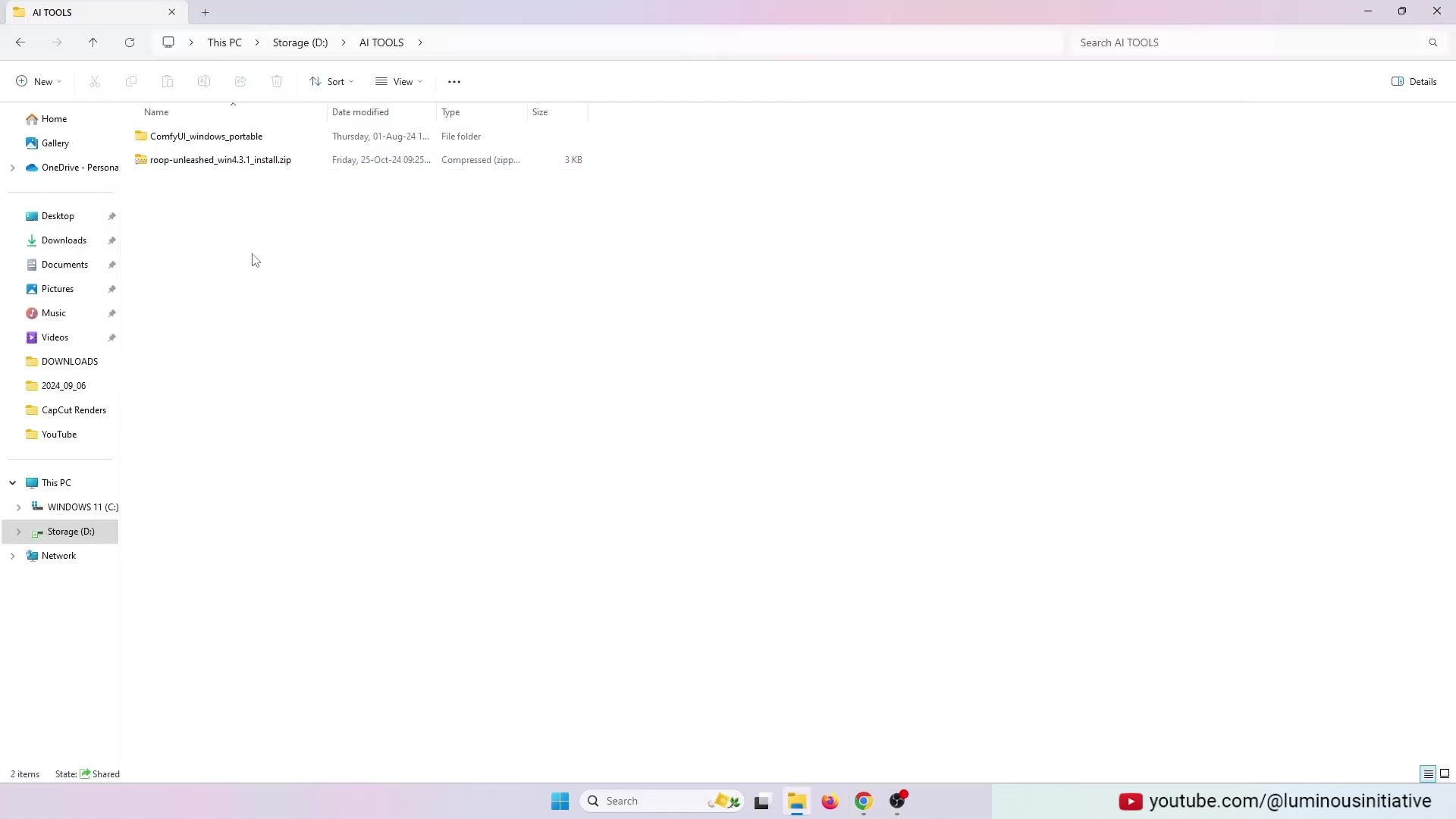
The video highlights the importance of choosing a drive with plenty of storage space for extracting the ZIP file. This ensures smooth operation and avoids potential issues due to insufficient space.

Extraction Process:

  1. Right-Click the ZIP File: Right-click on the downloaded ZIP file.
  2. Select 'Extract All': Choose the 'Extract All' option.
  3. Choose a Destination: Select a drive with plenty of free space, avoiding paths with spaces.

Installation Process:

  1. Navigate to the Extracted Folder: Open the folder where you extracted the ZIP file.
  2. Run the Batch File: Locate and run the .bat file to start the installation.
  3. Follow On-Screen Instructions: Adhere to any prompts or instructions that appear during the installation.
  4. Address Pathing Issues: Ensure the path does not contain spaces.

Troubleshooting Installation Issues

One common issue during installation is related to the path containing spaces. Roop Unleashed requires a path without any spaces to install correctly. If you encounter this problem, rename the containing folder by replacing spaces with underscores or removing them altogether. This simple fix can resolve most installation errors.
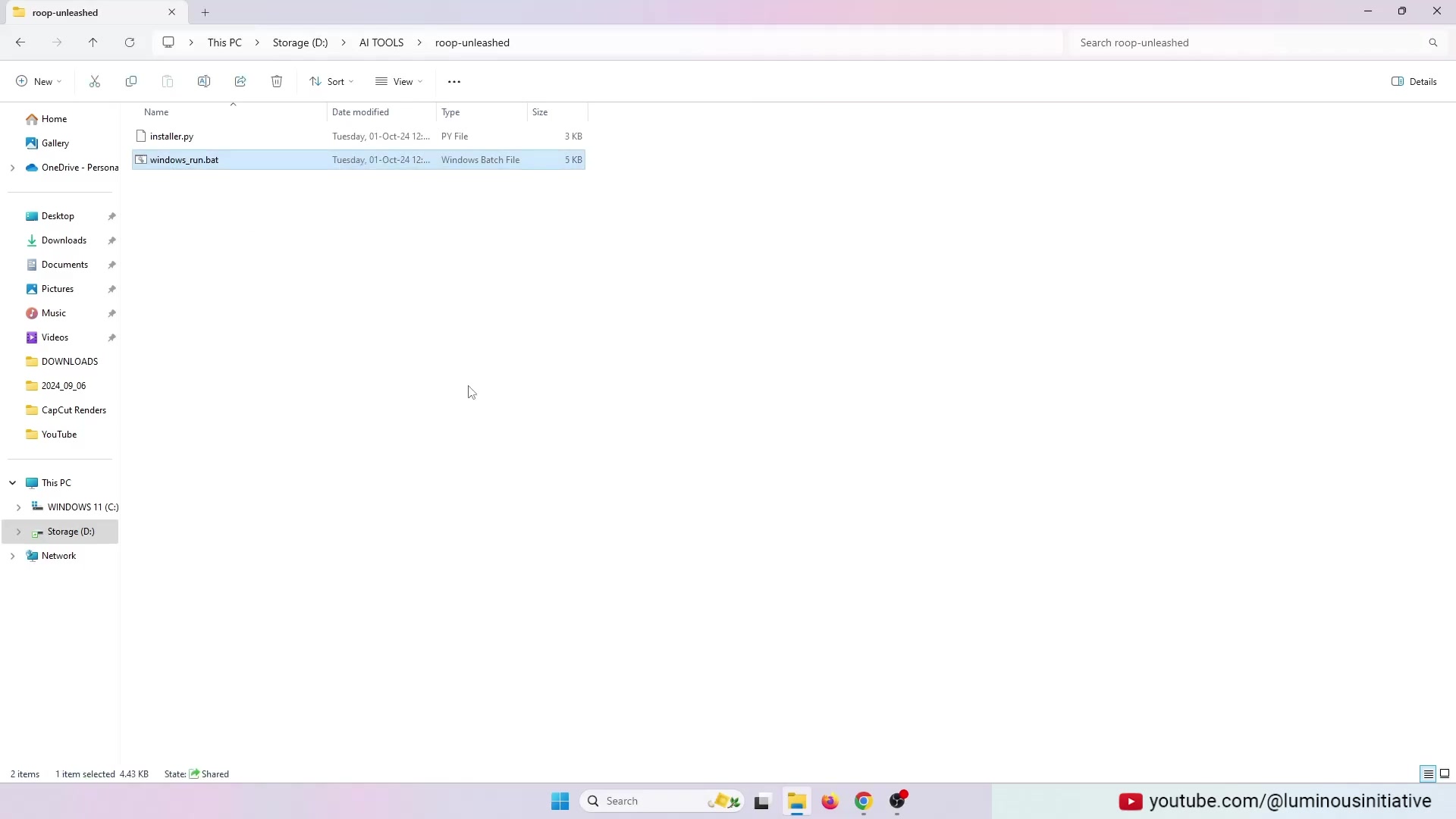
The video emphasizes that the installation path must not contain any spaces to prevent errors. This is a critical point to ensure a smooth installation process. Rename the containing folder by placing an underscore.

Steps to Fix Pathing Issues:

  1. Identify the Path: Note the path where you're trying to install Roop Unleashed.
  2. Rename Folders: Rename any folders in the path that contain spaces.
  3. Use Underscores: Replace spaces with underscores to create a valid path.
  4. Restart Installation: Run the batch file again to restart the installation process.

Launching Roop Unleashed

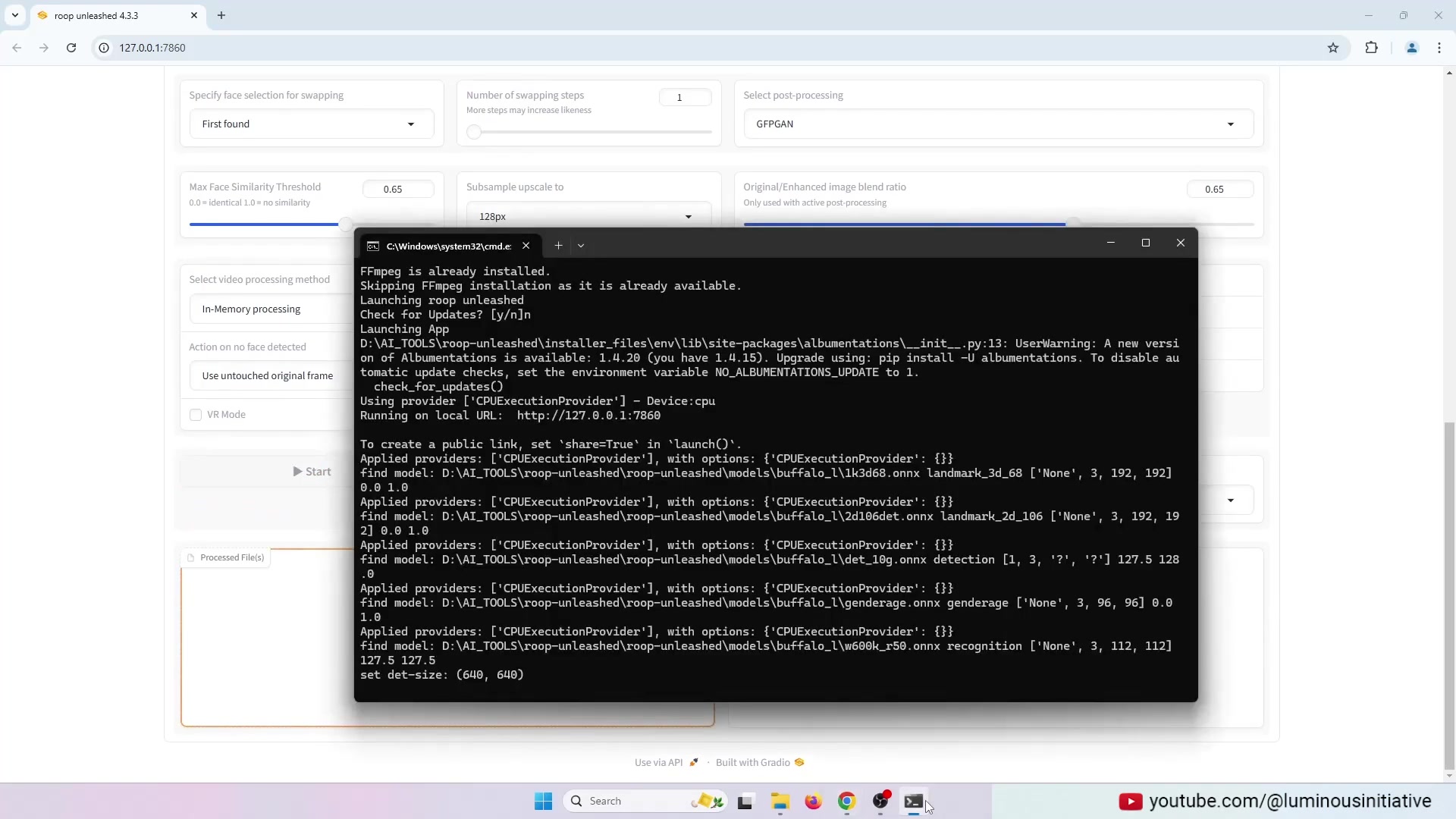
Once installed, launch Roop Unleashed by running the batch file again. This will open the application in your web browser. If FFMPEG isn't working properly, close the application completely, including the terminal, and relaunch it. This ensures that all components are functioning correctly.
Relaunching the application ensures that FFMPEG starts working properly.

Steps to Launch:

  1. Close All Terminals: Ensure all related terminal windows are closed.
  2. Rerun Batch File: Execute the .bat file again.
  3. Check for FFMPEG: Verify that FFMPEG is working by observing the terminal output.
  4. Access the Application: The application should launch in your web browser.

Selecting Source and Target Media

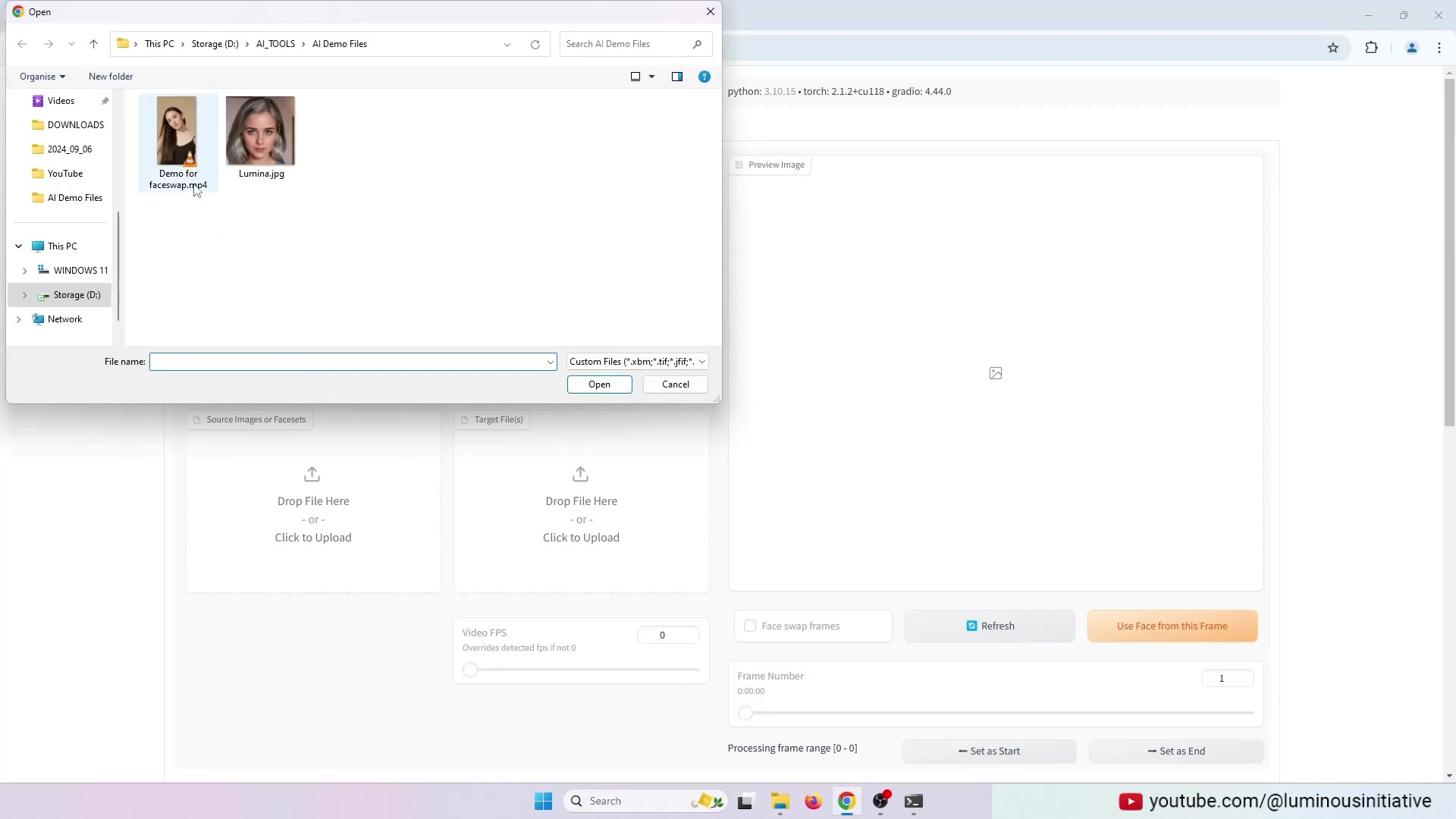
In the Roop Unleashed interface, select your source image and target video. The source image should be a clear photo of the face you want to swap in. The target video is where you want to apply the face swap. Ensure that both files are compatible with the software. Select an image of a face as the source. Now select a video as the target.
Select the source image and target video to start the face-swapping process. This step is crucial for determining which face will be swapped and where it will be applied.

Steps to Select Media:

  1. Locate Source Image Upload: Find the 'Source Images or Facets' section.
  2. Upload Source Image: Upload the image of the face you want to use.
  3. Locate Target Video Upload: Find the 'Target File(s)' section.
  4. Upload Target Video: Upload the video where you want to apply the face swap.

Configuring Post-Processing

To enhance the quality of your face swap, configure post-processing options. Select GPPGAN for post-processing to improve the final result. This setting can significantly enhance the realism and smoothness of the face swap. Select GPPGAN for the post processing. Choose GPPGAN for enhanced post-processing to improve the final result of the face swap.

Steps to Configure Post-Processing:

  1. Locate Post-Processing Options: Find the 'Select post processing' dropdown menu.
  2. Select GPPGAN: Choose 'GPPGAN' from the available options.
  3. Adjust Settings: If needed, adjust any additional post-processing settings to fine-tune the result.

Starting the Face Swap

With all settings configured, click the 'Start' button to initiate the face swap. The software will process the video, swapping the faces as instructed. Monitor the progress in the terminal window and wait for completion. The software will process the video and swap the faces. Start the face swap by clicking the 'Start' button, initiating the processing of the video.

Steps to Start:

  1. Review Settings: Double-check all your settings to ensure they are correct.
  2. Click 'Start': Press the 'Start' button to begin the face swap process.
  3. Monitor Progress: Keep an eye on the terminal window to track the progress.
  4. Wait for Completion: Allow the software to complete the face swap.

Accessing the Output Video

Once the face swap is complete, you can access the output video in the specified output folder. The video will be saved with the swapped faces. Review the video to ensure it meets your expectations, and make any necessary adjustments. After completion, you can check the video in the output folder. The output video can be accessed in the specified output folder, where you can review the final result of the face swap.

Steps to Access Output:

  1. Locate Output Folder Option: Find the 'Open Output Folder' button.
  2. Open Output Folder: Click the button to open the output folder.
  3. Review Video: Watch the video to ensure the face swap meets your expectations.

Roop Unleashed Pricing

Roop Unleashed Is Free

Roop Unleashed is an open-source project, making it completely free to download and use. This accessibility allows anyone to explore its face-swapping capabilities without financial constraints. While there are no upfront costs, consider supporting the developers through donations or contributions to help sustain the project. Since Roop Unleashed is an open-source project, it operates on community support. This means that updates, improvements, and maintenance depend on the contributions of developers and users alike. If you find the tool valuable, consider giving back to the community to ensure its continued availability and enhancement.

Being free of charge, Roop Unleashed removes barriers for users who may not have access to paid software. This includes hobbyists, students, and small content creators who can leverage the tool for their projects without incurring expenses. The open-source nature of Roop Unleashed also promotes transparency and collaboration, as users can examine the code, suggest improvements, and customize the tool to suit their specific needs.

In addition to being free, Roop Unleashed offers a wide range of features that rival those found in commercial software. This makes it an attractive option for users looking for a cost-effective face-swapping solution. While there may be community-driven costs like your own time or potential hardware upgrades, the absence of subscription fees makes it a great choice for users aiming to reduce their software expenses. Overall, Roop Unleashed's free pricing model, combined with its robust capabilities, makes it a standout option in the face-swapping software market.

Pros and Cons of Roop Unleashed

👍 Pros

Easy to use, even for beginners

Free and open-source

High-quality face swaps

Supports a variety of video formats

Regular updates and improvements

👎 Cons

Requires a PC with sufficient resources

Installation can be tricky due to pathing issues

May not produce results as high-quality as advanced tools

Limited advanced features compared to professional software

Roop Unleashed Core Features

Key Features of Roop Unleashed

Roop Unleashed comes packed with several features designed to make face swapping easy and efficient. Its beginner-friendly interface allows users of all skill levels to dive right in. Let's explore these key features:

  1. Simple Interface: The software boasts an intuitive interface that simplifies the face-swapping process.
  2. High-Quality Output: It produces seamless and natural-looking face swaps.
  3. Post-Processing Options: Includes GPPGAN for enhanced post-processing, refining the final result.
  4. Versatile Compatibility: Supports a wide range of video formats.
  5. Cross-Platform Support: Compatible with both Windows and macOS.
  6. Regular Updates: The software is frequently updated to improve performance and add new features.

These features combine to make Roop Unleashed a powerful tool for creating high-quality face swap videos. The ability to quickly produce impressive results, coupled with the software's ease of use, make it an excellent choice for both casual and professional users. The consistent updates ensure that Roop Unleashed remains at the forefront of face-swapping technology, adapting to new trends and user demands. The inclusion of GPPGAN further enhances the quality of the output, making Roop Unleashed a standout option in the market.

Roop Unleashed Use Cases

Creative Applications of Roop Unleashed

Roop Unleashed is versatile and can be used in various creative applications. Here are a few use cases:

  1. Entertainment: Create funny videos to share with friends and family.
  2. Social Media: Produce unique and engaging content for platforms like TikTok and Instagram.

  3. Marketing: Craft eye-catching marketing materials with a twist.
  4. Education: Use face swapping for educational purposes, such as historical reenactments.
  5. Personal Projects: Incorporate face swaps into personal video projects for a fun, creative touch.

By leveraging Roop Unleashed, you can enhance your content and captivate your audience. The possibilities are virtually endless, from swapping your face with a celebrity to inserting yourself into iconic movie scenes. Its ease of use makes it accessible for anyone to create entertaining and engaging content quickly. Whether you’re a hobbyist, student, or professional, Roop Unleashed provides the tools to bring your creative vision to life. The diverse range of applications ensures that you can find a use case that suits your unique needs and interests, making Roop Unleashed a valuable addition to your creative toolkit.

Frequently Asked Questions (FAQ)

What is the minimum PC requirement to run Roop Unleashed?
The minimum PC requirements for running Roop Unleashed depend largely on the complexity and length of the videos you intend to process. Generally, a PC with at least 8GB of RAM, a multi-core processor (such as an Intel Core i5 or AMD Ryzen 5), and a dedicated GPU (such as NVIDIA GeForce GTX 1050 or equivalent) is recommended for smooth performance. However, for longer or higher-resolution videos, a more powerful system with 16GB or more of RAM, a faster processor, and a more capable GPU is advisable. Ensure your operating system is up-to-date to avoid compatibility issues. The amount of storage space required will vary based on the video sizes, so having ample space on your hard drive is also crucial. Meeting these minimum specifications will help ensure that Roop Unleashed runs efficiently and produces high-quality face swaps. While the open-source nature of Roop Unleashed contributes to its flexibility, having adequate hardware ensures a better overall user experience.
Is Roop Unleashed safe to download and use?
Roop Unleashed, being an open-source project, is generally considered safe to download and use, provided you obtain it from a reputable source, such as the official GitHub repository. Downloading from unofficial sources can expose your system to malware or tampered versions of the software. The open-source nature means that the code is transparent and can be reviewed by the community, which helps in identifying and addressing potential security vulnerabilities. Regular updates from the official repository also include security patches that mitigate risks. However, as with any software, it is essential to maintain good cybersecurity practices, such as running antivirus software and keeping your system updated. Being cautious about the files you download and the permissions you grant to the application will further protect your system from potential threats. By taking these precautions, you can safely enjoy the face-swapping capabilities of Roop Unleashed.
How often is Roop Unleashed updated?
Roop Unleashed is frequently updated by its developers to improve performance, add new features, and address any identified bugs or security vulnerabilities. The frequency of these updates can vary, but it is common to see new releases every few weeks or months. These updates are often driven by community contributions, bug reports, and feature requests. Staying up-to-date with the latest version ensures that you are benefiting from the newest improvements and fixes, which can significantly enhance your experience with the software. To check for updates, you can regularly visit the official GitHub repository or follow the project's announcements. Updating Roop Unleashed is crucial for maintaining optimal performance and security, making it an integral part of using the software effectively. Regular updates keep the tool relevant and aligned with evolving user needs, reinforcing its value as a reliable face-swapping solution.

Related Questions

What are some alternative tools for face swapping?
While Roop Unleashed is a great option, there are several alternative tools for face swapping, each with its own strengths and weaknesses. Some popular alternatives include: DeepFaceLab: A more advanced tool that offers higher-quality face swaps but requires significant technical expertise and computational resources. Reface: A mobile app that provides quick and easy face swaps on the go, though the results may not be as polished as those from desktop software. FaceSwap: Another open-source tool that allows for deep customization but requires a deeper understanding of machine learning concepts. Adobe After Effects: A professional video editing software that can be used for face swapping with the help of plugins, offering a high degree of control but requiring a steep learning curve. When choosing a face-swapping tool, consider your skill level, the desired quality of the output, and the resources you have available. Roop Unleashed strikes a good balance between ease of use and quality, making it a great starting point for beginners. However, if you need more advanced features or higher-quality results, you may want to explore some of the more complex alternatives. Each tool caters to different needs and preferences, so it's essential to find one that aligns with your specific requirements.
How can I improve the quality of face swap videos?
Improving the quality of face swap videos involves several key steps, from selecting the right source materials to configuring the software settings. Here are some tips to enhance the quality of your face swap videos: Use High-Quality Source Images: Choose clear, high-resolution images for the source face. Ensure Consistent Lighting: Match the lighting conditions between the source image and target video. Adjust Post-Processing Settings: Experiment with different post-processing options, such as GPPGAN, to refine the results. Select Compatible Video Formats: Use video formats that are well-supported by the software. Optimize Video Resolution: Ensure that the video resolution is appropriate for the target platform. Use Advanced Masking Techniques: If the software allows, use advanced masking techniques to blend the faces seamlessly. By following these tips, you can significantly improve the quality of your face swap videos and create more realistic and engaging content. Experimenting with different settings and techniques will help you find the optimal configuration for your specific project, allowing you to achieve the best possible results.
Can I use Roop Unleashed for commercial purposes?
Yes, you can generally use Roop Unleashed for commercial purposes, given its open-source nature. However, it is crucial to comply with the license under which Roop Unleashed is distributed. Typically, open-source licenses like the MIT License or Apache License allow for commercial use, modification, and distribution, provided that you include the original copyright notice and license text. Additionally, you must ensure that you have the rights to use the source images and target videos for commercial purposes. This includes obtaining necessary permissions or licenses for any copyrighted content, such as celebrity faces or proprietary footage. Always review the specific license terms for Roop Unleashed to understand your rights and obligations. By adhering to these requirements, you can confidently use Roop Unleashed for commercial projects without legal concerns. The open-source framework facilitates flexibility in how you use the software, but compliance with licensing and copyright regulations is paramount.

Most people like











