































Table of Contents
- Key Points
- Understanding the Power of Auto Captions
- Zeemo: Your Auto Caption Solution
- Customizing Zeemo Captions for Maximum Impact
- Weighing the Benefits and Drawbacks
- FAQ
- Related Questions



Zeemo: Your Auto Caption Solution
Step-by-Step Guide to Generating Auto Captions with Zeemo
Zeemo streamlines the auto-captioning workflow, offering an intuitive interface and robust features. Below are the steps to generate captions using Zeemo:
- Project Setup:
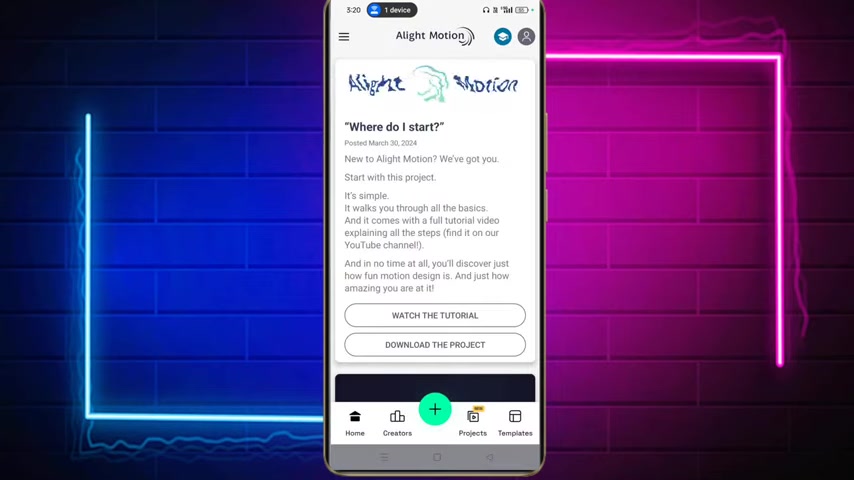
Start by opening Alight Motion, if you dont have it then try Kine Master or CapCut instead. Create a new project. Import the audio or video file you wish to caption.
- Export Video: Export the video. Use 720p HD to save file size and also have a good quality
- Zeemo Installation and Login: Download Zeemo from the Play Store and install it. Launch the application and proceed with logging in. Note that first-time users will be required to go through a login process. So proceed with logging in
- New Project Creation: After logging in, create a new project within Zeemo. This involves selecting the video you previously prepared.
- AI Caption Generation: Zeemo's AI algorithms analyze the audio and generate a transcript automatically. Click on 'ai captions' to start generation.
- Review and Edit: Once Zeemo is done generating the auto captions, Review the captions for accuracy and timing. Zeemo provides tools to edit the text and adjust the timestamps as needed.
- Style customization: You can even choose a suitable style to make the captions more aesthetically pleasing, if you are not satisfied with the original style.
-
Export: Finally, Export the finalized captions. Zeemo offers different export options, including SRT files, which are compatible with most video platforms.
Once you have the video, you import that video into alight motion and then you crop to your liking and import to YouTube or any platform
By following these steps, you can create high-quality captions that make your content more accessible and engaging. You can see that the captions are there in easy steps.







Most people like






























Report
Please select a reason for reporting
- 13 Reasons to Switch from Snapchat to Text Messaging
- 7 Powerful Speech to Text Apps to Boost Productivity
- 10 Best Speech to Text Tools for Effortless Transcription
- 13 Free Tools to Easily Transcribe Audio to Text
- 15 Surprising Ways Google's Speech-to-Text Boosts Productivity
- 7 Best Free Online Audio to Text Transcription Tools
- 9 Tips to Transcribe Speech to Text Faster and Better
- 13 Best Speech to Text Software for Windows 10 in 2023
- 7 Tips for Choosing the Best Transcriber for Audio to Text
- 11 Reasons Why Dragon Speech-to-Text Apps are Game-Changers
- 6 Secrets to Enhance Your Speech to Text Transcription
- 6 Brilliant Ways to Boost Productivity with Talk-to-Text on Your MacBook
- 6 Ways Transcription Software Converts Audio to Text
- 8 Tips to Transcribe Speech to Text Like a Pro
- 6 Reasons IBM Watson Speech to Text is a Game-Changer
- 14 Powerful Ways Talk-to-Text Improves Your Workflow
- 12 Top Windows Speech-to-Text Software for Efficient Transcription
- 12 Game-Changing Benefits of Apple's Speech to Text Technology
- 9 Powerful Use Cases for AWS Speech to Text Technology
- 10 Easy Steps to Transcribe YouTube Videos to Text
- transcription audio en texte
- online audio transcription
- free audio file transcription
- free ai audio transcription
- audio transcription service
- audio transcription online free
- audio transcription free online
- audio to transcription software
- audio and transcript
- ai audio transcription free
- voice recording to text converter
- translate voice recording to text
- record voice to text
- audio recording to text converter
- voice recording and transcription
- chatgpt voice to text
- gmail voice to text
- speech to text reader
- speech to text ai free
- speech to talk
- How SEO and Marketing Dashboards Empower Agencies to Drive Results
- How to Use AI Tools to Find Internal Linking Opportunities Across a Business Website
- Discover Your Perfect Haircut with AI Hairstyle Apps
- Free Reputation Calculator Tools: How They're Adapting to Score AI Visibility, Not Just Rankings
- Design Professional Flyers for Free on Your Phone
- Best Free Flyer Maker Apps for Android: Design Like a Pro
- How to Know If Your Business Is Ready for an AI Customer Service Agent
- Revolutionizing Storytelling: From Novels to Screenplays with AI
- Create Engaging Animated Explainer Videos with a Free AI Tool
- Stop Multi-Subscribing: Benchmark Top AI Visual Models in One Canvas
- Frame to Video Review: A Practical Look at Turning Two Still Frames Into Motion
- NVIDIA NIM: Revolutionizing Supply Chain Data Analysis with AI
- Top AI Tools That Help Brands Stand Out Offline (Not Just Online)
- Top 5 Cold Email Software: Maximize Your Outreach in 2025
- Magic School AI: Revolutionizing Quiz & Assessment Generation
- Create Your Own Email Bot and Automate Your Email Tasks
- Beyond Pure Prompts: Optimizing Production with 'Text With Reference' Generation
- Stop Using Boring TTS: My Honest Deep Dive Into VideoAI and the Hunt for the Perfect Custom Voices
- AI & Elections: Defending Democracy Against Misinformation
- Navigating Political Discourse: AI, Deepfakes, and Reality Checks

Copyright ©2026 toolify