































Table of Contents
- Key Points
- The Rise of Custom AI Interfaces
- Custom Conversational AI: How Voiceflow Simplifies the Process
- Leveraging Voiceflow: A Comprehensive Guide
- Voiceflow: Pricing Details
- The advantages and disadvantages of using custom actions in AI interfaces.
- Key Features of Voiceflow
- Use Cases for Voiceflow’s AI Integration
- Frequently Asked Questions (FAQ)
- Related Questions


The Rise of Custom AI Interfaces
Embedding AI into Products
The future of AI isn't just about complex algorithms, it's about embedding those algorithms into the interfaces and products people use daily . This means creating custom experiences that natively incorporate AI, making it a seamless part of the user journey. This integration is showcased by companies like OpenAI, which are developing desktop applications powered by their GPT models, and Voiceflow, which simplifies the connection of AI experiences through APIs.
Voiceflow enables developers and creators to design, build, and deploy conversational AI experiences without the complexity of traditional coding. This approach democratizes AI, allowing more individuals and organizations to leverage its power in their products.
AI in Education: EduChat on Voiceflow
One of the most promising applications of AI is in the education sector. The EduChat example on Voiceflow demonstrates how AI can be embedded to create interactive learning environments

. This innovative approach allows students to engage with articles and educational material through a chatbot, enhancing comprehension and making learning more dynamic.
EduChat's interactive chatbot answers questions, provides conversation starters, and dynamically adjusts to the user's reading progress. Features like Retrieval Augmented Generation (RAG) enhance the chatbot’s ability to provide contextually relevant information, making learning more efficient and engaging. Custom interfaces allow for the development of more effective educational products.
Custom Conversational AI: How Voiceflow Simplifies the Process
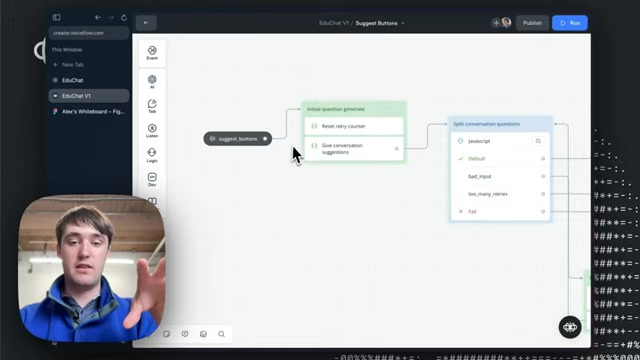
Implementing Custom Conversation Starters
Voiceflow provides tools to implement custom conversation starter actions within applications. By implementing these actions both inside the Voiceflow platform and within React chat apps, developers can offer tailored guidance and support
.
Why Implement Custom Conversation Starters?
- Improved User Engagement
- Better User Guidance
- Personalized AI Interactions
- Increase Product Use and Utility
The custom conversation starter actions are advantageous for building conversational AI by prompting initial engagement, directing users toward relevant topics, and adapting the conversation to specific user needs. These measures ensure the AI interaction is more helpful for users.
How EduChat Handles User States with Voiceflow
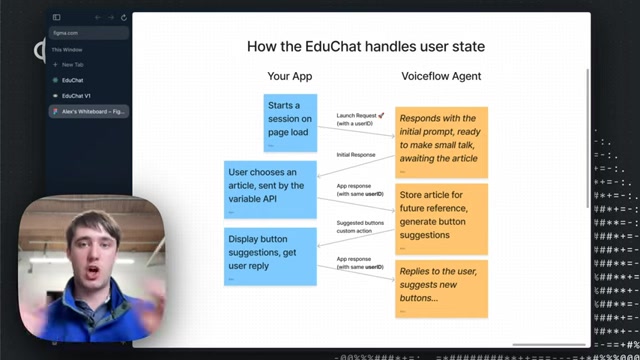
The EduChat application effectively manages user states using Voiceflow by employing a structured approach that seamlessly blends the capabilities of the application frontend with the AI processing power of the Voiceflow agent

. Here’s a detailed look at how EduChat manages these user states:
-
Initiating a Session:
- Your App: A session is started on the page load, with a launch request sent to the Voiceflow agent, including a unique userID. This step is crucial for tracking and managing individual user interactions.
- Voiceflow Agent: In response to the launch request, the Voiceflow agent responds with an initial Prompt, ready to engage the user. The agent awaits the user to select an article, preparing to tailor the conversation based on the article’s content.
-
User Article Selection:
- Your App: The user selects an article, with the choice sent via the variable API. This action updates the state of the application and prepares the system for context-specific interactions.
- Voiceflow Agent: The app response, which includes the same unique userID, triggers the agent to store the selected article for future reference. This stored context is used to generate tailored button suggestions that align with the article’s content, providing relevant and engaging interaction options for the user.
-
Displaying Suggestions and Handling User Replies:
- Your App: Button suggestions are displayed to the user through a custom action. The application waits for the user to respond, continuing the dialogue.
- Voiceflow Agent: When the user replies, the agent suggests new buttons based on the interaction history. This continuous feedback loop helps to refine suggestions over time, improving user experience.
These states are visually represented in the following table:
Leveraging Voiceflow: A Comprehensive Guide
Step-by-Step Guide to Using the Embedded AI System
Using this innovative embedded AI system begins with accessing the platform and navigating to the EduChat on Voiceflow interface

. Below is a breakdown of using this cutting-edge system:
-
Access the Landing Page: Launch the EduChat application, and you'll be greeted by a clean, intuitive landing page.
-
Select an Article: Choose an article from the dropdown menu to initiate the AI integration.
-
Engage with the AI: As you read the article, the AI generates conversation starters.
-
Type a message: You may also ask questions to the system.
Key Features of Voiceflow
Voiceflow: Exploring Core Features
Voiceflow is equipped with a range of features designed to enhance the development and deployment of AI agents
. The platform features:
- Knowledge Base Integration: Use documents from integrated websites to answer questions, or as a RAG to summarize the document for the LLM to ground it's response.
- Custom Actions: Extend the capabilities of your AI agents with custom actions, enabling you to integrate external APIs and services.
- Intuitive Drag-and-Drop Interface: Construct complex conversational flows without writing code, thanks to the drag-and-drop interface that simplifies the development process.
- Variable API Integration: Transfer information between voice flow and front ends using the variable API integration to customize the model.
- Built-in LLMs Voiceflow has built in LLMs, so you do not have to worry about importing data and setting up the system.








Most people like
































Report
Please select a reason for reporting
- 13 Reasons to Switch from Snapchat to Text Messaging
- 7 Powerful Speech to Text Apps to Boost Productivity
- 10 Best Speech to Text Tools for Effortless Transcription
- 13 Free Tools to Easily Transcribe Audio to Text
- 15 Surprising Ways Google's Speech-to-Text Boosts Productivity
- 7 Best Free Online Audio to Text Transcription Tools
- 9 Tips to Transcribe Speech to Text Faster and Better
- 13 Best Speech to Text Software for Windows 10 in 2023
- 7 Tips for Choosing the Best Transcriber for Audio to Text
- 11 Reasons Why Dragon Speech-to-Text Apps are Game-Changers
- 6 Secrets to Enhance Your Speech to Text Transcription
- 6 Brilliant Ways to Boost Productivity with Talk-to-Text on Your MacBook
- 6 Ways Transcription Software Converts Audio to Text
- 8 Tips to Transcribe Speech to Text Like a Pro
- 6 Reasons IBM Watson Speech to Text is a Game-Changer
- 14 Powerful Ways Talk-to-Text Improves Your Workflow
- 12 Top Windows Speech-to-Text Software for Efficient Transcription
- 12 Game-Changing Benefits of Apple's Speech to Text Technology
- 9 Powerful Use Cases for AWS Speech to Text Technology
- 10 Easy Steps to Transcribe YouTube Videos to Text
- transcription audio en texte
- online audio transcription
- free audio file transcription
- free ai audio transcription
- audio transcription service
- audio transcription online free
- audio transcription free online
- audio to transcription software
- audio and transcript
- ai audio transcription free
- voice recording to text converter
- translate voice recording to text
- record voice to text
- audio recording to text converter
- voice recording and transcription
- chatgpt voice to text
- gmail voice to text
- speech to text reader
- speech to text ai free
- speech to talk
- How to Use AI Tools to Find Internal Linking Opportunities Across a Business Website
- Discover Your Perfect Haircut with AI Hairstyle Apps
- Free Reputation Calculator Tools: How They're Adapting to Score AI Visibility, Not Just Rankings
- Design Professional Flyers for Free on Your Phone
- Best Free Flyer Maker Apps for Android: Design Like a Pro
- How to Know If Your Business Is Ready for an AI Customer Service Agent
- Revolutionizing Storytelling: From Novels to Screenplays with AI
- Create Engaging Animated Explainer Videos with a Free AI Tool
- Stop Multi-Subscribing: Benchmark Top AI Visual Models in One Canvas
- Best Seedance 2.5 API Provider: Every Price on the Market, Checked at Source
- Top AI Social Media Management Tools: Automate Your Content Strategy
- Free AI Text to Video Generator: Create Stunning Videos from Text
- Discover 17 ChatGPT Alternatives: A Comprehensive Comparison
- Character.AI vs. Janitor AI: Which AI Chat Platform Reigns Supreme?
- Top Virtual Assistant Companies in 2026: Reviews, Pricing, and Plans Compared
- Unveiling FaceCheck.ID: Revolutionizing Reverse Image Searches with AI
- 11 Best AI Dialers in 2026: Features, Pricing, Pros and Cons
- How I Direct Consistent AI Clips: A Hands-On Guide to Multi-Model Generation
- A Realistic Review of the Photo Generator Image Tool
- Playwright MCP Server: Automated Web Testing with Agent Mode

Copyright ©2026 toolify