































Table of Contents
- Key Points
- Introduction to Fabi Workflows
- Building a Deal Analysis Workflow with Fabi
- Step-by-Step Guide to Using Fabi Workflows
- Understanding Fabi Pricing
- Fabi Workflows: Pros and Cons
- Key Features of Fabi Workflows
- Diverse Use Cases for Fabi Workflows
- Frequently Asked Questions About Fabi
- Related Questions


Building a Deal Analysis Workflow with Fabi
Pulling Opportunity Data from Google Sheets
The first step involves connecting Fabi Workflows to a data source.
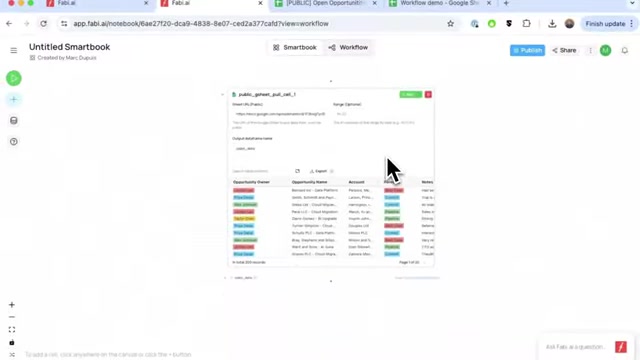
While it supports various sources like data warehouses through SQL queries, Google Sheets is used in this example for simplicity. This step is highly versatile and allows users to adapt to different data storage scenarios.
- Accessing Google Sheet Pull: Initiate the process by selecting the Google Sheet integration within Fabi.
- Authentication and Permissions: Securely connect your Google account to grant Fabi access to the specified Google Sheet.
- Specifying the Data Range: Define the data range to import, allowing Fabi to accurately target the required information.
- Naming the Dataframe: Assign a name to the imported dataset (e.g., sales data) for easy reference in subsequent analysis stages.
- Running the import: Run the process to pull the data from Google Sheets into Fabi, transforming it into a manageable format for analysis.
AI-Powered Risk Categorization
With the opportunity data now in Fabi, the next critical step is to analyze it using the platform's AI capabilities to classify deal risk. This process helps sales teams prioritize their efforts and focus on high-risk deals that may require immediate attention.
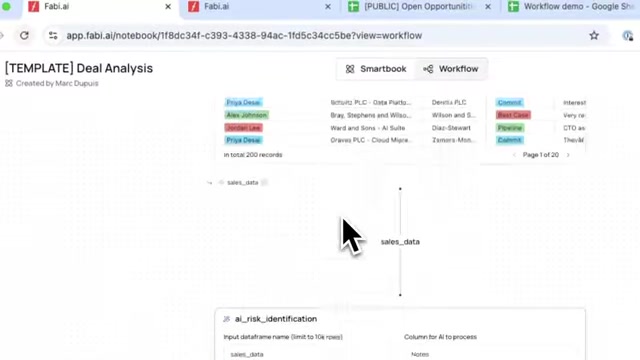
- Selecting AI Enrichment: Choose the AI enrichment option to harness Fabi’s AI analysis features.
- Configuring the Input: Specify the 'sales_data' as the input and 'Notes' field for AI-driven assessment to process the opportunity notes.
- Defining the Output: Name the resulting data frame with the risk classifications (e.g., processed_opps) and designate a new 'Risk' column for storing risk levels.
- Customizing the ai Prompt: Design a Prompt that instructs Fabi’s AI on how to evaluate each deal as either 'Low', 'Medium', or 'High' risk, based solely on the opportunity notes. This allows AI to categorize different levels of risk.
- Performing the AI Analysis: Trigger the process to run the AI, which analyzes each deal and automatically assigns a risk level. This can be switched to run over all of the opportunities.
By categorizing each deal’s risk level, businesses can direct their focus to mitigate threats, potentially enhancing overall sales effectiveness and minimizing losses.
Filtering and Visualizing Enterprise Deals
To provide executives with relevant strategic insights, it's essential to filter the data specifically for enterprise-level deals and present it through an easy-to-understand visualization.
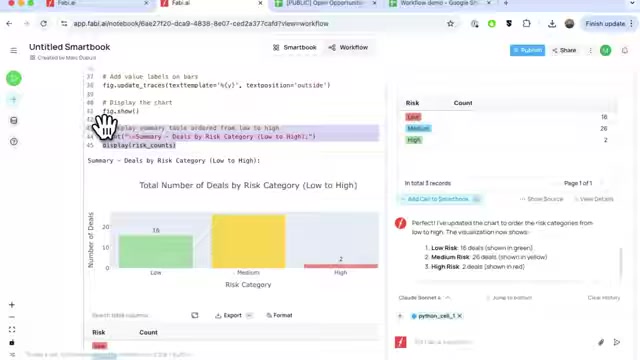
This allows for a concentrated view of high-value opportunities and their associated risks.
- Adding SQL for Targeted Filtering: Implement SQL integration to filter deals, focusing on the 'Segment' parameter to narrow down to 'Enterprise' deals. Use of the SQL cell offers quick slicing and dicing for a data overview.
- Generating the Risk Chart: Use the analyst agent to create a chart that visualizes the distribution of deals by risk category, which could order the chart from low to high. This provides quick insights for executives.
- Fine Tuning the Visualization: Alter the chart type and characteristics using AI analyst to specify the way it's displayed and the characteristics of the view to ensure clarity and ease of understanding.
- Ensuring Data Accuracy: Verify that the generated chart effectively represents the data by cross-checking key metrics such as count, order and coloring to ensure accurate interpretation.
By performing this filtering and visualization, you will be providing decision-makers with a snapshot of key deals at risk, enabling proactive measures to secure these opportunities.
Generating an AI-Powered Executive Summary
After filtering and visualizing the data, Fabi Workflows can then provide an AI-generated summary to give executives a concise overview. This feature is extremely useful for saving time and focusing attention on critical insights.
- Engaging the AI Analyst Agent: Fabi's Al analyst agent can generate a quick chart and summary. This agent is great at code generation and workflow understanding.
- Defining the scope of the Summary: Use this to generate a summary of Enterprise deals, highlighting key areas to focus on or potential deals to act on.
- Reviewing AI-Generated insights: To ensure the quality and relevance of its content. It is important to read and potentially re-write certain components of the output to ensure that the summary meets user requirements and is of sufficient quality for sending to the executives.
Now, the report is constructed!
Pushing Data Back to Google Sheets
Often, businesses require data to be easily accessible across multiple platforms. Fabi can seamlessly push the insights back into Google Sheets, ensuring seamless data integration across an organization.
- Implementing the Push Integration: First, you have to include the risk factor from your new insights in the Google Sheet using the push function.
- Establishing Data Integrity: Then, by cross-referencing back to the primary sheet, this can then show what leads are high, medium and low-value to follow up on.
- Accessing Insights Quickly: By providing access quickly to those involved, you can ensure that it meets the requirements and improves business decisions.
Configuring and Sending Automated Email Reports
As the last point in the automation process, Fabi Workflows provides a fully customized automated email sending service. This process involves the construction of an email using all of the generated and linked objects through the workflow. That is, a summary, report and link back to the spreadsheet.
- Setting a notification to allow Fabi to send emails to the recipients as this will have to be added to the settings.
- Add recipients, such as executives, marketing and sales teams that require the data.
- By having a snapshot of the data, visualization, AI-summary, link back to dataset, data points and information that is essential for quick assessment can be deployed.
By automating the delivery of key insights, decision-makers can operate on current knowledge, ensuring prompt and impactful strategies across the organization.













Most people like
























Report
Please select a reason for reporting
- 13 Reasons to Switch from Snapchat to Text Messaging
- 7 Powerful Speech to Text Apps to Boost Productivity
- 10 Best Speech to Text Tools for Effortless Transcription
- 13 Free Tools to Easily Transcribe Audio to Text
- 15 Surprising Ways Google's Speech-to-Text Boosts Productivity
- 7 Best Free Online Audio to Text Transcription Tools
- 9 Tips to Transcribe Speech to Text Faster and Better
- 13 Best Speech to Text Software for Windows 10 in 2023
- 7 Tips for Choosing the Best Transcriber for Audio to Text
- 11 Reasons Why Dragon Speech-to-Text Apps are Game-Changers
- 6 Secrets to Enhance Your Speech to Text Transcription
- 6 Brilliant Ways to Boost Productivity with Talk-to-Text on Your MacBook
- 6 Ways Transcription Software Converts Audio to Text
- 8 Tips to Transcribe Speech to Text Like a Pro
- 6 Reasons IBM Watson Speech to Text is a Game-Changer
- 14 Powerful Ways Talk-to-Text Improves Your Workflow
- 12 Top Windows Speech-to-Text Software for Efficient Transcription
- 12 Game-Changing Benefits of Apple's Speech to Text Technology
- 9 Powerful Use Cases for AWS Speech to Text Technology
- 10 Easy Steps to Transcribe YouTube Videos to Text
- transcription audio en texte
- online audio transcription
- free audio file transcription
- free ai audio transcription
- audio transcription service
- audio transcription online free
- audio transcription free online
- audio to transcription software
- audio and transcript
- ai audio transcription free
- voice recording to text converter
- translate voice recording to text
- record voice to text
- audio recording to text converter
- voice recording and transcription
- chatgpt voice to text
- gmail voice to text
- speech to text reader
- speech to text ai free
- speech to talk
- Create Engaging Animated Explainer Videos with a Free AI Tool
- Stop Multi-Subscribing: Benchmark Top AI Visual Models in One Canvas
- Best Seedance 2.5 API Provider: Every Price on the Market, Checked at Source
- AI OnlyFans: How to Generate $30,000/Month (Legally)
- Transform Your Script into an Engaging Video with AI Video Maker!
- AI Marketing Automation: A Comprehensive Guide for Small Businesses
- Midjourney Alternative for Anime Art Creators: Why PixAI May Be Better for Character Workflows
- 10 Things Most People Get Wrong About AI Image Search
- AI Girlfriend Apps: Top Choices Redefining Relationships 2025
- How to Reduce Quoting Errors in Salesforce with AI-Assisted Quote Creation
- AI Resume Builders: EnhanceCV, ResumeNerd AI, & Teal Compared
- ResumeAI: Crafting ATS-Optimized Resumes with AI
- AI in Resume Writing: A New Era for Job Seekers
- AI Resume Tools: Streamline Your Job Search and Land Your Dream Role
- AI Resume Optimization: The Right Way to Land Interviews
- Crafting a Killer Resume with AI: A Step-by-Step Guide
- Crafting a Winning Resume: AI Tools and Expert Tips
- AI Job Search: Level Up Your Career with AI Automation
- Empower Your Career Journey: Dynamic Resumes with AI
- AI Resume Builder: Create Professional Resumes Effortlessly

Copyright ©2026 toolify