































Table of Contents
- Key Points
- Understanding Frontly AI: The No-Code Revolution
- Unlocking Customization with AI: Custom Blocks and Actions
- Creating a Web App with Frontly AI: A Step-by-Step Guide
- Frontly AI Pricing: Different Plans for Different Demands
- Frontly AI: Weighing the Pros and Cons
- Frontly AI Core Features: A Detailed Look
- Frontly AI Use Cases: Real-World Applications
- FAQ
- Related Questions


Understanding Frontly AI: The No-Code Revolution
What is Frontly AI?
Frontly AI represents a significant leap in the no-code movement. It's a platform designed to empower individuals and businesses to create web applications without any coding knowledge.

Based out of Canada and gaining initial traction on AppSumo, Frontly AI distinguishes itself by focusing on ease of use and practical application of AI in app development. It provides a suite of tools that make app creation, customization, and automation accessible to everyone, regardless of their technical background.
Core Functionality: Frontly AI primarily operates by using spreadsheet software, like Google Sheets, as a backend for the web applications. It also supports Superbase, offering more scalable backend options. The platform will soon support Airtable as well. This allows users to manage their data in a familiar environment while Frontly AI handles the transformation of that data into a functional web application.
The true power of Frontly AI lies in its implementation of artificial intelligence. The platform employs AI to assist in various stages of the app development process, including:
-
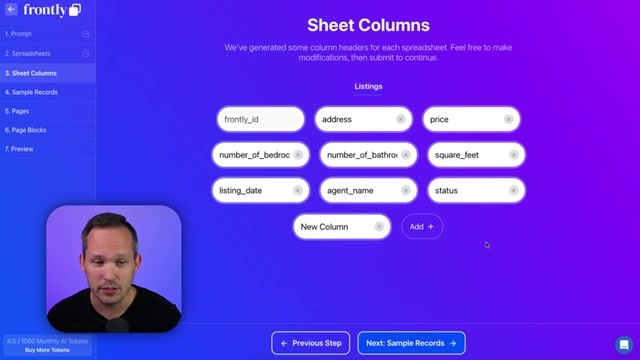
App Creation: AI can generate a new app based on text prompts, effectively translating your ideas into a functional application layout.
-
Custom Block Design: AI assists in designing custom blocks, allowing users to create unique and tailored components for their applications.
-
Custom Actions: AI facilitates creating custom actions, enabling automation of complex workflows and tasks within the app.
By focusing on these key areas, Frontly AI significantly reduces the time and effort required to build and deploy web applications, opening up new possibilities for businesses to innovate and optimize their processes.
Why Choose a No-Code AI App Builder?
Traditional app development is time-consuming and resource-intensive. No-code platforms like Frontly AI offer a streamlined alternative, boasting numerous advantages:
- Speed and Efficiency: Develop and deploy applications much faster compared to traditional methods.
- Cost Savings: Reduce development costs by minimizing or eliminating the need for developers and specialized IT personnel.
- Accessibility: Empowers non-technical users to create and manage their own applications, fostering innovation across departments.
- Agility: Quickly adapt and modify applications based on changing business needs, providing a high level of responsiveness.
- Focus on Core Business: Allows businesses to concentrate on their core competencies by freeing up resources dedicated to software development.
In an era where digital transformation is paramount, no-code AI app builders provide a crucial advantage, enabling businesses to rapidly respond to market demands and maintain a competitive edge.
Unlocking Customization with AI: Custom Blocks and Actions
Designing Custom Blocks with AI Assistance
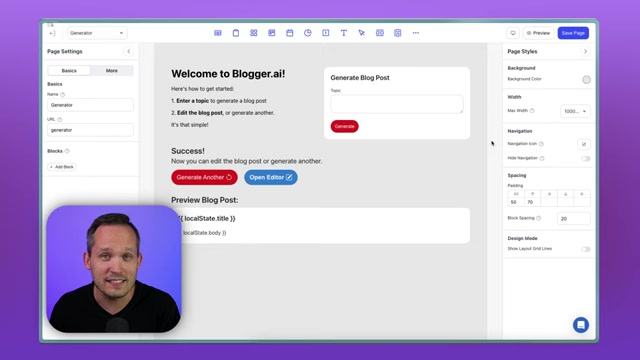
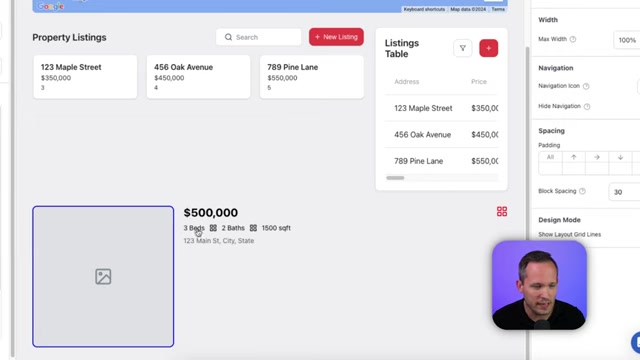
Frontly AI takes customization to the next level with its AI-powered custom block design feature. Instead of being limited to pre-defined blocks, you can design your own unique components using AI assistance. By providing a description of the block you want to create, Frontly AI will generate the block for you.
For example, describe a ‘Real estate listing block that is three columns wide, with an image of the property, price, number of beds and add an icon, number of baths and an icon, and the total square feet. Display the address of the property, and a heart icon to favourite listing.’ Frontly will create a custom listing display component to use through your app.
Creating Custom Actions for Automated Workflows
In addition to custom blocks, Frontly AI allows you to create custom actions using AI, enabling the automation of complex workflows. These actions can be triggered by user interactions within the app, automating tasks and improving efficiency.
These actions effectively do the same thing, taking different inputs and passing to Open AI.
Creating a Web App with Frontly AI: A Step-by-Step Guide
Step 1: Initial App Creation with AI
Start by creating a new app within the Frontly AI platform. Select the option to ‘Create with AI’ to leverage the platform's AI-powered assistance.
Provide a high-level description of the app you want to build. For example, 'A residential real estate listings page'. The AI will analyze your prompt and suggest appropriate tables or spreadsheets for your backend data.
Step 2: Defining Data Structure
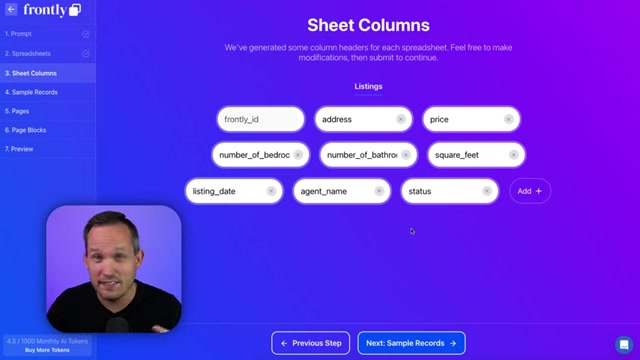
Frontly AI will determine the necessary fields for your application based on your initial Prompt. Review and customize the suggested fields, adding or removing as needed.
Example fields for the real estate listings app: address, price, number of beds, number of baths, square footage, listing date, agent name, and status. You can add feedback to the AI, influencing its understanding and output for a more tailored result. Adding fields like 'Neighborhood' to give the AI a more descriptive output.
Step 3: Generating Sample Records
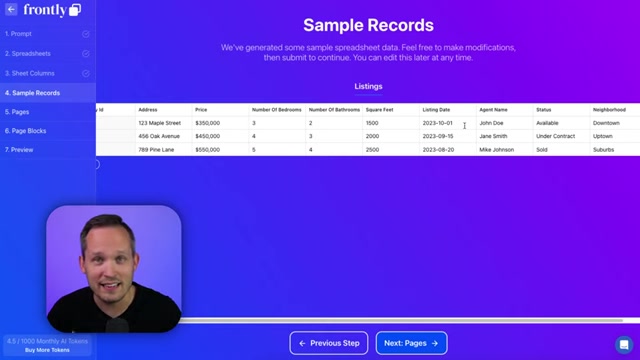
The platform generates sample records based on the fields you’ve defined. Review the generated data and make any necessary adjustments. This sample data serves as a foundation for building and testing your application.
Step 4: Customizing Pages and Blocks
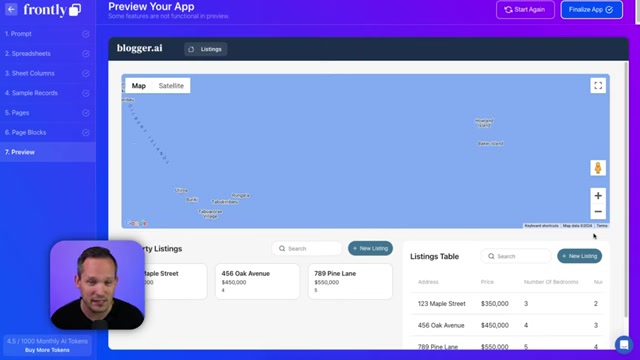
Frontly AI suggests page layouts and page blocks based on your app description. For the real estate listings app, it may suggest property listings, listings table, and listings map. Review these suggestions and customize the pages and blocks to your liking. This iterative process allows you to fine-tune the app's structure and functionality.
Step 5: Preview and Finalize Your App
Preview your app to see how it looks and functions. Once satisfied, finalize the app to make it live. The app is now ready to be viewed and customized further using Frontly AI's no-code editor.










Most people like

























Report
Please select a reason for reporting
- 13 Reasons to Switch from Snapchat to Text Messaging
- 7 Powerful Speech to Text Apps to Boost Productivity
- 10 Best Speech to Text Tools for Effortless Transcription
- 13 Free Tools to Easily Transcribe Audio to Text
- 15 Surprising Ways Google's Speech-to-Text Boosts Productivity
- 7 Best Free Online Audio to Text Transcription Tools
- 9 Tips to Transcribe Speech to Text Faster and Better
- 13 Best Speech to Text Software for Windows 10 in 2023
- 7 Tips for Choosing the Best Transcriber for Audio to Text
- 11 Reasons Why Dragon Speech-to-Text Apps are Game-Changers
- 6 Secrets to Enhance Your Speech to Text Transcription
- 6 Brilliant Ways to Boost Productivity with Talk-to-Text on Your MacBook
- 6 Ways Transcription Software Converts Audio to Text
- 8 Tips to Transcribe Speech to Text Like a Pro
- 6 Reasons IBM Watson Speech to Text is a Game-Changer
- 14 Powerful Ways Talk-to-Text Improves Your Workflow
- 12 Top Windows Speech-to-Text Software for Efficient Transcription
- 12 Game-Changing Benefits of Apple's Speech to Text Technology
- 9 Powerful Use Cases for AWS Speech to Text Technology
- 10 Easy Steps to Transcribe YouTube Videos to Text
- transcription audio en texte
- online audio transcription
- free audio file transcription
- free ai audio transcription
- audio transcription service
- audio transcription online free
- audio transcription free online
- audio to transcription software
- audio and transcript
- ai audio transcription free
- voice recording to text converter
- translate voice recording to text
- record voice to text
- audio recording to text converter
- voice recording and transcription
- chatgpt voice to text
- gmail voice to text
- speech to text reader
- speech to text ai free
- speech to talk
- Revolutionizing Storytelling: From Novels to Screenplays with AI
- Create Engaging Animated Explainer Videos with a Free AI Tool
- Stop Multi-Subscribing: Benchmark Top AI Visual Models in One Canvas
- Best Seedance 2.5 API Provider: Every Price on the Market, Checked at Source
- AI OnlyFans: How to Generate $30,000/Month (Legally)
- Transform Your Script into an Engaging Video with AI Video Maker!
- AI Marketing Automation: A Comprehensive Guide for Small Businesses
- Midjourney Alternative for Anime Art Creators: Why PixAI May Be Better for Character Workflows
- 10 Things Most People Get Wrong About AI Image Search
- AI Girlfriend Apps: Top Choices Redefining Relationships 2025
- Python Random Name Generator Tutorial
- Generate Unique Names with Python Random Name Generator
- Code a JavaScript Name Generator
- Create a Fun Name Generator App - Easy JavaScript Project!
- Experience Roblox's Avatar Creation for Karl Jacobs!
- May TBR Game: How a Letter Generator Chooses My Reads
- AI Celebrity Chat: Hilarious Pick-Up Lines & Chatbot Chaos!
- Embrace Chaos with the Random Makeup Challenge
- Boost Audience Engagement with the Wheel of Names
- Engage Your Audience with the Wheel of Names!

Copyright ©2026 toolify