































Table of Contents
- Key Points
- Understanding Gesture-Driven AI Hand Tracking
- Deep Dive into the Technology Stack
- How to Use the Gesture-Driven AI Hand Tracker
- Benefits and Drawbacks
- Key Features of the Gesture-Driven AI Hand Tracker
- Real-World Use Cases for Gesture-Driven AI Hand Tracking
- Frequently Asked Questions
- Related Questions


Understanding Gesture-Driven AI Hand Tracking
What is a Gesture-Driven AI Virtual Hand Tracker?
A gesture-driven AI virtual hand tracker is a system that uses artificial intelligence to interpret and respond to hand gestures.

This technology goes beyond simple touch-based interactions, allowing users to control devices, manipulate virtual objects, and input commands using natural hand movements. The 'virtual hand tracker' component creates a digital representation of the user's hand, mapping its position, orientation, and the configuration of fingers in real-time. AI algorithms then analyze these movements, recognizing specific gestures and translating them into corresponding actions. GenAI combined with Python provides the robust processing capabilities and flexibility required for this kind of project. This technology is a powerful way to make AI more accessible and intuitive for a wide range of users.
This innovative hand tracking system has broad implications across various fields, promising to revolutionize how we interact with technology and opening up new possibilities in areas such as gaming, virtual reality, robotics, and assistive technologies. This system's recognition in the 'best upcoming potential' category shows its bright future in the AI space.
Let's understand the components that work in conjunction to make gesture-driven AI virtual hand tracking possible:
- Computer Vision: Algorithms analyze video feed from a camera to identify and locate the user's hand.
- Machine Learning: Models trained on vast datasets of hand gestures enable the system to recognize and classify different movements.
- Real-time Processing: The system needs to process data and respond to gestures in real-time for a seamless user experience.
- Integration: Compatibility with various software platforms and hardware devices enhances the technology's usability.
The fusion of these components enables a dynamic and interactive experience, paving the way for more natural and intuitive human-computer interaction.
The Role of GenAI and Python
GenAI (Generative AI) plays a vital role in creating adaptable and intelligent systems. GenAI models can be trained to generate realistic hand movements and adapt to different hand sizes, lighting conditions, and camera angles, which significantly enhances the accuracy and robustness of the hand tracking system.
Python, a versatile and widely used programming language, is the backbone for developing AI applications, including the gesture-driven hand tracker. Python's extensive libraries like TensorFlow, PyTorch, and OpenCV provide the necessary tools for building, training, and deploying AI models. It also supports rapid prototyping and integration with other systems, making it ideal for creating innovative solutions.
Benefits of using GenAI and Python in gesture recognition:
- Adaptability: GenAI models can be fine-tuned to accommodate individual user differences and varied environmental conditions.
- Accuracy: Python's machine learning libraries provide tools for creating precise and reliable gesture recognition models.
- Scalability: Python-based systems can be easily scaled to handle increasing data volumes and user demands.
- Community Support: The large and active Python community ensures continuous development and support for AI projects.
Together, GenAI and Python enable the creation of sophisticated gesture recognition systems that are both powerful and easy to implement. Their seamless integration facilitates the development of intuitive user experiences, paving the way for wider adoption of gesture-based interactions.
The Importance of Problem Solving with AI
Integrating a problem-solving component into a gesture-driven AI hand tracker significantly expands the system's capabilities. Instead of merely recognizing gestures, the system can interpret these gestures as inputs or commands to solve specific problems. This adds a layer of intelligence, enabling users to interact with technology in a more meaningful way.
This approach can be applied to various fields, including:
- Education: Students can use hand gestures to solve math problems or manipulate virtual objects for learning.
- Healthcare: Doctors can use gestures to control medical imaging systems or perform virtual surgeries.
- Manufacturing: Workers can use gestures to control robotic arms or inspect products on an assembly line.
- Accessibility: People with disabilities can use gestures to control computers, smart home devices, and other assistive technologies.
By combining gesture recognition with problem-solving abilities, AI can deliver more practical and impactful solutions that enhance human productivity and improve the quality of life. This holistic approach represents a pivotal step toward creating truly intelligent and user-friendly AI systems. The system becomes an active participant in the user's tasks, offering assistance and solutions through simple and intuitive gestures.
Deep Dive into the Technology Stack
The Role of MediaPipe in Hand Tracking
MediaPipe stands as a powerhouse in the realm of real-time computer vision solutions. Its robust hand tracking capabilities make it an ideal choice for the foundational layer of our AI hand tracker. Let's delve into how MediaPipe facilitates accurate and efficient hand tracking:
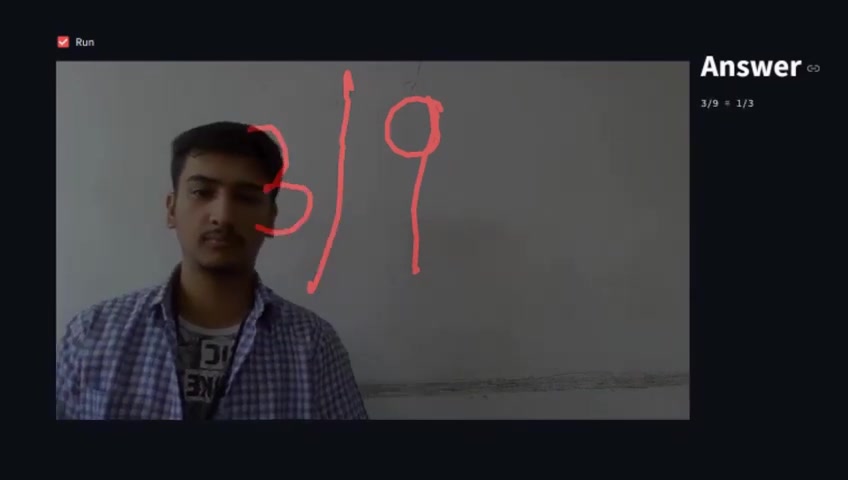
- Multi-Hand Tracking: MediaPipe can simultaneously track multiple hands in a frame, enhancing the inclusivity and applicability of the AI hand tracker. Whether it's collaborative tasks or multi-user interactions, MediaPipe ensures that each hand is uniquely identified and tracked.
- Robustness: MediaPipe’s tracking algorithms are engineered to be robust against variations in lighting, occlusion, and hand orientation. This robustness ensures reliable hand tracking in diverse environmental conditions, expanding the scope of applications for the AI hand tracker.
- Accuracy: Employing advanced machine learning models, MediaPipe delivers high-precision hand tracking, accurately identifying key landmarks on the hand. This precision is crucial for accurate gesture recognition and enables more refined and nuanced interactions.
- Efficiency: MediaPipe is designed for efficiency, providing real-time tracking without requiring substantial computational resources. This efficiency ensures that the AI hand tracker can operate smoothly on a range of devices, including mobile phones, tablets, and embedded systems.
- Platform Independence: MediaPipe operates across a variety of platforms, including iOS, Android, and desktop environments. This platform independence ensures that the AI hand tracker can be seamlessly integrated into a diverse range of applications.
By leveraging MediaPipe’s robust hand tracking, the AI hand tracker achieves a stable and high-performing foundation for gesture-driven interactions. It underscores the significance of choosing the right technological building blocks to create a user-friendly and responsive AI experience.
Leveraging Deep Learning Models for Gesture Recognition
Deep learning models are the backbone of gesture recognition, enabling the AI hand tracker to understand and interpret a wide range of hand gestures with high accuracy. Let’s delve into the deep learning models that drive this technology:
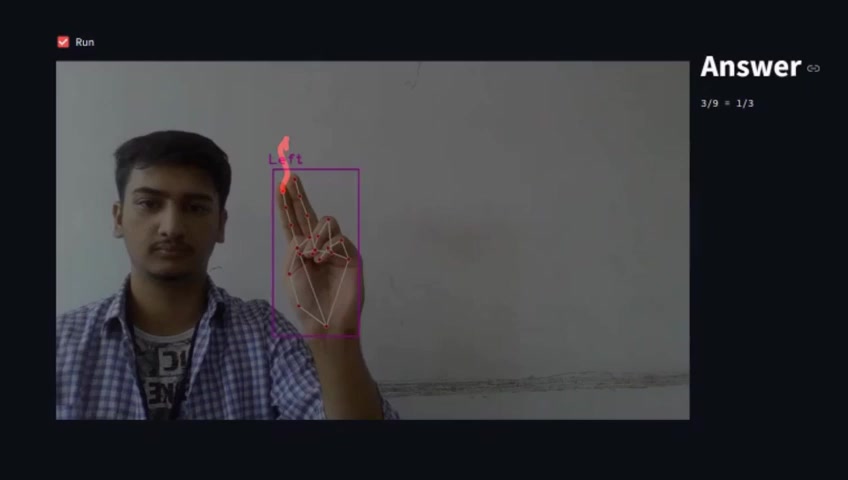
- Convolutional Neural Networks (CNNs): CNNs excel at capturing spatial hierarchies in images and videos. In gesture recognition, they are used to analyze patterns and features in hand images, extracting meaningful information for accurate classification.
- Recurrent Neural Networks (RNNs): RNNs are designed to process sequential data, making them perfect for analyzing temporal aspects of hand gestures. By capturing the evolution of hand movements over time, RNNs provide a more contextual understanding of gestures.
- Long Short-Term Memory (LSTM): LSTM networks, a variant of RNNs, address the challenges of learning long-term dependencies. In gesture recognition, LSTMs can accurately recognize gestures that involve complex sequences of hand movements.
- Transformer Networks: Transformer networks have gained popularity due to their ability to capture long-range dependencies in data. In gesture recognition, they offer superior performance in understanding the context and nuances of hand gestures.
- Transfer Learning: Transfer learning involves using pre-trained models and fine-tuning them on gesture recognition datasets. This approach accelerates the training process and improves performance, making it possible to achieve high accuracy with less data.
The integration of these deep learning models with gesture recognition enables the AI hand tracker to deliver unparalleled accuracy and responsiveness. As technology progresses, the system continues to evolve, promising even more intuitive and seamless interactions.








Most people like



































Report
Please select a reason for reporting
- 13 Reasons to Switch from Snapchat to Text Messaging
- 7 Powerful Speech to Text Apps to Boost Productivity
- 10 Best Speech to Text Tools for Effortless Transcription
- 13 Free Tools to Easily Transcribe Audio to Text
- 15 Surprising Ways Google's Speech-to-Text Boosts Productivity
- 7 Best Free Online Audio to Text Transcription Tools
- 9 Tips to Transcribe Speech to Text Faster and Better
- 13 Best Speech to Text Software for Windows 10 in 2023
- 7 Tips for Choosing the Best Transcriber for Audio to Text
- 11 Reasons Why Dragon Speech-to-Text Apps are Game-Changers
- 6 Secrets to Enhance Your Speech to Text Transcription
- 6 Brilliant Ways to Boost Productivity with Talk-to-Text on Your MacBook
- 6 Ways Transcription Software Converts Audio to Text
- 8 Tips to Transcribe Speech to Text Like a Pro
- 6 Reasons IBM Watson Speech to Text is a Game-Changer
- 14 Powerful Ways Talk-to-Text Improves Your Workflow
- 12 Top Windows Speech-to-Text Software for Efficient Transcription
- 12 Game-Changing Benefits of Apple's Speech to Text Technology
- 9 Powerful Use Cases for AWS Speech to Text Technology
- 10 Easy Steps to Transcribe YouTube Videos to Text
- transcription audio en texte
- online audio transcription
- free audio file transcription
- free ai audio transcription
- audio transcription service
- audio transcription online free
- audio transcription free online
- audio to transcription software
- audio and transcript
- ai audio transcription free
- voice recording to text converter
- translate voice recording to text
- record voice to text
- audio recording to text converter
- voice recording and transcription
- chatgpt voice to text
- gmail voice to text
- speech to text reader
- speech to text ai free
- speech to talk
- How SEO and Marketing Dashboards Empower Agencies to Drive Results
- How to Use AI Tools to Find Internal Linking Opportunities Across a Business Website
- Discover Your Perfect Haircut with AI Hairstyle Apps
- Free Reputation Calculator Tools: How They're Adapting to Score AI Visibility, Not Just Rankings
- Design Professional Flyers for Free on Your Phone
- Best Free Flyer Maker Apps for Android: Design Like a Pro
- How to Know If Your Business Is Ready for an AI Customer Service Agent
- Revolutionizing Storytelling: From Novels to Screenplays with AI
- Create Engaging Animated Explainer Videos with a Free AI Tool
- Stop Multi-Subscribing: Benchmark Top AI Visual Models in One Canvas
- 5 Data Problems That Stall AI Projects in Financial Compliance
- Master Storyboard Drawing: Expert Tips for Non-artists
- The Future of Smart Glasses: Explained & Assembling Guide
- DeepL Translator: The AI-Powered Translation Tool
- AI Video Upscaling: Top Tools Compared for Enhanced Quality
- Bridging the Gap: How One Indie Developer Solved the "Art Asset Nightmare" Using AI Style Transfer
- How I Direct Consistent AI Clips: A Hands-On Guide to Multi-Model Generation
- My Honest Review of VideoAI: The Ultimate Character Voice Generator I've Been Using Lately
- Why do so many AI tools underdeliver for online stores?
- My Brand New Logo: AI-Powered Logo Design for Startups

Copyright ©2026 toolify