































Table of Contents
- Key Points
- GitHub's Mission and Developer Collaboration
- Spotlight on GitHub Accelerator Projects
- How to Use some of the Github accelerator projects.
- Pricing
- Pros and Cons for all mentioned projects
- Core Features
- Use Cases
- FAQ
- Related Questions


GitHub's Mission and Developer Collaboration
Accelerating Human Progress through Open Source
GitHub is on a mission to accelerate human progress through developer collaboration. To achieve this ambitious goal, GitHub aims to unlock the potential of one billion developers around the globe. This initiative is rooted in the understanding that software development, particularly within an open source context, is the world's largest collaborative team sport.
By fostering collaboration and providing the necessary resources, GitHub empowers developers to create innovative solutions that address global challenges. This mission underscores GitHub's commitment to not only providing a platform for code hosting but also actively facilitating the growth and development of a thriving open source ecosystem.
GitHub recognizes that developer collaboration is the cornerstone of technological advancement. By enabling developers to work together seamlessly, share knowledge, and contribute to projects, GitHub fosters an environment where innovation can flourish. This collaborative approach ensures that diverse perspectives and skill sets converge, leading to more robust and impactful solutions.
The GitHub Accelerator Program
To realize its mission, GitHub has established programs like the GitHub Accelerator, which provides funding, time, and expertise to open source maintainers.

These resources are crucial in helping maintainers sustain and Scale their projects, ensuring the continued growth and vitality of the open source ecosystem.
The GitHub Accelerator program addresses the unique challenges faced by open source maintainers, who often juggle multiple responsibilities with limited resources. By offering financial support, the program enables maintainers to dedicate more time to their projects, improving code quality, addressing user needs, and fostering community engagement.
Moreover, the Accelerator program provides access to expert guidance and mentorship, helping maintainers navigate the complexities of Project Management, community building, and sustainability. This support network empowers maintainers to make informed decisions, overcome obstacles, and build thriving open source projects that benefit the broader community.
Spotlight on GitHub Accelerator Projects
Unsloth AI: Streamlining Language Model Fine-Tuning
Unsloth AI, created by Daniel and Michael from Sydney, Australia, addresses the challenge of lengthy fine-tuning processes for language models.

Currently, fine-tuning a language model can take weeks or even months. Unsloth allows you to fine-tune language models two times faster, using 70% less memory, and with no degradation in accuracy.
Unsloth’s website can be found at unsloth.ai and their github is located at github.com/unslothai/unsloth. This project allows developers with limited resources to train cutting-edge AI. The project’s goal is to bring the cost curve of fine-tuning models down, increasing AI accessibility. The project has already achieved over one million downloads per month.
Daniel explains that the inspiration behind Unsloth AI stemmed from their personal experience of trying to train language models on a computer with a less powerful GPU. This limitation led them to optimize the code, resulting in a tool that has garnered significant traction and support from the open source community. The project has over 2M downloads on GitHub, showing that the open-source community is receptive to unsloth.
OpenWebUI: A User Interface for AI Models
Tim Baek is the person behind OpenWebUI, a user interface for AI models, which can be found on github.com/OpenWebUI/OpenWebUI. OpenWebUI provides an accessible interface for interacting with AI models.
One of the key advantages of OpenWebUI is that it allows users to simply use and sustain work done in open source full time.
It offers a user-friendly interface that integrates various language models, including Llama 3 and GPT-4o. With OpenWebUI, users can easily deploy a variety of models, and have a very nice, intuitive way to explore AI technologies.
The project’s capabilities include allowing the user to upload files, and utilize web search directly from the application. In the demonstration shown, a user queries 'What is OpenWebUI?' The AI then provides a helpful answer, displaying both language models, and links to the websites it gathered the information from. OpenWebUI is on a mission to build the best AI Interface and is already delivering on the vision.
Web-Check: X-Ray Vision for Your Website
Alicia Sykes created Web-Check, which can be found on github.com/lissy93/web-check. The project provides you x-ray vision for your website, so you can see what attackers already know.

Web-Check provides over 30 supported checks so that you can view and analyze key website information instantly. By entering a URL to start a check you can Instantly view the website's:
- Carbon Footprint
- Site Features
- Server Location
- Cookies
- DNS Records
- Firewall Types
- Uptime Status
- Social Tags It is built on the idea that to be on defense, you have to understand where your weaknesses are. When security researchers are looking at a website, they have a certain checklist that they use to quickly ascertain potential vulnerabilities. Web-Check automates that work for everyone so that it’s easy to view where your weaknesses are. It also provides direct raw data in JSON format.
This project is a great way to level the playing field by allowing website owners to quickly Visualize and fix issues before someone else has the chance to find and exploit it.
NAV2: Open Source Robotics Navigation Framework
Steve Macenski is the person behind NAV2, an open source robotics navigation framework, which can be found on github.com/open-navigation/navigation2. NAV2 is the navigation system inside of hundreds of robots, all over the world.
These robots range from manufacturing to farming, and NAV2 is the brain that powers them all.
The need for strong software in the robotics market caused Steve to realize that robotics’ hard parts were in the software. He designed the system that he wanted, and I had a strong conviction that if I built this, it would resonate with a lot of people.
In order to use Nav2, all a user has to do is input where they want the robot to go and Nav2 will send a control signal for the robot to move from Point A to Point B. Nav2 uses a variety of different maps to complete this job. These maps include cost maps that Outline safe spots, and points to avoid.
While Nav2 has a wide range of robotic applications, one of the goals of the project is to be the first system that allows for multi-robot autonomy. The open-source nature of NAV2 allows it to be a long-lasting tool.
LLMware AI: Your Data - Without a Data Scientist
Namee Oberst is working with LLMware AI. At LLMware AI they strive to make every CPU as good as a GPU by picking the right tools, and using small language models. Small language models have a variety of applications from enterprise use to internal data management. It has a github found at github.com/llmware-ai.
The main advantage is that every CPU, is as good as a GPU, because of the right models. This opens up many use cases that are not traditionally available due to the increased cost and scarcity of GPUs. With LLMware’s framework, a company can use AI without data scientists because it’s built with out of the box examples.
A-Frame: Accessible 3D Graphics
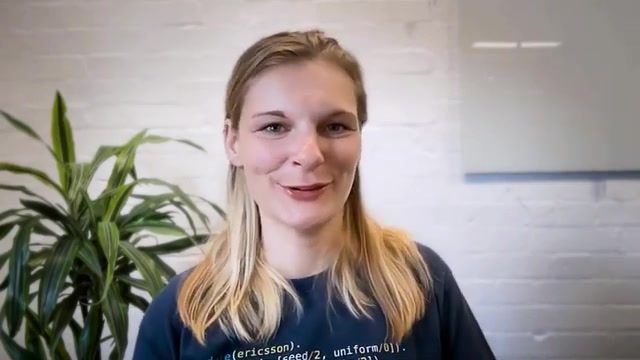
Diego Marcos works with A-Frame. A-Frame makes the onboarding and learning process to create 3D graphics more accessible to anyone.

It has a Github at github.com/aframevr/aframe.
The core objective of A-Frame is to democratize 3D graphics and make them more accessible to the general public. A-Frame is a building block and provides users the ability to generate 3D objects using natural language. To do this you would use code like, "a-entity ai-model=Prompt: awesome wizard, the code then outputs a picture of a wizard. You can also use natural language prompts to output locations such as "a hill with a castle on top."
How to Use some of the Github accelerator projects.
How to start with Unsloth AI
-
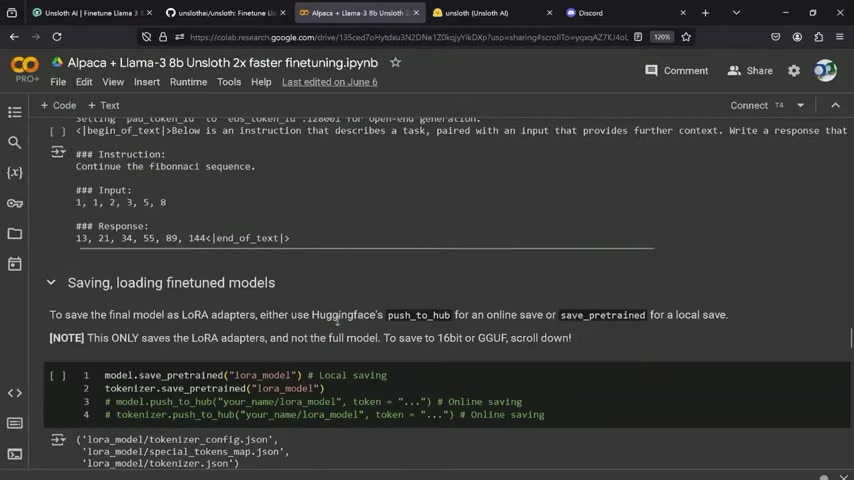
Head over to the Unsloth AI Website at unsloth.ai
-
Press Start for free
-
Follow the instructions on their github found at github.com/unslothai/unsloth Here, you can simply set up a google colab and follow their instructions to accelerate your ai model development.
How to start with LLMware.ai
- Go to their github at github.com/llmware-ai/llmware[t: 1321]
- Install LLMware:
pip3 install llmware - Run The Code.
How to start with Talkd.ai
- Go to Talkd.ai's Github at github.com/talkdai/dialog
- Follow the steps outlined on their page to deploy
- Use their API to extract data from emails.







Most people like


































Report
Please select a reason for reporting
- 13 Reasons to Switch from Snapchat to Text Messaging
- 7 Powerful Speech to Text Apps to Boost Productivity
- 10 Best Speech to Text Tools for Effortless Transcription
- 13 Free Tools to Easily Transcribe Audio to Text
- 15 Surprising Ways Google's Speech-to-Text Boosts Productivity
- 7 Best Free Online Audio to Text Transcription Tools
- 9 Tips to Transcribe Speech to Text Faster and Better
- 13 Best Speech to Text Software for Windows 10 in 2023
- 7 Tips for Choosing the Best Transcriber for Audio to Text
- 11 Reasons Why Dragon Speech-to-Text Apps are Game-Changers
- 6 Secrets to Enhance Your Speech to Text Transcription
- 6 Brilliant Ways to Boost Productivity with Talk-to-Text on Your MacBook
- 6 Ways Transcription Software Converts Audio to Text
- 8 Tips to Transcribe Speech to Text Like a Pro
- 6 Reasons IBM Watson Speech to Text is a Game-Changer
- 14 Powerful Ways Talk-to-Text Improves Your Workflow
- 12 Top Windows Speech-to-Text Software for Efficient Transcription
- 12 Game-Changing Benefits of Apple's Speech to Text Technology
- 9 Powerful Use Cases for AWS Speech to Text Technology
- 10 Easy Steps to Transcribe YouTube Videos to Text
- transcription audio en texte
- online audio transcription
- free audio file transcription
- free ai audio transcription
- audio transcription service
- audio transcription online free
- audio transcription free online
- audio to transcription software
- audio and transcript
- ai audio transcription free
- voice recording to text converter
- translate voice recording to text
- record voice to text
- audio recording to text converter
- voice recording and transcription
- chatgpt voice to text
- gmail voice to text
- speech to text reader
- speech to text ai free
- speech to talk
- How SEO and Marketing Dashboards Empower Agencies to Drive Results
- How to Use AI Tools to Find Internal Linking Opportunities Across a Business Website
- Discover Your Perfect Haircut with AI Hairstyle Apps
- Free Reputation Calculator Tools: How They're Adapting to Score AI Visibility, Not Just Rankings
- Design Professional Flyers for Free on Your Phone
- Best Free Flyer Maker Apps for Android: Design Like a Pro
- How to Know If Your Business Is Ready for an AI Customer Service Agent
- Revolutionizing Storytelling: From Novels to Screenplays with AI
- Create Engaging Animated Explainer Videos with a Free AI Tool
- Stop Multi-Subscribing: Benchmark Top AI Visual Models in One Canvas
- Top 5 Cold Email Software: Maximize Your Outreach in 2025
- Magic School AI: Revolutionizing Quiz & Assessment Generation
- Create Your Own Email Bot and Automate Your Email Tasks
- Beyond Pure Prompts: Optimizing Production with 'Text With Reference' Generation
- Stop Using Boring TTS: My Honest Deep Dive Into VideoAI and the Hunt for the Perfect Custom Voices
- AI & Elections: Defending Democracy Against Misinformation
- Navigating Political Discourse: AI, Deepfakes, and Reality Checks
- Detecting Political Bias in News Articles: A Powerful AI Algorithm
- AI Bias Unveiled: Political Leanings in ChatGPT & Beyond
- Revolutionize Learning: Discover Quizzes AI for Engaging Interactive Quizzes

Copyright ©2026 toolify