































Table of Contents
- Key Points
- Understanding GitHub Copilot
- Practical Applications of GitHub Copilot
- Unlocking the Power: How to Use GitHub Copilot Effectively
- GitHub Copilot Pricing: Flexible Options for Every Developer
- Weighing the Options: GitHub Copilot Pros and Cons
- Frequently Asked Questions about GitHub Copilot
- Dive Deeper: Related Questions About AI-Powered Coding Assistants



Understanding GitHub Copilot
What is GitHub Copilot?
GitHub Copilot is an AI-powered coding assistant developed by GitHub and OpenAI.

It's designed to help developers write code faster and more efficiently by providing real-time suggestions and autocompletions. Think of it as your AI pair programmer, offering intelligent assistance as you type. It leverages machine learning models trained on billions of lines of public code to understand your coding context and provide relevant suggestions. GitHub Copilot is revolutionizing the software development industry by providing an AI-driven assistant to improve code quality and writing speed.
In essence, GitHub Copilot analyzes the code you're writing, taking into account factors like:
- Your coding style: It learns your preferred coding conventions and patterns.
- Comments: It understands natural language comments and can generate code based on them.
- Function names: It uses function names to infer the intended functionality and suggest appropriate code.
- Existing code: It considers the surrounding code to provide contextually relevant suggestions.
Based on this analysis, Copilot offers a range of suggestions, from simple autocompletions to complete code blocks, helping you write code with greater speed and accuracy. Because it is AI driven it will get better and better the more you use it. It is a great resource for not only writing code, but assisting with testing and documentation.
Key Features of GitHub Copilot:
- Code Completion: Predicts and suggests code as you type, reducing boilerplate and improving efficiency.
- Contextual Suggestions: Offers code suggestions based on the surrounding code, comments, and context.
- Multi-Language Support: Supports a wide range of programming languages, including Java, Python, JavaScript, TypeScript, C#, and more.
- Integration with IDEs: Seamlessly integrates with popular IDEs like VS Code and IntelliJ IDEA, providing a familiar coding experience.
Seamless Integration with IntelliJ IDEA
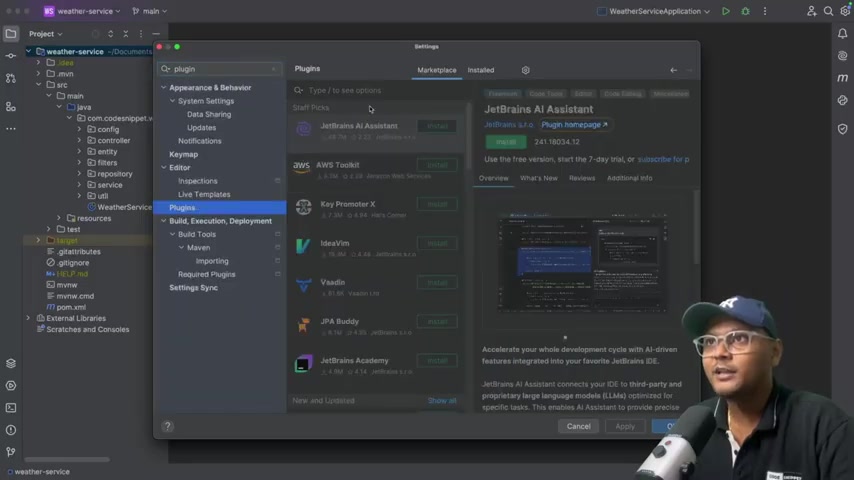
While GitHub Copilot integrates seamlessly with VS Code, integrating it with IntelliJ IDEA can significantly enhance the coding experience for Java and Spring Boot developers.

IntelliJ IDEA is a renowned IDE, especially favored by Java developers for building robust and scalable applications. Here's how to integrate GitHub Copilot with IntelliJ IDEA:
- Install the GitHub Copilot Plugin:
- Open IntelliJ IDEA and navigate to Settings (or Preferences on macOS).
- Select Plugins and search for "GitHub Copilot".
- Click Install and restart IntelliJ IDEA to activate the plugin.
- Authenticate with GitHub:
- After restarting, IntelliJ IDEA will Prompt you to authenticate with your GitHub account.
- Follow the on-screen instructions to authorize GitHub Copilot. This step connects your IDE to your GitHub account, granting access to Copilot's AI-powered assistance.
Once integrated, GitHub Copilot will provide real-time code suggestions, autocompletions, and even generate entire code blocks as you type in IntelliJ IDEA, drastically improving your coding speed and accuracy. By integrating this tool, Java developers can stay focused on the creative problem solving aspect of development, and let the AI assistant handle the more mundane coding tasks.
Exploring the Different Modes of GitHub Copilot
GitHub Copilot offers a range of modes to cater to different coding preferences and needs:
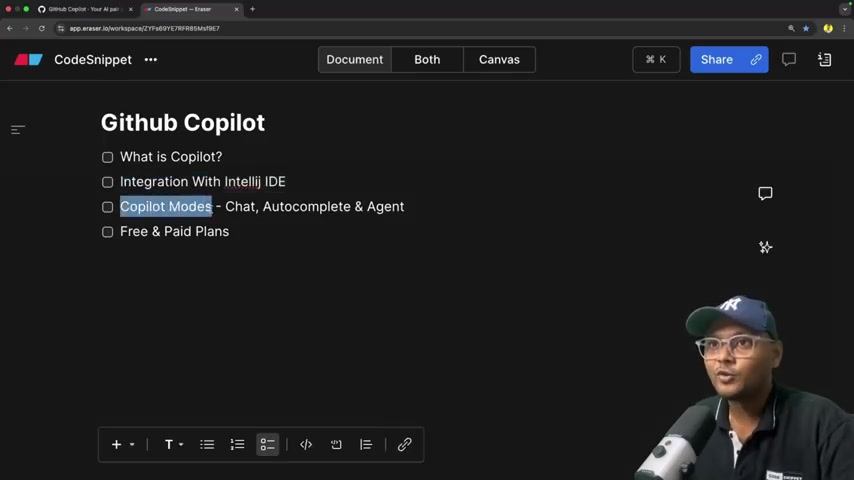
- Chat Mode: Engage in a conversation with Copilot to ask questions, seek guidance, and explore alternative solutions. The chat mode acts as an intelligent assistant, providing insights and suggestions as you code.
- Autocomplete Mode: Receive real-time code suggestions and autocompletions as you type, accelerating your coding speed and reducing errors. Copilot predicts your next move and offers contextually relevant code snippets.
- Agent Mode: The Agent Mode automates coding tasks. The agent mode takes code from start to finish, with minimal input from the developer. Agent mode is especially powerful. By starting start editing you can define a set of files you want to work with. Then Copilot is powered by AI, so mistakes are possible. Review output carefully before you attach context.
Practical Applications of GitHub Copilot
Generating Boilerplate Code
GitHub Copilot excels at generating boilerplate code, saving developers valuable time and effort.
Whether it's creating basic class structures, setting up method signatures, or defining data models, Copilot can quickly generate the necessary code, allowing you to focus on the more complex aspects of your project.
For instance, if you need to create a new Spring Boot controller, simply type a comment like // Create a REST controller for user management. Copilot will then generate the basic structure of the controller, including the necessary annotations and method signatures. It can help streamline repetitive tasks, allowing you to focus on more strategic coding.
Writing Unit Tests with AI Assistance
Unit testing is a crucial aspect of software development. GitHub Copilot can assist in writing unit tests by analyzing your code and suggesting relevant test cases. It can generate test methods, assertions, and even mock objects, helping you ensure the quality and reliability of your code.
For example, if you have a method that calculates the average of a list of numbers, Copilot can suggest test cases to verify the method's behavior with different inputs, such as empty lists, lists with positive numbers, and lists with negative numbers. You can copy this code into your files, giving you the ability to make sure that all your tests are running smoothly and functioning as intended.
Unlocking the Power: How to Use GitHub Copilot Effectively
Getting Started with Agent Mode
Agent mode supercharges copilot with new automated functionality, and offers great code writing possibilities. With a detailed prompt, CoPilot can understand how to implement, review and test code. To unlock GitHub copilot agent mode effectively:
- Open Github Copilot Chat: Open the chat window, select the code that you will be editing and then add them into the agent window.
- Choosing your task: Pick whether you want to ask, edit, or use agent mode to implement code.
- Writing clear and detailed prompts: Detail what you want to implement and give context on where and how. For example,
Create an API endpoint with put mapping to enable updating the log.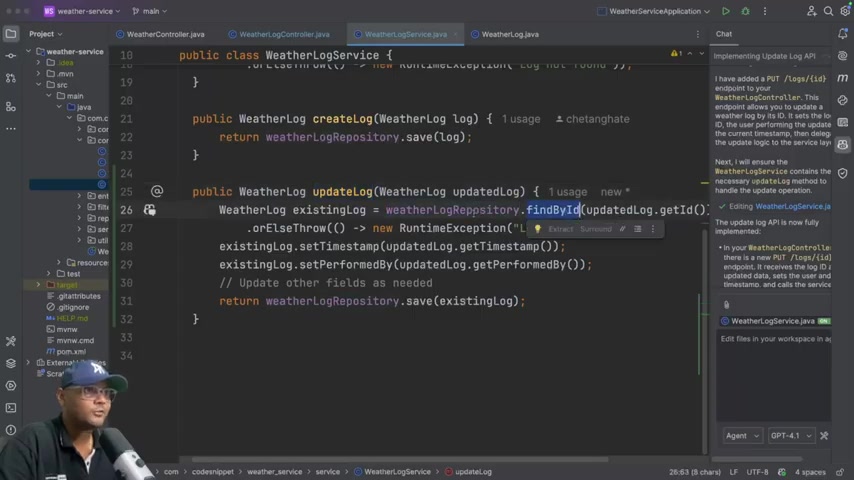
The more detail you provide copilot, the more targeted and relevant code you get.
- Testing : Copilot can also be used to create tests. To create a test for getweather, detail that the test should create a test and inject mocks. Make sure to look over all code to make sure its secure.
Using GitHub Copilot Chat for Guidance
GitHub Copilot Chat is the virtual assistant that runs the platform. To make the most of your AI pair programmer, follow these steps:
- Activating the Chat Window: Make sure that you have successfully setup your Github Copilot. You should see an icon to the right of the ide to access Github copilot chat. If it isnt there, check that the plugin is installed and you are correctly signed in.
- Ask clear and concise questions: To get the best responses, it is important to write detailed questions. Questions that detail a task, the code you are working on and the specific language or functionality.
- Copy into workspace: Copilot will give you code for you to input. Make sure to copy that code into your code base and that you save. After saving, you can use agent mode to assist with the rest of your software development task.





Most people like































Report
Please select a reason for reporting
- 13 Reasons to Switch from Snapchat to Text Messaging
- 7 Powerful Speech to Text Apps to Boost Productivity
- 10 Best Speech to Text Tools for Effortless Transcription
- 13 Free Tools to Easily Transcribe Audio to Text
- 15 Surprising Ways Google's Speech-to-Text Boosts Productivity
- 7 Best Free Online Audio to Text Transcription Tools
- 9 Tips to Transcribe Speech to Text Faster and Better
- 13 Best Speech to Text Software for Windows 10 in 2023
- 7 Tips for Choosing the Best Transcriber for Audio to Text
- 11 Reasons Why Dragon Speech-to-Text Apps are Game-Changers
- 6 Secrets to Enhance Your Speech to Text Transcription
- 6 Brilliant Ways to Boost Productivity with Talk-to-Text on Your MacBook
- 6 Ways Transcription Software Converts Audio to Text
- 8 Tips to Transcribe Speech to Text Like a Pro
- 6 Reasons IBM Watson Speech to Text is a Game-Changer
- 14 Powerful Ways Talk-to-Text Improves Your Workflow
- 12 Top Windows Speech-to-Text Software for Efficient Transcription
- 12 Game-Changing Benefits of Apple's Speech to Text Technology
- 9 Powerful Use Cases for AWS Speech to Text Technology
- 10 Easy Steps to Transcribe YouTube Videos to Text
- transcription audio en texte
- online audio transcription
- free audio file transcription
- free ai audio transcription
- audio transcription service
- audio transcription online free
- audio transcription free online
- audio to transcription software
- audio and transcript
- ai audio transcription free
- voice recording to text converter
- translate voice recording to text
- record voice to text
- audio recording to text converter
- voice recording and transcription
- chatgpt voice to text
- gmail voice to text
- speech to text reader
- speech to text ai free
- speech to talk
- AI OnlyFans: How to Generate $30,000/Month (Legally)
- Transform Your Script into an Engaging Video with AI Video Maker!
- Create Engaging Animated Explainer Videos with a Free AI Tool
- AI Marketing Automation: A Comprehensive Guide for Small Businesses
- Midjourney Alternative for Anime Art Creators: Why PixAI May Be Better for Character Workflows
- 10 Things Most People Get Wrong About AI Image Search
- AI Girlfriend Apps: Top Choices Redefining Relationships 2025
- How to Reduce Quoting Errors in Salesforce with AI-Assisted Quote Creation
- How AI Is Changing Back Office Outsourcing And Why It Matters
- How AI Helps You Spot the Next Friendslop Hit on Steam (Dear Passengers Case)
- The First-Take Trap: A Repeatable Way to Evaluate AI-Generated Songs
- Top 5 AI-Driven CDN Solutions in 2026
- Pollo AI Review: Evaluating the Multi-Model Generative Media Ecosystem
- AI OnlyFans: How to Generate $30,000/Month (Legally)
- Transform Your Script into an Engaging Video with AI Video Maker!
- Create Engaging Animated Explainer Videos with a Free AI Tool
- 8 Best Social Media Scheduling Tools (2026)
- Best Free Static QR Code Generators for Gyms and Fitness Studios
- How to Track QR Code Scans: A Complete Guide (2026)
- AI Marketing Automation: A Comprehensive Guide for Small Businesses

Copyright ©2026 toolify