































Table of Contents
- Key Points
- Unveiling ima Copilot: Tencent's AI-Powered Knowledge Hub
- Getting Started with ima Copilot: A Step-by-Step Guide
- Maximize Your Productivity with ima Copilot: Practical Use Cases
- Weighing the Benefits and Drawbacks of ima Copilot
- Frequently Asked Questions about ima Copilot
- Explore Related AI Tools



Unveiling ima Copilot: Tencent's AI-Powered Knowledge Hub
What is ima Copilot?
ima Copilot is positioned as an AI-driven intelligent work platform. Think of it as a personal Knowledge Base that possesses the ability to think and reason.
This implies the platform not only stores information but also actively helps users analyze and retrieve insights from it. Its core value lies in its capacity to support users in various tasks, from brainstorming and research to writing and problem-solving, ultimately boosting their overall work efficiency. The platform aims to consolidate information silos, making knowledge readily accessible and actionable.
Unique Features of ima Copilot
ima boasts several features setting it apart from other AI Tools

:
- Dedicated Storage: It offers 1GB of storage, allowing users to upload and store WORD, PDF, PNG, and JPG files directly on the platform. This enables the creation of a personalized knowledge repository.
- Specialized Knowledge Base: Unlike general AI models with broad knowledge domains, ima Copilot enables users to build a focused knowledge base around specific areas of expertise. By uploading relevant documents and resources, users can tailor the platform to their unique needs.
- Reduced AI Hallucinations: ima Copilot prioritizes accuracy by drawing information directly from its curated knowledge base. This approach minimizes the risk of AI "hallucinations" or generating incorrect or nonsensical responses, ensuring more reliable results.
- Customizable AI Model: Users can customize the setting such as waking shortcut keys and the application range of the AI dictionary tool. In addition, users can choose between different large models for generating responses, allowing for a tailored user experience.
Getting Started with ima Copilot: A Step-by-Step Guide
Simple Setup and Personalization
Setting up and personalizing ima is a breeze.
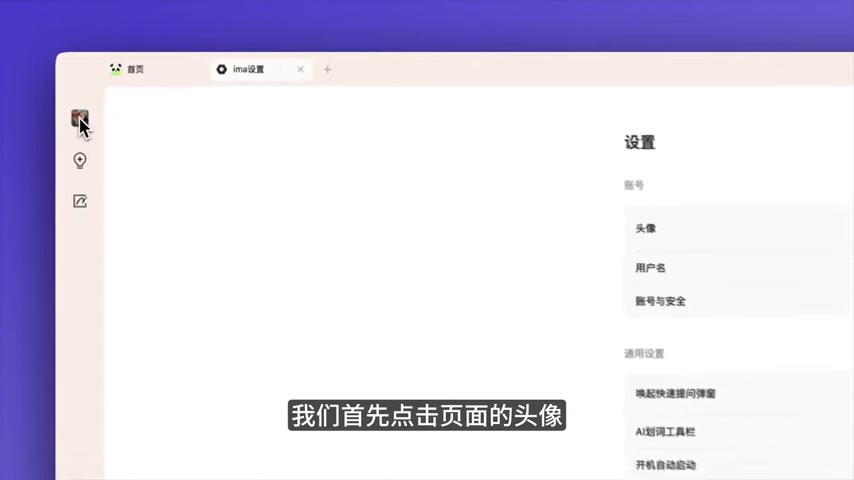
Follow these simple steps to get started:
- Access Settings: Click on your profile picture within the platform to access the settings menu.
- Customize Quick Prompts: Define your preferred shortcut keys for quickly launching the Prompt window. This feature allows for instant access to the AI assistant without disrupting your workflow.
- Configure Dictionary Tools: Specify the application scope of the AI dictionary tool. This tool enables users to quickly define unknown terms or concepts encountered during their work, further enhancing knowledge acquisition.
- Select Preferred AI Model: Choose your preferred large model for generating responses. ima offers a selection of different models, each with its own strengths and characteristics. Experiment with different models to find the best fit for your needs.
By following these simple steps, you can tailor ima to your specific preferences and workflow, maximizing its effectiveness as a personal Knowledge Management tool.
Building Your Personal Knowledge Library
The heart of ima Copilot lies in its ability to create a personalized knowledge library.
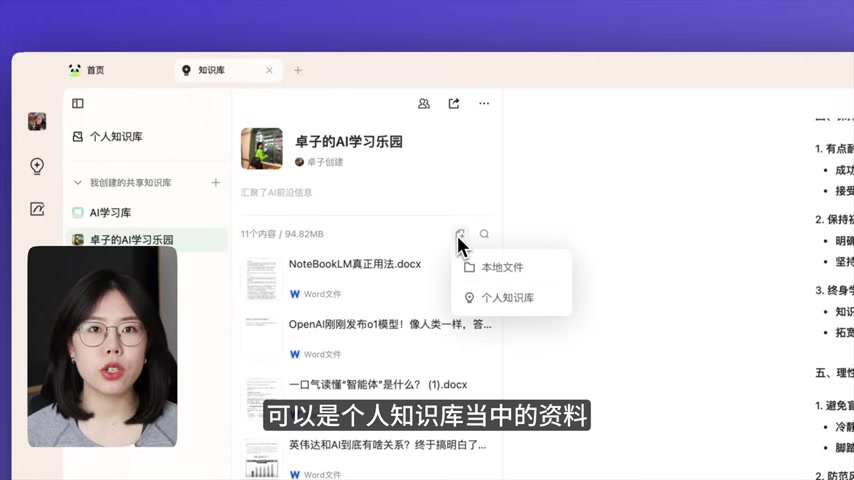
Follow these instructions to effectively build your knowledge base:
- Access Your Personal Knowledge Base: Locate the lightbulb icon on the left side of the screen and click it to access your personal knowledge base.
- Create Shared Knowledge Bases (Optional): If you collaborate with a team, create shared knowledge bases to facilitate knowledge sharing and collaboration. Click "Create Shared Knowledge Base" and define the name, description, and default questions for the new knowledge base.
- Upload Relevant Documents: Upload your own working data, or the documents that you usually visit to the personal or shared knowledge base. Click the folder icon in the library to import local files, supporting Word, PDF, PNG, and JPG formats.
- Convert Notes to Knowledge: Seamlessly transform your handwritten notes into structured knowledge entries within the platform. This feature allows you to capture and preserve valuable insights derived from meetings, brainstorming sessions, or personal reflections. By building your personal knowledge library, you can create a central repository of information tailored to your specific needs, enabling more efficient knowledge retrieval and application.
Harnessing AI-Powered Tools for Enhanced Productivity
Once your knowledge library is in place, you can start leveraging AI features.
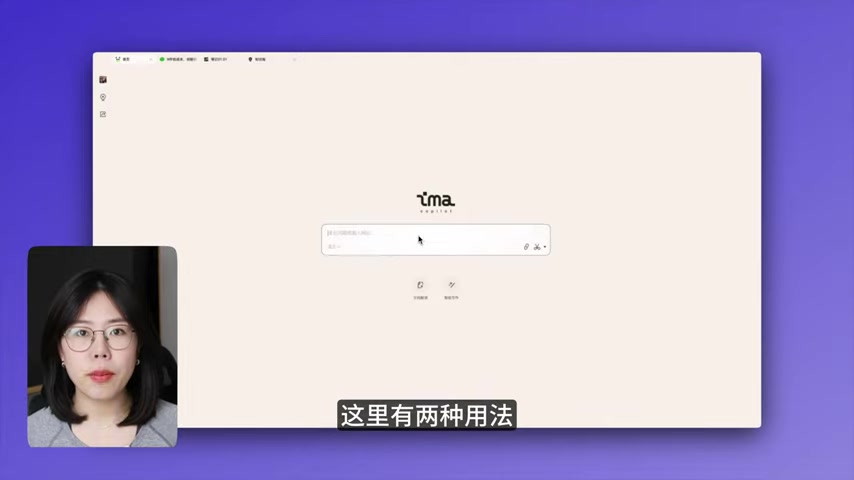
This tool features a search box where you can ask your question, or enter the website that you are looking for. To add more AI functions, you can type “/” for AI generating writing and picture functions. The system will provide AI based on its internal knowledge and model. The AI response will be stored as notebook and is transferrable to the knowledge base.
Maximize Your Productivity with ima Copilot: Practical Use Cases
Public Account Content Creation
One of the most compelling use cases for ima Copilot is assisting with public account content creation.

By uploading previous content you've created and requesting the AI to write the content, the new writing will have a similar writing pattern.
Little Red Book Copywriting
ima Copilot can be used for Little Red Book Copywriting

. The model and knowledge can be switched so that the user can get the best solution with its requirements.







Most people like






























Report
Please select a reason for reporting
- 13 Reasons to Switch from Snapchat to Text Messaging
- 7 Powerful Speech to Text Apps to Boost Productivity
- 10 Best Speech to Text Tools for Effortless Transcription
- 13 Free Tools to Easily Transcribe Audio to Text
- 15 Surprising Ways Google's Speech-to-Text Boosts Productivity
- 7 Best Free Online Audio to Text Transcription Tools
- 9 Tips to Transcribe Speech to Text Faster and Better
- 13 Best Speech to Text Software for Windows 10 in 2023
- 7 Tips for Choosing the Best Transcriber for Audio to Text
- 11 Reasons Why Dragon Speech-to-Text Apps are Game-Changers
- 6 Secrets to Enhance Your Speech to Text Transcription
- 6 Brilliant Ways to Boost Productivity with Talk-to-Text on Your MacBook
- 6 Ways Transcription Software Converts Audio to Text
- 8 Tips to Transcribe Speech to Text Like a Pro
- 6 Reasons IBM Watson Speech to Text is a Game-Changer
- 14 Powerful Ways Talk-to-Text Improves Your Workflow
- 12 Top Windows Speech-to-Text Software for Efficient Transcription
- 12 Game-Changing Benefits of Apple's Speech to Text Technology
- 9 Powerful Use Cases for AWS Speech to Text Technology
- 10 Easy Steps to Transcribe YouTube Videos to Text
- transcription audio en texte
- online audio transcription
- free audio file transcription
- free ai audio transcription
- audio transcription service
- audio transcription online free
- audio transcription free online
- audio to transcription software
- audio and transcript
- ai audio transcription free
- voice recording to text converter
- translate voice recording to text
- record voice to text
- audio recording to text converter
- voice recording and transcription
- chatgpt voice to text
- gmail voice to text
- speech to text reader
- speech to text ai free
- speech to talk
- How SEO and Marketing Dashboards Empower Agencies to Drive Results
- How to Use AI Tools to Find Internal Linking Opportunities Across a Business Website
- Discover Your Perfect Haircut with AI Hairstyle Apps
- Free Reputation Calculator Tools: How They're Adapting to Score AI Visibility, Not Just Rankings
- Design Professional Flyers for Free on Your Phone
- Best Free Flyer Maker Apps for Android: Design Like a Pro
- How to Know If Your Business Is Ready for an AI Customer Service Agent
- Revolutionizing Storytelling: From Novels to Screenplays with AI
- Create Engaging Animated Explainer Videos with a Free AI Tool
- Stop Multi-Subscribing: Benchmark Top AI Visual Models in One Canvas
- Frame to Video Review: A Practical Look at Turning Two Still Frames Into Motion
- NVIDIA NIM: Revolutionizing Supply Chain Data Analysis with AI
- Top AI Tools That Help Brands Stand Out Offline (Not Just Online)
- Top 5 Cold Email Software: Maximize Your Outreach in 2025
- Magic School AI: Revolutionizing Quiz & Assessment Generation
- Create Your Own Email Bot and Automate Your Email Tasks
- Beyond Pure Prompts: Optimizing Production with 'Text With Reference' Generation
- Stop Using Boring TTS: My Honest Deep Dive Into VideoAI and the Hunt for the Perfect Custom Voices
- AI & Elections: Defending Democracy Against Misinformation
- Navigating Political Discourse: AI, Deepfakes, and Reality Checks

Copyright ©2026 toolify