































Table of Contents
- Key Points
- Understanding GitHub Models
- Navigating the GitHub Marketplace for Models
- Experimenting and Integrating GitHub Models
- Cost and Rate Limits of GitHub Models
- Pros and Cons
- Frequently Asked Questions (FAQ)
- Related Questions


Understanding GitHub Models
What are GitHub Models?
GitHub Models is designed to be a developer's one-stop-shop for integrating AI into projects. It provides a curated and ever-expanding catalog of AI and machine learning models, ranging from foundation models to language models, all available directly within the GitHub environment.

This integration simplifies the process of finding, experimenting with, and deploying AI models, making AI accessible even for those without deep machine learning expertise. The goal is to offer a platform that reduces the complexity and cost associated with AI implementation, enabling developers to focus on innovation rather than infrastructure.
Foundation Models, Small Language Models, and Large Language Models: Understanding the difference is key to selecting the right tool for the job. Foundation Models serve as general-purpose models that can be adapted to a wide variety of tasks, while Small Language Models are optimized for specific, often resource-constrained environments. Large Language Models, on the other hand, are designed for complex language tasks requiring vast computational resources. Navigating these choices can be tricky, which is why GitHub Models aims to simplify the selection and experimentation processes.
Experimentation and Comparison: GitHub Models allows developers to compare and contrast various AI models. This is vital to ensuring developers can assess factors like model performance, cost, and suitability for their specific application requirements. This platform provides resources and tools that help developers in all facets of AI implementation, whether in machine learning or other fields. Ultimately, it lets them incorporate AI in efficient, effective ways.
Navigating the GitHub Marketplace for Models
Exploring the Model Catalog
The GitHub Marketplace is a central hub that provides extensions for your workflows, including tools for Copilot and a wide range of models, apps, and actions.
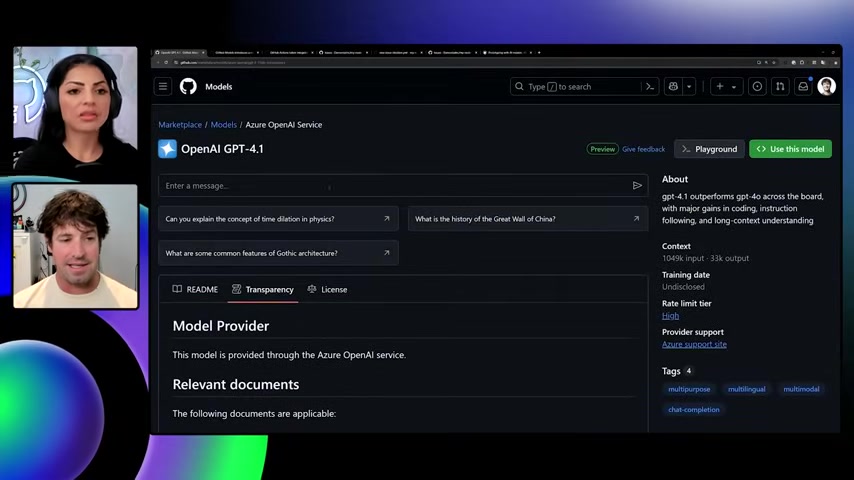
To find the models available, navigate to the Marketplace, then select Models under the Explore section. This will display a catalog of models, including recently added and most popular options.
Recently Added Models: Here's a selection of models that have recently been added to the marketplace. These can range from models designed for AI in the cloud to tools designed to improve your app's functionality. Here's a list of the new models:
- OpenAI o4-mini
- Cohere Embed 4
- Cohere Command A
Types of Models Available: From language processing to image recognition, there are models available for any purpose. To easily search, use the search bar. Below is a table that will organize your options, to show different options for models in AI, machine learning, language processing, and Image Recognition.
A Table of AI Models
Here's a markdown table designed to organize popular AI options:
| Model Category | Description | Key Features |
|---|---|---|
| Language Processing | Designed for natural language understanding and generation, aiding in tasks like chatbots, content creation, and language translation. | GPT-4.1 integration, multilingual support, sentiment analysis. |
| Image Recognition | Specializes in identifying objects, scenes, and patterns in images, useful for applications like facial recognition and automated visual inspection. | High accuracy, object detection, facial recognition. |
| Foundation Models | General-purpose models adaptable to a variety of tasks including data analysis and prediction. | Broad applicability, adaptability to different tasks, a foundation for a wide range of applications. |
| Small Language Models | Optimized for use in resource-constrained environments, providing language processing capabilities with minimal computational overhead. | Low resource consumption, fast processing, ideal for mobile applications. |
| Large Language Models | Suited for complex language-related tasks requiring advanced computational capabilities. | Complex language handling, suitable for detailed analysis, natural response formation. |
This table helps you quickly identify which models best suit your project needs, optimizing selection and experimentation. It will be important to consult the specific features of each of your chosen models to ensure it is as helpful as possible for your app or software. For example, GPT 4.1 is a helpful tool in AI to help optimize the board in coding, instruction following, and long-context understanding.
Experimenting and Integrating GitHub Models
Experimenting in the Playground
Once you’ve selected a model, you can start experimenting in a sandbox.
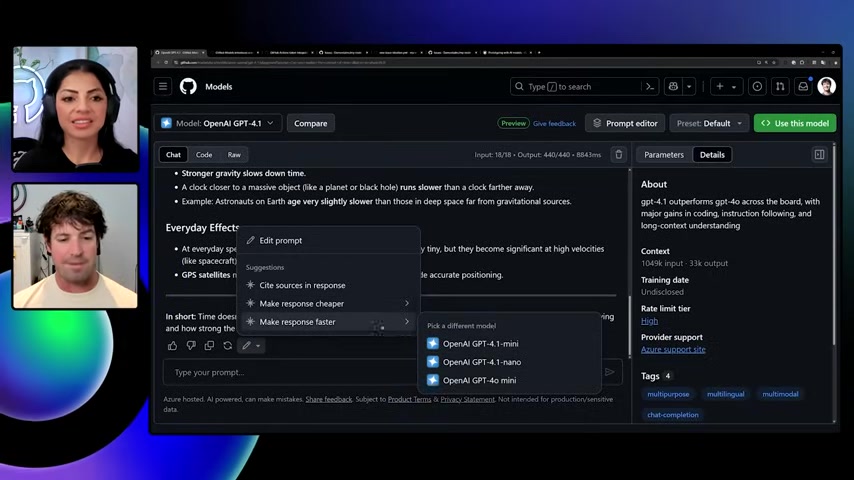
Click on a model such as OpenAI GPT-4.1 to access its playground. Here, you can test the model with various inputs to see how it performs. This testing ground allows developers to experiment and fine-tune prompts, so it is a vital part of choosing which models will work best in your application.
For example, one of the tests includes "Can you explain the concept of time dilation in physics?" The model generates an explanation based on Einstein's theory of relativity, which makes these Large Language Models very valuable for use in information collection. GitHub models use AI to generate responses, making it a faster process than researching on your own.
Integrating Models into Your Applications
Once you're ready to integrate a model into your application, GitHub Models provides several code snippets and tools.
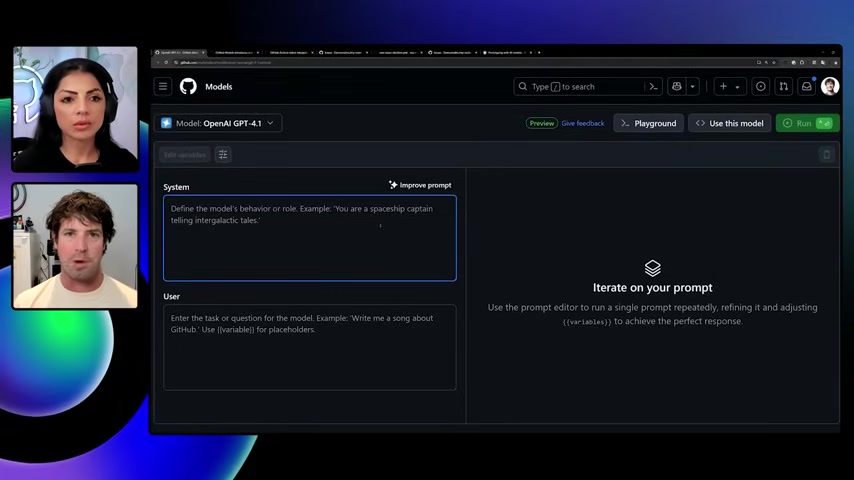
Click the Code tab for examples in languages like Python, JavaScript, C#, and more. These snippets provide a starting point for incorporating the model into your project.
Simplifying Integration: The code snippets provide a REST API integration, making adding code as simple as copy and paste. It can even include a "Copy to Clipboard" option. By taking these shortcuts, you can implement AI within minutes. That way, you can save time and resources for other areas of your application.
Optimizing Prompts with AI
GitHub Models even help you improve the prompts for better AI integration. To accomplish this, GitHub models use AI to use your current prompt. This tool suggests specific changes to give improved results. A key feature of this approach is Prompt-driven programming, where AI models are structured and managed through prompts to elicit desired responses or perform specific tasks. This is particularly useful in refining interaction flows or data retrieval methods.
As AI becomes more incorporated in everyday life, developers and companies will need to rely on features such as this to ensure they have reliable models. Using AI to improve your prompts for AI will greatly increase the chance of your project's success.
Cost and Rate Limits of GitHub Models
GitHub Actions Token Integration
GitHub Actions token integration is all you need to get started with GitHub Models. By integrating AI capabilities directly into your actions, you simplify workflows.

As part of GitHub actions, you just need to follow these instructions. These integrations eliminate needing personal tokens or various requests. By integrating this, it can provide cost and AI-driven workflow.
Rate Limits: One of the most crucial parts of utilizing GitHub Actions token integration is that it provides rate limits to help guide your cost and budget. Rate limits provide access to free and paid API usages, and can be tracked by the minute or per request. It is important to consult these limits to improve your use of AI, or improve it. The rate limits you receive can be dependent upon what sort of plan you pay for, whether Copilot Free, Copilot Business, or Copilot Enterprise. Understanding these metrics will improve usage while minimizing resources.






Most people like

































Report
Please select a reason for reporting
- 13 Reasons to Switch from Snapchat to Text Messaging
- 7 Powerful Speech to Text Apps to Boost Productivity
- 10 Best Speech to Text Tools for Effortless Transcription
- 13 Free Tools to Easily Transcribe Audio to Text
- 15 Surprising Ways Google's Speech-to-Text Boosts Productivity
- 7 Best Free Online Audio to Text Transcription Tools
- 9 Tips to Transcribe Speech to Text Faster and Better
- 13 Best Speech to Text Software for Windows 10 in 2023
- 7 Tips for Choosing the Best Transcriber for Audio to Text
- 11 Reasons Why Dragon Speech-to-Text Apps are Game-Changers
- 6 Secrets to Enhance Your Speech to Text Transcription
- 6 Brilliant Ways to Boost Productivity with Talk-to-Text on Your MacBook
- 6 Ways Transcription Software Converts Audio to Text
- 8 Tips to Transcribe Speech to Text Like a Pro
- 6 Reasons IBM Watson Speech to Text is a Game-Changer
- 14 Powerful Ways Talk-to-Text Improves Your Workflow
- 12 Top Windows Speech-to-Text Software for Efficient Transcription
- 12 Game-Changing Benefits of Apple's Speech to Text Technology
- 9 Powerful Use Cases for AWS Speech to Text Technology
- 10 Easy Steps to Transcribe YouTube Videos to Text
- transcription audio en texte
- online audio transcription
- free audio file transcription
- free ai audio transcription
- audio transcription service
- audio transcription online free
- audio transcription free online
- audio to transcription software
- audio and transcript
- ai audio transcription free
- voice recording to text converter
- translate voice recording to text
- record voice to text
- audio recording to text converter
- voice recording and transcription
- chatgpt voice to text
- gmail voice to text
- speech to text reader
- speech to text ai free
- speech to talk
- How SEO and Marketing Dashboards Empower Agencies to Drive Results
- How to Use AI Tools to Find Internal Linking Opportunities Across a Business Website
- Discover Your Perfect Haircut with AI Hairstyle Apps
- Free Reputation Calculator Tools: How They're Adapting to Score AI Visibility, Not Just Rankings
- Design Professional Flyers for Free on Your Phone
- Best Free Flyer Maker Apps for Android: Design Like a Pro
- How to Know If Your Business Is Ready for an AI Customer Service Agent
- Revolutionizing Storytelling: From Novels to Screenplays with AI
- Create Engaging Animated Explainer Videos with a Free AI Tool
- Stop Multi-Subscribing: Benchmark Top AI Visual Models in One Canvas
- AI & Elections: Defending Democracy Against Misinformation
- Navigating Political Discourse: AI, Deepfakes, and Reality Checks
- Detecting Political Bias in News Articles: A Powerful AI Algorithm
- AI Bias Unveiled: Political Leanings in ChatGPT & Beyond
- Revolutionize Learning: Discover Quizzes AI for Engaging Interactive Quizzes
- From AI-Generated to Audience-Ready: How Quillbot Humanize AI Is Changing the Content Editing Process
- Building an AI Writing Stack in 2026: LLMs, Detectors, and Humanizers
- 7 Top AI-Powered Database Assistant Platforms
- An Objective Look at Modern Web-Based Visual Modifications
- My Honest Experience with VideoAI: The Secret Weapon for Creators Who Need Character Voices

Copyright ©2026 toolify