































Table of Contents
- Key Points
- Understanding Oracle Data Conversion
- Detailed Conversion Items in Oracle ERP
- Executing the Data Conversion: Step-by-Step Guide
- Advantages and Disadvantages of Oracle Data Conversion Approaches
- FAQ
- Related Questions


Understanding Oracle Data Conversion
What is Oracle Data Conversion?
Data conversion generally happens whenever an organization goes for a fresh implementation of Oracle ERP.
. This process involves extracting data from a legacy system and uploading it into Oracle. It includes several critical steps to ensure that data is accurately and efficiently transferred. The success of an Oracle data conversion project hinges on careful planning and meticulous execution. This process helps organizations migrate their crucial information, maintaining data integrity and continuity as they transition to new systems. In essence, Oracle data conversion acts as a bridge, seamlessly connecting legacy data with a new, enhanced operating environment.
Key Steps in Oracle Data Conversion
Several steps are involved in a successful Oracle data conversion. These include:
- Conversion of Closing Balances: Converting closing balances data as of the cut-off date into journals in Oracle General Ledger.
- Conversion of Open Transactions: Converting open transactions as of the cut-off date into Oracle Subledger modules such as Accounts Payable, Accounts Receivables, Fixed Assets, Purchasing, and Inventory.
- Import of Oracle Subledger Module Data: Importing Oracle Subledger Module data into Oracle General Ledger and reversing those entries in GL.
These steps are crucial for maintaining financial accuracy and ensuring that the new system reflects the correct starting balances and ongoing transactions. Each step needs careful preparation and validation to avoid discrepancies. Implementing effective processes during this stage is critical to achieving a stable and accurate foundation for Oracle data conversion.
| Step | Description |
|---|---|
| Conversion of Closing Balances | Transferring ending balances from the old system to the Oracle General Ledger. |
| Conversion of Open Transactions | Migrating active transactions to Oracle Subledger modules such as Accounts Payable and Receivables. |
| Import of Subledger Module Data | Importing and reconciling subledger details with the General Ledger, then reversing any imported journal entries in GL. |
The three step table represents vital phases for the Oracle data conversion process. This structured approach supports accurate and well-organized migration.
Executing the Data Conversion: Step-by-Step Guide
Trial Balance Extraction and Web ADI Journal Upload
The initial step is to extract your trial balance from the client's legacy system. Ensure the extracted trial balance is balanced before proceeding further. If the trial balance looks like the example provided in a spreadsheet, where you have data including: Cash/Bank Account, accounts receivable balance, revenue, expense, and any other pertinent item data to be transferred. Upload this trial balance into Oracle GL as a Web ADI journal. This method uses Excel to create journals for easier data entry.
Ensure that your trial balance is accurate and complete as it forms the foundation for all future transactions. Taking time for this step to be as seamless as possible will save time down the road for the Oracle data conversion.
Uploading Open Transactions into Subledgers
Next, upload open transactions into the appropriate subledgers, such as Accounts Payable (AP) and Accounts Receivable (AR). This involves extracting invoice, debit memo, credit memo, and prepayment data. A standard general entry for data uploading needs to include: debit and credit items into the sub ledger using data loader or other appropriate API. Remember all debit and credits are balanced.
Ensure that open purchase orders have only non received amounts at the quantities that need to be uploaded.
Accounts Payable Example: Account Charge Debit and Account Liability Credit Accounts Receivable Example: Account Receivable Debit and Revenue Account Credit
These procedures apply to fixed assets and other modules to ensure a complete and detailed accounting record. The goal is to ensure the transactions all have the same data from your original trial balance.
Create Accounting and General Ledger Transfers
After uploading all your Subledger data, run the create accounting program for your transactions.
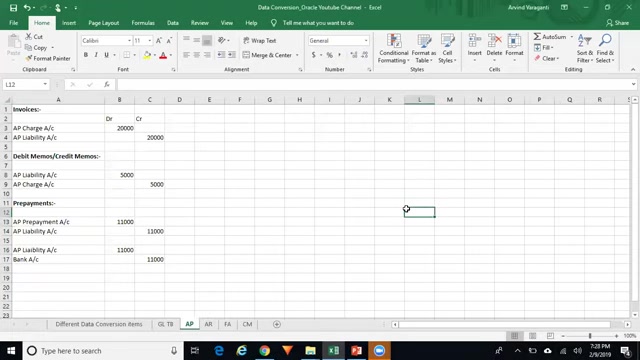
. After running, the general entries should be successfully transferred into your general ledger. Review that the accounts that came into subledger match back into the general ledger for an easy Oracle data conversion.
Account Reversal for Accurate Reconciliation
Once accounting entries are transferred to GL, unfreeze the journal source and reverse the entries. The reversal ensures that the original trial balance is not double-counted and that subledger details and general ledger balances remain in sync. You have uploaded to your sub ledger and then created an account to send it over and reverse account it, so it does not impact your GL account.
Freezing the Journal Source is essential to prevent unauthorized manual changes to balances.
Ensuring accuracy at all times through the Oracle data conversion process is incredibly important.








Most people like































Report
Please select a reason for reporting
- 13 Reasons to Switch from Snapchat to Text Messaging
- 7 Powerful Speech to Text Apps to Boost Productivity
- 10 Best Speech to Text Tools for Effortless Transcription
- 13 Free Tools to Easily Transcribe Audio to Text
- 15 Surprising Ways Google's Speech-to-Text Boosts Productivity
- 7 Best Free Online Audio to Text Transcription Tools
- 9 Tips to Transcribe Speech to Text Faster and Better
- 13 Best Speech to Text Software for Windows 10 in 2023
- 7 Tips for Choosing the Best Transcriber for Audio to Text
- 11 Reasons Why Dragon Speech-to-Text Apps are Game-Changers
- 6 Secrets to Enhance Your Speech to Text Transcription
- 6 Brilliant Ways to Boost Productivity with Talk-to-Text on Your MacBook
- 6 Ways Transcription Software Converts Audio to Text
- 8 Tips to Transcribe Speech to Text Like a Pro
- 6 Reasons IBM Watson Speech to Text is a Game-Changer
- 14 Powerful Ways Talk-to-Text Improves Your Workflow
- 12 Top Windows Speech-to-Text Software for Efficient Transcription
- 12 Game-Changing Benefits of Apple's Speech to Text Technology
- 9 Powerful Use Cases for AWS Speech to Text Technology
- 10 Easy Steps to Transcribe YouTube Videos to Text
- transcription audio en texte
- online audio transcription
- free audio file transcription
- free ai audio transcription
- audio transcription service
- audio transcription online free
- audio transcription free online
- audio to transcription software
- audio and transcript
- ai audio transcription free
- voice recording to text converter
- translate voice recording to text
- record voice to text
- audio recording to text converter
- voice recording and transcription
- chatgpt voice to text
- gmail voice to text
- speech to text reader
- speech to text ai free
- speech to talk
- How to Use AI Tools to Find Internal Linking Opportunities Across a Business Website
- Discover Your Perfect Haircut with AI Hairstyle Apps
- Free Reputation Calculator Tools: How They're Adapting to Score AI Visibility, Not Just Rankings
- Design Professional Flyers for Free on Your Phone
- Best Free Flyer Maker Apps for Android: Design Like a Pro
- How to Know If Your Business Is Ready for an AI Customer Service Agent
- Revolutionizing Storytelling: From Novels to Screenplays with AI
- Create Engaging Animated Explainer Videos with a Free AI Tool
- Stop Multi-Subscribing: Benchmark Top AI Visual Models in One Canvas
- Best Seedance 2.5 API Provider: Every Price on the Market, Checked at Source
- Top AI Social Media Management Tools: Automate Your Content Strategy
- Free AI Text to Video Generator: Create Stunning Videos from Text
- Discover 17 ChatGPT Alternatives: A Comprehensive Comparison
- Character.AI vs. Janitor AI: Which AI Chat Platform Reigns Supreme?
- Top Virtual Assistant Companies in 2026: Reviews, Pricing, and Plans Compared
- Unveiling FaceCheck.ID: Revolutionizing Reverse Image Searches with AI
- 11 Best AI Dialers in 2026: Features, Pricing, Pros and Cons
- How I Direct Consistent AI Clips: A Hands-On Guide to Multi-Model Generation
- A Realistic Review of the Photo Generator Image Tool
- Playwright MCP Server: Automated Web Testing with Agent Mode

Copyright ©2026 toolify