































Table of Contents
- Key Points
- Seamless Integration of Azure AI Foundry into GitHub
- Hands-On Model Evaluation and Comparison
- Getting Started with Azure AI Integration in GitHub
- Pricing for Azure AI Services
- Weighing the Pros and Cons of Azure AI Foundry and GitHub Integration
- Key Features of Azure AI and GitHub Integration
- Diverse Use Cases for Azure AI and GitHub Integration
- Frequently Asked Questions (FAQ)
- Related Questions


Seamless Integration of Azure AI Foundry into GitHub
Bringing AI to Where Developers Live
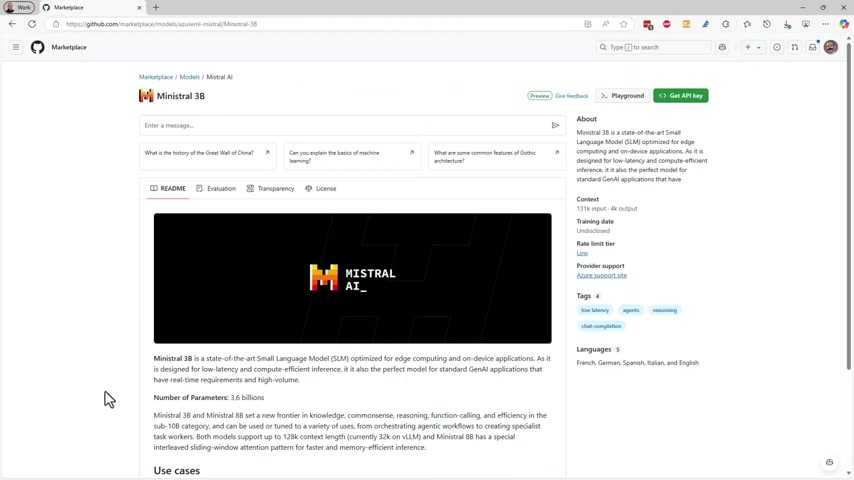
Microsoft is strategically positioning its AI models directly within GitHub, the central hub for over 100 million developers. This move addresses a critical need: making AI accessible and easily integrable into existing workflows. By embedding AI capabilities within GitHub, Azure AI Foundry lowers the barrier to entry for developers looking to leverage AI in their projects.
This integration simplifies model exploration, testing, and deployment, fostering a more collaborative and efficient AI development environment. The core idea is to empower developers with the AI Tools they need, right where they're already working. This direct access encourages experimentation and innovation, leading to more widespread adoption of AI technologies. The GitHub Marketplace now serves as a comprehensive resource for AI models, offering a diverse range of options tailored to various development needs. Developers can seamlessly integrate these models into their projects, unlocking new possibilities and accelerating their development cycles. The focus is on providing a frictionless experience that promotes AI adoption and innovation across the entire development community. The strategic placement of Azure AI Foundry within GitHub signifies a commitment to democratizing AI and making it accessible to all developers, regardless of their experience level. This integration is designed to transform how developers build and deploy AI-powered applications, driving innovation and creating new opportunities for growth. This accessibility is intended to spur a new era of AI-driven applications across diverse sectors. With the right tools readily available, developers can concentrate on creating value and solving real-world problems, rather than grappling with complex integration challenges. This user-centric approach promises to unlock the full potential of AI and drive innovation across industries. By meeting developers where they are, Microsoft is fostering a more collaborative and efficient AI development landscape. The Azure AI Foundry integration is not just about providing access to AI models; it's about empowering developers to build, test, and deploy AI-powered applications with ease. This seamless experience promises to accelerate AI innovation and unlock new possibilities across diverse sectors. By simplifying the AI development process, Microsoft is enabling developers to focus on creativity and problem-solving, driving the next Wave of AI-driven innovation. The GitHub integration represents a pivotal step towards making AI an integral part of every developer's toolkit. The ultimate goal is to empower developers to harness the power of AI to create transformative applications that benefit society as a whole. The GitHub Marketplace now serves as a comprehensive resource for AI models, offering a diverse range of options tailored to various development needs. Developers can seamlessly integrate these models into their projects, unlocking new possibilities and accelerating their development cycles. The focus is on providing a Frictionless experience that promotes AI adoption and innovation across the entire development community.
Exploring the AI Model Library
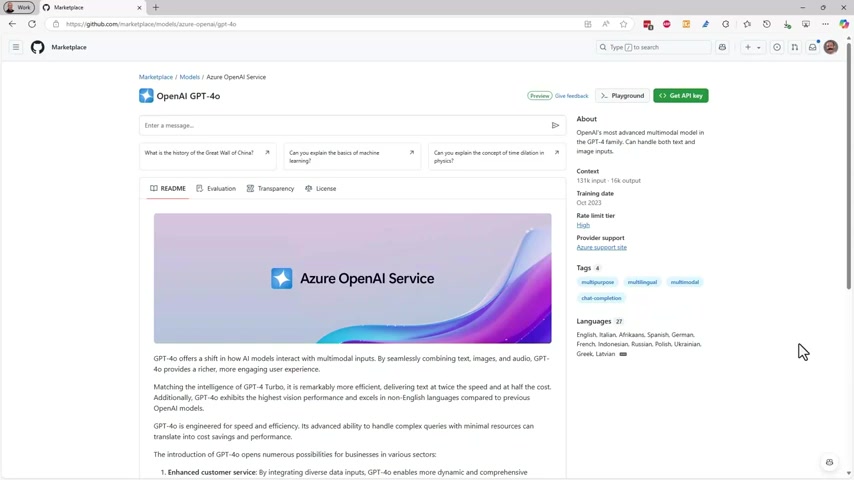
Within GitHub, developers can now access a comprehensive library of AI models, each possessing unique capabilities, performance characteristics, and cost structures. This rich selection empowers developers to choose the model that best aligns with their specific project requirements.
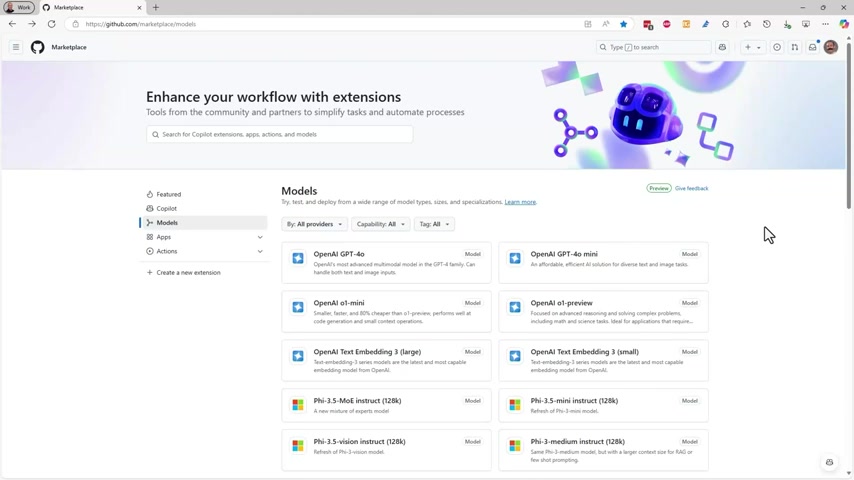
Developers gain the flexibility to experiment with different models, optimizing their applications for performance and cost-efficiency. Each model in the library is meticulously documented, providing developers with comprehensive insights into its capabilities, limitations, and best-use scenarios. This transparency fosters informed decision-making and enables developers to select the most suitable model for their project. The library includes models from various providers, ensuring a diverse range of options to cater to different development needs. Developers can explore models specialized in natural language processing, computer vision, and other AI domains, enabling them to build a wide array of AI-powered applications. The availability of diverse models encourages developers to explore new possibilities and push the boundaries of AI innovation. The library is continuously updated with the latest AI models, ensuring developers have access to the most cutting-edge technologies. This commitment to innovation empowers developers to stay ahead of the curve and build applications that leverage the full potential of AI. The detailed documentation accompanying each model enables developers to understand its strengths and weaknesses, facilitating effective integration and optimization. This transparency is crucial for building trustworthy and reliable AI applications. The model library also includes tools for evaluating model performance, enabling developers to benchmark different models and select the one that delivers the best results. This data-driven approach ensures that developers are making informed decisions based on empirical evidence. The integration of the model library within GitHub simplifies the process of discovering and integrating AI capabilities into existing workflows. This streamlined experience reduces friction and accelerates the AI development lifecycle. The variety of models, coupled with comprehensive documentation and performance evaluation tools, empowers developers to build innovative and impactful AI-powered applications. The strategic placement of this library within GitHub underscores Microsoft's commitment to democratizing AI and making it accessible to all developers. The library not only provides access to a wide range of AI models but also fosters a community of developers who can share their experiences, insights, and best practices. This collaborative environment accelerates learning and innovation, driving the adoption of AI technologies across diverse sectors. The Azure AI model library on GitHub is a resource designed to encourage exploration, testing, and integration of AI capabilities into a wide range of development projects. Whether you're building a chatbot, Image Recognition system, or predictive analytics tool, the library provides the building blocks you need to bring your vision to life.
Hands-On Model Evaluation and Comparison
Free Testing with Interactive Playgrounds
Before committing to production, developers can freely test drive AI models within an interactive playground environment.
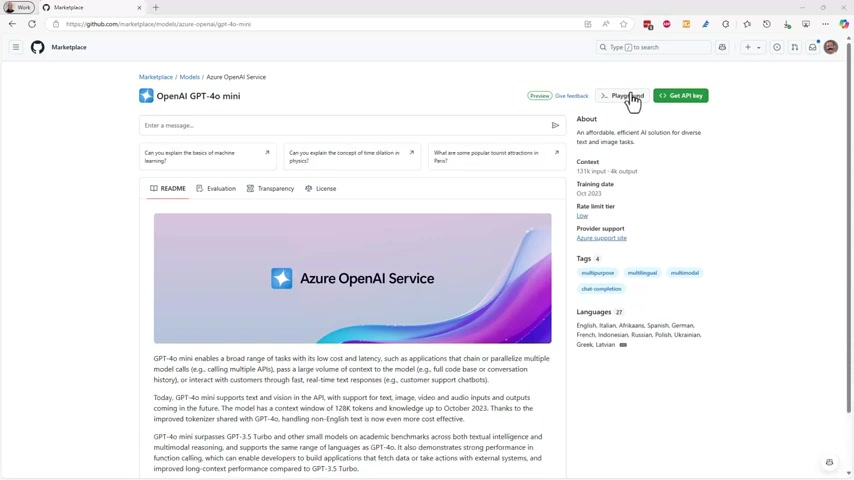
This sandbox allows for experimentation with prompts and parameters, enabling developers to understand model behavior and performance without incurring costs. This is an invaluable tool for optimizing model selection and ensuring that the chosen model meets the application's specific requirements. This hands-on approach empowers developers to gain a deeper understanding of AI models and their capabilities. The playground environment provides a safe space to experiment with different prompts and parameters, without the risk of impacting production systems. This iterative process enables developers to fine-tune their applications and optimize their use of AI models. The free testing environment significantly lowers the barrier to entry for developers looking to incorporate AI into their projects. This accessibility encourages experimentation and innovation, leading to more widespread adoption of AI technologies. The interactive playground also provides real-time feedback on model performance, enabling developers to identify and address potential issues early in the development cycle. This proactive approach helps to ensure the quality and reliability of AI-powered applications. The ability to test drive models for free is a Game-changer for developers, empowering them to make informed decisions and optimize their AI deployments. This user-centric approach aligns with Microsoft's commitment to democratizing AI and making it accessible to all developers. The interactive playground includes a range of tools for analyzing model performance, enabling developers to identify areas for improvement and optimize their applications. This data-driven approach ensures that developers are making informed decisions based on empirical evidence. The playground environment also provides access to comprehensive documentation, enabling developers to understand the intricacies of each model and its best-use scenarios. This transparency is crucial for building trustworthy and reliable AI applications. This feature empowers developers to fine-tune their prompts and model parameters to achieve optimal results. The combination of free testing, interactive feedback, and comprehensive documentation makes the playground an indispensable tool for any developer working with AI models. Whether you're a seasoned AI expert or a novice developer, the playground provides the resources you need to succeed.
Side-by-Side Model Comparison
The integration offers a unique model comparison feature, allowing developers to evaluate different models side-by-side using the same inputs and prompts.
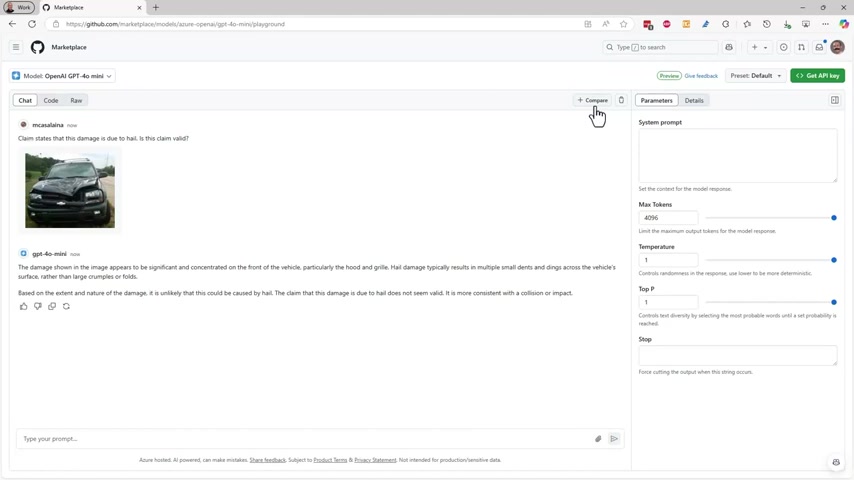
This feature streamlines the process of identifying the optimal model for a given task, considering factors such as accuracy, latency, and cost. This comparative analysis ensures developers can make informed decisions based on objective performance data. This is useful when building multi-modal applications. Developers can compare GPT-4o Mini with Meta’s Llama 3.2 vision model. The side-by-side comparison feature provides a clear and concise view of model performance, enabling developers to quickly identify the strengths and weaknesses of each model. This streamlined process saves time and effort, allowing developers to focus on building innovative applications. The ability to compare models using the same inputs ensures a fair and objective evaluation, minimizing the risk of biased results. This data-driven approach empowers developers to make informed decisions based on empirical evidence. The model comparison feature also provides insights into the trade-offs between different models, enabling developers to optimize their applications for specific performance requirements. This flexibility is crucial for building applications that meet the diverse needs of users. The side-by-side view highlights the key differences between models, making it easier for developers to identify the one that best aligns with their project goals. This streamlined process reduces the complexity of model selection and accelerates the AI development lifecycle. This is particularly valuable when choosing the best model for a specific task, such as image recognition or natural language processing. By directly comparing the performance of different models, developers can make data-driven decisions that optimize their applications for accuracy, speed, and cost-efficiency. The side-by-side view allows for quick identification of the strengths and weaknesses of each model. This capability is essential for selecting the right tools for the job and building high-performing AI applications. This comparative analysis helps to reduce the risk of choosing a suboptimal model and ensures that developers are making informed decisions based on solid performance data. By offering a streamlined and objective way to compare models, the integration empowers developers to build AI applications that are both innovative and effective. This comparative approach is designed to minimize the risk of biased results and ensure that developers are making informed decisions based on empirical evidence. The side-by-side feature simplifies the complex task of model selection, making it easier for developers to build cutting-edge AI applications.
Getting Started with Azure AI Integration in GitHub
Step-by-Step Guide to Grounding Models with Custom Data
For real-world applications, models often require grounding with custom data to provide Relevant and accurate responses.
The integration simplifies this process with Retrieval-Augmented Generation (RAG), enabling developers to upload their own data directly within GitHub. This custom data enhances model performance and ensures that the application delivers accurate and contextually relevant results. The ability to ground models with custom data is crucial for building AI applications that address specific business needs. RAG ensures that the model has access to the information it needs to provide accurate and informative responses. The integration simplifies the process of uploading and indexing data, making it easy for developers to incorporate their own knowledge into the model. Developers can ground the model by uploading files such as PDF, txt, docs, asox, and xlsx. This streamlined approach accelerates the development cycle and reduces the complexity of building AI-powered applications. The RAG feature also enables developers to compare the performance of grounded and ungrounded models, providing insights into the impact of custom data on model accuracy. This data-driven approach ensures that developers are making informed decisions about how to best ground their models. The integration supports a variety of data sources, enabling developers to incorporate information from diverse sources into their AI applications. This flexibility is crucial for building applications that leverage the full potential of custom data. The RAG feature also provides tools for managing and updating custom data, ensuring that the model is always up-to-date with the latest information. This ongoing maintenance is essential for building reliable and trustworthy AI applications. By simplifying the process of grounding models with custom data, the integration empowers developers to build AI applications that are both accurate and relevant. The ability to add custom knowledge significantly enhances model performance and ensures that the application delivers the best possible results. This customizability is key to building AI applications that meet the specific needs of users and provide real-world value. Once you've grounded your model, you can compare it to the ungrounded version to see the improvements in your app's ROI. This feature helps developers understand the value of incorporating their own data into AI models. By adding proprietary information, the model’s answers can better align with your business goals, allowing for higher efficiency in practical usage.
Seamless Code Integration
Once the model's responses Align with business goals, the integration provides a code button to generate the necessary code directly within GitHub.
This streamlined process allows developers to copy the code into VS Code and run it immediately with their GitHub credentials. This eliminates the need for manual code generation and simplifies the process of integrating AI into existing projects. This streamlined process empowers developers to quickly deploy AI-powered features without the need for extensive coding. The code button generates code that is optimized for the chosen model and data, ensuring seamless integration and optimal performance. This time-saving feature accelerates the development cycle and reduces the complexity of building AI applications. The integration also provides access to comprehensive documentation, enabling developers to understand the generated code and customize it to meet their specific needs. This transparency is crucial for building trustworthy and reliable AI applications. The seamless code integration feature is a game-changer for developers, empowering them to quickly deploy AI-powered features without the need for extensive coding. This user-centric approach aligns with Microsoft's commitment to democratizing AI and making it accessible to all developers. The generated code is designed to be easily integrated into existing projects, minimizing the risk of compatibility issues and ensuring seamless deployment. This time-saving feature accelerates the development cycle and reduces the complexity of building AI applications. By providing a seamless code integration process, the integration empowers developers to build AI applications that are both innovative and effective. This streamlined approach is designed to minimize the risk of errors and ensure that the generated code is both accurate and reliable. By offering a Simplified and automated code generation process, the integration empowers developers to build AI applications without the need for extensive coding expertise. The streamlined process ensures that the generated code aligns with the chosen model and data. This integration is designed to minimize compatibility issues and ensure seamless deployment.
Pricing for Azure AI Services
Cost-Effective AI Development
The integration offers a range of pricing options to suit different development needs and budgets. Developers can test drive models for free within the interactive playground, minimizing upfront costs and enabling informed decision-making. This pay-as-you-go approach ensures that developers only pay for the resources they use, optimizing cost-efficiency and maximizing ROI.
The free testing environment eliminates the risk of incurring unexpected costs while experimenting with different models and prompts. This cost-effective approach encourages developers to explore the full potential of AI without financial constraints. The pay-as-you-go pricing model ensures that developers only pay for the resources they use, making it easy to Scale their AI applications up or down as needed. This flexibility is crucial for optimizing cost-efficiency and maximizing ROI. The integration also provides access to detailed cost analysis tools, enabling developers to track their AI spending and identify areas for optimization. This transparency empowers developers to manage their AI budgets effectively and ensure that they are getting the best value for their money. By offering a range of pricing options and detailed cost analysis tools, the integration empowers developers to build AI applications that are both innovative and cost-effective. This user-centric approach aligns with Microsoft's commitment to democratizing AI and making it accessible to all developers. The free testing environment eliminates the risk of incurring unexpected costs while experimenting with different models and prompts. This cost-effective approach encourages developers to explore the full potential of AI without financial constraints. By providing a range of pricing options and detailed cost analysis tools, the integration empowers developers to build AI applications that are both innovative and cost-effective. This streamlined approach is designed to minimize the risk of overspending and ensure that developers are getting the best value for their money. By offering a flexible and transparent pricing model, the integration empowers developers to focus on building innovative AI applications without worrying about complex cost structures. This cost-conscious design promotes experimentation and encourages the widespread adoption of AI technologies.
Key Features of Azure AI and GitHub Integration
Comprehensive Feature Set
The Azure AI Foundry integration with GitHub offers a comprehensive suite of features designed to streamline the AI development lifecycle, including:
- AI Model Library: Access a vast library of AI models with diverse capabilities, performance, and cost structures.
- Interactive Playground: Test drive models for free and experiment with prompts and parameters.
- Model Comparison: Evaluate different models side-by-side to identify the optimal choice for a given task.
- Retrieval-Augmented Generation (RAG): Ground models with custom data to enhance accuracy and relevance.
- Code Generation: Generate optimized code for seamless integration of AI into existing projects.
- Model Experimentation: Run live experiments in production to optimize prompts and models based on real-world usage data.
- AI Portal: Scale applications, customize models, and build AI agents within a comprehensive AI portal.
- Evaluation Tools: Evaluate AI applications to ensure responsible and trustworthy behavior.
These features empower developers to build innovative and impactful AI-powered applications with ease and efficiency. Let's take a closer look at these features and how they can benefit your AI development projects.
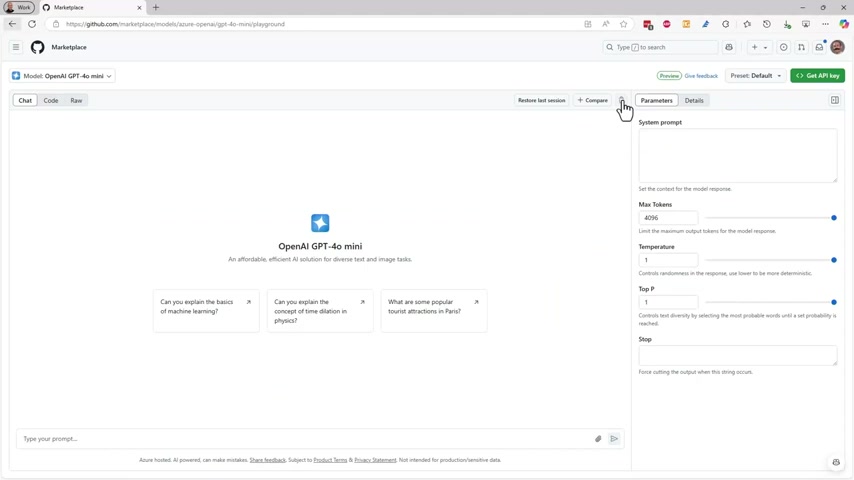
The interactive playground is an invaluable tool for optimizing model selection and ensuring that the chosen model meets the application's specific requirements. This hands-on approach empowers developers to gain a deeper understanding of AI models and their capabilities. The free testing environment significantly lowers the barrier to entry for developers looking to incorporate AI into their projects. This accessibility encourages experimentation and innovation, leading to more widespread adoption of AI technologies.
The RAG feature also enables developers to compare the performance of grounded and ungrounded models, providing insights into the impact of custom data on model accuracy. This data-driven approach ensures that developers are making informed decisions about how to best ground their models. By simplifying the process of grounding models with custom data, the integration empowers developers to build AI applications that are both accurate and relevant. The seamless code integration feature is a game-changer for developers, empowering them to quickly deploy AI-powered features without the need for extensive coding. The seamless code integration feature is a game-changer for developers, empowering them to quickly deploy AI-powered features without the need for extensive coding. This user-centric approach aligns with Microsoft's commitment to democratizing AI and making it accessible to all developers. This pay-as-you-go approach ensures that developers only pay for the resources they use, optimizing cost-efficiency and maximizing ROI. This flexibility is crucial for optimizing cost-efficiency and maximizing ROI. This transparency empowers developers to manage their AI budgets effectively and ensure that they are getting the best value for their money.










Most people like




























Report
Please select a reason for reporting
- 13 Reasons to Switch from Snapchat to Text Messaging
- 7 Powerful Speech to Text Apps to Boost Productivity
- 10 Best Speech to Text Tools for Effortless Transcription
- 13 Free Tools to Easily Transcribe Audio to Text
- 15 Surprising Ways Google's Speech-to-Text Boosts Productivity
- 7 Best Free Online Audio to Text Transcription Tools
- 9 Tips to Transcribe Speech to Text Faster and Better
- 13 Best Speech to Text Software for Windows 10 in 2023
- 7 Tips for Choosing the Best Transcriber for Audio to Text
- 11 Reasons Why Dragon Speech-to-Text Apps are Game-Changers
- 6 Secrets to Enhance Your Speech to Text Transcription
- 6 Brilliant Ways to Boost Productivity with Talk-to-Text on Your MacBook
- 6 Ways Transcription Software Converts Audio to Text
- 8 Tips to Transcribe Speech to Text Like a Pro
- 6 Reasons IBM Watson Speech to Text is a Game-Changer
- 14 Powerful Ways Talk-to-Text Improves Your Workflow
- 12 Top Windows Speech-to-Text Software for Efficient Transcription
- 12 Game-Changing Benefits of Apple's Speech to Text Technology
- 9 Powerful Use Cases for AWS Speech to Text Technology
- 10 Easy Steps to Transcribe YouTube Videos to Text
- transcription audio en texte
- online audio transcription
- free audio file transcription
- free ai audio transcription
- audio transcription service
- audio transcription online free
- audio transcription free online
- audio to transcription software
- audio and transcript
- ai audio transcription free
- voice recording to text converter
- translate voice recording to text
- record voice to text
- audio recording to text converter
- voice recording and transcription
- chatgpt voice to text
- gmail voice to text
- speech to text reader
- speech to text ai free
- speech to talk
- Revolutionizing Storytelling: From Novels to Screenplays with AI
- Create Engaging Animated Explainer Videos with a Free AI Tool
- Stop Multi-Subscribing: Benchmark Top AI Visual Models in One Canvas
- Best Seedance 2.5 API Provider: Every Price on the Market, Checked at Source
- AI OnlyFans: How to Generate $30,000/Month (Legally)
- Transform Your Script into an Engaging Video with AI Video Maker!
- AI Marketing Automation: A Comprehensive Guide for Small Businesses
- Midjourney Alternative for Anime Art Creators: Why PixAI May Be Better for Character Workflows
- 10 Things Most People Get Wrong About AI Image Search
- AI Girlfriend Apps: Top Choices Redefining Relationships 2025
- iPhone Photo Editing: Clean Up Images Like a Pro!
- Boost Your WordPress Site with Webp Images
- Unlock the Full Potential of iPhone Images with Topaz Gigapixel AI
- Transform Your Images with Leia Pix AI: Get Started Now!
- XnView MP: The Ultimate Image Viewer and Converter
- Exploring the Power of AI Image Editing Tools
- Build an Image Converter with Chat GPT
- Transform Your Photos with the Best Free Photo Editing Software
- TensorArt Tutorial: Troubleshooting & New Animation Features
- Convert and Download iCloud Photos/Videos from HEIF/HEIC/HEVC to JPEG/MP4

Copyright ©2026 toolify