































Table of Contents
- Key Points
- Understanding Document Digitization and OCR
- InvoiceAgent: Revolutionizing Document Management
- How to Digitize Documents with OCR and InvoiceAgent
- Pricing of InvoiceAgent and AI OCR
- Evaluating the Benefits and Drawbacks of OCR Technology
- Core Features of InvoiceAgent for Document Management
- Use Cases for InvoiceAgent and OCR Technology
- Frequently Asked Questions About OCR and Document Digitization
- Related Questions About Document Digitization and Business Processes



Understanding Document Digitization and OCR
What is Document Digitization?
Document digitization refers to the process of converting paper-based documents into digital formats. This transformation allows businesses to store, manage, and access information electronically, removing the need for physical storage and manual handling. Digitization offers numerous benefits, including improved accessibility, enhanced security, and reduced operational costs. By digitizing documents, businesses can create a more efficient and agile workflow, allowing employees to quickly retrieve critical information and collaborate effectively. This digital transformation is not just about saving space; it’s about making information more readily available and usable across the organization. Proper document digitization strategies encompass scanning, indexing, and secure storage to ensure data integrity and compliance.
Key Benefits of Document Digitization:
- Improved Accessibility: Digital documents can be accessed from anywhere with an internet connection, promoting remote work and collaboration.
- Reduced Costs: Eliminates the need for physical storage space, printing, and manual filing.
- Enhanced Security: Digital documents can be protected with encryption and access controls, reducing the risk of loss or theft.
- Streamlined Workflows: Quick retrieval and easy sharing of documents improve overall efficiency.
- Better Collaboration: Multiple users can access and collaborate on the same document simultaneously.
The implementation of document digitization helps to transform an organization from being paper-based and inefficient to an efficient and streamlined digital environment, providing faster access to critical data and improved business processes.
What is Optical Character Recognition (OCR)?
Optical Character Recognition (OCR) is a technology that enables computers to “read” text within images, scanned documents, or PDFs and convert it into machine-readable text.
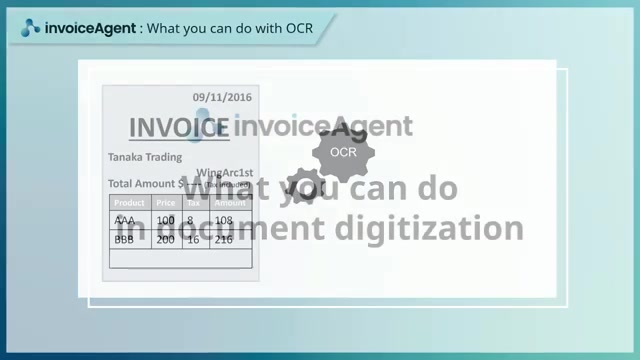
It allows businesses to extract valuable information from documents that would otherwise be inaccessible to digital searches and data analysis. The OCR process involves analyzing the structure and Patterns of characters in an image to identify and transcribe them into a text format that can be edited, searched, and processed by computers. This functionality is essential for making digitized documents truly useful, as it transforms static images into dynamic, searchable data.
How OCR Works:
- Scanning and Image Processing: The document is scanned, and the image is pre-processed to enhance Clarity and remove noise.
- Character Recognition: The OCR engine identifies individual characters by comparing them to known patterns and shapes.
- Text Conversion: Recognized characters are converted into a digital text format, such as TXT, DOC, or PDF.
- Post-Processing: The converted text undergoes post-processing, including Spell-checking and formatting adjustments, to improve accuracy.
OCR technology is a cornerstone of effective document digitization, transforming static images into valuable, actionable data. By making text searchable and editable, OCR unlocks new possibilities for data analysis, automation, and improved decision-making within organizations.
InvoiceAgent: Revolutionizing Document Management
InvoiceAgent's OCR Capabilities
InvoiceAgent offers a comprehensive suite of OCR functions designed to streamline document processing and improve data accuracy. These functions are crucial for extracting text and data from invoices and other financial documents, automating the data entry process, and reducing the risk of manual errors. InvoiceAgent enables businesses to automate workflows, improve data accuracy, and enhance overall efficiency.
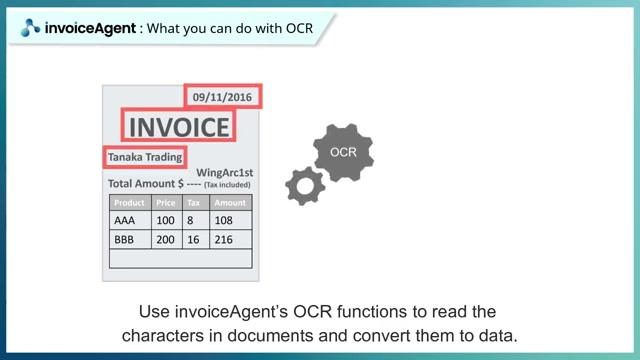
This automation capability reduces manual effort and saves time, allowing employees to focus on more strategic tasks. InvoiceAgent's OCR capabilities are designed to be user-friendly and easily integrated into existing business systems.
Key Benefits of InvoiceAgent's OCR:
- Automated Data Extraction: Automatically extracts key data fields from invoices, such as invoice number, date, vendor name, and total amount.
- Reduced Manual Data Entry: Eliminates the need for manual data entry, reducing errors and saving time.
- Improved Data Accuracy: Advanced OCR algorithms ensure high accuracy in data extraction.
- Streamlined Workflows: Automates invoice processing, reducing cycle times and improving efficiency.
- Integration with Business Systems: Seamlessly integrates with existing accounting and ERP systems for streamlined data management.
InvoiceAgent’s OCR functions are not just about converting images to text; they are about transforming document management, automating processes, and providing accurate, actionable data that drives better decision-making and improves business performance.
Why Choose InvoiceAgent for Document Digitization?
Choosing the right tool for document digitization is crucial for achieving maximum efficiency and accuracy. InvoiceAgent stands out as a leading solution for document digitization, offering a range of features that address common challenges and optimize workflows. Its OCR capabilities, combined with seamless integration and user-friendly design, make it an ideal choice for businesses looking to streamline document management.
InvoiceAgent is designed to handle a wide variety of document types, including invoices, receipts, and contracts, ensuring that businesses can digitize and manage all critical information in one centralized system. Its flexible configuration options allow businesses to tailor the system to their specific needs, ensuring that it integrates seamlessly with existing workflows and processes.
Key Reasons to Choose InvoiceAgent:
- Comprehensive OCR Capabilities: Powerful OCR functions ensure accurate data extraction from a variety of document types.
- Seamless Integration: Easily integrates with existing accounting and ERP systems for streamlined data management.
- User-Friendly Design: Intuitive interface and customizable workflows make it easy to use and manage.
- Scalability: Designed to Scale with your business, accommodating increasing volumes of documents and data.
- Customizable Workflows: Flexible configuration options allow you to tailor the system to your specific needs.
Choosing InvoiceAgent for document digitization means investing in a solution that not only streamlines your document management processes but also enhances data accuracy, improves efficiency, and supports better decision-making across your organization. With InvoiceAgent, businesses can unlock the full potential of their digitized documents and transform their operations for long-term success.
How to Digitize Documents with OCR and InvoiceAgent
Step-by-Step Guide to OCR with InvoiceAgent
Here’s a step-by-step guide to effectively use OCR with InvoiceAgent, incorporating best practices to ensure accuracy and efficiency:
- Document Preparation:
Ensure your documents are clear, well-lit, and free from excessive wrinkles or smudges. Clean, high-quality scans or images are essential for accurate OCR. Proper preparation can significantly reduce errors and improve the overall quality of the digitized data.
- Scanning Documents: Use a scanner or high-resolution camera to create digital images of your documents. Save these images in a common format like PDF or JPEG. High-resolution images provide more detailed data for the OCR engine to process, leading to better results.
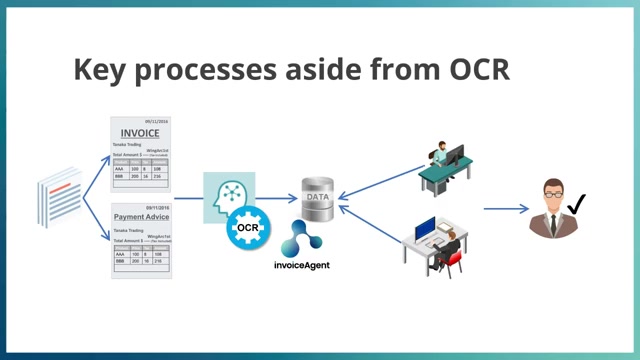
- Uploading to InvoiceAgent: Upload the digital documents to InvoiceAgent. The platform supports various input methods, including manual uploads, email attachments, and automated imports via Web API. Select the appropriate upload method based on your workflow and document volume.
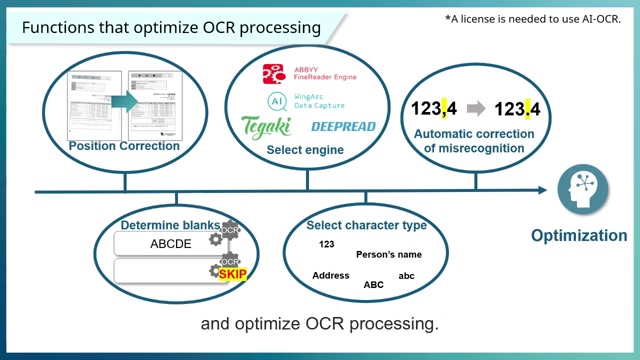
- Configuring OCR Settings: Configure the OCR settings in InvoiceAgent to match the document type and data fields you want to extract. Adjust settings such as language, Font, and character recognition to improve accuracy. Customizing these settings can optimize OCR performance for different document layouts and content.
- Running OCR Process: Initiate the OCR process within InvoiceAgent. The system will analyze the documents, extract text, and convert it into searchable and editable data. Monitor the process to ensure it runs smoothly and address any issues that may arise.
- Verifying and Correcting Data: Review the extracted data to verify its accuracy. Use InvoiceAgent’s built-in verification tools to identify and correct any errors. Implementing a verification step ensures that the final data is reliable and consistent.
- Exporting Data: Export the verified data in a format compatible with your business systems, such as CSV or XML. Import this data into your accounting, ERP, or other Relevant systems for further processing. Choose the export format that best suits your data integration needs.
By following these steps, you can effectively use OCR with InvoiceAgent to streamline document management, improve data accuracy, and enhance overall efficiency within your organization.
Pricing of InvoiceAgent and AI OCR
Understanding the Cost of OCR Solutions
When evaluating OCR solutions like InvoiceAgent and its AI-powered OCR capabilities, it’s essential to understand the pricing structures and potential costs involved. While basic OCR functionalities may be included in standard packages, advanced features like AI OCR often come with additional fees. Understanding these costs is crucial for making an informed decision.
Cost Factors to Consider:
-
Licensing Fees: InvoiceAgent may require licensing fees based on the number of users, documents processed, or specific features utilized. Check the terms and conditions for any Hidden costs. Licensing fees can vary significantly depending on the scale and complexity of your document management needs.
-
AI OCR Usage: AI OCR, which enhances accuracy and supports complex document layouts, typically incurs per-use or subscription-based charges. Evaluate your document processing volume to estimate the potential costs of AI OCR.
-
Integration Costs: Integrating InvoiceAgent with existing business systems may require additional development or consulting fees. Factor in these integration costs to get a complete picture of the total investment.
-
Training and Support: Consider the costs of training employees to use InvoiceAgent and accessing ongoing technical support. Proper training can ensure that your team maximizes the value of the solution and minimizes potential issues.
By carefully evaluating these cost factors, businesses can make informed decisions about implementing OCR solutions like InvoiceAgent, ensuring that they Align with their budgetary constraints and deliver a positive return on investment.
Use Cases for InvoiceAgent and OCR Technology
Real-World Applications of Document Digitization
InvoiceAgent and OCR technology can be applied across various industries and business functions to streamline document management and improve efficiency. Understanding these real-world applications helps businesses identify how they can leverage these tools to transform their operations. The versatility of InvoiceAgent and OCR makes them valuable assets for organizations of all sizes and across diverse sectors.
Common Use Cases:
- Invoice Processing: Automate the extraction of data from invoices, reducing manual data entry and improving accuracy in accounts payable processes.
Automated invoice processing accelerates cycle times and reduces the risk of errors.
- Receipt Management: Digitize and organize receipts for expense tracking and reimbursement, simplifying expense reporting for employees and accounting teams. Efficient receipt management improves compliance and reduces administrative overhead.
- Contract Management: Digitize and store contracts in a secure, searchable repository, improving access and compliance with contractual obligations. Centralized Contract Management ensures that important agreements are readily accessible and properly managed.
- Healthcare Records: Digitize patient records for improved access and compliance with privacy regulations, streamlining administrative tasks for healthcare providers. Digitized Healthcare records improve patient care and reduce administrative burdens.
- Legal Document Management: Organize and manage legal documents in a secure, searchable database, improving access and compliance for law firms and legal departments. Efficient legal document management enhances productivity and ensures compliance with regulatory requirements.
These use cases highlight the broad applicability of InvoiceAgent and OCR technology, demonstrating how they can transform document management processes and drive efficiency across various industries and business functions. Whether it’s automating invoice processing or managing legal documents, InvoiceAgent provides the tools and capabilities needed to optimize workflows and improve overall operational performance.






Most people like


































Report
Please select a reason for reporting
- 13 Reasons to Switch from Snapchat to Text Messaging
- 7 Powerful Speech to Text Apps to Boost Productivity
- 10 Best Speech to Text Tools for Effortless Transcription
- 13 Free Tools to Easily Transcribe Audio to Text
- 15 Surprising Ways Google's Speech-to-Text Boosts Productivity
- 7 Best Free Online Audio to Text Transcription Tools
- 9 Tips to Transcribe Speech to Text Faster and Better
- 13 Best Speech to Text Software for Windows 10 in 2023
- 7 Tips for Choosing the Best Transcriber for Audio to Text
- 11 Reasons Why Dragon Speech-to-Text Apps are Game-Changers
- 6 Secrets to Enhance Your Speech to Text Transcription
- 6 Brilliant Ways to Boost Productivity with Talk-to-Text on Your MacBook
- 6 Ways Transcription Software Converts Audio to Text
- 8 Tips to Transcribe Speech to Text Like a Pro
- 6 Reasons IBM Watson Speech to Text is a Game-Changer
- 14 Powerful Ways Talk-to-Text Improves Your Workflow
- 12 Top Windows Speech-to-Text Software for Efficient Transcription
- 12 Game-Changing Benefits of Apple's Speech to Text Technology
- 9 Powerful Use Cases for AWS Speech to Text Technology
- 10 Easy Steps to Transcribe YouTube Videos to Text
- transcription audio en texte
- online audio transcription
- free audio file transcription
- free ai audio transcription
- audio transcription service
- audio transcription online free
- audio transcription free online
- audio to transcription software
- audio and transcript
- ai audio transcription free
- voice recording to text converter
- translate voice recording to text
- record voice to text
- audio recording to text converter
- voice recording and transcription
- chatgpt voice to text
- gmail voice to text
- speech to text reader
- speech to text ai free
- speech to talk
- How SEO and Marketing Dashboards Empower Agencies to Drive Results
- How to Use AI Tools to Find Internal Linking Opportunities Across a Business Website
- Discover Your Perfect Haircut with AI Hairstyle Apps
- Free Reputation Calculator Tools: How They're Adapting to Score AI Visibility, Not Just Rankings
- Design Professional Flyers for Free on Your Phone
- Best Free Flyer Maker Apps for Android: Design Like a Pro
- How to Know If Your Business Is Ready for an AI Customer Service Agent
- Revolutionizing Storytelling: From Novels to Screenplays with AI
- Create Engaging Animated Explainer Videos with a Free AI Tool
- Stop Multi-Subscribing: Benchmark Top AI Visual Models in One Canvas
- 5 Data Problems That Stall AI Projects in Financial Compliance
- Master Storyboard Drawing: Expert Tips for Non-artists
- The Future of Smart Glasses: Explained & Assembling Guide
- DeepL Translator: The AI-Powered Translation Tool
- AI Video Upscaling: Top Tools Compared for Enhanced Quality
- Bridging the Gap: How One Indie Developer Solved the "Art Asset Nightmare" Using AI Style Transfer
- How I Direct Consistent AI Clips: A Hands-On Guide to Multi-Model Generation
- My Honest Review of VideoAI: The Ultimate Character Voice Generator I've Been Using Lately
- Why do so many AI tools underdeliver for online stores?
- My Brand New Logo: AI-Powered Logo Design for Startups

Copyright ©2026 toolify