































Table of Contents
- Key Points
- Understanding the Peg Game Solver
- Setting Up and Solving Peg Solitaire Games
- How to Effectively Use the Peg Game Solver
- Advantages and Disadvantages of Using a Peg Game Solver
- FAQ
- Related Questions


Understanding the Peg Game Solver
What is a Peg Game Solver?
A Peg Game Solver is a software tool designed to find solutions to peg solitaire puzzles. These puzzles typically involve a board with holes and pegs, where the goal is to remove all pegs except for one by jumping pegs over each other into empty holes. The solver employs algorithms to determine the correct sequence of jumps to achieve the desired final state. This can be particularly useful for complex board configurations where manual solutions are difficult to find.
The software allows users to input both an initial state and a final state. The initial state represents the starting arrangement of pegs on the board, while the final state specifies the desired end configuration. Once these states are defined, the solver searches for a series of moves that transforms the initial state into the final state. This process involves exploring various possible jumps and evaluating their effectiveness in reducing the number of pegs and achieving the target configuration.
Interface Overview of the Peg Game Solver
The Peg Game Solver features a user-friendly interface with several key components designed for easy interaction and Puzzle setup.
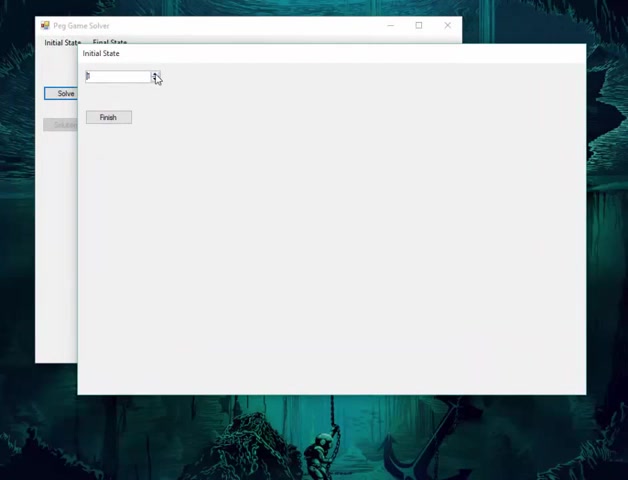
The interface typically includes:
- Initial State Configuration: A section where you can define the starting arrangement of pegs on the board. This might involve selecting the size of the triangle and the position of the initial open slot.
- Final State Configuration: A section to specify the desired end configuration of the pegs. Typically, this involves clicking on the desired position for the last remaining peg after the moves.
- Solve Button: A button that initiates the solving process. Once clicked, the algorithm starts searching for a solution based on the defined initial and final states.
- Solution Display: A section where the steps to solve the puzzle are displayed once the solution is found. This will show the initial state first, followed by the moves required to solve it.
Using this interface allows you to easily customize your peg solitaire challenges.
Setting Up and Solving Peg Solitaire Games
Configuring the Initial State
To begin using the Peg Game Solver, the first step is to configure the initial state of the peg solitaire game. This involves setting up the board with the starting arrangement of pegs and defining the initial empty space. The steps typically include:
- Selecting the Board Size: Choose the size of the triangular board. The solver may offer options for different numbers of rows, such as 2, 3, 4, 5, or 6. The board size determines the total number of holes and pegs in the game.
- Defining the Empty Hole: Specify the location of the initial empty hole on the board. This hole is crucial as it allows the first peg to jump over another peg, initiating the game. If you don't select a specific location to start with, it could choose a default location automatically.
- Confirming the Initial State: Once the board size and initial empty hole are set, finalize the initial state configuration. This creates the starting arrangement of pegs on the board, ready for the solving process.
Specifying the Final State
After configuring the initial state, the next step is to specify the final state of the game. This defines the desired end configuration, typically involving a single peg remaining in a specific location on the board. The process includes:
-
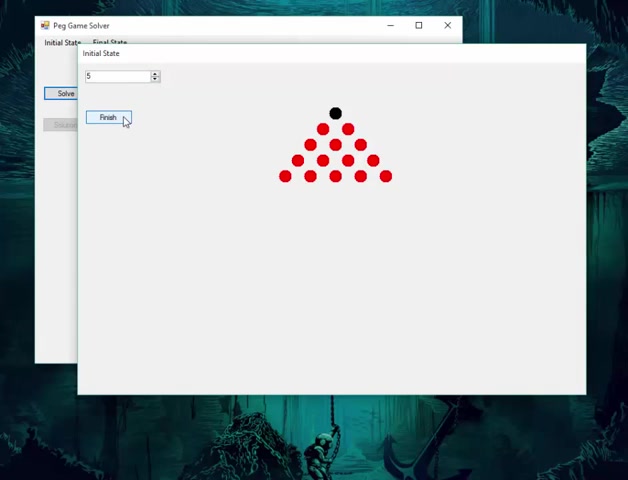
Navigating to the Final State Tab: Switch to the final state configuration section in the solver interface.
-
Selecting the Final Peg Position: Click on the hole where you want the last remaining peg to be located. The choice of this position can significantly impact the complexity of the solution.
-
Confirming the Final State: Once the final peg position is selected, confirm the final state configuration. This sets the goal for the solver, which will attempt to find a sequence of moves that results in only one peg at the specified location.
Solving the Puzzle
With both the initial and final states configured, the Peg Game Solver is ready to find a solution. The solving process typically involves:
-
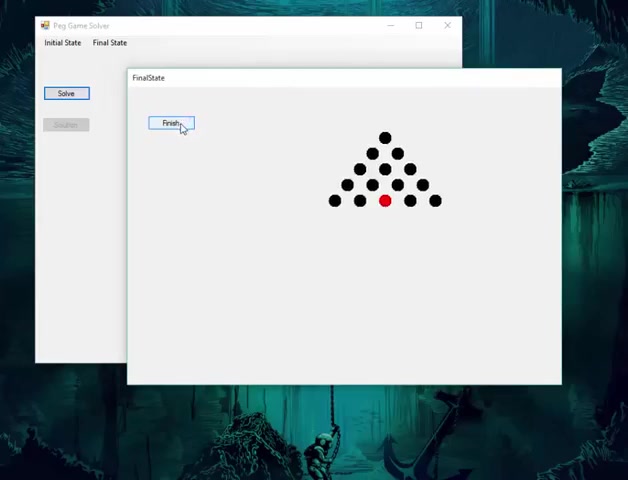
Clicking the Solve Button: Initiate the solving algorithm by clicking the “Solve” button in the interface.
-
Analyzing the Solution: Review the sequence of moves provided by the solver. Each move is a peg jumping over another peg into an empty hole. Note that some starting and final states may not lead to a solution.
-
Understanding the Moves: The solver presents a visual representation of the board state after each move. Observe how the peg arrangement changes with each jump, bringing you closer to the final state.
-
Resetting or Adjusting States: If the solver doesn’t find a solution, or if you wish to explore different scenarios, you can adjust either the initial or final states and try again.





Most people like































Report
Please select a reason for reporting
- 13 Reasons to Switch from Snapchat to Text Messaging
- 7 Powerful Speech to Text Apps to Boost Productivity
- 10 Best Speech to Text Tools for Effortless Transcription
- 13 Free Tools to Easily Transcribe Audio to Text
- 15 Surprising Ways Google's Speech-to-Text Boosts Productivity
- 7 Best Free Online Audio to Text Transcription Tools
- 9 Tips to Transcribe Speech to Text Faster and Better
- 13 Best Speech to Text Software for Windows 10 in 2023
- 7 Tips for Choosing the Best Transcriber for Audio to Text
- 11 Reasons Why Dragon Speech-to-Text Apps are Game-Changers
- 6 Secrets to Enhance Your Speech to Text Transcription
- 6 Brilliant Ways to Boost Productivity with Talk-to-Text on Your MacBook
- 6 Ways Transcription Software Converts Audio to Text
- 8 Tips to Transcribe Speech to Text Like a Pro
- 6 Reasons IBM Watson Speech to Text is a Game-Changer
- 14 Powerful Ways Talk-to-Text Improves Your Workflow
- 12 Top Windows Speech-to-Text Software for Efficient Transcription
- 12 Game-Changing Benefits of Apple's Speech to Text Technology
- 9 Powerful Use Cases for AWS Speech to Text Technology
- 10 Easy Steps to Transcribe YouTube Videos to Text
- transcription audio en texte
- online audio transcription
- free audio file transcription
- free ai audio transcription
- audio transcription service
- audio transcription online free
- audio transcription free online
- audio to transcription software
- audio and transcript
- ai audio transcription free
- voice recording to text converter
- translate voice recording to text
- record voice to text
- audio recording to text converter
- voice recording and transcription
- chatgpt voice to text
- gmail voice to text
- speech to text reader
- speech to text ai free
- speech to talk
- How to Use AI Tools to Find Internal Linking Opportunities Across a Business Website
- Discover Your Perfect Haircut with AI Hairstyle Apps
- Free Reputation Calculator Tools: How They're Adapting to Score AI Visibility, Not Just Rankings
- Design Professional Flyers for Free on Your Phone
- Best Free Flyer Maker Apps for Android: Design Like a Pro
- How to Know If Your Business Is Ready for an AI Customer Service Agent
- Revolutionizing Storytelling: From Novels to Screenplays with AI
- Create Engaging Animated Explainer Videos with a Free AI Tool
- Stop Multi-Subscribing: Benchmark Top AI Visual Models in One Canvas
- Best Seedance 2.5 API Provider: Every Price on the Market, Checked at Source
- Top AI Social Media Management Tools: Automate Your Content Strategy
- Free AI Text to Video Generator: Create Stunning Videos from Text
- Discover 17 ChatGPT Alternatives: A Comprehensive Comparison
- Character.AI vs. Janitor AI: Which AI Chat Platform Reigns Supreme?
- Top Virtual Assistant Companies in 2026: Reviews, Pricing, and Plans Compared
- Unveiling FaceCheck.ID: Revolutionizing Reverse Image Searches with AI
- 11 Best AI Dialers in 2026: Features, Pricing, Pros and Cons
- How I Direct Consistent AI Clips: A Hands-On Guide to Multi-Model Generation
- A Realistic Review of the Photo Generator Image Tool
- Playwright MCP Server: Automated Web Testing with Agent Mode

Copyright ©2026 toolify