































Table of Contents
- Key Points
- Understanding Peropesis Linux
- The Educational Value of Peropesis
- Weighing the Benefits and Drawbacks of Peropesis Linux
- Frequently Asked Questions About Peropesis
- Further Exploration: Advanced Linux Concepts


Understanding Peropesis Linux
What is Peropesis Linux?
Peropesis Linux is not just another Linux distribution; it's a journey into the heart of the operating system.
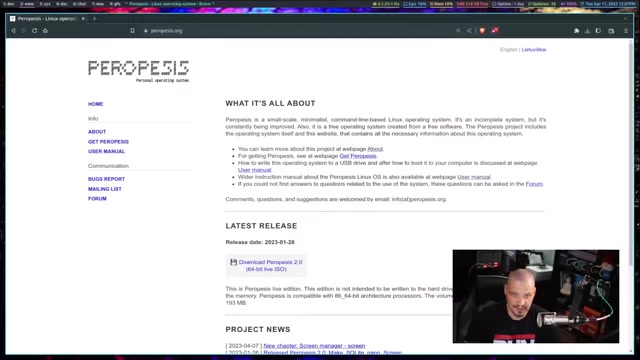
Designed as a small-scale, minimalist, and strictly command-line-based system, Peropesis offers a unique experience for those seeking a deeper understanding of Linux. It's an operating system stripped down to its essentials, making it ideal for experienced Linux users who are comfortable with the command line.
One of the most striking aspects of Peropesis Linux is its size. The entire ISO image is a mere 193 MB, a testament to its minimalist philosophy. This tiny footprint means it can run on older hardware or virtual machines with limited resources. It's a far cry from modern, feature-rich distributions that often require gigabytes of storage and processing power.
Peropesis is an incomplete system, but is constantly being improved. This makes it not just an operating system but also a project, an ongoing effort to refine and expand its capabilities. This project involves creating a system and this website, that contains all the necessary information about this operating system.
At its core, Peropesis provides the Bash shell, the GNU core utilities, and a few other tools that enhance its usability. This combination provides the essential building blocks for interacting with the system. The documentation, especially the user manual, becomes an invaluable guide, leading users through the intricacies of command-line operations. This focus makes Peropesis an excellent learning tool for those seeking to master core Linux utilities and commands.
Unlike many modern distributions that offer graphical interfaces, Peropesis Linux is strictly command-line. This design choice promotes a deeper understanding of Linux internals. It encourages users to interact directly with the operating system, mastering essential commands, and utilities. Peropesis forgoes the convenience of point-and-click interfaces, demanding a more hands-on approach. This makes it an excellent system for those seeking to truly understand what's going on under the hood.
Its unique approach provides a learning experience that can be incredibly valuable for aspiring system administrators, developers, or anyone who wants to gain a deeper understanding of Linux.
Key Features of Peropesis Linux
Peropesis Linux, while minimal, offers a carefully selected set of features designed to enhance the command-line experience.
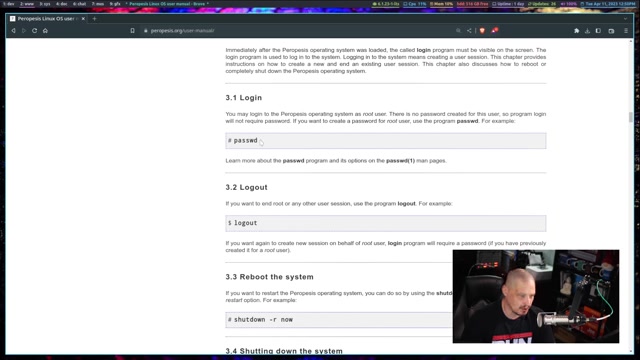
These features contribute to both its usability and its educational value. A great way to start learning about the operating system is to dive straight into the manual. It is very detailed and will tell you everything you need to know. Peropesis has also had several updates over the years.
- Links Web Browser: The inclusion of the Links web browser is a notable feature. This terminal-based browser allows users to access online documentation, tutorials, and other resources directly from the command line. It's a practical tool for troubleshooting, researching, and learning without leaving the terminal environment. It allows you to view documentation online without the need for a full graphical desktop.
- Documentation: The comprehensive documentation is a cornerstone of Peropesis Linux. The user manual covers everything from booting the system to using essential command-line utilities. This documentation is essential for navigating the system and making the most of its capabilities. The user manual is very detailed and helps even the newest users to learn how to use the operating system. The documentation makes Peropesis a distribution great for learning.
- Bash Shell and GNU Core Utilities: These form the foundation of the system. The Bash shell provides the interface for interacting with the operating system, while the GNU core utilities provide essential tools for file management, text processing, and system administration. Mastering these utilities is crucial for any serious Linux user, and Peropesis provides an ideal environment for doing so.
- Virtual Consoles: Peropesis Linux supports virtual consoles, allowing users to run multiple terminal sessions simultaneously. This is useful for multitasking, running background processes, or experimenting with different configurations. If you’re looking for a deeper understanding of virtual consoles, the user manual contains information to make sure that you fully learn how to utilize these functionalities.
These key features, combined with its minimalist design, make Peropesis Linux a powerful and educational tool for Linux enthusiasts. It's a system designed to empower users to learn, experiment, and truly understand the inner workings of the Linux operating system.
Installation and Usage of Peropesis Linux
Getting started with Peropesis Linux is a straightforward process. The small ISO image makes it easy to download and boot from a USB drive or virtual machine. The process of installing Peropesis is as easy as downloading the ISO and booting it from a USB drive.
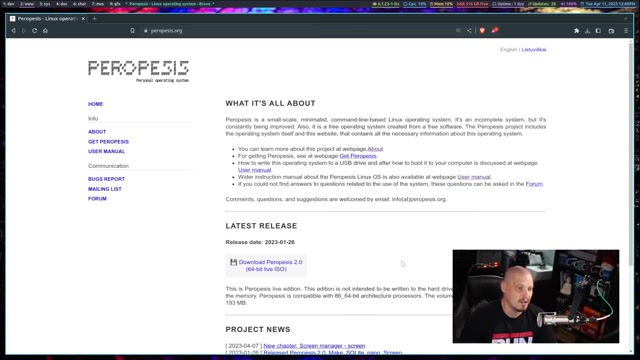
This section provides a step-by-step guide to help you get up and running.
- Download the ISO Image: Download the latest ISO image of Peropesis Linux from the official website. The image is small, so the download should be quick. Once you have the ISO image, you can proceed to the next step.
- Create a Bootable USB Drive: You can use tools like Etcher on Linux or Rufus on Windows to create a bootable USB drive. These tools will copy the contents of the ISO image to the USB drive, making it bootable. It’s extremely important to ensure that this bootable USB is created correctly, otherwise you might run into issues when trying to use Peropesis.
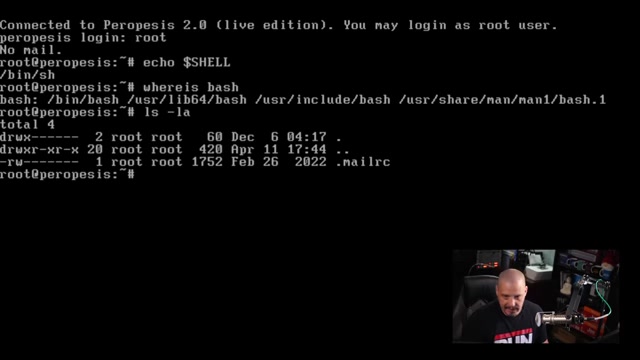
- Boot from the USB Drive: Insert the USB drive into your computer and restart. You may need to change the boot order in your BIOS settings to boot from the USB drive. When you successfully boot from the USB drive, you will be presented with a command-line Prompt. If done correctly, Peropesis should show up on your computer once you properly restart it.
- Explore the Command Line: Once you have booted into Peropesis Linux, you will be greeted by a command-line prompt. This is where you can start exploring the system and experimenting with different commands. Take some time to familiarize yourself with the core utilities and the file system structure.
- Consult the User Manual: The user manual is your best friend when using Peropesis Linux. It provides detailed information on all aspects of the system, from basic commands to advanced configurations. Keep the user manual handy and refer to it whenever you need help or guidance.
The main challenge may be the transition for users accustomed to graphical interfaces. For instance, editing configuration files, navigating the file system, and managing software updates all require proficiency in command-line tools. However, these challenges also provide an opportunity to learn and grow, pushing users beyond their comfort zone and expanding their Linux skills. As you practice and consult the documentation, the command line will become a more intuitive and powerful tool.
The Educational Value of Peropesis
Why Use Peropesis for Learning?
Peropesis Linux is not just an operating system; it’s an educational tool. There are many reasons why it’s great for those that are starting out learning Linux commands.
Its minimalist design, focus on the command line, and comprehensive documentation all contribute to its value as a learning platform.
- Minimalist Design: Peropesis removes the distractions and complexity of modern desktop environments. You are forced to engage directly with the core components of the operating system. This direct interaction fosters a deeper understanding of how things work under the hood.
- Command-Line Focus: Interacting with Peropesis solely through the command line requires you to learn essential commands and utilities. You will learn how to navigate the file system, manage processes, configure network settings, and perform other administrative tasks, all from the command line. This expertise is invaluable for any Linux professional.
- Comprehensive Documentation: The user manual serves as a detailed guide to Peropesis Linux. The documentation provides explanations, examples, and troubleshooting tips. It empowers you to learn at your own pace and explore the system in depth.
By using Peropesis, you actively engage with the building blocks of the operating system. As you learn and explore, you gain a deeper appreciation for the power and flexibility of the Linux command line. Peropesis is the perfect training system.









Most people like


























Report
Please select a reason for reporting
- 13 Reasons to Switch from Snapchat to Text Messaging
- 7 Powerful Speech to Text Apps to Boost Productivity
- 10 Best Speech to Text Tools for Effortless Transcription
- 13 Free Tools to Easily Transcribe Audio to Text
- 15 Surprising Ways Google's Speech-to-Text Boosts Productivity
- 7 Best Free Online Audio to Text Transcription Tools
- 9 Tips to Transcribe Speech to Text Faster and Better
- 13 Best Speech to Text Software for Windows 10 in 2023
- 7 Tips for Choosing the Best Transcriber for Audio to Text
- 11 Reasons Why Dragon Speech-to-Text Apps are Game-Changers
- 6 Secrets to Enhance Your Speech to Text Transcription
- 6 Brilliant Ways to Boost Productivity with Talk-to-Text on Your MacBook
- 6 Ways Transcription Software Converts Audio to Text
- 8 Tips to Transcribe Speech to Text Like a Pro
- 6 Reasons IBM Watson Speech to Text is a Game-Changer
- 14 Powerful Ways Talk-to-Text Improves Your Workflow
- 12 Top Windows Speech-to-Text Software for Efficient Transcription
- 12 Game-Changing Benefits of Apple's Speech to Text Technology
- 9 Powerful Use Cases for AWS Speech to Text Technology
- 10 Easy Steps to Transcribe YouTube Videos to Text
- transcription audio en texte
- online audio transcription
- free audio file transcription
- free ai audio transcription
- audio transcription service
- audio transcription online free
- audio transcription free online
- audio to transcription software
- audio and transcript
- ai audio transcription free
- voice recording to text converter
- translate voice recording to text
- record voice to text
- audio recording to text converter
- voice recording and transcription
- chatgpt voice to text
- gmail voice to text
- speech to text reader
- speech to text ai free
- speech to talk
- Revolutionizing Storytelling: From Novels to Screenplays with AI
- Create Engaging Animated Explainer Videos with a Free AI Tool
- Stop Multi-Subscribing: Benchmark Top AI Visual Models in One Canvas
- Best Seedance 2.5 API Provider: Every Price on the Market, Checked at Source
- AI OnlyFans: How to Generate $30,000/Month (Legally)
- Transform Your Script into an Engaging Video with AI Video Maker!
- AI Marketing Automation: A Comprehensive Guide for Small Businesses
- Midjourney Alternative for Anime Art Creators: Why PixAI May Be Better for Character Workflows
- 10 Things Most People Get Wrong About AI Image Search
- AI Girlfriend Apps: Top Choices Redefining Relationships 2025
- Top 4 Face Swap Generator Tools to Transform Your Visual Content
- Master Canva's Video Background Remover with 5 Essential Tips
- Mastering Microsoft Stream: Video Management Tips & Tricks
- AI Video Generation: Extend AI Videos for Free
- Master Loom: Create and Share Professional Videos with AI
- Create Captivating AI News Videos: Step-by-Step Guide
- Create Your Own AI News Channel with AI-Powered News Video Generator and AI Lip Sync
- Unleash the Power of Heygen AI: Create Unlimited Videos for Free!
- Kapwing Smart Cut: AI Video Editing for Creators & Marketers
- Upscale Video Quality with UniFab Upscaler AI: A Complete Guide

Copyright ©2026 toolify