































Table of Contents
- Key Points
- Understanding Playground AI
- Getting Started with Playground AI: A Step-by-Step Guide
- How to Use Playground AI for Different Purposes
- Playground AI Pricing Plans
- Weighing the Options: Playground AI Pros and Cons
- Exploring Playground AI's Core Features
- Unlocking the Potential: Playground AI Use Cases
- Frequently Asked Questions
- Related Questions



Understanding Playground AI
What is Playground AI?
Playground AI is a cutting-edge, free ai image generator that transforms textual descriptions into stunning visual realities
. It leverages advanced machine learning algorithms to interpret your ideas and generate corresponding images. This tool is incredibly versatile, catering to a wide array of creative needs. Whether you're a marketer seeking eye-catching visuals, a blogger in need of engaging graphics, or simply an individual with a desire to bring your imagination to life, Playground AI offers a user-friendly platform to achieve your goals.
Unlike complex Graphic Design software, Playground AI requires no specialized skills or technical expertise. Its intuitive interface and straightforward prompting system make it accessible to everyone, regardless of their background. By simply providing a descriptive text Prompt, you can witness your words materialize into unique and captivating images. This ease of use, coupled with its powerful AI capabilities, makes Playground AI a Game-changer in the world of digital content creation.
Benefits of Using Playground AI
Playground AI offers a multitude of benefits for individuals and businesses alike:
- Cost-effectiveness: As a free tool, Playground AI eliminates the need for expensive software subscriptions or hiring professional graphic designers. This makes it an ideal solution for budget-conscious creators.
- Time-saving: Generating images with Playground AI is significantly faster than traditional methods. You can create visuals in minutes, freeing up valuable time for other tasks.
- Accessibility: Its user-friendly interface and simple prompting system make Playground AI accessible to everyone, regardless of their technical skills.
- Creativity: Playground AI fosters creativity by allowing you to experiment with different prompts and styles. You can explore endless possibilities and discover unique visual representations of your ideas.
- Versatility: Playground AI can be used to generate images for a wide range of purposes, including marketing materials, blog posts, social media content, presentations, and personal projects.
The power of AI-driven image generation is transforming how we approach visual content. The simplicity and accessibility of platforms such as Playground AI are reshaping creative workflows and empowering individuals to realize their ideas without the traditional barriers of cost and technical proficiency. Playground AI levels the playing field, offering unparalleled freedom to users seeking custom visuals. The ease of use and low-entry threshold means anyone can generate images for marketing, blogs, and even for fun
. You describe, the AI paints. Whether for a professional or a personal project, the potential is limitless.
Getting Started with Playground AI: A Step-by-Step Guide
Step 1: Accessing the Playground AI Website
The first step in harnessing the power of Playground AI is to visit their website. Simply open your preferred web browser and navigate to PlaygroundAI.com
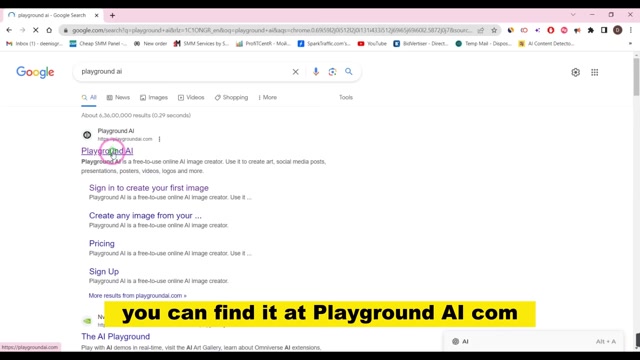
. This will take you to the platform's homepage, where you can begin the sign-up process.The website has a simple interface that leads you to begin creating images.
Step 2: Signing Up for a Free Account
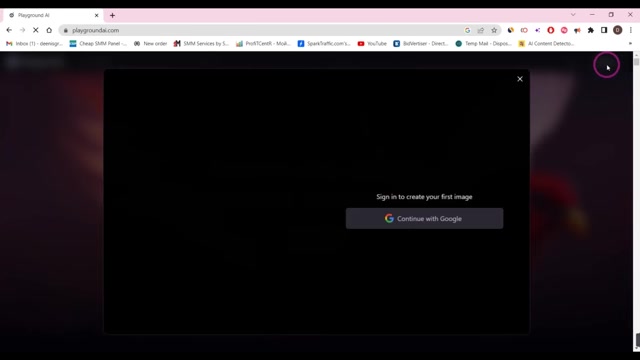
Once on the Playground AI Website, you'll need to sign up for a free account to begin creating images
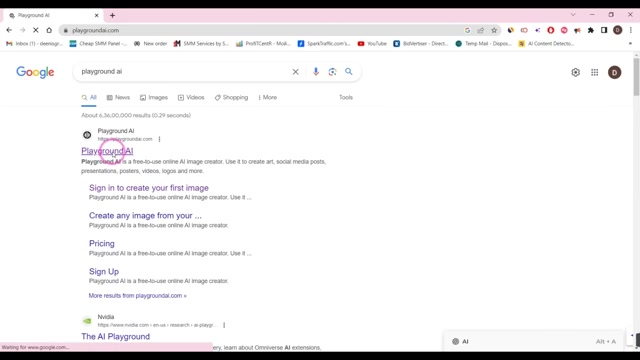
. Click on the 'Sign Up' button, typically located in the upper-right corner of the page. You'll be presented with several options for creating an account, including using your Google account.
Choosing 'Continue with Google' offers a streamlined and convenient way to create your Playground AI account. Simply select your Google account, and the platform will automatically create an account using your Google profile information.
Once you've created your account, you'll be redirected to the Playground AI dashboard, where you can begin exploring the platform's features and generating images.
Step 3: Navigating the Playground AI Interface
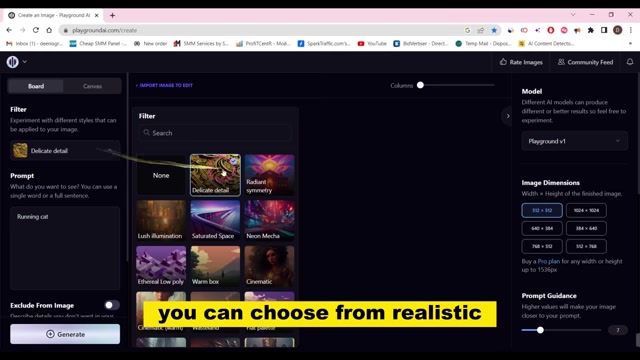
Upon successful login, you'll encounter Playground AI's intuitive interface. The dashboard is designed for ease of navigation, allowing you to quickly access the key features you need to create stunning visuals
.
The 'Create' button, prominently displayed on the dashboard, is your gateway to the image generation process. Clicking this button will take you to the image creation page, where you can input your text prompts and customize various settings to achieve your desired results .
Step 4: Choosing an AI Model
Playground AI offers a selection of different AI models to power your image generation. These models vary in their capabilities and artistic styles, allowing you to experiment and find the perfect fit for your creative vision
.
Here are the primary AI models available on Playground AI:
- Playground v1: This is the default AI model on Playground AI, offering a good balance of realism and artistic flair. It's a great starting point for experimenting and exploring the platform's capabilities.
- Stable Diffusion 1.5: This model is known for its ability to generate highly realistic and detailed images. It's a popular choice for creating photorealistic visuals.
- Stable Diffusion 2.1: An updated version of Stable Diffusion, offering improved performance and image quality.
- DALL-E 2: A powerful AI model developed by OpenAI, known for its ability to generate highly creative and imaginative images. Access to DALL-E 2 may require a paid subscription
.
Select a AI mode that fits the budget and creativity needs. After selecting, proceed to the next step.
Step 5: Entering Your Text Description (Prompting)
The heart of Playground AI lies in its ability to Translate textual descriptions into images. This process, known as prompting, involves providing the AI with a clear and descriptive text prompt that outlines the image you want to create
.
To input your text description, locate the text box on the image creation page. This is where you'll type or paste your prompt. The more detailed and descriptive your prompt, the better the AI will be able to understand your vision and generate a corresponding image.
For example, 'A majestic lion standing on a rocky cliff overlooking a vast savanna at sunset' would be a more descriptive and effective prompt than simply 'lion'.
Step 6: Applying Styles and Filters
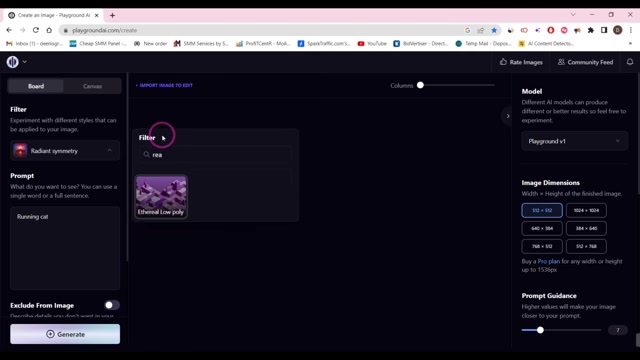
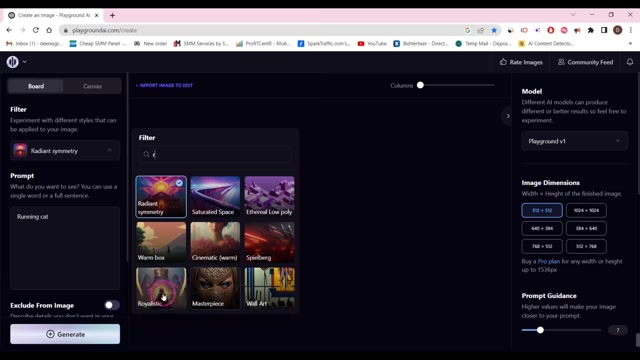
Playground AI provides a range of styles and filters that can be applied to your generated images, allowing you to further customize their appearance
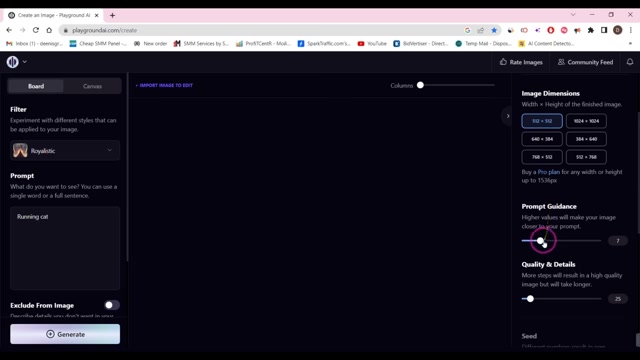
. These styles and filters can dramatically alter the mood, tone, and artistic style of your visuals.
Some popular styles and filters include:
- Delicate detail: Enhances the fine details in your images.
- Radiant symmetry: Creates symmetrical and visually balanced compositions.
- Lush illumination: Adds a soft, warm glow to your images.
- Saturated space: Creates vibrant and colorful images with a space-like feel.
Experiment with different styles and filters to discover the unique effects they can bring to your creations. Filters on Playground AI offer a variety of styles to choose from, and can be realistic, cartoony, or even abstract styles .
Step 7: Adjusting Dimensions and Other Options
Before generating your image, Playground AI allows you to customize several options, including the image dimensions, prompt guidance, and quality details
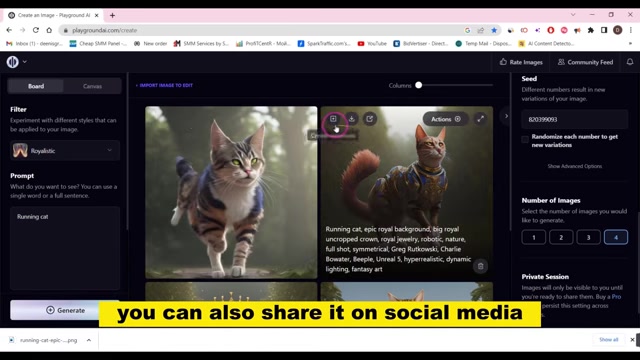
. These options give you greater control over the final output.
The image dimensions determine the width and height of your generated image. Higher dimensions result in larger, more detailed images, but they may also take longer to generate and consume more processing power. The size also depends on the paid plan selected. Experiment with different dimensions to find the balance between image quality and generation speed.
Step 8: Generating Your Image
Once you're satisfied with your prompt, style, filters, and dimensions, it's time to generate your image. Simply click on the 'Generate' button, typically located at the bottom of the image creation page .
Playground AI will then begin processing your request, using its AI models to translate your text description into a visual representation. The generation time will vary depending on the complexity of your prompt, the selected AI model, and the chosen image dimensions. Images can be generated after settings are selected .
Step 9: Saving or Sharing Your Image
After Playground AI has finished generating your image, you'll be presented with the final result. If you're happy with the outcome, you can save the image to your computer or share it on social media .
To save your image, simply click on the download icon, typically located in the upper-right corner of the image preview. This will download the image file to your computer in a standard format like JPEG or PNG.
To share your image on social media, click on the appropriate social media icon (e.g., Facebook, Twitter, Instagram). This will allow you to directly post your image to your social media accounts.


Most people like



































Report
Please select a reason for reporting
- 13 Reasons to Switch from Snapchat to Text Messaging
- 7 Powerful Speech to Text Apps to Boost Productivity
- 10 Best Speech to Text Tools for Effortless Transcription
- 13 Free Tools to Easily Transcribe Audio to Text
- 15 Surprising Ways Google's Speech-to-Text Boosts Productivity
- 7 Best Free Online Audio to Text Transcription Tools
- 9 Tips to Transcribe Speech to Text Faster and Better
- 13 Best Speech to Text Software for Windows 10 in 2023
- 7 Tips for Choosing the Best Transcriber for Audio to Text
- 11 Reasons Why Dragon Speech-to-Text Apps are Game-Changers
- 6 Secrets to Enhance Your Speech to Text Transcription
- 6 Brilliant Ways to Boost Productivity with Talk-to-Text on Your MacBook
- 6 Ways Transcription Software Converts Audio to Text
- 8 Tips to Transcribe Speech to Text Like a Pro
- 6 Reasons IBM Watson Speech to Text is a Game-Changer
- 14 Powerful Ways Talk-to-Text Improves Your Workflow
- 12 Top Windows Speech-to-Text Software for Efficient Transcription
- 12 Game-Changing Benefits of Apple's Speech to Text Technology
- 9 Powerful Use Cases for AWS Speech to Text Technology
- 10 Easy Steps to Transcribe YouTube Videos to Text
- transcription audio en texte
- online audio transcription
- free audio file transcription
- free ai audio transcription
- audio transcription service
- audio transcription online free
- audio transcription free online
- audio to transcription software
- audio and transcript
- ai audio transcription free
- voice recording to text converter
- translate voice recording to text
- record voice to text
- audio recording to text converter
- voice recording and transcription
- chatgpt voice to text
- gmail voice to text
- speech to text reader
- speech to text ai free
- speech to talk
- ChatGPT Knows Ford. It Just Doesn't Quote Ford
- Meshy AI: How to Create 3D Models from Text and Images
- How SEO and Marketing Dashboards Empower Agencies to Drive Results
- How to Use AI Tools to Find Internal Linking Opportunities Across a Business Website
- Discover Your Perfect Haircut with AI Hairstyle Apps
- Free Reputation Calculator Tools: How They're Adapting to Score AI Visibility, Not Just Rankings
- Design Professional Flyers for Free on Your Phone
- Best Free Flyer Maker Apps for Android: Design Like a Pro
- How to Know If Your Business Is Ready for an AI Customer Service Agent
- Revolutionizing Storytelling: From Novels to Screenplays with AI
- Your Business Data Could Be Worth Up to $4M. Find Out Without Uploading a Single File.
- Can an eSIM Plan Save You Time During Travel Setup?
- AI Video Editor Review: A Hands-On Look at Prompt-Based Video Editing
- Keep Characters Consistent Across Scenes With Image-to-Video AI
- How to Convert BTC to HNT
- ProxyWing DuckDuckGo Proxy Review: Plans, Setup and Who It Is For
- ChatGPT Knows Ford. It Just Doesn't Quote Ford
- Automate Lead Generation: A Comprehensive Guide with AI Agents
- Revideo.io: The Future of Reverse Video Search Technology
- Revolutionizing Email Marketing Agency with AI

Copyright ©2026 toolify