































Table of Contents
- Key Points
- Understanding PointChecker: The Document Analysis Revolution
- Exploring PointChecker's Versatile Checklist Options
- Step-by-Step Guide: Using PointChecker for Document Analysis
- PointChecker Pricing Plans: Tailored for Every User
- Weighing the Options: Pros and Cons of Using PointChecker
- Core Features of PointChecker: Enhancing Document Analysis
- Real-World Use Cases: How PointChecker Transforms Industries
- Frequently Asked Questions About PointChecker
- Related Questions


Understanding PointChecker: The Document Analysis Revolution
What is PointChecker?
PointChecker is an innovative document analysis tool leveraging artificial intelligence to simplify and enhance document management processes. It's designed to streamline workflows, boost productivity, and supercharge research by offering insightful analysis and easy access to crucial information. The platform aims to transform how professionals and researchers interact with their documents. This cutting-edge tool revolutionizes document handling through its seamless and efficient processes, designed to save users valuable time.
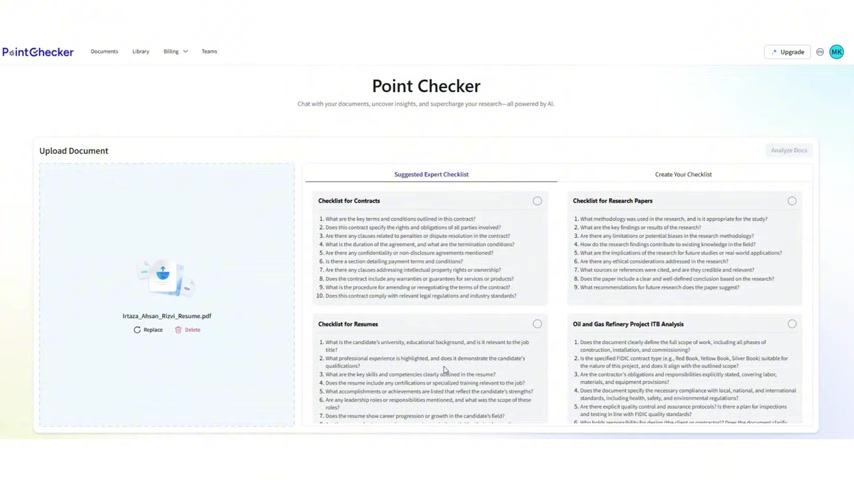
PointChecker is more than just a tool; it's a strategic partner, empowering users to achieve efficiency and accuracy in their document management. The ultimate goal is to turn documents into sources of actionable insights rather than overwhelming masses of data. Through its user-friendly design and advanced features, PointChecker makes document analysis accessible and manageable for everyone, regardless of their technical expertise.
With PointChecker, document handling is transformed from a chore into a strategic advantage. It makes it possible to gain clarity, accuracy, and significant time savings, helping users focus on what matters most – making informed decisions and achieving their goals.
Key Features and Benefits of Using PointChecker
PointChecker is packed with features designed to make document analysis more efficient and insightful. Here's a breakdown of its key capabilities:
-
Intuitive Interface:
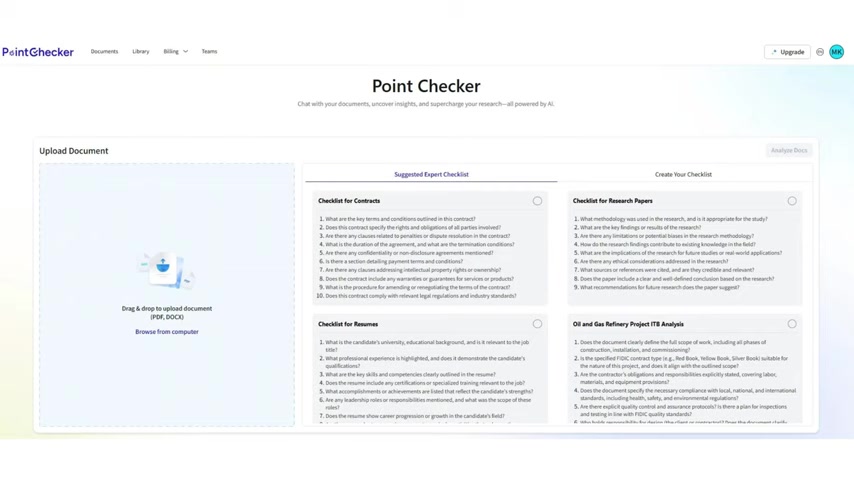
The platform features a sleek, user-friendly interface that invites exploration and simplifies navigation. This design ensures that users can quickly access and utilize the tool's full potential without a steep learning curve.
-
Effortless Document Upload:
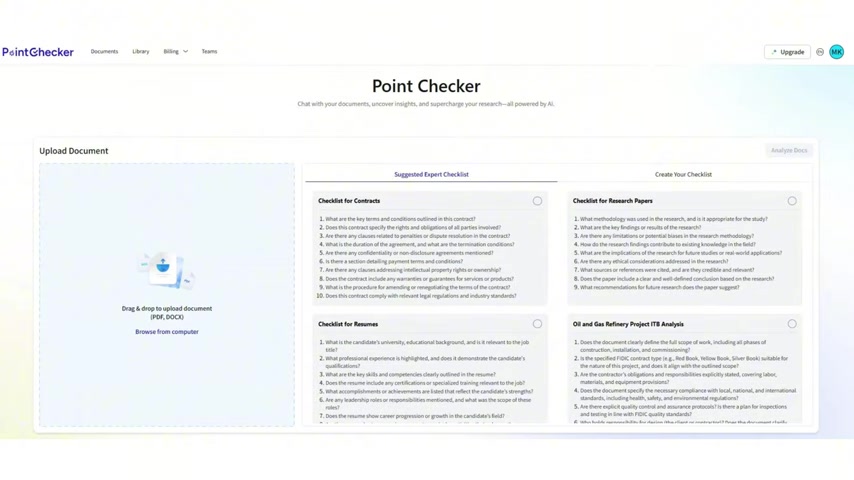
Uploading documents in PDF or DOCX format is seamless, allowing users to quickly start the analysis process. This functionality streamlines document handling, saving valuable time.
-
Diverse Checklist Templates: PointChecker provides a wide array of checklist templates tailored for various document types, including contracts, resumes, research Papers, and financial documents. This feature helps users conduct thorough and targeted analyses.
-
Customizable Checklists: Users have the flexibility to create their own checklists, customizing the analysis to meet specific requirements. This adaptability ensures that PointChecker can be tailored to diverse needs and scenarios.
-
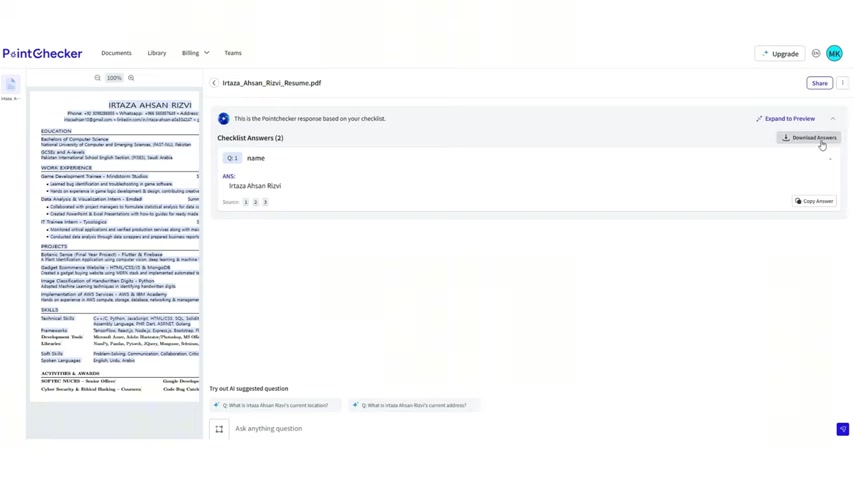
AI-Powered Analysis: The tool employs advanced AI technology to process documents and generate relevant insights, offering a deeper understanding of the content.
-
Interactive Chat Interface: An interactive chat interface allows users to ask additional questions about their documents and receive instant answers, enhancing the overall analysis experience.
-
Source Navigation: The platform allows users to navigate directly to the source page within a document, enhancing transparency and building trust in the analysis results.
-
Team Collaboration: PointChecker facilitates team collaboration, allowing users to create teams and streamline processes within their organizations. This promotes efficient teamwork and knowledge sharing.
These features combine to offer a powerful and comprehensive document analysis solution. Whether you're a legal professional, researcher, or business analyst, PointChecker provides the tools you need to extract valuable insights from your documents efficiently.
Exploring PointChecker's Versatile Checklist Options
Suggested Expert Checklists
PointChecker offers a variety of suggested expert checklists that cater to different document types, ensuring comprehensive and targeted analyses. These checklists are designed to guide users through critical points and relevant aspects of each document, making the review process more efficient and accurate.
-
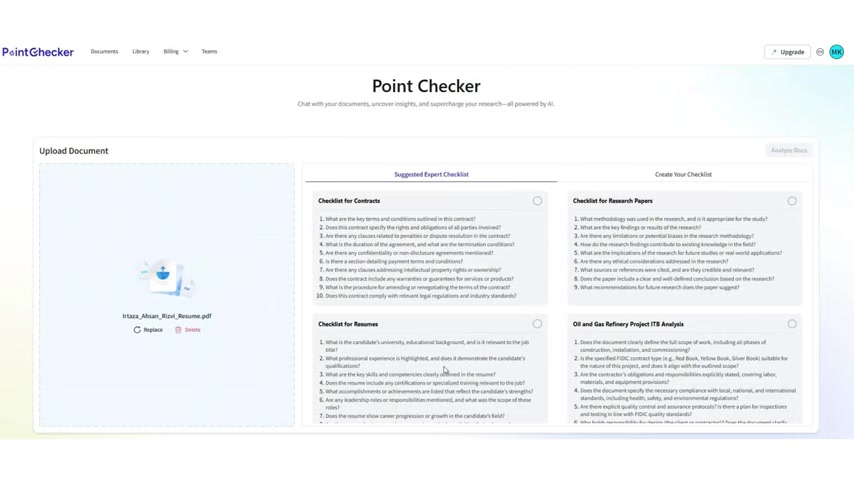
Checklist for Contracts: This checklist ensures all critical legal terms and conditions are outlined, clarifies the rights and obligations of all parties involved, and identifies potential penalties or dispute resolution clauses. It also confirms the duration of the agreement and termination conditions, assesses confidentiality and non-disclosure agreements, and verifies compliance with legal and industry standards.
-
Checklist for Resumes: This checklist evaluates the candidate's educational background, relevant experience, and skills. It also verifies certifications, accomplishments, leadership roles, and career progression to ensure a comprehensive assessment of the candidate’s qualifications.
-
Checklist for Research Papers:
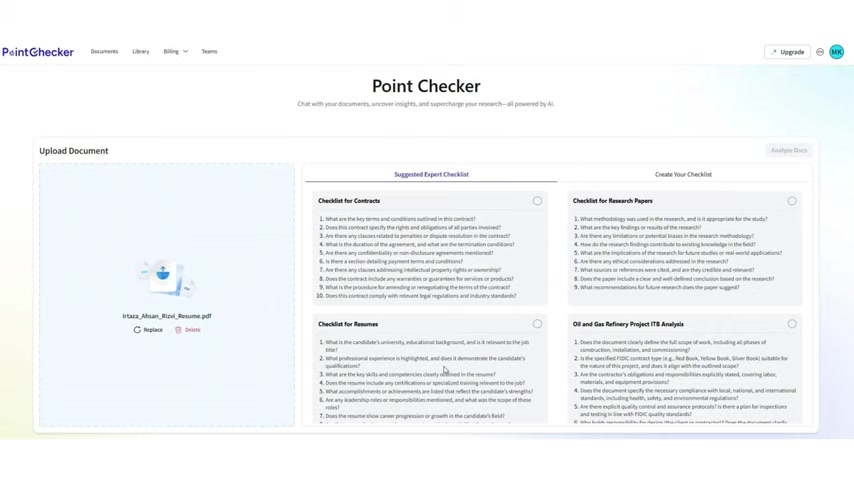
This checklist assesses the methodology used in the research, key findings and results, and any limitations or potential biases. It also examines ethical considerations, the credibility of sources, and whether the paper includes a clear conclusion with recommendations for future research.
-
Oil and Gas Refinery Project ITB Analysis:
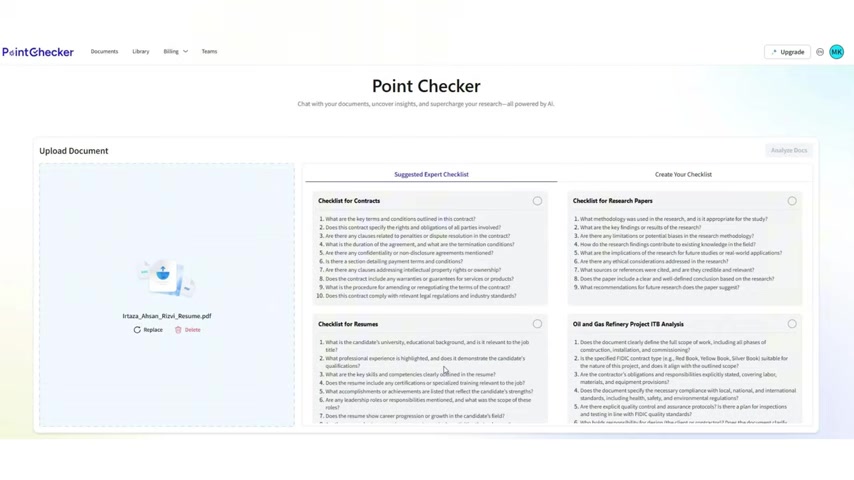
This checklist ensures the document clearly defines the full scope of work, lists all phases of construction, and explicitly states obligations and responsibilities. It also verifies compliance with local, national, and international standards and explicitly covers environmental regulations.
These suggested expert checklists save users time and effort by providing a structured approach to document analysis, tailored to specific industries and document types.
Creating Your Own Custom Checklist
PointChecker’s custom checklist feature provides unparalleled flexibility, allowing users to tailor their document analysis to precise needs. This feature enables the creation of highly specific checklists, ensuring that no crucial detail is overlooked.
To create a custom checklist, simply navigate to the "Create Your Checklist" tab on the platform. From there, you can:
- Name Your Checklist: Give your checklist a descriptive name to easily identify its purpose.
- Select a Category: Choose a category for your checklist, such as Resume, contract, or research paper, to keep your checklists organized.
- Add Checklist Items: Enter your specific checklist items. These can be questions, requirements, or criteria relevant to your analysis.
- Save Your Checklist: Once you’ve added all necessary items, save your checklist to use it for future document analyses.
By creating custom checklists, users can ensure that PointChecker meets their exact analytical requirements. This level of customization enhances the tool’s adaptability, making it an indispensable asset for professionals across various fields.
Step-by-Step Guide: Using PointChecker for Document Analysis
Step 1: Uploading Your Document
The first step to leveraging PointChecker is uploading your document. The platform supports both PDF and DOCX formats, ensuring compatibility with a wide range of documents. To upload, simply:
- Click on the “Browse from computer” button.
- Select the document you wish to analyze from your local drive.
- Confirm the upload.
Once uploaded, PointChecker prepares the document for analysis, initiating the process that extracts valuable insights.
Step 2: Selecting a Checklist Template or Creating a Custom One
After uploading, choose a checklist to guide your document analysis. PointChecker offers a variety of expert checklists tailored for different document types. Alternatively, you can create your own custom checklist to meet specific analytical needs.
- Selecting an Expert Checklist: Browse the available expert checklists and select the one that best fits your document type.
- Creating a Custom Checklist: If you require a more specific analysis, create a custom checklist by naming it, selecting a category, and adding individual checklist items. Save the checklist once you’ve added all necessary items.
Step 3: Analyzing Your Document with PointChecker
Once you have uploaded your document and chosen or created a checklist, you're ready to begin the analysis.
- Click on the “Analyze Docs” button.
- PointChecker's AI will process the document, cross-referencing it with your chosen checklist.
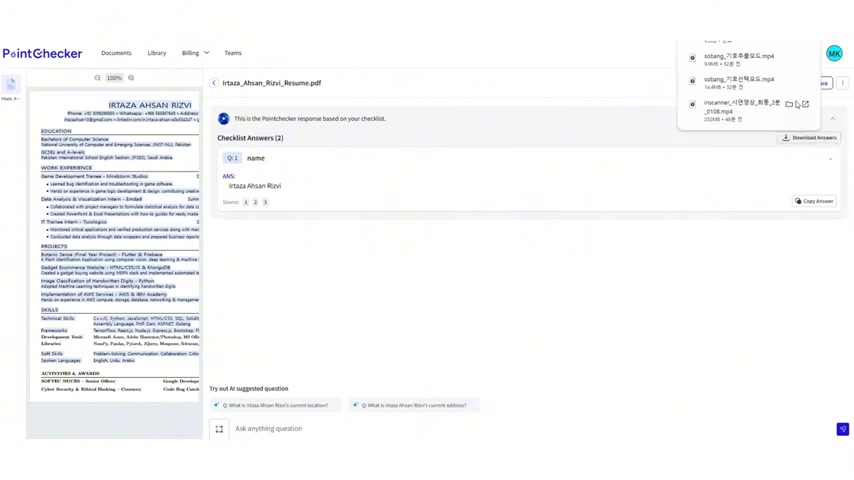
- The platform will display the analysis results, providing answers and insights based on the checklist criteria.
This step transforms your document into a source of actionable information, making the review process more efficient and insightful.
Step 4: Reviewing and Interacting with Analysis Results
After the analysis, review the results displayed on the screen. PointChecker presents the checklist answers alongside your document, making it easy to verify findings.
- Navigating the Document: Use the source links to navigate directly to specific pages within the PDF document, enhancing transparency.
- Asking Additional Questions: Utilize the interactive chat interface to ask further questions and gain deeper insights into your document.
This interactive review process ensures that you extract maximum value from your document, turning data into strategic decisions.








Most people like































Report
Please select a reason for reporting
- 13 Reasons to Switch from Snapchat to Text Messaging
- 7 Powerful Speech to Text Apps to Boost Productivity
- 10 Best Speech to Text Tools for Effortless Transcription
- 13 Free Tools to Easily Transcribe Audio to Text
- 15 Surprising Ways Google's Speech-to-Text Boosts Productivity
- 7 Best Free Online Audio to Text Transcription Tools
- 9 Tips to Transcribe Speech to Text Faster and Better
- 13 Best Speech to Text Software for Windows 10 in 2023
- 7 Tips for Choosing the Best Transcriber for Audio to Text
- 11 Reasons Why Dragon Speech-to-Text Apps are Game-Changers
- 6 Secrets to Enhance Your Speech to Text Transcription
- 6 Brilliant Ways to Boost Productivity with Talk-to-Text on Your MacBook
- 6 Ways Transcription Software Converts Audio to Text
- 8 Tips to Transcribe Speech to Text Like a Pro
- 6 Reasons IBM Watson Speech to Text is a Game-Changer
- 14 Powerful Ways Talk-to-Text Improves Your Workflow
- 12 Top Windows Speech-to-Text Software for Efficient Transcription
- 12 Game-Changing Benefits of Apple's Speech to Text Technology
- 9 Powerful Use Cases for AWS Speech to Text Technology
- 10 Easy Steps to Transcribe YouTube Videos to Text
- transcription audio en texte
- online audio transcription
- free audio file transcription
- free ai audio transcription
- audio transcription service
- audio transcription online free
- audio transcription free online
- audio to transcription software
- audio and transcript
- ai audio transcription free
- voice recording to text converter
- translate voice recording to text
- record voice to text
- audio recording to text converter
- voice recording and transcription
- chatgpt voice to text
- gmail voice to text
- speech to text reader
- speech to text ai free
- speech to talk
- How SEO and Marketing Dashboards Empower Agencies to Drive Results
- How to Use AI Tools to Find Internal Linking Opportunities Across a Business Website
- Discover Your Perfect Haircut with AI Hairstyle Apps
- Free Reputation Calculator Tools: How They're Adapting to Score AI Visibility, Not Just Rankings
- Design Professional Flyers for Free on Your Phone
- Best Free Flyer Maker Apps for Android: Design Like a Pro
- How to Know If Your Business Is Ready for an AI Customer Service Agent
- Revolutionizing Storytelling: From Novels to Screenplays with AI
- Create Engaging Animated Explainer Videos with a Free AI Tool
- Stop Multi-Subscribing: Benchmark Top AI Visual Models in One Canvas
- ASOMobile Helps Teams Benchmark App Store Screenshots Against Competitors
- How to Match LMS Software With Your Organization's Training Plan
- Revolutionizing Email Marketing Agency with AI
- How to Convert BTC to HNT
- Unleashing the Power of AI: Cognizant's Roadmap for Transformation
- Frame to Video Review: A Practical Look at Turning Two Still Frames Into Motion
- NVIDIA NIM: Revolutionizing Supply Chain Data Analysis with AI
- Top AI Tools That Help Brands Stand Out Offline (Not Just Online)
- Top 5 Cold Email Software: Maximize Your Outreach in 2025
- Magic School AI: Revolutionizing Quiz & Assessment Generation

Copyright ©2026 toolify