































Table of Contents
- Key Points
- Understanding the Python Data Converter
- Key Features and Functionalities
- Getting Started with the Python Data Converter
- Licensing and Access
- Weighing the Python Data Converter: Pros and Cons
- Core Features of the Python Data Converter
- Use Cases: Applying the Python Data Converter in Real-World Scenarios
- Frequently Asked Questions (FAQ)
- Related Questions


Understanding the Python Data Converter
What is Python Data Converter?
The Python Data Converter is a converter library primarily designed for converting data between formats such as CSV, JSON, Pandas DataFrames (DF), and URLs.
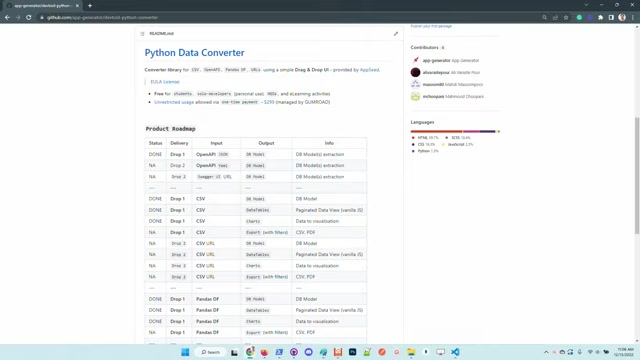
It features a simple drag & drop UI, making it accessible to users with varying levels of technical expertise. The aim is to streamline data conversion processes commonly encountered in programming workflows, whether it's for data analysis, software development, or other data-related projects. This Python converter supports OpenAPI and Swagger among others. The tool is designed to take data in a known format and efficiently convert it to a more accessible format used in programming. This can dramatically reduce the amount of time that programmers spend manually converting data.
One of the tool's primary strengths lies in its ability to extract database models directly from API definitions in formats like JSON and YAML. This functionality drastically reduces the effort required to integrate API data into database-driven applications. The tool's ability to create paginated data views, generate charts, and even export data with filters into CSV or PDF formats enhances data usability for a wider audience. This is an exceptional data converter, offering a free option for users.
The Python Data Converter library is a pivotal tool for any data professional looking to streamline their workflow. Its easy accessibility and clear roadmap provide a solid foundation for future growth, making it a valuable asset for anyone dealing with diverse data formats and conversion requirements.
Key Features and Functionalities
Data Conversion Matrix and Roadmap
The core functionality of the Python Data Converter revolves around its ability to convert data between different formats, as highlighted in the conversion matrix
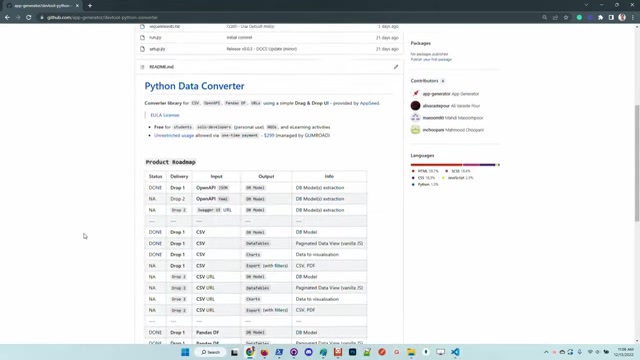
within the project's README.md. The roadmap organizes features into 'drops,' with the tool accepting JSON descriptions for API services in the initial product iteration. This setup facilitates the extraction of model definitions for frameworks like Flask and Django, with the plan to extend support to other languages.
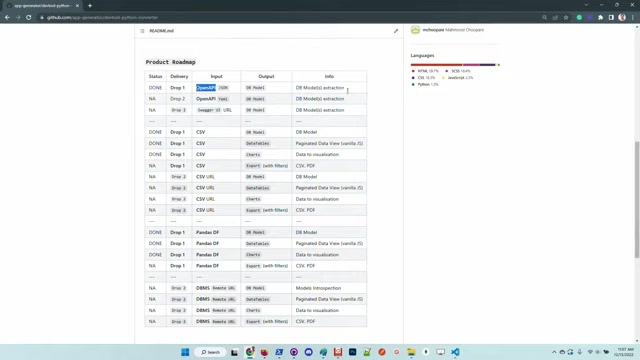
The current roadmap includes:
- Drop 1 (Done): Open API (JSON) to DB Model(s) extraction.
- Drop 2 (NA): Open API (YAML) to DB Model(s) extraction.
- Drop 3 (NA): Swagger UI URL to DB Model(s) extraction.
- Drop 1 (Done): CSV to DB Model.
- Drop 1 (Done): CSV to Datatables (Paginated Data View).
- Drop 1 (Done): CSV to Charts.
- Drop 1 (NA): CSV to Export (with filters) (CSV, PDF).
The roadmap clearly outlines which data conversions are done and still in development to set proper expectations. The data tables features offer a comprehensive view of your data , as well as visualization with auto-generated charts. This allows users to gain insights and use data effectively.
Current features and data conversions also include:
- OpenAPI JSON and YAML to DB Model extraction
- CSV to Datatables for paginated data views
- CSV to Charts
- CSV Export with Filters
- Pandas DF to DB Model, Datatables, Charts, and Export with Filters
License and Usage
While the project remains open-source
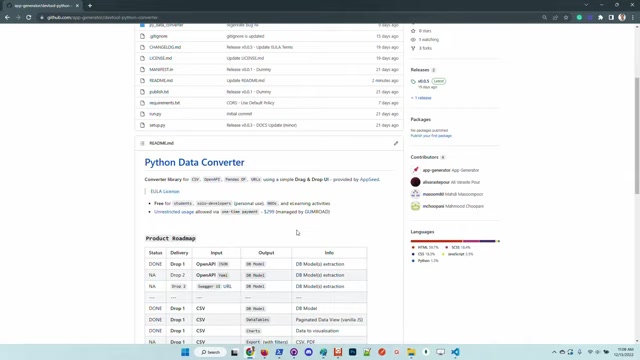
, the license applied is not MIT, impacting its usage terms. It is free for students, solo developers (personal use), NGOs, and e-learning activities. Unrestricted usage is allowed via a one-time payment managed by GUMROAD for those not falling under the free-use categories. Understanding the licensing is important when considering using the Python Data Converter for business and commerical purposes.
License Information:
| User Category | Usage Terms |
|---|---|
| Students | Free |
| Solo Developers | Free |
| NGOs | Free |
| E-learning Activities | Free |
| Commercial/Business Use | Paid |
Given this is a fully functional, open-source Python data converter tool, the developers have kept the cost low, but fair. Users may feel like the license is restricted, but this enables the product to grow and be fully supported.
Getting Started with the Python Data Converter
Setting Up the Project Locally
To use the Python Data Converter effectively, setting it up locally is essential.
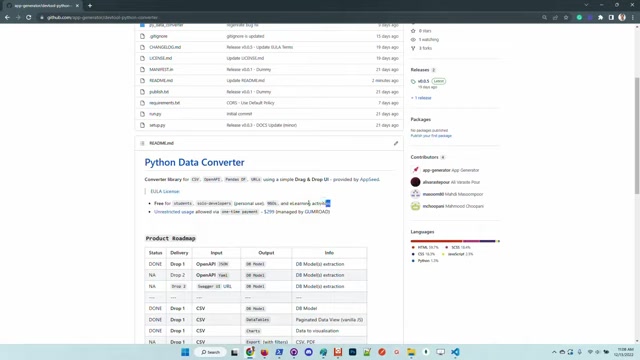
Start by cloning the sources from GitHub, and then set up a virtual environment to manage dependencies. Activate the virtual environment and install the necessary modules listed in the requirements.txt file to ensure the application runs smoothly.
Step-by-Step Instructions:
- Clone the Repository:
git clone https://github.com/app-generator/devtool-python-converter.git cd devtool-python-converter - Create a Virtual Environment:
python -m venv venv - Activate the Virtual Environment:
- On Windows:
venv\Scripts\activate - On macOS and Linux:
source venv/bin/activate
- On Windows:
- Install Dependencies:
pip install -r requirements.txt
These steps ensure your local environment is correctly configured to run the Python Data Converter.
Launching and Interacting with the UI
After setting up the local environment, launch the application to interact with its drag-and-drop UI
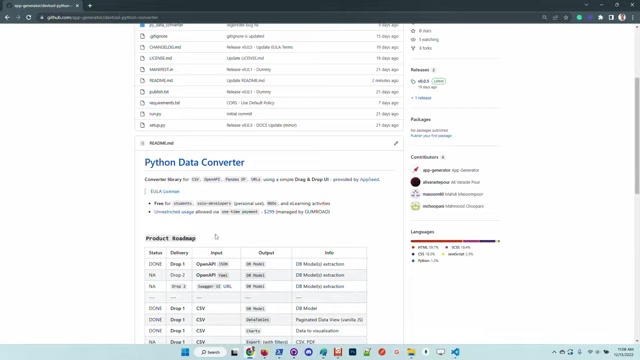
. The UI is designed to accept different data formats for conversion. The visual interface is key to making the app useable and valuable, so be sure to use the UI for all supported conversion processes.
Launching the app:
- Navigate to the root directory and execute the following command:
flask run
This command starts the Flask development server, typically accessible through a local web browser.
Using the UI:
- Open your web browser and navigate to the address shown by the flask run command.
- The tool will now allow you to simply drag and drop the information into the UI.
- Drop your asset on the designated area.
- Use the select output to choose how you wish to convert the data.
- Click generate.
The app will now perform the conversion. You may have to modify the UI depending on the conversion performed. The app makes it easy to transform your data, without any complex or manual processes.
Core Features of the Python Data Converter
Core Features List
The Python Data Converter is packed with features to streamline data workflows
. Each feature has been designed with the end-user in mind to create a cohesive and valuable experience.
- Database Model Extraction: Simplifies the creation of database models by directly extracting from API descriptions in JSON and YAML formats.
- Data Visualization: Creates visual charts from data sets for better data insights.
- Paginated Data Views: Presents data in manageable, paginated formats that facilitate easier data review and analysis, improving user interaction with large datasets.
- Data Export with Filters: Exports processed data into CSV and PDF formats, allowing users to apply filters for refined results.
- Format Versatility: Supports popular formats like CSV, JSON, and Pandas DataFrames, providing a versatile toolkit for various data environments and tasks.
Use Cases: Applying the Python Data Converter in Real-World Scenarios
Using the Python Data Converter
The flexibility of the Python Data Converter makes it indispensable across various sectors and workflows, streamlining data handling and conversion tasks
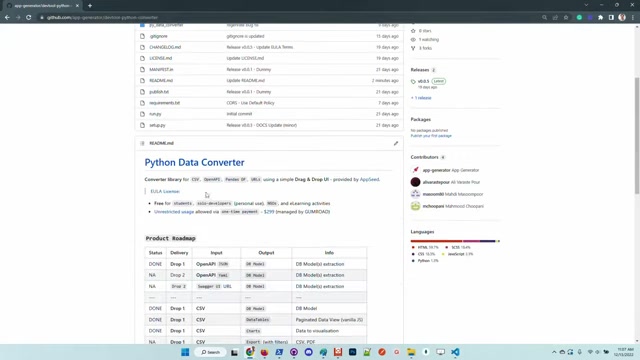
. From supporting academic research to enhancing data management for NGOs, its applications span several domains.
- Educational Tools: Facilitates easier handling and demonstration of data conversion processes in learning environments.
- Solo Development Projects: Enables efficient data transformations for small-scale projects without complex setups.
- NGO Operations: Aids in managing and converting data for reporting and operational needs, increasing the effectiveness and transparency of data use.
- API Data Integration: Automates the extraction and conversion of API data into usable database models for applications.
- Data Analytics and Visualization: Simplifies creating reports with interactive charts and data tables, enabling more informed decision-making.






Most people like



































Report
Please select a reason for reporting
- 13 Reasons to Switch from Snapchat to Text Messaging
- 7 Powerful Speech to Text Apps to Boost Productivity
- 10 Best Speech to Text Tools for Effortless Transcription
- 13 Free Tools to Easily Transcribe Audio to Text
- 15 Surprising Ways Google's Speech-to-Text Boosts Productivity
- 7 Best Free Online Audio to Text Transcription Tools
- 9 Tips to Transcribe Speech to Text Faster and Better
- 13 Best Speech to Text Software for Windows 10 in 2023
- 7 Tips for Choosing the Best Transcriber for Audio to Text
- 11 Reasons Why Dragon Speech-to-Text Apps are Game-Changers
- 6 Secrets to Enhance Your Speech to Text Transcription
- 6 Brilliant Ways to Boost Productivity with Talk-to-Text on Your MacBook
- 6 Ways Transcription Software Converts Audio to Text
- 8 Tips to Transcribe Speech to Text Like a Pro
- 6 Reasons IBM Watson Speech to Text is a Game-Changer
- 14 Powerful Ways Talk-to-Text Improves Your Workflow
- 12 Top Windows Speech-to-Text Software for Efficient Transcription
- 12 Game-Changing Benefits of Apple's Speech to Text Technology
- 9 Powerful Use Cases for AWS Speech to Text Technology
- 10 Easy Steps to Transcribe YouTube Videos to Text
- transcription audio en texte
- online audio transcription
- free audio file transcription
- free ai audio transcription
- audio transcription service
- audio transcription online free
- audio transcription free online
- audio to transcription software
- audio and transcript
- ai audio transcription free
- voice recording to text converter
- translate voice recording to text
- record voice to text
- audio recording to text converter
- voice recording and transcription
- chatgpt voice to text
- gmail voice to text
- speech to text reader
- speech to text ai free
- speech to talk
- How to Use AI Tools to Find Internal Linking Opportunities Across a Business Website
- Discover Your Perfect Haircut with AI Hairstyle Apps
- Free Reputation Calculator Tools: How They're Adapting to Score AI Visibility, Not Just Rankings
- Design Professional Flyers for Free on Your Phone
- Best Free Flyer Maker Apps for Android: Design Like a Pro
- How to Know If Your Business Is Ready for an AI Customer Service Agent
- Revolutionizing Storytelling: From Novels to Screenplays with AI
- Create Engaging Animated Explainer Videos with a Free AI Tool
- Stop Multi-Subscribing: Benchmark Top AI Visual Models in One Canvas
- Best Seedance 2.5 API Provider: Every Price on the Market, Checked at Source
- Top AI Social Media Management Tools: Automate Your Content Strategy
- Free AI Text to Video Generator: Create Stunning Videos from Text
- Discover 17 ChatGPT Alternatives: A Comprehensive Comparison
- Character.AI vs. Janitor AI: Which AI Chat Platform Reigns Supreme?
- Top Virtual Assistant Companies in 2026: Reviews, Pricing, and Plans Compared
- Unveiling FaceCheck.ID: Revolutionizing Reverse Image Searches with AI
- 11 Best AI Dialers in 2026: Features, Pricing, Pros and Cons
- How I Direct Consistent AI Clips: A Hands-On Guide to Multi-Model Generation
- A Realistic Review of the Photo Generator Image Tool
- Playwright MCP Server: Automated Web Testing with Agent Mode

Copyright ©2026 toolify