































Table of Contents
- Key Points
- Understanding Data Conversion Scope and Strategy
- Key Data Conversion Activities: A Project Timeline
- Checklist for Successful Conversion Strategy Execution
- FAQ
- Related Questions


Understanding Data Conversion Scope and Strategy
Defining the Conversion Scope
When embarking on an SAP data conversion or migration, the first crucial step is to clearly define the scope of the project. This involves determining precisely what data needs to be converted and migrated into the new SAP system. A well-defined scope is paramount to prevent scope creep, manage resources effectively, and ensure that the project stays on track.
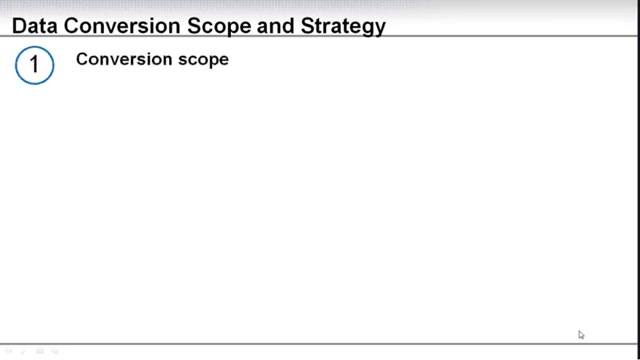
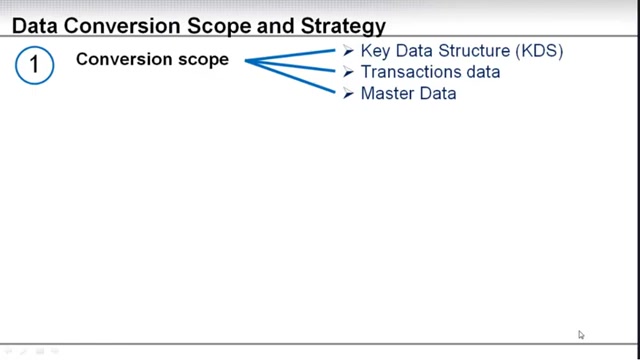
The conversion scope directly translates into defining what key data structures, transaction data, and master data require migration.
- Key Data Structures (KDS): Identifying the essential data elements within the existing system is fundamental. This includes critical fields, tables, and relationships necessary for business operations. These elements must be accurately mapped to the corresponding structures in the SAP system.
- Transaction Data: This encompasses historical data that reflects business transactions. Consider which transactions need to be migrated, such as sales orders, purchase orders, financial postings, and inventory movements. Decide the historical depth of transaction data required in the new system.
- Master Data: Master data forms the backbone of business processes. This includes customer data, vendor data, material master, and chart of accounts. Establishing a comprehensive master data strategy is crucial for data consistency and accuracy.
Defining the scope is well defined and at least, it's conceptual concept should be defined, during the business blueprint phase. Your business blueprint document should outline what are the key data structure elements that you need. Also, roughly, what are the data conversion considerations?
Selecting the Right Conversion Method
The next strategic decision involves choosing the appropriate conversion method. Generally, two primary approaches exist: manual entry and automated conversion. The selection depends on factors such as data volume, complexity, budget, and available resources.
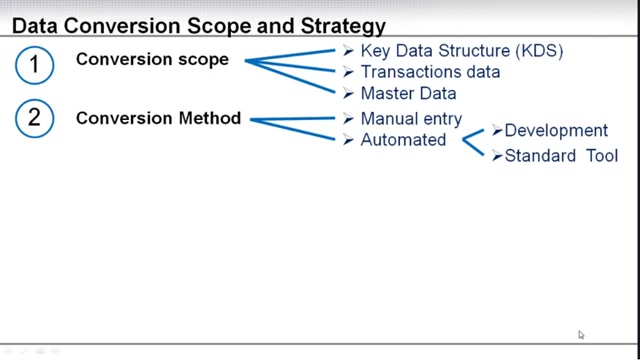
- Manual Entry: Involves manually entering data into the new SAP system. This method is suitable for small data volumes, simple data structures, and situations where data transformation requirements are minimal. However, manual entry is time-consuming, prone to errors, and can strain resources.
- Automated Conversion: Relies on specialized tools and programs to extract, transform, and load data into the SAP system. This approach is ideal for large data volumes, complex data transformations, and situations where data accuracy is critical. Automation minimizes manual effort, reduces errors, and accelerates the conversion process.
When considering an automated approach, the next decision is choosing between development or using a Standard tool. Are you going to purchase a standard tool or are you going to develop your own solution. The type of tool and conversion method are key parts to define in your conversion strategy.
Data Assessment: Understanding Your Data Landscape
Before initiating the data conversion, a comprehensive data assessment is indispensable. This assessment helps to understand the quality, volume, and sources of the data, and identifies potential issues that may arise during the conversion process.
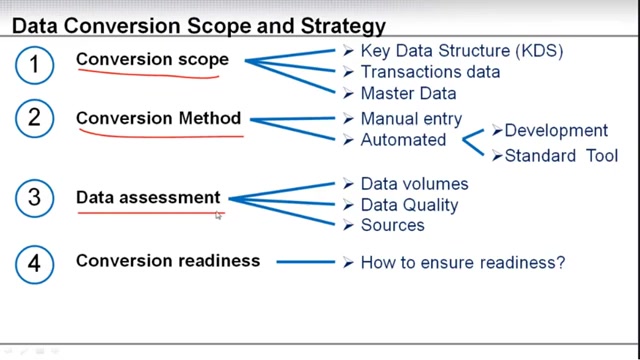
- Data Volumes: Assessing the volume of data to be converted helps to determine the resources and time required for the project. It also influences the choice of conversion method and tools. High data volumes typically necessitate automated conversion methods.
- Data Quality: Data quality is paramount for a successful SAP implementation. Assess the accuracy, completeness, consistency, and validity of the existing data. Identify data quality issues such as missing values, duplicates, and inconsistencies.
- Sources: Understand the various sources from which data will be extracted. This might include legacy systems, databases, spreadsheets, and external sources. Each source may have unique data formats and structures, requiring specific extraction and transformation techniques.
Assessing these data components accurately is key to success and will eventually lead to what your conversion readiness is. Conversion readiness will ensure a smooth process, as well as identify any potential issues that may arise, such as poor data quality or large data volume.
Conversion Readiness and Test Runs
Conversion readiness involves ensuring that all preparations are complete before the actual data conversion begins. Test runs play a crucial role in validating the conversion process, identifying potential issues, and ensuring that the data is migrated accurately.
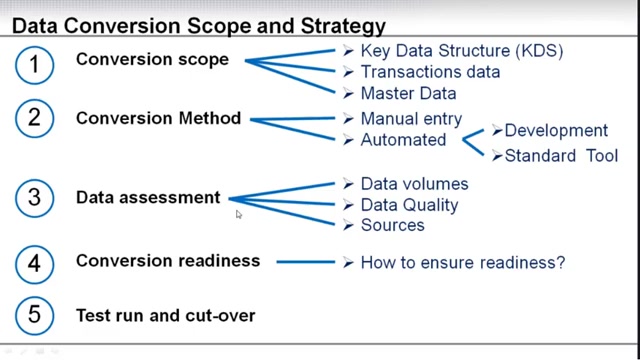
A test run's are crucial to ensure data accuracy before go-live. To ensure readiness for these test runs is to be clear on the scope, the method and make sure all the data assessment is completed.
Key elements of conversion readiness include:
- Data Mapping and Transformation Rules: Ensure that data mapping and transformation rules are clearly defined and documented. Validate these rules to ensure they accurately Translate data from the existing system to the SAP system.
- System Configuration: Verify that the SAP system is correctly configured to receive the converted data. This includes defining data structures, validation rules, and authorization settings.
- Resource Availability: Confirm that sufficient resources are available to execute the data conversion. This includes technical staff, business users, and project managers.
Here are key metrics to consider for assessing readiness:
| Metric | Description |
|---|---|
| Data Migration Completion | Percentage of data successfully migrated to the new system; indicates progress and potential bottlenecks in the migration process. |
| Data Quality Metrics | Measurements of data integrity, accuracy, and consistency; alerts to data cleansing needs and errors introduced during conversion. |
| System Performance | Key indicators such as data load times and system responsiveness; provides insights into system readiness for handling migrated data volumes. |
| User Acceptance testing | Feedback from end-users testing the data in the new system; ensures that the data meets user needs and that any usability issues are identified before the go-live date. |
| Issue Resolution Rate | The speed at which identified data or system issues are resolved; indicates the project team’s efficiency and ability to handle problems that arise during migration, impacting overall timelines and risks. |
Key Data Conversion Activities: A Project Timeline
Mapping Activities to the Project Phases
Understanding where specific data conversion activities fit within the overall project timeline is essential for planning and resource allocation. Let's map these activities to the typical phases of an SAP project:
-
Project Preparation: Initial data conversion strategy and data conversion tool selection.
-
Business Blueprint: Finalize data conversion design and perform data assessment. Includes "as-is" and "to-be" models.
-
Realization: Building the data conversion programs/processes and testing these processes. Development and testing of all conversion programs and processes.
-
Final Preparation: Perform Dry Run of full data conversions and user testing.
-
Go-Live & Support: The live data conversion, with full data loads.
Throughout all of these phases, make sure you are tracking the data cleansing process.
Checklist for Successful Conversion Strategy Execution
Key Steps
Executing a conversion strategy will have many key steps that you need to consider.
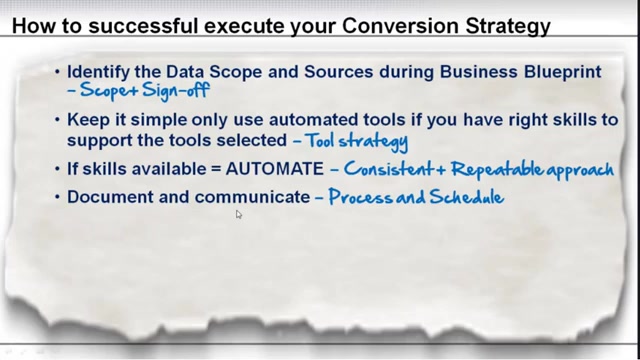
This checklist that will guide you through these steps and some things to consider:
- Identify Data Scope and Sources: Conduct an initial data conversion strategy and select the data conversion tools even before starting the business blueprint.
- Keep it Simple: Use automated tools only if you have the right skills to support the tools selected.
- If Skills are Available: Use automated tools for a consistent and repeatable approach.
- Track Data: Track data preparation and data execution.
- At Least 1 Data Conversion Dry-Run: Have at least 1 data conversion dry-run or risk a disaster at go-live.
- Data Cleansing: It can not be said enough, start data cleansing early. Do not procrastinate data cleansing. As soon as it's available, start cleaning it.







Most people like




























Report
Please select a reason for reporting
- 13 Reasons to Switch from Snapchat to Text Messaging
- 7 Powerful Speech to Text Apps to Boost Productivity
- 10 Best Speech to Text Tools for Effortless Transcription
- 13 Free Tools to Easily Transcribe Audio to Text
- 15 Surprising Ways Google's Speech-to-Text Boosts Productivity
- 7 Best Free Online Audio to Text Transcription Tools
- 9 Tips to Transcribe Speech to Text Faster and Better
- 13 Best Speech to Text Software for Windows 10 in 2023
- 7 Tips for Choosing the Best Transcriber for Audio to Text
- 11 Reasons Why Dragon Speech-to-Text Apps are Game-Changers
- 6 Secrets to Enhance Your Speech to Text Transcription
- 6 Brilliant Ways to Boost Productivity with Talk-to-Text on Your MacBook
- 6 Ways Transcription Software Converts Audio to Text
- 8 Tips to Transcribe Speech to Text Like a Pro
- 6 Reasons IBM Watson Speech to Text is a Game-Changer
- 14 Powerful Ways Talk-to-Text Improves Your Workflow
- 12 Top Windows Speech-to-Text Software for Efficient Transcription
- 12 Game-Changing Benefits of Apple's Speech to Text Technology
- 9 Powerful Use Cases for AWS Speech to Text Technology
- 10 Easy Steps to Transcribe YouTube Videos to Text
- transcription audio en texte
- online audio transcription
- free audio file transcription
- free ai audio transcription
- audio transcription service
- audio transcription online free
- audio transcription free online
- audio to transcription software
- audio and transcript
- ai audio transcription free
- voice recording to text converter
- translate voice recording to text
- record voice to text
- audio recording to text converter
- voice recording and transcription
- chatgpt voice to text
- gmail voice to text
- speech to text reader
- speech to text ai free
- speech to talk
- Create Engaging Animated Explainer Videos with a Free AI Tool
- Stop Multi-Subscribing: Benchmark Top AI Visual Models in One Canvas
- Best Seedance 2.5 API Provider: Every Price on the Market, Checked at Source
- AI OnlyFans: How to Generate $30,000/Month (Legally)
- Transform Your Script into an Engaging Video with AI Video Maker!
- AI Marketing Automation: A Comprehensive Guide for Small Businesses
- Midjourney Alternative for Anime Art Creators: Why PixAI May Be Better for Character Workflows
- 10 Things Most People Get Wrong About AI Image Search
- AI Girlfriend Apps: Top Choices Redefining Relationships 2025
- How to Reduce Quoting Errors in Salesforce with AI-Assisted Quote Creation
- 4 Best Motion Sync AI Tools: A Personal Testing Review of Audio-Video Synchronization
- Convert PDF to Audio: Free Urdu Text-to-Speech Tool
- Automatically Transcribe and Subtitle Audio and Video with Descript
- Revolutionize your video editing with AI-generated transcripts
- Mastering Wordpad: Essential Tips for Windows 10 Users
- AfirstSoft PDF Editor: The Ultimate PDF Solution of 2025
- UPDF: The Ultimate PDF Editor for iPadOS and macOS
- Translate PDF Documents: A Comprehensive Guide with OnlineDocTranslator
- Tenorshare PDNob PDF Editor: Smarter AI-Powered Editing
- uPDF Pro Review: AI-Powered PDF Editing for Professionals

Copyright ©2026 toolify