































Table of Contents
- Key Points
- Understanding SetFit: A New Paradigm for Text Classification
- Diving Deeper: A Step-by-Step Look at SetFit's Workflow
- Practical Implementation: Using SetFit in a Code Notebook
- SetFit Pricing
- Pros and Cons of Using SetFit for Text Classification
- SetFit Core Features
- SetFit Use Cases
- Frequently Asked Questions about SetFit
- Further Exploration: Expanding Your Knowledge of SetFit



Understanding SetFit: A New Paradigm for Text Classification
The Challenge of Labeled Data in Text Classification
Text classification, the task of assigning predefined categories to text documents, is a cornerstone of NLP. From sentiment analysis to topic categorization, its applications are vast and varied. However, achieving high accuracy often necessitates training models on large, meticulously labeled datasets. This process is time-consuming, resource-intensive, and sometimes impractical, especially when dealing with specialized domains or emerging topics where labeled data is scarce.
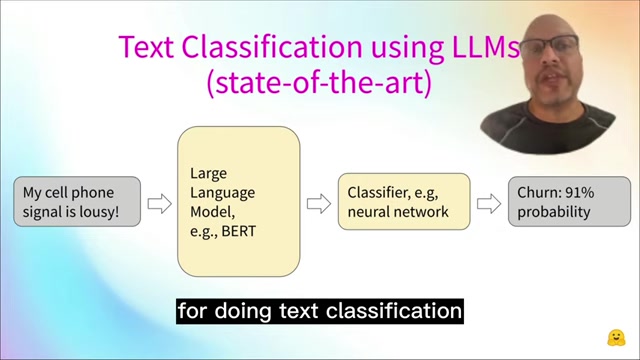
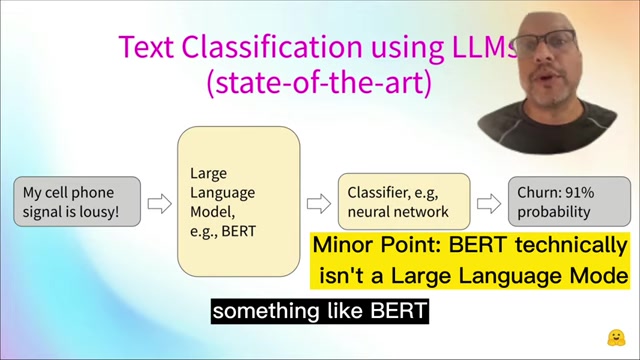
The state-of-the-art way for doing text classification, is to bring your text in, use a large language model, something like BERT. That's going to give you some embeddings, which you then put into a classifier or classifier head of a network which will then give you your classification outcome.
- Fine-tuning challenges: Fine-tuning a classifier for a neural network often requires lots of labeled data. Hundreds or thousands of examples and this amount of labeled data goes up dramatically when you start thinking about more classes because all of a sudden, you're going to want plenty of examples for each class to cover that. Fine-tuning, while powerful, demands substantial computational resources and time.
- Prompt engineering limitations: Manually crafted prompts are difficult to employ since they are subject to high variability from manually crafted prompts, and typically require billion-parameter language models to achieve high accuracy.
Introducing SetFit: Few-Shot Learning with Sentence Transformers
SetFit offers an alternative approach that addresses the limitations of traditional methods by leveraging few-shot learning. It uses as little as 10 labeled examples per class.
This technique enables you to achieve comparable or even superior accuracy with significantly less labeled data.
Sentence Transformers: SetFit hinges on the power of Sentence Transformers, pre-trained language models designed to generate meaningful sentence embeddings. Embeddings capture the semantic information of text, allowing models to understand the relationships between words and sentences. Sentence Transformers excel at generating high-quality embeddings, making them ideal for few-shot learning scenarios.
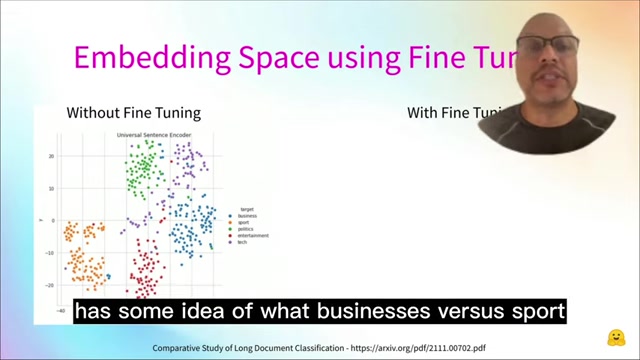
The Core Idea: SetFit uses contrastive learning, widely used in NLP. The pre-trained model itself, as you can see on the left has some idea of what businesses versus sport versus politics but you can see it's a little bit scattered compared to if we could finely tune the sentence transformer so it really understood these classes. Now you can see these clusters are much tighter and the classification performance is going to improve. The core idea is to leverage these pre-trained embeddings and fine-tune them with a small set of labeled examples. This fine-tuning process aligns the embeddings with the specific classification task, enhancing the model's ability to discriminate between categories. The key is to measure the distance between the two, literally the Euclidean distance and what we'd want to do is have great reception, be very close to I love the Family Plan because they are in the same category and very and you want the two that are dissimilar very far apart from each other and that's actually the way the loss functions work when we're using contrast of learning where they put similar things together, try to spread apart the differences.
This approach enables the model to learn from a limited number of examples and generalize effectively to unseen data.
Contrasting Learning
At the heart of SetFit lies the concept of contrasting learning, a technique designed to train embeddings by contrasting similar and dissimilar examples. The process involves creating pairs of text examples and labeling them as either similar (belonging to the same category) or dissimilar (belonging to different categories).
During training, the model learns to minimize the distance between similar pairs and maximize the distance between dissimilar pairs. This process effectively shapes the embedding space, clustering examples from the same category together and separating examples from different categories. In this way similar sample pairs stay close to each other while dissimilar ones.
Benefits of contrasting learning:
- Improved discrimination: It enhances the model's ability to distinguish between categories, even with limited data.
- Robustness to noise: It reduces the impact of noisy or ambiguous examples, improving the model's overall performance.
SetFit Efficiency
The implementation of the sentence pairs is efficient and Prompt-free fine-tuning. To address these shortcomings, the framework is efficient for the fine-tuning of Sentence Transformers.
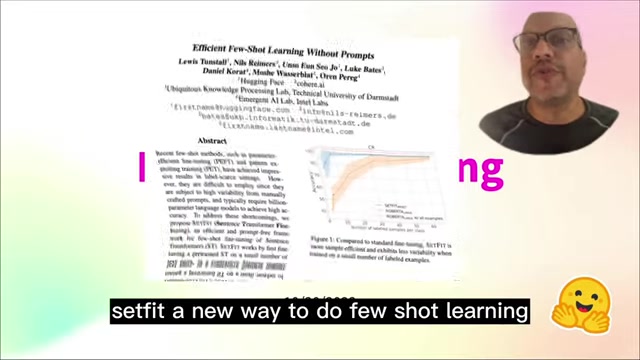
As a result, SetFit works by first fine-tuning a pre-trained ST on a small number of labeled examples. Using Customer Reviews dataset, SetFit can use a small number of labeled examples to exceed the performance of a large model. But this one should just give you an intuitive understanding of why we want to use set fit and when it works the best.
This efficiency makes SetFit an attractive option for resource-constrained environments, such as mobile devices or edge computing platforms.
Diving Deeper: A Step-by-Step Look at SetFit's Workflow
Generating Sentence Pairs
The initial step involves generating sentence pairs from the labeled data. For each example, the process creates a similar example (belonging to the same category) and a dissimilar example (belonging to a different category).
The model then can start with a churn dataset with just eight rows, so not enough to do any fine tuning but should be enough to give you an idea of what's going on. To make this work, what you want to do is, you're going to use something called contrastive learning, this is why they used an NLP.
Random sampling or data augmentation techniques can be employed to create these pairs, ensuring diversity and robustness.
Fine-Tuning Sentence Transformers
The generated sentence pairs are then fed into a pre-trained Sentence Transformer, which is fine-tuned using a contrastive loss function. This function encourages the model to generate embeddings that are closer for similar pairs and further apart for dissimilar pairs.
The fine-tuning process adapts the Sentence Transformer to the specific classification task, improving the quality of the generated embeddings and enhancing the model's ability to discriminate between categories.
Training a Classifier
Once the Sentence Transformer is fine-tuned, the next step involves training a classifier on top of the generated embeddings. A simple linear classifier, such as logistic regression, is often sufficient to achieve high accuracy in few-shot scenarios.
The classifier learns to map the embeddings to the corresponding categories, enabling the model to perform text classification on unseen data.







Most people like































Report
Please select a reason for reporting
- 13 Reasons to Switch from Snapchat to Text Messaging
- 7 Powerful Speech to Text Apps to Boost Productivity
- 10 Best Speech to Text Tools for Effortless Transcription
- 13 Free Tools to Easily Transcribe Audio to Text
- 15 Surprising Ways Google's Speech-to-Text Boosts Productivity
- 7 Best Free Online Audio to Text Transcription Tools
- 9 Tips to Transcribe Speech to Text Faster and Better
- 13 Best Speech to Text Software for Windows 10 in 2023
- 7 Tips for Choosing the Best Transcriber for Audio to Text
- 11 Reasons Why Dragon Speech-to-Text Apps are Game-Changers
- 6 Secrets to Enhance Your Speech to Text Transcription
- 6 Brilliant Ways to Boost Productivity with Talk-to-Text on Your MacBook
- 6 Ways Transcription Software Converts Audio to Text
- 8 Tips to Transcribe Speech to Text Like a Pro
- 6 Reasons IBM Watson Speech to Text is a Game-Changer
- 14 Powerful Ways Talk-to-Text Improves Your Workflow
- 12 Top Windows Speech-to-Text Software for Efficient Transcription
- 12 Game-Changing Benefits of Apple's Speech to Text Technology
- 9 Powerful Use Cases for AWS Speech to Text Technology
- 10 Easy Steps to Transcribe YouTube Videos to Text
- transcription audio en texte
- online audio transcription
- free audio file transcription
- free ai audio transcription
- audio transcription service
- audio transcription online free
- audio transcription free online
- audio to transcription software
- audio and transcript
- ai audio transcription free
- voice recording to text converter
- translate voice recording to text
- record voice to text
- audio recording to text converter
- voice recording and transcription
- chatgpt voice to text
- gmail voice to text
- speech to text reader
- speech to text ai free
- speech to talk
- How SEO and Marketing Dashboards Empower Agencies to Drive Results
- How to Use AI Tools to Find Internal Linking Opportunities Across a Business Website
- Discover Your Perfect Haircut with AI Hairstyle Apps
- Free Reputation Calculator Tools: How They're Adapting to Score AI Visibility, Not Just Rankings
- Design Professional Flyers for Free on Your Phone
- Best Free Flyer Maker Apps for Android: Design Like a Pro
- How to Know If Your Business Is Ready for an AI Customer Service Agent
- Revolutionizing Storytelling: From Novels to Screenplays with AI
- Create Engaging Animated Explainer Videos with a Free AI Tool
- Stop Multi-Subscribing: Benchmark Top AI Visual Models in One Canvas
- ASOMobile Helps Teams Benchmark App Store Screenshots Against Competitors
- How to Match LMS Software With Your Organization's Training Plan
- Revolutionizing Email Marketing Agency with AI
- How to Convert BTC to HNT
- Unleashing the Power of AI: Cognizant's Roadmap for Transformation
- Frame to Video Review: A Practical Look at Turning Two Still Frames Into Motion
- NVIDIA NIM: Revolutionizing Supply Chain Data Analysis with AI
- Top AI Tools That Help Brands Stand Out Offline (Not Just Online)
- Top 5 Cold Email Software: Maximize Your Outreach in 2025
- Magic School AI: Revolutionizing Quiz & Assessment Generation

Copyright ©2026 toolify