































Table of Contents
- Key Points
- Using ChatGPT for Math Problem Solving
- Benefits of Using ChatGPT for Math
- How to Use the ChatGPT Mobile App for Math Problems
- ChatGPT Pricing
- Pros and Cons of Using ChatGPT for Math
- Key Features of ChatGPT for Math Problem Solving
- Practical Use Cases for ChatGPT in Math
- Frequently Asked Questions
- Related Questions


Using ChatGPT for Math Problem Solving
The Power of Visual Input
ChatGPT, an advanced AI model, has revolutionized various fields, and mathematics is no exception. One of the most innovative ways to use ChatGPT for math is through image analysis. Instead of tediously typing out complex equations, you can simply provide an image of the problem, and ChatGPT will process it to give you a solution. This is particularly useful for problems involving integrals, trigonometry, or any visually presented math challenge.
This approach not only saves time but also reduces the chance of Transcription errors. Whether you're dealing with handwritten notes, textbook problems, or online exercises, capturing an image can be the quickest way to get started. The ability to handle visual input makes ChatGPT an invaluable tool for students, educators, and professionals alike.
The functionality relies on ChatGPT's advanced Image Recognition capabilities, allowing it to interpret mathematical symbols, diagrams, and notations accurately. This feature is especially beneficial for those who struggle with typing complex mathematical expressions or for situations where the problem is presented graphically.
By harnessing the power of visual input, you can unlock a more intuitive and efficient way to tackle mathematical problems using ChatGPT. This method opens up new possibilities for learning, teaching, and problem-solving in the realm of mathematics. Embrace this technological advancement to make your math journey smoother and more productive.
Solving Math Problems with the ChatGPT Web Version
The web version of ChatGPT offers a seamless way to solve math problems using image input. Here’s how you can do it:
- Capture the Question: Use a tool like the Snipping Tool on Windows to capture the math question from your screen.
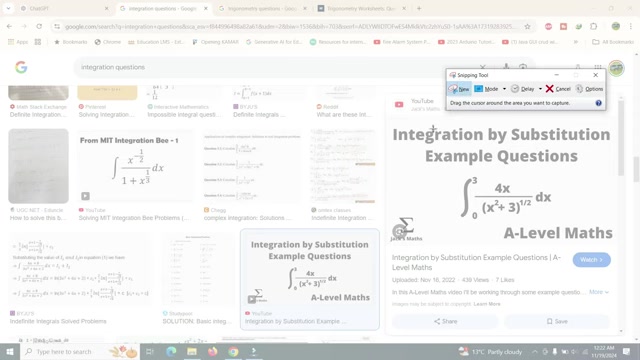
This avoids having to manually write down the problem.
- Paste the Image: In the ChatGPT interface, right-click in the message box and paste the image.
- Upload from Computer: Alternatively, if you have the question saved as an image on your computer, click the attachment option and upload it directly.
- Type a Prompt: Type a simple Prompt like 'Solve it' to instruct ChatGPT to begin.
- Review the Solution: ChatGPT will then analyze the image and provide a step-by-step solution. Make sure to verify the solution's accuracy, as AI can occasionally make mistakes.
This method is particularly helpful for quickly transferring complex equations into ChatGPT for immediate solving. Keep in mind that the free version may have limitations, such as a maximum of 10 image uploads per day, but this should be sufficient for most users.
This approach empowers you to tackle mathematical challenges efficiently. By visually inputting the problems, you can reduce the time and effort required to solve them, making your math journey more manageable and productive. Be sure to leverage this functionality to enhance your learning, teaching, or problem-solving experiences.
Solving Missing Lengths with ChatGPT
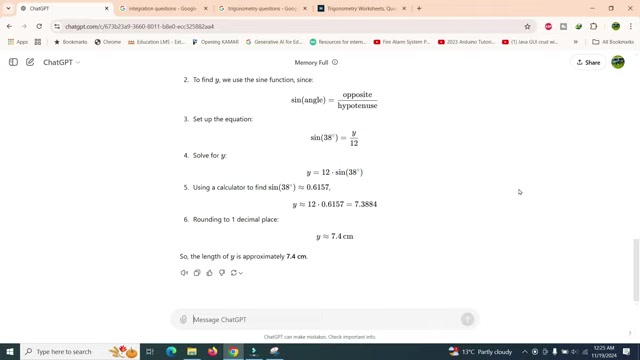
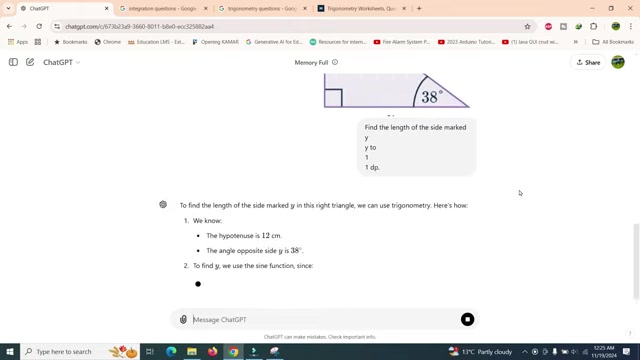
ChatGPT isn’t just for equations; it can also handle geometry problems. For example, you can use it to find missing lengths in triangles.
-
Capture the Diagram: Use the Snipping Tool to take a snapshot of the triangle with the given measurements and the missing length marked.
-
Paste and Upload: Paste the image into ChatGPT or upload it from your computer .
-
Ask ChatGPT: Type a prompt such as 'Find the length of the side marked y'.
-
Get Step-by-Step Solution: ChatGPT will use trigonometric functions to calculate the missing length and provide a detailed solution.
This method is excellent for visual problems where understanding the diagram is crucial. By providing a clear image, you help ChatGPT accurately interpret the problem and deliver the correct answer. Remember to verify the solution and understand the process to enhance your learning.
How to Use the ChatGPT Mobile App for Math Problems
Using the ChatGPT Mobile App
The ChatGPT mobile app offers a more streamlined approach for solving math problems, especially when you have the questions on paper.
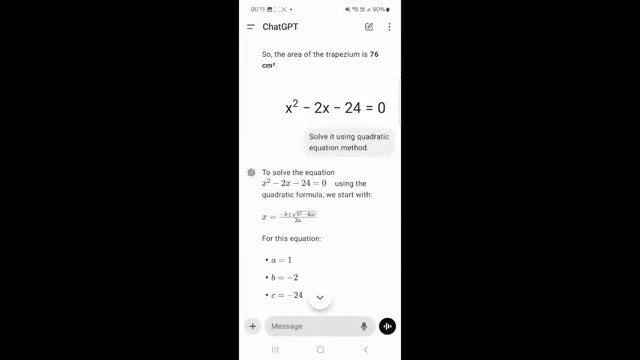
Here’s how to leverage it:
- Install the App: Download and install the ChatGPT app on your smartphone.
- Open the App: Launch the ChatGPT app.
- Take a Photo: Tap the camera icon within the app. Frame the math problem on paper and snap a picture.
- Upload an Image: Alternatively, if you already have the image saved, tap the picture icon to upload it.
- Type a Prompt: Type 'Solve it' to initiate the problem-solving process.
- Review the Solution: ChatGPT will analyze the image and provide a detailed, step-by-step solution.
The mobile app simplifies the process by allowing you to directly scan math problems without needing additional tools like the Snipping Tool. This method is perfect for students working on Homework or anyone needing quick solutions on the go. Make sure to adjust the lighting and focus for a clearer image to help ChatGPT accurately interpret the problem.
Solving Math Problems from a Screen
Even if the math problem is displayed on a screen—such as a computer monitor or tablet—the ChatGPT mobile app can still assist you. Here’s how:
- Capture the Screen: Take a screenshot of the math problem displayed on your screen.
- Trim the Image: Trim the screenshot to focus solely on the equation, removing any unnecessary background.
- Upload the Image: Open the ChatGPT app and upload the trimmed screenshot.
- Enter the Prompt: Type a prompt like 'Solve this equation using the quadratic equation method'.
- Analyze and Solve: ChatGPT will analyze the equation and provide a step-by-step solution.
This approach is especially helpful when you encounter math problems while browsing online resources or attending virtual classes. By using the mobile app to capture and upload the screen display, you can quickly solve the equations without having to manually input them. This method is straightforward and allows for easy solving of math problems from any digital screen.
Key Features of ChatGPT for Math Problem Solving
Core Features of ChatGPT
ChatGPT offers several key features that make it a powerful tool for solving math problems:
-
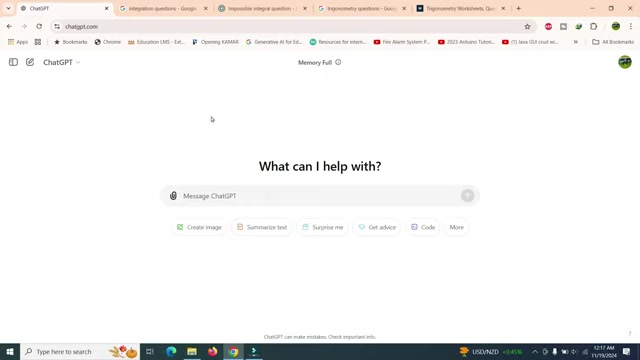
Image Recognition: This allows you to upload or scan images of math problems directly into ChatGPT.
-
Step-by-Step Solutions: ChatGPT provides detailed solutions, helping you understand the process.
-
Versatility: It can handle various types of math problems, from basic arithmetic to complex calculus.
-
Accessibility: Available on both web and mobile platforms, making it convenient to use anywhere.
-
Cost-Effective: The free version offers substantial functionality, with affordable paid options for more advanced use.
-
Ease of Use: User-friendly interface that simplifies the process of inputting and solving problems.
These features combine to make ChatGPT an exceptional tool for math enthusiasts and those who need assistance with mathematical challenges.
Practical Use Cases for ChatGPT in Math
Effective Applications of ChatGPT in Math
ChatGPT can be applied in numerous scenarios to enhance your mathematical capabilities:
- Homework Assistance: Students can use ChatGPT to check their work and understand difficult concepts.
- Tutoring Aid: Educators can use it to explain complex problems and provide step-by-step guidance to students.
- Quick Calculations: Professionals can quickly solve math-related tasks in fields like finance, engineering, and data analysis.
- Exam Preparation: Students can use ChatGPT to practice and review for exams.
- Visual Problem Solving: Easily solve visual problems, like finding missing lengths in geometric shapes.
These use cases highlight the versatility of ChatGPT as a tool for learning, teaching, and solving math problems in various contexts. Whether you are a student, educator, or professional, ChatGPT offers a valuable resource for improving your math skills and productivity.


Most people like








































Report
Please select a reason for reporting
- 13 Reasons to Switch from Snapchat to Text Messaging
- 7 Powerful Speech to Text Apps to Boost Productivity
- 10 Best Speech to Text Tools for Effortless Transcription
- 13 Free Tools to Easily Transcribe Audio to Text
- 15 Surprising Ways Google's Speech-to-Text Boosts Productivity
- 7 Best Free Online Audio to Text Transcription Tools
- 9 Tips to Transcribe Speech to Text Faster and Better
- 13 Best Speech to Text Software for Windows 10 in 2023
- 7 Tips for Choosing the Best Transcriber for Audio to Text
- 11 Reasons Why Dragon Speech-to-Text Apps are Game-Changers
- 6 Secrets to Enhance Your Speech to Text Transcription
- 6 Brilliant Ways to Boost Productivity with Talk-to-Text on Your MacBook
- 6 Ways Transcription Software Converts Audio to Text
- 8 Tips to Transcribe Speech to Text Like a Pro
- 6 Reasons IBM Watson Speech to Text is a Game-Changer
- 14 Powerful Ways Talk-to-Text Improves Your Workflow
- 12 Top Windows Speech-to-Text Software for Efficient Transcription
- 12 Game-Changing Benefits of Apple's Speech to Text Technology
- 9 Powerful Use Cases for AWS Speech to Text Technology
- 10 Easy Steps to Transcribe YouTube Videos to Text
- transcription audio en texte
- online audio transcription
- free audio file transcription
- free ai audio transcription
- audio transcription service
- audio transcription online free
- audio transcription free online
- audio to transcription software
- audio and transcript
- ai audio transcription free
- voice recording to text converter
- translate voice recording to text
- record voice to text
- audio recording to text converter
- voice recording and transcription
- chatgpt voice to text
- gmail voice to text
- speech to text reader
- speech to text ai free
- speech to talk
- Twitter/X API Alternatives for AI Agents and Developers in 2026
- ChatGPT Knows Ford. It Just Doesn't Quote Ford
- Meshy AI: How to Create 3D Models from Text and Images
- How SEO and Marketing Dashboards Empower Agencies to Drive Results
- How to Use AI Tools to Find Internal Linking Opportunities Across a Business Website
- Discover Your Perfect Haircut with AI Hairstyle Apps
- Free Reputation Calculator Tools: How They're Adapting to Score AI Visibility, Not Just Rankings
- Design Professional Flyers for Free on Your Phone
- Best Free Flyer Maker Apps for Android: Design Like a Pro
- How to Know If Your Business Is Ready for an AI Customer Service Agent
- Top 10 AI Marketing Tools Content Creators Need in 2025
- Top 5 Cold Email Software: Maximize Your Outreach in 2025
- Inside Motion Syncr: A Real-World Test of AI Character Animation
- Twitter/X API Alternatives for AI Agents and Developers in 2026
- Your Business Data Could Be Worth Up to $4M. Find Out Without Uploading a Single File.
- Can an eSIM Plan Save You Time During Travel Setup?
- AI Video Editor Review: A Hands-On Look at Prompt-Based Video Editing
- Keep Characters Consistent Across Scenes With Image-to-Video AI
- How to Convert BTC to HNT
- ProxyWing DuckDuckGo Proxy Review: Plans, Setup and Who It Is For

Copyright ©2026 toolify