































Table of Contents
- Key Points
- Understanding the AI Image Generation Landscape
- Stable Diffusion 3: A Deep Dive
- Generating Images with Stable Diffusion 3: A Step-by-Step Guide



Understanding the AI Image Generation Landscape
The Rise of AI Image Generators
Artificial intelligence has revolutionized numerous industries, and image generation is no exception. AI image generators leverage sophisticated algorithms and machine learning models to create images from textual descriptions, known as prompts. These tools offer unprecedented creative opportunities, enabling users to visualize abstract concepts, prototype designs, and generate unique artwork with ease. The market is filled with various options, each with its strengths and weaknesses.
But the true breakthrough comes when such powerful technology becomes accessible to everyone, free of charge.
Paid vs. Free AI Image Generators: A Comparative Overview
Many popular AI image generators operate on a subscription-based model, requiring users to pay for access to their services. While these paid platforms often offer advanced features and high-quality outputs, the cost can be a barrier for many individuals and small businesses.
Free AI image generators, on the other hand, provide an accessible alternative, allowing users to explore the capabilities of AI without financial commitment. However, they might come with limitations such as lower resolution outputs, fewer customization options, or usage restrictions. Stable Diffusion 3 aims to bridge this gap, providing high-quality, versatile image generation capabilities without any cost.
Stable Diffusion 3: A Deep Dive
Why is Stable Diffusion 3 Gaining Popularity?
Stable Diffusion 3 has rapidly gained traction in the AI community and among creative professionals. Multiple factors contribute to its rising popularity:
- Cost-Effectiveness: As a completely free tool, it eliminates the financial barrier to entry, making AI-powered image generation accessible to a wider audience.
- Quality and Performance: It delivers impressive results, often rivaling those of paid platforms. Its ability to understand and execute complex prompts with precision sets it apart.
- Ease of Use: Despite its sophistication, it offers a user-friendly interface, making it easy for both beginners and experienced users to create stunning visuals.
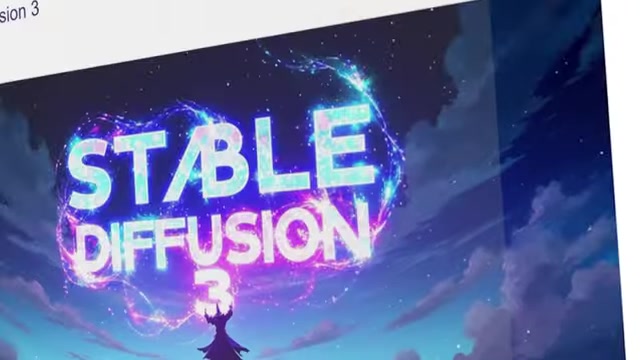
The buzz surrounding Stable Diffusion 3 is evident in search trends, where it now surpasses Midjourney in YouTube searches, indicating a significant shift in user interest.
Key Enhancements and Features of Stable Diffusion 3
Stable Diffusion 3 brings several key enhancements and features to the table, making it a standout in the AI image generation arena:
- Accurate Text Rendering: One of the most significant improvements is its ability to accurately render text within images. This is a crucial feature for creating designs, marketing materials, or artwork that requires clear and legible text integration.
- Advanced Prompt Adherence: It excels at understanding and executing complex prompts, producing images that closely align with the user's vision.
- Versatile Style Generation: From photorealistic renderings to artistic illustrations, Stable Diffusion 3 supports a wide range of styles, allowing users to explore various creative avenues.
- Open Source Nature: The open-source nature of Stable Diffusion fosters community collaboration and innovation, leading to continuous improvements and new features.
Analyzing Stable Diffusion 3 Research Paper
The official Stable Diffusion 3 research paper highlights its state-of-the-art text-to-image generation systems that outperform rivals such as DALL-E 3, Midjourney v6, and Ideogram v1. One of the remarkable achievements of Stable Diffusion 3 is in typography and prompt adherence based on human preference evaluations, proving its ability to create images that align closely with user intent.
One of the underlying technologies of Stable Diffusion 3 is the new Multimodal Diffusion Transformer (MMDiT) architecture. This architecture uses separate sets of weights for image and language representations, enhancing the software's text understanding and spelling capabilities compared to previous versions of Stable Diffusion.
Three key things caught the presenter's eye while analysing the research paper of Stable Diffusion 3:
- Text Generation: The capability to insert coherent, realistic text into images is crucial for various applications.
- Image Styles: The versatility of image styles is impressive.
- Translucent pig with another pig inside: The ability to generate complex, abstract ideas like a translucent pig containing another pig shows its power of rendering images, thus making it excel at diverse tasks
Generating Images with Stable Diffusion 3: A Step-by-Step Guide
Accessing the Stable Diffusion 3 Image Generator
To start creating images with Stable Diffusion 3, follow these steps:
- Find the Link: Access the Stable Diffusion 3 image generator using the link provided.
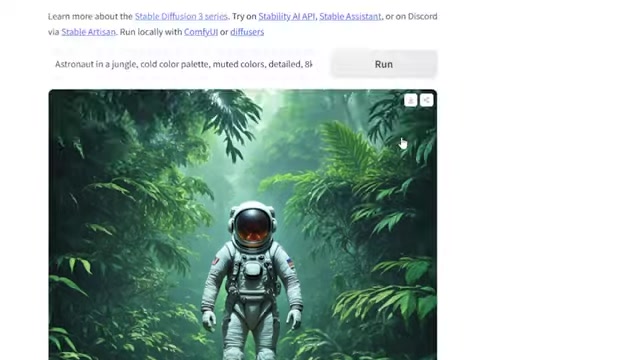
This will take you to the platform's interface.
- Enter Your Prompt: In the designated text box, type a detailed description of the image you want to generate. The more specific your prompt, the better the results will be.
- Run the AI: Click the "Run" button to initiate the image generation process. Stable Diffusion 3 will analyze your prompt and create an image based on your description.
- Review and Download: Once the image is generated, review the output. If you're satisfied, you can download the image for your use.
Leveraging Advanced Settings for Customization
For more control over the image generation process, Stable Diffusion 3 offers advanced settings:
-
Access Advanced Settings: Click on the "Advanced Settings" option to reveal additional customization parameters.
-
Adjust Parameters: Modify settings such as image dimensions, guidance scale, and sampling method to fine-tune the output to your preferences.
-
Experiment: Don't be afraid to experiment with different settings to discover new styles and effects. The key is to find the combination that works best for your desired aesthetic.
Improving Image Quality Using VideoProc Converter AI
To enhance the quality of images generated by Stable Diffusion 3, consider using VideoProc Converter AI:
-
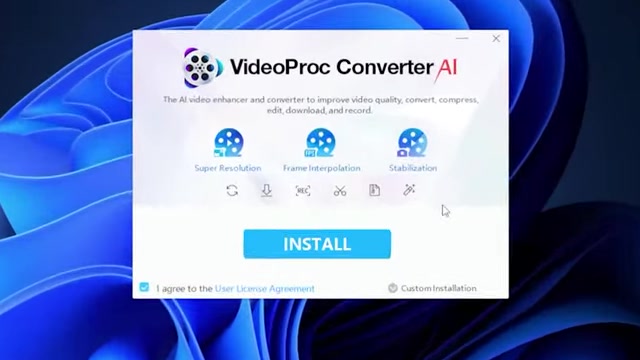
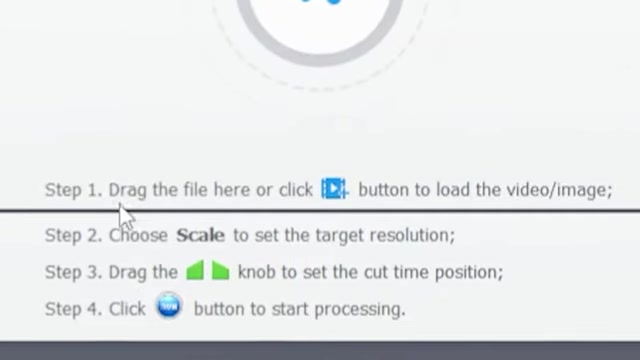
Download and install VideoProc Converter AI: Visit the VideoProc website and download the software. The free version is a great starting point.
-
Import the image into VideoProc: Open VideoProc Converter AI and import the image you want to enhance.
-
Select the "Super Resolution" option: Use the 'Super Resolution' feature to upscale your low-resolution images and sharpen the details.
-
Run the AI conversion: Click "Run" to begin the enhancement process. Review the output and save the enhanced image.
VideoProc Converter AI employs advanced algorithms to upscale images, reduce noise, and sharpen details, resulting in a significant improvement in visual quality.






Most people like





























Report
Please select a reason for reporting
- 13 Reasons to Switch from Snapchat to Text Messaging
- 7 Powerful Speech to Text Apps to Boost Productivity
- 10 Best Speech to Text Tools for Effortless Transcription
- 13 Free Tools to Easily Transcribe Audio to Text
- 15 Surprising Ways Google's Speech-to-Text Boosts Productivity
- 7 Best Free Online Audio to Text Transcription Tools
- 9 Tips to Transcribe Speech to Text Faster and Better
- 13 Best Speech to Text Software for Windows 10 in 2023
- 7 Tips for Choosing the Best Transcriber for Audio to Text
- 11 Reasons Why Dragon Speech-to-Text Apps are Game-Changers
- 6 Secrets to Enhance Your Speech to Text Transcription
- 6 Brilliant Ways to Boost Productivity with Talk-to-Text on Your MacBook
- 6 Ways Transcription Software Converts Audio to Text
- 8 Tips to Transcribe Speech to Text Like a Pro
- 6 Reasons IBM Watson Speech to Text is a Game-Changer
- 14 Powerful Ways Talk-to-Text Improves Your Workflow
- 12 Top Windows Speech-to-Text Software for Efficient Transcription
- 12 Game-Changing Benefits of Apple's Speech to Text Technology
- 9 Powerful Use Cases for AWS Speech to Text Technology
- 10 Easy Steps to Transcribe YouTube Videos to Text
- transcription audio en texte
- online audio transcription
- free audio file transcription
- free ai audio transcription
- audio transcription service
- audio transcription online free
- audio transcription free online
- audio to transcription software
- audio and transcript
- ai audio transcription free
- voice recording to text converter
- translate voice recording to text
- record voice to text
- audio recording to text converter
- voice recording and transcription
- chatgpt voice to text
- gmail voice to text
- speech to text reader
- speech to text ai free
- speech to talk
- Meshy AI: How to Create 3D Models from Text and Images
- How SEO and Marketing Dashboards Empower Agencies to Drive Results
- How to Use AI Tools to Find Internal Linking Opportunities Across a Business Website
- Discover Your Perfect Haircut with AI Hairstyle Apps
- Free Reputation Calculator Tools: How They're Adapting to Score AI Visibility, Not Just Rankings
- Design Professional Flyers for Free on Your Phone
- Best Free Flyer Maker Apps for Android: Design Like a Pro
- How to Know If Your Business Is Ready for an AI Customer Service Agent
- Revolutionizing Storytelling: From Novels to Screenplays with AI
- Create Engaging Animated Explainer Videos with a Free AI Tool
- Meshy AI: How to Create 3D Models from Text and Images
- ASOMobile Helps Teams Benchmark App Store Screenshots Against Competitors
- How to Match LMS Software With Your Organization's Training Plan
- Revolutionizing Email Marketing Agency with AI
- How to Convert BTC to HNT
- Unleashing the Power of AI: Cognizant's Roadmap for Transformation
- Frame to Video Review: A Practical Look at Turning Two Still Frames Into Motion
- NVIDIA NIM: Revolutionizing Supply Chain Data Analysis with AI
- Top AI Tools That Help Brands Stand Out Offline (Not Just Online)
- Top 5 Cold Email Software: Maximize Your Outreach in 2025

Copyright ©2026 toolify