































Table of Contents
- Key Points
- Getting Started with StableCode Local Installation
- Understanding AutoGPTQ: The backbone of local StableCode Installation
- How to Use StableCode Locally: A Step-by-Step Guide
- Advantages and Disadvantages of Using StableCode
- Frequently Asked Questions About Local StableCode Installation
- Related Questions about AI Code Generation


Getting Started with StableCode Local Installation
What is StableCode?
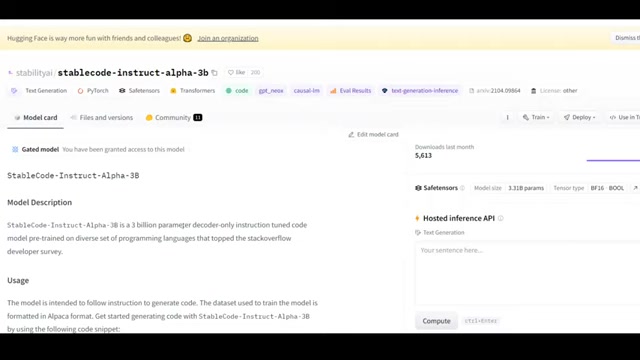
StableCode is an AI Code Generator developed by Stability AI. It leverages a decoder-only instruction-tuned code model pre-trained on diverse sets of programming languages. This ai Code Generator is designed to assist developers in generating code snippets and functions, enhancing productivity and code quality. The StableCode model aims to follow instructions to generate the best and cleanest code. The data used to train the model is formatted in Alpaca format.
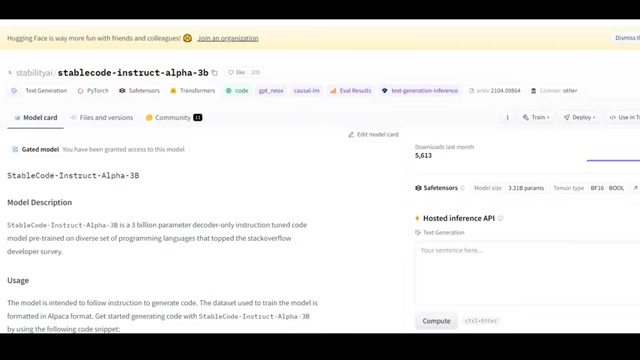
StableCode stands out as a valuable tool in the AI-assisted development landscape. It exemplifies the increasing role of artificial intelligence in streamlining and augmenting traditional coding practices. By providing intelligent code suggestions, StableCode enables developers to focus on higher-level problem-solving and architectural design, rather than getting bogged down in syntax and boilerplate code.
Prerequisites for Local Installation of StableCode
Before proceeding with the local installation of StableCode, there are several prerequisites you should ensure are in place:
-
Hugging Face Account: As StableCode is a gated model, you'll need to log in to Hugging Face through your code. Make sure you have an account and are authorized to access the model.
-
Linux Environment: A Linux instance or Jupyter Notebook environment is required. This guide will utilize an AWS SageMaker Notebook instance, but any compatible environment should work.
-
Sufficient Computing Resources: Consider using a machine with at least one GPU. The video demonstration utilizes an AWS SageMaker Notebook with a G4DN instance. Be aware that it can be time-consuming, so you will need appropriate computing resources to run this locally.
-
Storage Space: Ensure you have adequate storage; the model size is around 6 GB. Allocate at least 10-15 GB to accommodate the model and associated files.
-
Basic Python Knowledge: Familiarity with Python and related libraries is helpful, as the installation process involves using
pipand running Python scripts. -
AutoGPTQ: The local installation also requires using AutoGPTQ.
Meeting these prerequisites ensures a smoother and more efficient installation process for StableCode. Make sure to prepare your environment accordingly before proceeding.
Understanding AutoGPTQ: The backbone of local StableCode Installation
The Role of AutoGPTQ in AI Code Generation
AutoGPTQ is a repository crucial for the efficient and streamlined installation of StableCode locally. It plays a vital role in optimizing the model and managing the necessary dependencies.
By leveraging AutoGPTQ, developers can simplify the installation and setup process for StableCode, ensuring that the model runs smoothly and efficiently on their local machines. This integration enhances the usability and accessibility of StableCode, making it easier for developers to harness the power of AI-driven code generation in their projects.
Here's a table that sums up AutoGPTQ usage in StableCode's local installation.
| Action | Command/Process | Description |
|---|---|---|
| Cloning AutoGPTQ | git clone <repository_url> |
Downloads the AutoGPTQ repository to the local machine. |
| Navigating to AutoGPTQ | cd AutoGPTQ |
Changes the current directory to the AutoGPTQ folder. |
| Installing Libraries | pip install . |
Installs the required Python libraries and dependencies specified in the setup.py file. |
| Downloading StableCode Model | Define model_name_or_path |
Specifies the path to the StableCode model for loading. |
| Tokenization | AutoTokenizer.from_pretrained |
Converts input text into a format that the model can understand. |
How to Use StableCode Locally: A Step-by-Step Guide
Step 1: Cloning the AutoGPTQ Repository
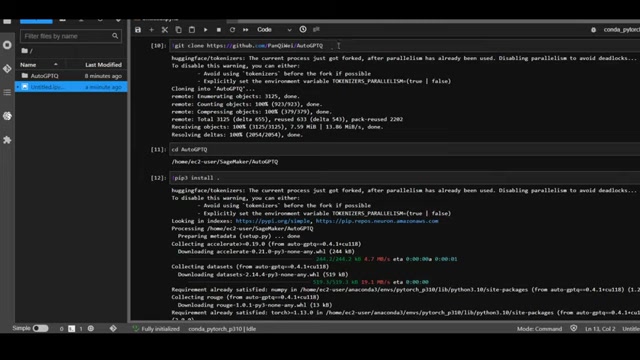
The first step involves cloning the AutoGPTQ repository. This is achieved using the git clone command followed by the repository URL. This command downloads the AutoGPTQ repository into your local environment.
git clone https://github.com/PanQiWei/AutoGPTQ
<img src="https://cdn.louhu.com/5iujaw01000dd7ibttjvaw8uhxxb9liy.jpeg"/>
This command will copy all the necessary files and directories from the AutoGPTQ repository to your machine. It is essential to ensure that Git is installed and configured correctly in your environment for this step to succeed.
Step 2: Navigating into the AutoGPTQ Directory
After cloning the repository, navigate into the AutoGPTQ directory using the cd command. This changes your current working directory to the AutoGPTQ folder, allowing you to execute subsequent commands within that context.
cd AutoGPTQ
<img src="https://cdn.louhu.com/5iujaw01000dd7ic5te48q8uiv3zf1c7.jpeg"/>
This step is important because the following installation commands need to be run from within the AutoGPTQ directory to correctly install the required libraries and dependencies.
Step 3: Installing Required Libraries
With the AutoGPTQ directory as your current working directory, execute the pip install . command. This command installs all the necessary Python libraries and dependencies specified in the setup.py file within the AutoGPTQ directory.
pip install .
<img src="https://cdn.louhu.com/5iujaw01000dd7nz03xmljj9mo3foxy6.jpeg"/>
This process may take some time as it involves downloading and installing multiple packages. Ensure that your Python environment is properly configured and that you have an active internet connection for this step to complete successfully. The code from the video runs
pip3 install . which is essentially the same code.
Pay close attention to the command line output during the pip install process. It will display the status of each package being installed, along with any error messages. If an error occurs, carefully review the message to identify the cause, such as missing dependencies or version conflicts. Addressing these issues promptly will ensure a smooth and successful installation.
Step 4: Downloading the StableCode Model
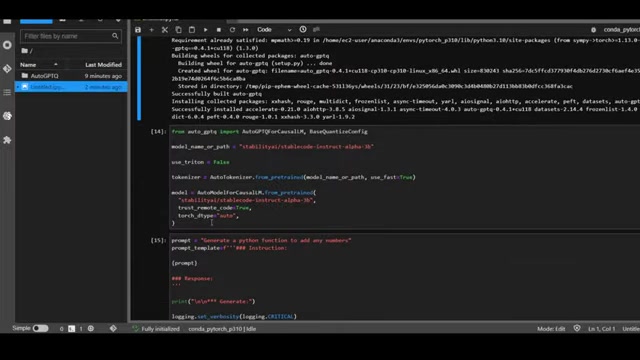
Next, download the StableCode model. This involves specifying the model name or path within your code. The model used in the video is StabilityAI's stablecode-instruct-alpha-3b.
This indicates that you are using the 3-billion parameter model. You will want to make sure you are using the same model if you want to match the results. In a Python script or Jupyter Notebook, you would typically define the model name as a variable:
model_name_or_path = "stabilityai/stablecode-instruct-alpha-3b"This variable is then used to load the model from the Hugging Face Model Hub. The loading process may take some time depending on your network speed and the model size. The file size should be approximately 6GB, so you want to make sure that you have enough space in your machine.
Step 5: Model Tokenization
Once the model is downloaded, it needs to be tokenized. Tokenization involves converting the input text into a format that the model can understand. This is typically done using a tokenizer associated with the model. The code from the video suggests this code:
use_triton = False
tokenizer = AutoTokenizer.from_pretrained(model_name_or_path, use_fast=True)

model = AutoModelForCausalLM.from_pretrained(
    model_name_or_path,
    trust_remote_code=True,
    torch_dtype='auto',
)
This ensures that the input prompts are correctly processed by the model. After tokenization, you can proceed to generate code by providing prompts and instructions to the model.
Step 6: Generating Python Code
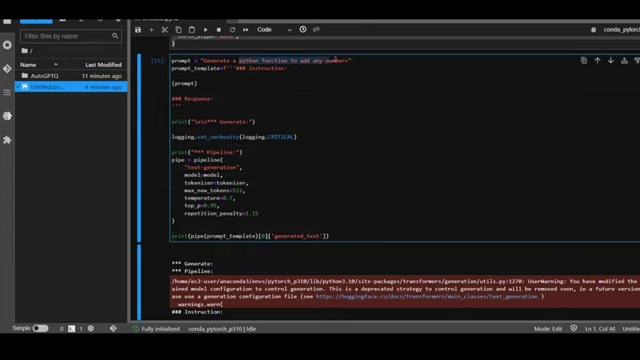
After setting up the model, you can start generating Python code by providing a Prompt. Here’s how it’s done.
Define the prompt to generate a Python function to add any number:
prompt = "Generate a python function to add any numbers"
prompt_template = f"""Instruction:
{prompt}
### Response:"""

print("

*** Generate***")
logging.set_verbosity(logging.CRITICAL)

pipe = pipeline("text-generation",
                    model=model,
                    tokenizer=tokenizer,
                    max_new_tokens=512,
                    temperature=0.7,
                    top_p=0.95,
                    repetition_penalty=1.15
                    )

print(pipe(prompt_template)[0]['generated_text'])
By crafting clear and specific prompts, you can guide StableCode to generate the desired Python functions effectively.
Step 7: Generating Fibonacci Sequence Code
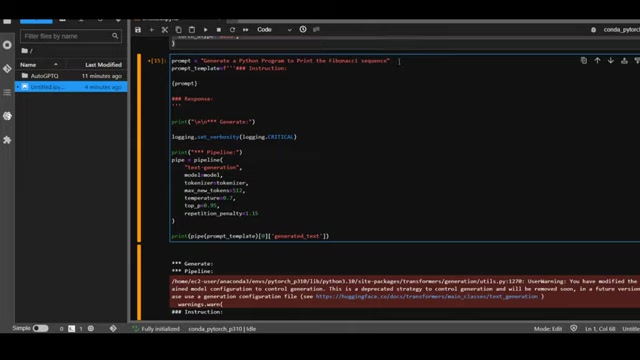
In addition to simple functions, StableCode can generate more complex code, such as a Fibonacci sequence. You just have to adjust the prompt and run the code. Keep in mind that it will take time.
prompt = "Generate a Python Program to Print the Fibonacci sequence"
prompt_template = f"""Instruction:
{prompt}
### Response:"""

print("

*** Generate***")
logging.set_verbosity(logging.CRITICAL)

pipe = pipeline("text-generation",
                    model=model,
                    tokenizer=tokenizer,
                    max_new_tokens=512,
                    temperature=0.7,
                    top_p=0.95,
                    repetition_penalty=1.15
                    )

print(pipe(prompt_template)[0]['generated_text'])
Crafting clear, specific prompts allows StableCode to deliver high-quality and relevant Python code, helping to make the entire code generation process more effective.





Most people like






























Report
Please select a reason for reporting
- 13 Reasons to Switch from Snapchat to Text Messaging
- 7 Powerful Speech to Text Apps to Boost Productivity
- 10 Best Speech to Text Tools for Effortless Transcription
- 13 Free Tools to Easily Transcribe Audio to Text
- 15 Surprising Ways Google's Speech-to-Text Boosts Productivity
- 7 Best Free Online Audio to Text Transcription Tools
- 9 Tips to Transcribe Speech to Text Faster and Better
- 13 Best Speech to Text Software for Windows 10 in 2023
- 7 Tips for Choosing the Best Transcriber for Audio to Text
- 11 Reasons Why Dragon Speech-to-Text Apps are Game-Changers
- 6 Secrets to Enhance Your Speech to Text Transcription
- 6 Brilliant Ways to Boost Productivity with Talk-to-Text on Your MacBook
- 6 Ways Transcription Software Converts Audio to Text
- 8 Tips to Transcribe Speech to Text Like a Pro
- 6 Reasons IBM Watson Speech to Text is a Game-Changer
- 14 Powerful Ways Talk-to-Text Improves Your Workflow
- 12 Top Windows Speech-to-Text Software for Efficient Transcription
- 12 Game-Changing Benefits of Apple's Speech to Text Technology
- 9 Powerful Use Cases for AWS Speech to Text Technology
- 10 Easy Steps to Transcribe YouTube Videos to Text
- transcription audio en texte
- online audio transcription
- free audio file transcription
- free ai audio transcription
- audio transcription service
- audio transcription online free
- audio transcription free online
- audio to transcription software
- audio and transcript
- ai audio transcription free
- voice recording to text converter
- translate voice recording to text
- record voice to text
- audio recording to text converter
- voice recording and transcription
- chatgpt voice to text
- gmail voice to text
- speech to text reader
- speech to text ai free
- speech to talk
- AI Marketing Automation: A Comprehensive Guide for Small Businesses
- Midjourney Alternative for Anime Art Creators: Why PixAI May Be Better for Character Workflows
- 10 Things Most People Get Wrong About AI Image Search
- AI Girlfriend Apps: Top Choices Redefining Relationships 2025
- How to Reduce Quoting Errors in Salesforce with AI-Assisted Quote Creation
- How AI Is Changing Back Office Outsourcing And Why It Matters
- How AI Helps You Spot the Next Friendslop Hit on Steam (Dear Passengers Case)
- AI Angels Review: Create Your Own AI Companion with Voice, Images & Videos
- AI and Real Estate: A New Era for Property Search, Pricing and Investment
- Best AI Sales Training Tools in 2026: Roleplay, Coaching & Onboarding
- 8 Best Social Media Scheduling Tools (2026)
- Pollo AI Review: Evaluating the Multi-Model Generative Media Ecosystem
- Best Free Static QR Code Generators for Gyms and Fitness Studios
- How to Track QR Code Scans: A Complete Guide (2026)
- AI Marketing Automation: A Comprehensive Guide for Small Businesses
- How AI-Powered Businesses Can Build a Strong Online Presence in 2026
- Top AI Facial Recognition Tools in 2026
- Unlocking the Power of Artificial Intelligence: A Comprehensive Guide
- Toolify.ai: Your Ultimate AI Tools Directory & Resource Hub
- Generative AI: Understanding Models, Datasets, and Applications

Copyright ©2026 toolify