































Table of Contents
- Key Points
- Understanding Sublimation Printing
- Converting Your Printer for Sublimation
- Crafting with Sublimation: Essential Steps
- Budgeting for Sublimation: Costs to Consider
- Sublimation Pros and Cons
- Frequently Asked Questions
- Related Questions


Understanding Sublimation Printing
What is Sublimation?
Sublimation is the process of turning a solid directly into a gas, bypassing the liquid state.
In the context of printing, this means using special sublimation ink, which, when heated, transforms into a gas that penetrates the fibers of the target material, such as polyester fabric or specially coated hard surfaces. Unlike traditional printing methods where ink sits on top of the material, sublimation creates a permanent, vibrant design that is embedded within the material itself. This results in a print that won't crack, peel, or fade over time, even with repeated washing or use. Sublimation printing is a fantastic method for creating unique and personalized products, so it has exploded in popularity in the crafting community. Sublimation printing is considered by many in the DIY community to be a Game-changer.
Why Choose Sublimation?
There are several compelling reasons to choose sublimation printing over other methods:
- Durability: Designs are permanent and resistant to fading, cracking, and peeling.
- Vibrancy: Sublimation inks produce bright, vivid colors that are truly eye-catching.
- Versatility: Sublimation isn't limited to t-shirts. It works on mugs, phone cases, and more.
- Customization: Easily create personalized items with unique designs and images.
- Professional Quality: Results look and feel professional, making it ideal for both personal projects and small businesses.
Many people want to get into sublimation but are intimidated, but with the right tools and knowledge, anyone can achieve amazing things. Sublimation is achievable for anyone interested.
What materials work best with Sublimation?
Not all materials are suitable for sublimation. To achieve the best results, the target material should be either a 100% polyester fabric or a hard surface that has been specifically coated for sublimation. The reason for this is that the gaseous sublimation ink needs to bond with polyester fibers or the special coating to create a permanent image. While you can sublimate on lower polyester blends, the image will be less vibrant and may fade more quickly. Natural fabrics like cotton are not suitable for sublimation as the ink will not properly bond to the fibers. Materials such as ceramic and metal can be used as long as they have been prepped with a polyester coating.
Converting Your Printer for Sublimation
Why Convert an Epson EcoTank?
While you can purchase printers specifically designed for sublimation, converting an Epson EcoTank printer offers a more cost-effective solution for beginners.
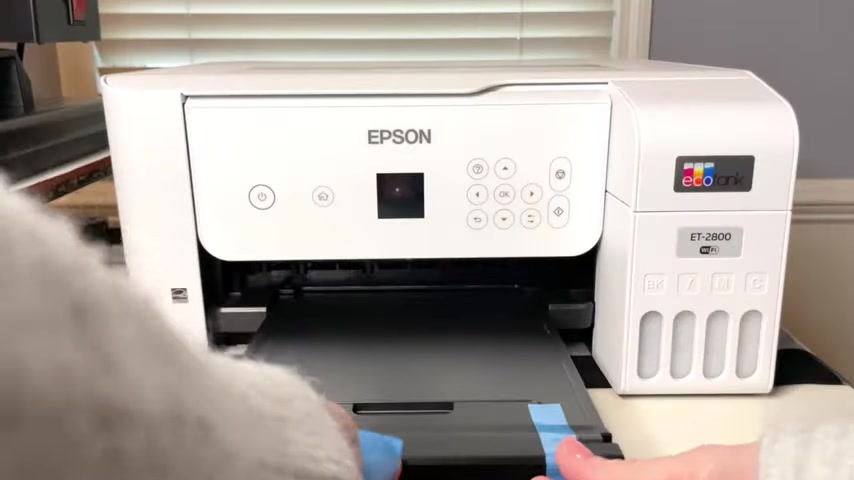
EcoTank printers use refillable ink tanks instead of cartridges, which translates to significant savings on ink costs over time. Converting a compatible EcoTank printer is a relatively simple process that involves replacing the standard ink with sublimation ink. This gives you a dedicated sublimation printer without the hefty price tag of a purpose-built model. EcoTank printers are also popular for their reliability and print quality.
Choosing the Right Epson EcoTank Printer
Not all Epson EcoTank printers are suitable for conversion. It is recommended to start with a brand new printer. Many users recommend the Epson EcoTank ET-2800 model. It is essential to check compatibility before purchasing, as some newer models may have design changes that make conversion difficult or impossible. It's also important to note that once you convert an EcoTank printer to sublimation, it cannot be easily switched back to regular printing. Therefore, it's best to dedicate a specific printer solely to sublimation. In general, when converting your printer it's best to fill the printer with the ink right away to avoid problems down the line.
Sublimation Inks and EasyFill Bottles
To successfully convert your EcoTank printer, you'll need to replace the standard ink with sublimation ink. The old method of printer refills involved using syringes to apply the ink. These are bottles with a special nozzle designed to prevent spills and air bubbles during the refilling process.
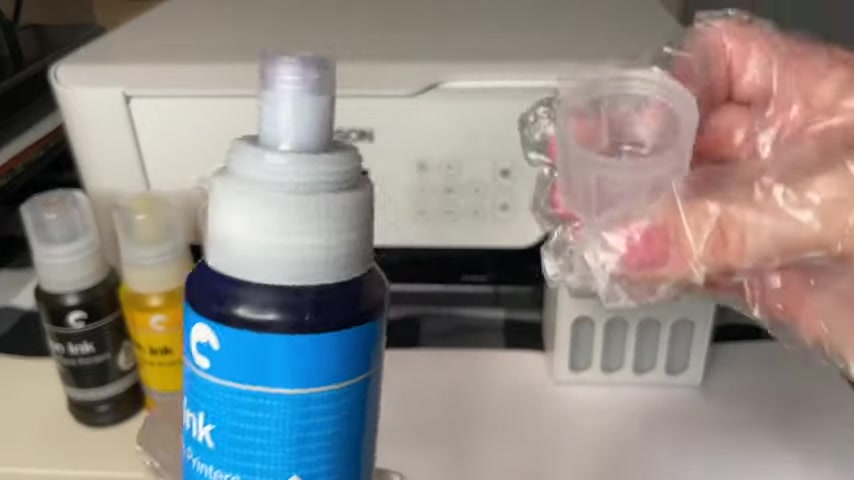
Make sure that if you use this method, that you never try to inject sublimation ink into your printer without one. The speaker recommends Hippo Brand Ink. Hippo offers a new way to refill sublimation ink that's easier than ever. This also creates less mess overall.
What materials do I need to convert my printer to sublimation?
Here is a list of the tools that are needed to convert your printer into a sublimation printer:
- Sublimation Ink
- Gloves
- Paper
Steps to convert printer
Here is the step-by-step procedure to convert your printer into a sublimation printer:
-
Gather the proper tools, including ink and gloves
-
Then find the proper location to begin refilling your ink
-
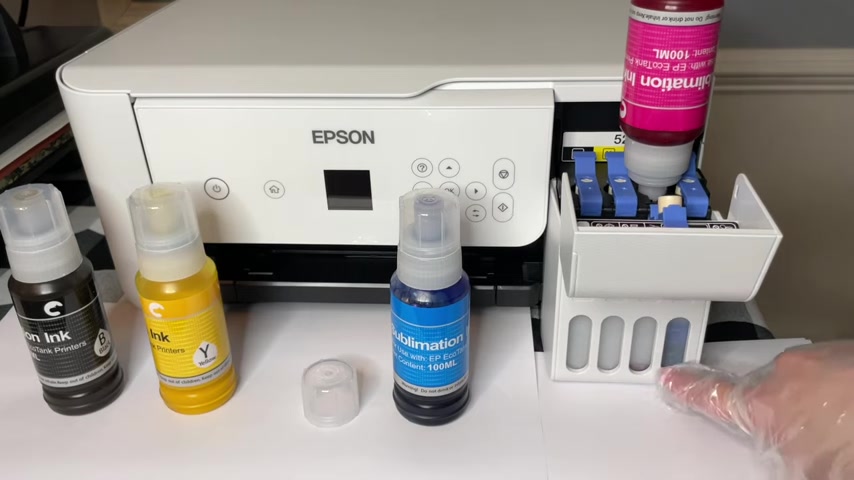
Begin by unscrewing the cap, and lifting the tab on the printer to prevent leaks.
-
Put the sublimation ink into the EcoTank printer's tank, and ensure that it locks.
-
Close that last tab and close the EcoTank and congratulations, you have converted your printer to sublimation!






Most people like

































Report
Please select a reason for reporting
- 13 Reasons to Switch from Snapchat to Text Messaging
- 7 Powerful Speech to Text Apps to Boost Productivity
- 10 Best Speech to Text Tools for Effortless Transcription
- 13 Free Tools to Easily Transcribe Audio to Text
- 15 Surprising Ways Google's Speech-to-Text Boosts Productivity
- 7 Best Free Online Audio to Text Transcription Tools
- 9 Tips to Transcribe Speech to Text Faster and Better
- 13 Best Speech to Text Software for Windows 10 in 2023
- 7 Tips for Choosing the Best Transcriber for Audio to Text
- 11 Reasons Why Dragon Speech-to-Text Apps are Game-Changers
- 6 Secrets to Enhance Your Speech to Text Transcription
- 6 Brilliant Ways to Boost Productivity with Talk-to-Text on Your MacBook
- 6 Ways Transcription Software Converts Audio to Text
- 8 Tips to Transcribe Speech to Text Like a Pro
- 6 Reasons IBM Watson Speech to Text is a Game-Changer
- 14 Powerful Ways Talk-to-Text Improves Your Workflow
- 12 Top Windows Speech-to-Text Software for Efficient Transcription
- 12 Game-Changing Benefits of Apple's Speech to Text Technology
- 9 Powerful Use Cases for AWS Speech to Text Technology
- 10 Easy Steps to Transcribe YouTube Videos to Text
- transcription audio en texte
- online audio transcription
- free audio file transcription
- free ai audio transcription
- audio transcription service
- audio transcription online free
- audio transcription free online
- audio to transcription software
- audio and transcript
- ai audio transcription free
- voice recording to text converter
- translate voice recording to text
- record voice to text
- audio recording to text converter
- voice recording and transcription
- chatgpt voice to text
- gmail voice to text
- speech to text reader
- speech to text ai free
- speech to talk
- How SEO and Marketing Dashboards Empower Agencies to Drive Results
- How to Use AI Tools to Find Internal Linking Opportunities Across a Business Website
- Discover Your Perfect Haircut with AI Hairstyle Apps
- Free Reputation Calculator Tools: How They're Adapting to Score AI Visibility, Not Just Rankings
- Design Professional Flyers for Free on Your Phone
- Best Free Flyer Maker Apps for Android: Design Like a Pro
- How to Know If Your Business Is Ready for an AI Customer Service Agent
- Revolutionizing Storytelling: From Novels to Screenplays with AI
- Create Engaging Animated Explainer Videos with a Free AI Tool
- Stop Multi-Subscribing: Benchmark Top AI Visual Models in One Canvas
- AI & Elections: Defending Democracy Against Misinformation
- Navigating Political Discourse: AI, Deepfakes, and Reality Checks
- Detecting Political Bias in News Articles: A Powerful AI Algorithm
- AI Bias Unveiled: Political Leanings in ChatGPT & Beyond
- Revolutionize Learning: Discover Quizzes AI for Engaging Interactive Quizzes
- From AI-Generated to Audience-Ready: How Quillbot Humanize AI Is Changing the Content Editing Process
- Building an AI Writing Stack in 2026: LLMs, Detectors, and Humanizers
- 7 Top AI-Powered Database Assistant Platforms
- An Objective Look at Modern Web-Based Visual Modifications
- My Honest Experience with VideoAI: The Secret Weapon for Creators Who Need Character Voices

Copyright ©2026 toolify