































Table of Contents
- Key Points: Open Source Projects Revolutionizing AI
- Deep Dive into Trending Open Source Projects
- The Power of Open Source in AI Development
- Quick Start Guides: Leveraging These Projects in Your Workflow
- Pros and Cons of Open-Source Development (General)
- Frequently Asked Questions
- Related Questions


Deep Dive into Trending Open Source Projects
Tongyi Deep Research: AI-Powered Deep Information Seeking
The world of AI is constantly evolving, and Tongyi Deep Research

represents a significant leap forward. This open-source project presents an agentic large language model specifically designed for deep information-seeking tasks. With an impressive 30.5 billion total parameters, it’s engineered for long-horizon operations, pushing the boundaries of what's possible in AI-assisted research.
Here's a breakdown of what makes Tongyi Deep Research special:
- Agentic Architecture: Designed as an agentic model, meaning it acts proactively to seek out information, not just passively respond.
- Massive Context Length: Handles context lengths of up to 128,000 tokens, allowing it to follow complex conversations, analyze long documents, and maintain context across extensive research trails.
- Scale & Efficiency: Balances the power of a large model with efficient inference costs, activating only 3.3 billion parameters per token.
- Dual Inference Modes: Supports ReAct style inference for tool use and simpler reasoning, as well as IterResearch Heavy mode for complex, multi-round evidence gathering.
Features include:
- Fully automated synthetic data generation pipeline.
- Large-scale continual pre-training on agentic data.
- End-to-end reinforcement learning.
- Agent Inference Paradigm Compatibility.
With all its power in deep research, the project has gained more than 10.6k stars on Github.
If you're interested in exploring Tongyi Deep Research further, you can find it at https://github.com/Alibaba-NLP/DeepResearch.
Convex Chef: AI-Powered Full-Stack App Development
Convex Chef

is an open-source AI Tool designed to build complete full-stack applications. Unlike many AI-powered development tools that focus solely on front-end design or code snippets, Convex Chef aims to generate entire working applications, backends included. This approach has the potential to dramatically accelerate the development process, allowing developers to bring their ideas to life faster.
What Makes Convex Chef Unique?
- Full-Stack Generation: Builds both the front-end user interface and the backend logic, including databases, authentication, and server-side functions.
- Prompt-Based Development: Applications are generated from natural language prompts, making it accessible to developers of varying skill levels.
- Built-in Functionality: Includes features like user authentication, file uploads, real-time updates, and background workflows out-of-the-box.
- Convex Integration: Leverages Convex, an open-source reactive database, for seamless data management and real-time updates.
With Convex Chef building full stack web apps with a built-in database,zero config auth, file uploads, real-time UIs, and background workflows,it has built a system prompt that works. If you want to check out the secret sauce that powers Chef, you can view or download the system Prompt here.
If you're eager to explore Convex Chef's capabilities, you can find it on GitHub: https://github.com/get-convex/chef.
Agent Payments Protocol (AP2): Secure and Auditable AI Agent Transactions
As AI agents become more sophisticated and autonomous, the need for secure and transparent payment protocols is growing. The Agent Payments Protocol (AP2)

tackles this challenge by establishing a standardized framework for trusted and auditable payments made by AI agents. This open-source initiative aims to build confidence and accountability in AI-driven commerce.
Why is AP2 Important?
- Trust & Transparency: Establishes a clear audit trail for all transactions made by AI agents.
- Security: Provides cryptographic verification of user authorization for each payment.
- Interoperability: Creates a common standard for AI agent payments across various platforms and payment systems.
AP2 uses mandates, cryptographically signed verifiable agreements that capture exactly what a user intends, what the agent is allowed to buy, spending limits, timing, etc.
Key Features
- It is payment agnostic, working with credit cards, real-time bank transfers, stablecoins, etc
- AP2 also builds in a strong audit trail. Every transaction leaves a trace: the intent mandate, the cart mandate, and the proofs along the chain.
Dive deeper into the Agent Payments Protocol (AP2) on GitHub: https://github.com/google-agentic-commerce/AP2.
WebGoat: A Playground for Web Security Learning
Enhance your web security skills with WebGoat

, a deliberately insecure web application designed to teach developers and security professionals how to identify and exploit common web vulnerabilities. This open-source project provides a safe and ethical environment for hands-on learning. Maintained by the OWASP community, WebGoat is a cornerstone of web security education.
Why Choose WebGoat?
- Hands-on Learning: Provides practical exercises to exploit real-world vulnerabilities.
- Safe Environment: Allows experimentation without risking production systems.
- OWASP Top 10 Focus: Lessons are aligned with the OWASP Top 10 vulnerabilities, ensuring relevant and up-to-date training.
What makes WebGoat special is its learning by doing structure. Each lesson starts by explaining a particular type of vulnerability – say, SQL injection, cross-site scripting, or session hijacking. Then, you actively exploit that flaw in a contained environment. Lastly, WebGoat walks you through how to defend against that same issue, showing real mitigation strategies you can use in your own projects.
Enhance your security expertise with WebGoat: https://github.com/WebGoat/WebGoat.
Serverless Stack (SST): Streamlined Cloud Infrastructure
Simplify cloud infrastructure management with Serverless Stack (SST)

. This open-source toolkit is designed to help developers build and deploy full-stack serverless applications on their own infrastructure with ease. The main goal of SST is to take messiness and complexities out of deploying applications so developers can have more time doing the work they love. It delivers streamlined cloud infrastructure.
Key Features
- Define your entire app front-end, back-end, databases, queues, storage buckets, domains, authentication—everything—in one place with code.
- Supports a lot of Cloud Providers.
- Live Development Environment
If you're seeking simplicity and control in your cloud deployments, explore Serverless Stack (SST) on GitHub: https://github.com/sst/sst.
TimesFM: AI-Powered Forecasting for Time Series Data
Explore TimesFM
, Google's pretrained time-series foundation model, that delivers strong predictions out of the box, even on data it has never seen before. A forecasting model trained by Google Research on over 100 billion real-world time series points that sets it apart from other similar projects. It’s another great AI tool with a ton of use cases.
What makes TimesFM unique?
- Massive Pretraining Scale,trained on 100 billion real-world time series points.
- It has relatively 200 Million Parameters
- Its Forecasting Performance comes close to state-of-the-art models.
- Supports Long Input Histories.
- Has Dual execution styles Suited For Lightweight reasoning And Heavy multi-step research
The best part of TimesFM, it is available in community tools. It’s also integrated into Google Cloud, BigQuery ML, so you can plug it into forecasting workflows without building everything from scratch.
Check out TimesFM: https://github.com/google-research/timesfm.
LazyVim
If you like NeoVim (A hyperextensible Vim-based text editor) Then LazyVim
is the way to go. LazyVim shines by hitting that perfect balance between a polished, ready-to-use development editor environment, and full freedom to make it your own.
What makes LazyVim stand out is that turns Neovim into something close to what people expect from an IDE without overwhelming complexity.Some of Its’ features include::
- Fancy buffer / tabline and icons.
- A clean statusline showing diagnostics, git info, etc.
LazyVim is built to be easily extended, as it uses a lazy loading plugin manager under the hood, so many features and plugins only load when you need them. This makes it fast, you editor starts quickly and the runtime stays smooth, even as you add more tools.
It also exposes configuration surfaces, so you can customize things like your color scheme, icons, and UI behavior without having to hack or rewrite large parts.
Want to get started with your version of LazyVim? Check it out: https://github.com/LazyVim/LazyVim.
Redoc-Beautiful Documentation
If you’re looking for a tool to turn your API definitions – like Open API, OR swagger files- into documentation that’s not just usable, but clean, interactive, and easy to explore, then Redoc is a must. This open-source tool is designed to make API documentation both functional and visually appealing, enhancing developer experience.
Redoc uses Open API/Swagger-generated API, and it provides:
- A Clear three-panel layout. You have navigation and search on the left.
- Main documentation content that’s responsive in the middle.
- Live examples of requests and responses on the right. Redoc also makes theme customization practical with options for font styles, color themes, branding, and flexible configuration for how the docs show up.
Take advantage of the beautiful documentation available with Redoc: https://github.com/Redocly/redoc.
MCP-Graphql
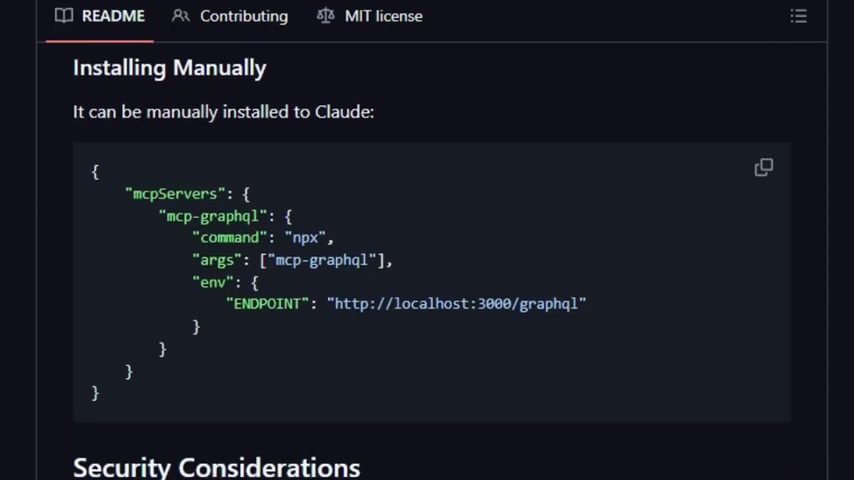
With Model Context Protocol Server for GraphQL MCP Graphql makes it easy to get AI Models to use GraphQL API’s It makes it possible for language models to see and use GraphQL APIs in a dynamic, safer, and standardized way.What sets this tool apart is that it doesn’t force developers or agents to manually code every endpoint or every data structure.
Instead, it provides schema introspection. So, an AI can discover what data types, queries, and fields are available in a GraphQL service and allows it execute those queries automatically.
MCP Graphql can offer even more with custom headers.You can provide custom headers and use local schema files.That gives additional control over authentication, and over which version of the schema the agent interacts with. So if you’ve got multiple GraphQL services, or you want agents to tap into external schemas without risking integrity, this tool delivers that ability.
It is generic and flexible. It works with any GraphQL API, as long as you provide the endpoint. It auto-builds its introspection of the schema, so models can dynamically adjust.
The combination of dynamic discovery, safe defaults, and flexible configuration is what makes MCP-Graphql standout from the others
Find out more about MCP Graphql with the Github here:https://github.com/blurrah/mcp-graphql.
Ripple
With Ripple explore the TypeScript UI framework, and find out how best to blend React, Solid and Svelte, This elegant UI framework allows developers to produce the very best out of every system.
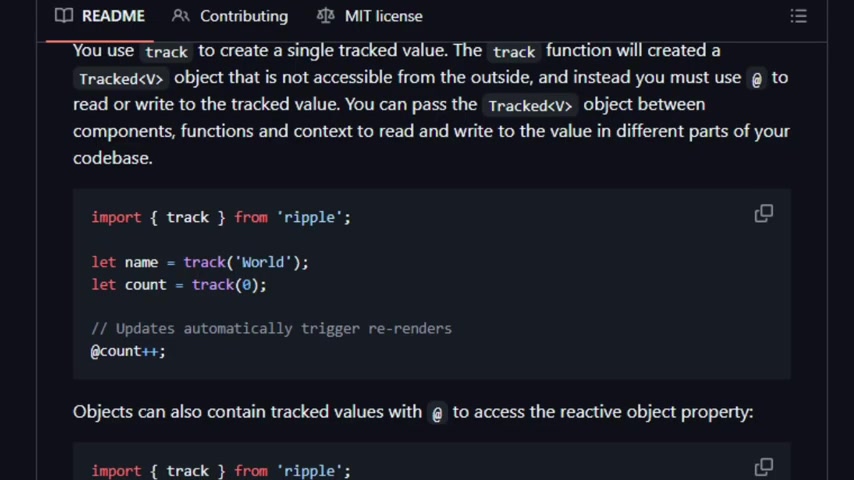
Ripple is designed to be a JS/TS-first framework, rather than HTML-first. Ripple modules have their own .ripple extension, and these modules fully support TypeScript. By introducing a new extension, it allows Ripple to invent its own superset language, which plays really nicely with TypeScript and JSX, but with a few interesting touches.
Another cool thing about Ripple is its Reactivity .It use track and reactive synrax so changes in data propagate automatically and efficiently.
More on Ripple here: https://github.com/trueadm/ripple.





Most people like



































Report
Please select a reason for reporting
- 13 Reasons to Switch from Snapchat to Text Messaging
- 7 Powerful Speech to Text Apps to Boost Productivity
- 10 Best Speech to Text Tools for Effortless Transcription
- 13 Free Tools to Easily Transcribe Audio to Text
- 15 Surprising Ways Google's Speech-to-Text Boosts Productivity
- 7 Best Free Online Audio to Text Transcription Tools
- 9 Tips to Transcribe Speech to Text Faster and Better
- 13 Best Speech to Text Software for Windows 10 in 2023
- 7 Tips for Choosing the Best Transcriber for Audio to Text
- 11 Reasons Why Dragon Speech-to-Text Apps are Game-Changers
- 6 Secrets to Enhance Your Speech to Text Transcription
- 6 Brilliant Ways to Boost Productivity with Talk-to-Text on Your MacBook
- 6 Ways Transcription Software Converts Audio to Text
- 8 Tips to Transcribe Speech to Text Like a Pro
- 6 Reasons IBM Watson Speech to Text is a Game-Changer
- 14 Powerful Ways Talk-to-Text Improves Your Workflow
- 12 Top Windows Speech-to-Text Software for Efficient Transcription
- 12 Game-Changing Benefits of Apple's Speech to Text Technology
- 9 Powerful Use Cases for AWS Speech to Text Technology
- 10 Easy Steps to Transcribe YouTube Videos to Text
- transcription audio en texte
- online audio transcription
- free audio file transcription
- free ai audio transcription
- audio transcription service
- audio transcription online free
- audio transcription free online
- audio to transcription software
- audio and transcript
- ai audio transcription free
- voice recording to text converter
- translate voice recording to text
- record voice to text
- audio recording to text converter
- voice recording and transcription
- chatgpt voice to text
- gmail voice to text
- speech to text reader
- speech to text ai free
- speech to talk
- Meshy AI: How to Create 3D Models from Text and Images
- How SEO and Marketing Dashboards Empower Agencies to Drive Results
- How to Use AI Tools to Find Internal Linking Opportunities Across a Business Website
- Discover Your Perfect Haircut with AI Hairstyle Apps
- Free Reputation Calculator Tools: How They're Adapting to Score AI Visibility, Not Just Rankings
- Design Professional Flyers for Free on Your Phone
- Best Free Flyer Maker Apps for Android: Design Like a Pro
- How to Know If Your Business Is Ready for an AI Customer Service Agent
- Revolutionizing Storytelling: From Novels to Screenplays with AI
- Create Engaging Animated Explainer Videos with a Free AI Tool
- Automate Lead Generation: A Comprehensive Guide with AI Agents
- Revideo.io: The Future of Reverse Video Search Technology
- Revolutionizing Email Marketing Agency with AI
- Breaking the Character Drift Dilemma: A Practical Test of Smart Shot
- Meshy AI: How to Create 3D Models from Text and Images
- ASOMobile Helps Teams Benchmark App Store Screenshots Against Competitors
- How to Match LMS Software With Your Organization's Training Plan
- How to Convert BTC to HNT
- Unleashing the Power of AI: Cognizant's Roadmap for Transformation
- Frame to Video Review: A Practical Look at Turning Two Still Frames Into Motion

Copyright ©2026 toolify