































Table of Contents
- Key Points
- Unveiling Logos Bible Software
- Deeper Dive into Key Features of Logos Bible Software
- How to Use Logos Bible Software
- Logos Pricing and Trial Information
- Logos Bible Software: Weighing the Pros and Cons
- Use Cases of Logos Bible Software
- Frequently Asked Questions
- Dive Deeper: Related Questions



Unveiling Logos Bible Software
Logos Bible Software: A Long-Standing Tradition of Biblical Exploration
For a long time, dedicated users have found Logos Bible Software to be a cornerstone.

Its reputation for providing in-depth Bible analysis and a myriad of study tools is highly valued. As a partner of many Christian channels, Logos has seamlessly woven itself into theological conversations. The software is lauded for its daily usability, allowing users to access and explore the Greek, the multiple different Bible translations, and enrich their understanding through its comprehensive features. Logos Bible Software offers users so many different study tools, it is something you will never get tired of using.
With its ability to work across mobile devices and desktops, it is something you can take with you everywhere you go. If you don’t want to spend your time digging through dozens of commentaries, Logos Bible Software is right for you. The power of AI can make it all that more effective.
What's New? The AI Revolution in Logos Bible Software
Recently, Logos Bible Software has been updated and undergone an evolution. The introduction of AI has sparked both excitement and concern within its user base. There was some fear associated with this shift, because many users speculated that the implementation of AI meant the direct and unmonitored integration of the internet into the software.

These fears were unfounded.
Instead of simply linking to the internet, Logos has harnessed the power of AI and wrapped it around its theological books and commentaries. It is AI with guardrails, which keeps users grounded in solid theological scholarship. This approach ensures AI does not override the original intention of the scripture, rather, only supports it. The AI searches through a given collection of digital books, finding you accurate and scholarly material. This method emphasizes responsible technology integration for theological study.
Navigating the New Logos Interface: A Beginner's Guide
The newest version of Logos Bible Software offers some great new features. Upon launching the software, a streamlined dashboard appears with its new AI integration.
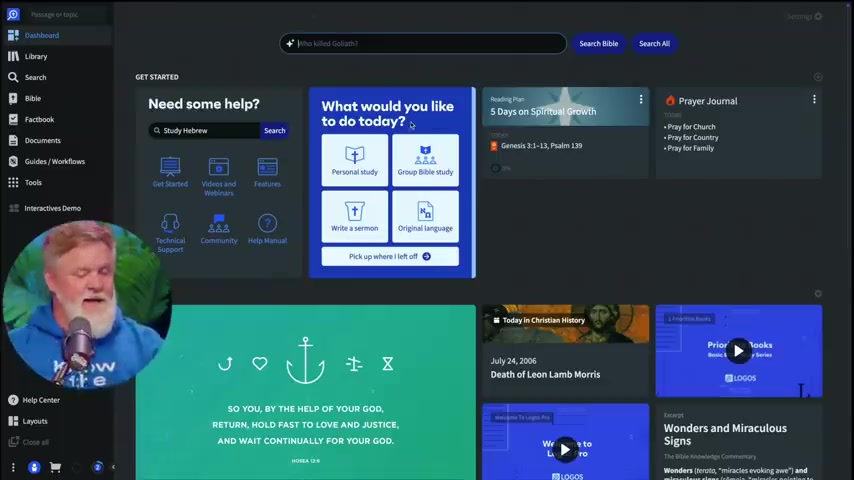
One of the most helpful features is called “Get Started.” This function is designed to reduce stress from new users who may feel overwhelmed with the program. The 'Need Some Help?' search bar helps users utilize the program, regardless of whether the user is looking to study Greek or Hebrew, or other languages. This function serves as a resource for those looking for support.
Another new function is the ‘What would you like to do today?’ block. Logos offers several options, personal study, group study, sermon writing, original language learning, etc. Clicking one of these prompts directs the user to further helpful information. This function allows users to discover tools within Logos they might not have found otherwise.
Deeper Dive into Key Features of Logos Bible Software
Harnessing the Power of the New Search Function
Logos has implemented a tool in the search function that is revolutionizing user research. Logos Bible Software AI can help provide search results, no matter how the user asks the question.
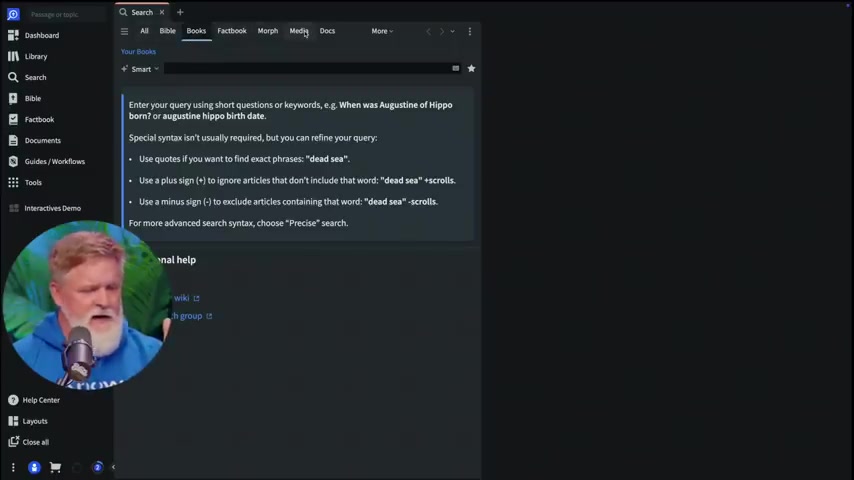
Users are encouraged to simply type the question as they would naturally ask. This is especially helpful for those who are looking for something specific, but unsure how to phrase it. It's a great tool for those new to theological study.
Many modern churches rely on Google for their theological understanding, but this is not always the best solution. Google often has mixed or even bad sources. With Logos, users can be certain they’re getting help from trusted material with true theological background. Users can select where they want to pull research from. In doing this, you are ensuring that all resources are scholarly and accurate.
AI Summaries: An Innovative Feature
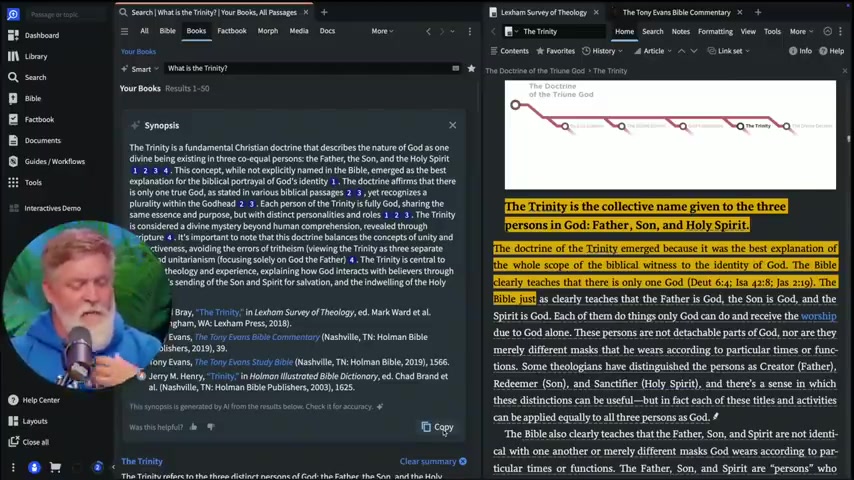
A notable feature in Logos Bible Software is its AI Summary tool. This function provides a condensed version of a given source to the user.

These tools are carefully cited so that users don’t need to worry about using information dishonestly. A user can utilize this function by opening a given resource and pressing the ‘summarize’ button.
Additionally, Logos will automatically find study notes as you read in the app. The AI notes stay aligned to the place on the page that is relevant, providing contextual notes as the user scrolls. The tool highlights what is the important or crucial information from the text, helping users better understand complex information. When writing Papers, all citations are copied to the user, as well.
How to Use Logos Bible Software
Getting Started
-
Purchase a Subscription: Choose the level of subscription that fits your needs from Logos.
-
Download the Application: Install the Logos Bible Software application on your desktop, laptop, tablet, and mobile devices.
-
Familiarize with the Dashboard: Take a tour of the “Get Started” panel on the home screen.
-
Utilize Search: Try experimenting with the search features across multiple languages and commentaries.
-
Try a Study: Consider doing a Greek or Hebrew study.
-
Contact Support: Contact technical support with the built-in function.



Most people like

































Report
Please select a reason for reporting
- 13 Reasons to Switch from Snapchat to Text Messaging
- 7 Powerful Speech to Text Apps to Boost Productivity
- 10 Best Speech to Text Tools for Effortless Transcription
- 13 Free Tools to Easily Transcribe Audio to Text
- 15 Surprising Ways Google's Speech-to-Text Boosts Productivity
- 7 Best Free Online Audio to Text Transcription Tools
- 9 Tips to Transcribe Speech to Text Faster and Better
- 13 Best Speech to Text Software for Windows 10 in 2023
- 7 Tips for Choosing the Best Transcriber for Audio to Text
- 11 Reasons Why Dragon Speech-to-Text Apps are Game-Changers
- 6 Secrets to Enhance Your Speech to Text Transcription
- 6 Brilliant Ways to Boost Productivity with Talk-to-Text on Your MacBook
- 6 Ways Transcription Software Converts Audio to Text
- 8 Tips to Transcribe Speech to Text Like a Pro
- 6 Reasons IBM Watson Speech to Text is a Game-Changer
- 14 Powerful Ways Talk-to-Text Improves Your Workflow
- 12 Top Windows Speech-to-Text Software for Efficient Transcription
- 12 Game-Changing Benefits of Apple's Speech to Text Technology
- 9 Powerful Use Cases for AWS Speech to Text Technology
- 10 Easy Steps to Transcribe YouTube Videos to Text
- transcription audio en texte
- online audio transcription
- free audio file transcription
- free ai audio transcription
- audio transcription service
- audio transcription online free
- audio transcription free online
- audio to transcription software
- audio and transcript
- ai audio transcription free
- voice recording to text converter
- translate voice recording to text
- record voice to text
- audio recording to text converter
- voice recording and transcription
- chatgpt voice to text
- gmail voice to text
- speech to text reader
- speech to text ai free
- speech to talk
- Meshy AI: How to Create 3D Models from Text and Images
- How SEO and Marketing Dashboards Empower Agencies to Drive Results
- How to Use AI Tools to Find Internal Linking Opportunities Across a Business Website
- Discover Your Perfect Haircut with AI Hairstyle Apps
- Free Reputation Calculator Tools: How They're Adapting to Score AI Visibility, Not Just Rankings
- Design Professional Flyers for Free on Your Phone
- Best Free Flyer Maker Apps for Android: Design Like a Pro
- How to Know If Your Business Is Ready for an AI Customer Service Agent
- Revolutionizing Storytelling: From Novels to Screenplays with AI
- Create Engaging Animated Explainer Videos with a Free AI Tool
- Meshy AI: How to Create 3D Models from Text and Images
- ASOMobile Helps Teams Benchmark App Store Screenshots Against Competitors
- How to Match LMS Software With Your Organization's Training Plan
- Revolutionizing Email Marketing Agency with AI
- How to Convert BTC to HNT
- Unleashing the Power of AI: Cognizant's Roadmap for Transformation
- Frame to Video Review: A Practical Look at Turning Two Still Frames Into Motion
- NVIDIA NIM: Revolutionizing Supply Chain Data Analysis with AI
- Top AI Tools That Help Brands Stand Out Offline (Not Just Online)
- Top 5 Cold Email Software: Maximize Your Outreach in 2025

Copyright ©2026 toolify