































Table of Contents
- Key Points
- Understanding Unity Muse Animate
- How Unity Muse Animate Can Change the Game Development Landscape
- Step-by-Step Guide: How to Use Unity Muse Animate
- Weighing the Pros and Cons of Unity Muse Animate
- Exploring the Core Features of Unity Muse Animate
- Unveiling the Use Cases for Unity Muse Animate
- Frequently Asked Questions About Unity Muse Animate
- Related Questions


Understanding Unity Muse Animate
What is Unity Muse Animate?
Unity Muse Animate is an AI-driven animation tool designed to seamlessly integrate into the Unity Game engine.
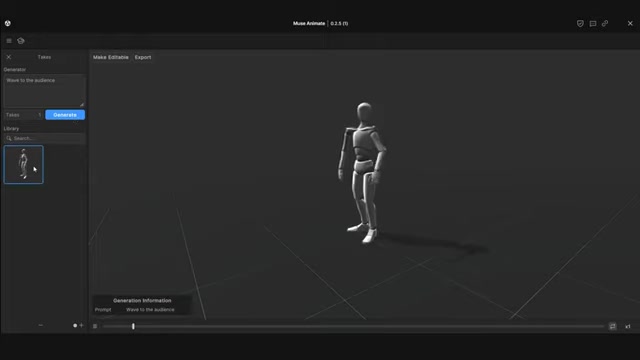
Its core function is to enable developers to generate and refine animations through simple text prompts. Instead of spending countless hours manually creating animations, users can describe the desired movement or action, and the AI will generate a corresponding animation sequence. This represents a paradigm shift in animation workflows, allowing for rapid prototyping and iteration. By reducing the technical barriers to entry, Unity Muse Animate empowers artists and developers to focus on the creative aspects of their projects, accelerating the entire game development lifecycle.
This tool is particularly beneficial for indie developers and small teams with limited resources. Traditionally, animation has been a time-consuming and expensive process, often requiring specialized skills and software. Unity Muse Animate eliminates many of these hurdles, providing a cost-effective and efficient solution for bringing characters and objects to life within a game environment. The ability to quickly generate placeholder animations also aids in testing game mechanics and level design early in development, saving time and resources in the long run.
Moreover, the AI-powered editing capabilities of Unity Muse Animate allow developers to fine-tune generated animations to match their specific vision. Whether it's adjusting timing, refining poses, or adding subtle nuances, the tool provides the flexibility needed to create truly unique and polished animations. This combination of AI-driven generation and manual refinement makes Unity Muse Animate a versatile and powerful asset for any game development project.
Step-by-Step Guide: How to Use Unity Muse Animate
Accessing Unity Muse Animate
To begin using Unity Muse Animate, ensure you have a Unity account and access to the Unity Muse suite of tools. As it is in Beta, you will need to check if you are able to access the Beta. The steps below are for the Beta Web Version.
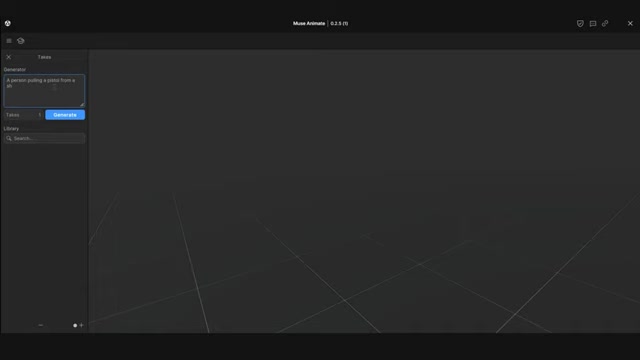
- Navigate to the Unity Muse website.
- Log in with your Unity credentials.
- Locate and launch Unity Muse Animate.
Generating Animations from Text
Once you have accessed the interface, you can begin entering the text Prompt to generate an animation.
- In the Muse Animate, use the Describe a motion here, then press Generate section to enter a line of text. This is called a Prompt.
- Click the Generate button.
- After a few moments you will see the AI generated Animation in the Takes Library.
Editing and Refining Animations
The AI will create a base animation for you, that you can customize to meet your specific needs. To edit an animation, follow these steps:
- Click the generated animation from the Takes Library.
- Click on the Make Editable button.
- Adjust the sampling options to determine the number of keyframes by adjusting the Sensitivity.
- Convert the sampling to a keyframe.
- Adjust the keyframes by selecting the circle at the keyframe point.
- Use the available tools to adjust the posing of the skeleton, the rotation of the skeleton, or the position of the skeleton.
Mirror Fix
As sometimes the animations will be backwards, after you move into Unity, apply the mirror button at the rig to fix this.
Integrating Animations into Your Unity Project
After generating and refining an animation, you can seamlessly integrate it into your Unity project:
- From the Muse Animate, click Export.
- The Cloud Drive feature is currently not working so you will need to export locally. Select the Export Locally tab.
- Select a Asset Name and enter it.
- Select a Location where the animation should be exported to.
- Click the Export button.
Exploring the Core Features of Unity Muse Animate
Text-to-Animation Generation
At the heart of Unity Muse Animate lies its ability to generate animations from text prompts. Users simply describe the desired action or movement, and the AI generates a corresponding animation sequence. This feature dramatically accelerates the animation process, allowing developers to quickly prototype and test different movement ideas.
Example prompts could include 'a character walking,' 'a zombie staggering,' or 'a character waving to the audience.' The AI interprets these prompts and creates a base animation that can be further refined. This is a game-changer for developers who may lack extensive animation experience or those who need to quickly create placeholder animations for testing game mechanics.
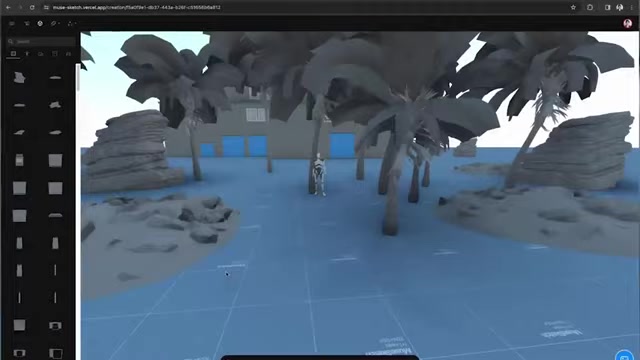
The use of AI in animation will undoubtedly make it easier to prototype scenes quickly.
Animation Editing and Refinement
While AI-generated animations provide a solid starting point, Unity Muse Animate also offers powerful editing tools to fine-tune the results. Users can adjust the timing of animations, refine poses, and add subtle nuances to create unique and polished movements.
This level of control ensures that the AI-generated animations seamlessly integrate with the overall aesthetic and feel of the game. Developers are not limited to the AI's initial output; they have the flexibility to Shape and mold the animations to perfectly match their artistic vision. Editing features let users customize the AI generated animation with fine-grained control.
Seamless Unity Integration
Unity Muse Animate is designed to integrate seamlessly with the Unity game engine. This means that animations generated and refined within the tool can be easily imported into Unity projects, eliminating compatibility issues and streamlining the workflow.
This integration is crucial for ensuring a smooth and efficient development process. Developers can focus on the creative aspects of their projects without being bogged down by technical complexities. Direct integration with Unity allows developers to quickly implement their AI generated content in their project without import hassles.
Muse Animate
Muse Animate has keyframing to generate natural motion between keyframes. It uses AI effectors to allow you to have precise posing and keyframe abilities.
Unveiling the Use Cases for Unity Muse Animate
Rapid Prototyping
Unity Muse Animate is an invaluable tool for rapid prototyping.
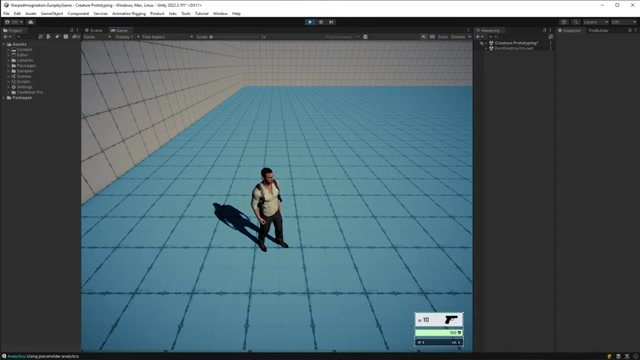
Developers can quickly generate placeholder animations for characters, creatures, and objects, allowing them to test game mechanics, level design, and overall gameplay early in development. This accelerated prototyping process saves time and resources, allowing for faster iteration and refinement.
For instance, a designer can quickly create basic animations for a new enemy type, allowing them to test its behavior and combat mechanics without waiting for a dedicated animator. This approach allows for faster experimentation and refinement of core gameplay elements.
Animation for Indie Developers
Indie developers and small teams often face resource constraints when it comes to animation. Unity Muse Animate levels the playing field by providing a cost-effective and efficient solution for creating high-quality animations.
Instead of outsourcing animation work or spending countless hours manually animating characters, indie developers can leverage the power of AI to generate and refine animations in-house. This empowers them to create visually appealing and engaging games without breaking the bank. Indie developers may greatly benefit from the animation shortcuts Muse Animate offers.
Enhanced Character Development
With Unity Muse Animate, developers can bring their characters to life with greater ease and efficiency. The ability to quickly generate animations for a wide range of actions and emotions allows for more expressive and engaging character interactions.
Whether it's creating nuanced facial expressions or dynamic combat maneuvers, Unity Muse Animate provides the tools needed to craft compelling and believable characters. This enhanced character development contributes to a more immersive and enjoyable gaming experience.





Most people like
































Report
Please select a reason for reporting
- 13 Reasons to Switch from Snapchat to Text Messaging
- 7 Powerful Speech to Text Apps to Boost Productivity
- 10 Best Speech to Text Tools for Effortless Transcription
- 13 Free Tools to Easily Transcribe Audio to Text
- 15 Surprising Ways Google's Speech-to-Text Boosts Productivity
- 7 Best Free Online Audio to Text Transcription Tools
- 9 Tips to Transcribe Speech to Text Faster and Better
- 13 Best Speech to Text Software for Windows 10 in 2023
- 7 Tips for Choosing the Best Transcriber for Audio to Text
- 11 Reasons Why Dragon Speech-to-Text Apps are Game-Changers
- 6 Secrets to Enhance Your Speech to Text Transcription
- 6 Brilliant Ways to Boost Productivity with Talk-to-Text on Your MacBook
- 6 Ways Transcription Software Converts Audio to Text
- 8 Tips to Transcribe Speech to Text Like a Pro
- 6 Reasons IBM Watson Speech to Text is a Game-Changer
- 14 Powerful Ways Talk-to-Text Improves Your Workflow
- 12 Top Windows Speech-to-Text Software for Efficient Transcription
- 12 Game-Changing Benefits of Apple's Speech to Text Technology
- 9 Powerful Use Cases for AWS Speech to Text Technology
- 10 Easy Steps to Transcribe YouTube Videos to Text
- transcription audio en texte
- online audio transcription
- free audio file transcription
- free ai audio transcription
- audio transcription service
- audio transcription online free
- audio transcription free online
- audio to transcription software
- audio and transcript
- ai audio transcription free
- voice recording to text converter
- translate voice recording to text
- record voice to text
- audio recording to text converter
- voice recording and transcription
- chatgpt voice to text
- gmail voice to text
- speech to text reader
- speech to text ai free
- speech to talk
- How to Use AI Tools to Find Internal Linking Opportunities Across a Business Website
- Discover Your Perfect Haircut with AI Hairstyle Apps
- Free Reputation Calculator Tools: How They're Adapting to Score AI Visibility, Not Just Rankings
- Design Professional Flyers for Free on Your Phone
- Best Free Flyer Maker Apps for Android: Design Like a Pro
- How to Know If Your Business Is Ready for an AI Customer Service Agent
- Revolutionizing Storytelling: From Novels to Screenplays with AI
- Create Engaging Animated Explainer Videos with a Free AI Tool
- Stop Multi-Subscribing: Benchmark Top AI Visual Models in One Canvas
- Best Seedance 2.5 API Provider: Every Price on the Market, Checked at Source
- Top AI Social Media Management Tools: Automate Your Content Strategy
- Free AI Text to Video Generator: Create Stunning Videos from Text
- Discover 17 ChatGPT Alternatives: A Comprehensive Comparison
- Character.AI vs. Janitor AI: Which AI Chat Platform Reigns Supreme?
- Top Virtual Assistant Companies in 2026: Reviews, Pricing, and Plans Compared
- Unveiling FaceCheck.ID: Revolutionizing Reverse Image Searches with AI
- 11 Best AI Dialers in 2026: Features, Pricing, Pros and Cons
- How I Direct Consistent AI Clips: A Hands-On Guide to Multi-Model Generation
- A Realistic Review of the Photo Generator Image Tool
- Playwright MCP Server: Automated Web Testing with Agent Mode

Copyright ©2026 toolify