































Table of Contents
- Key Points
- Understanding Vector Functions in Azure SQL Database
- Practical Applications of Vector Functions
- How to Utilize Vector Functions in Azure SQL Database
- Azure SQL Database Pricing and Availability
- Weighing the Pros and Cons of Vector Functions
- Core Features
- Explore Azure SQL Database with Vector Functions Use Cases
- FAQ
- Related Questions


Understanding Vector Functions in Azure SQL Database
What are Vector Functions?
Vector functions in Azure SQL Database are new capabilities designed to facilitate AI-driven tasks by allowing you to store and manipulate data as vectors.
Vectors are foundational to AI because they represent data in a way that allows machine learning algorithms to understand relationships and Patterns. This often includes numbers represented in an optimized binary format within your database. Customers requested that SQL be able to handle vectors directly, thus allowing for faster AI. Vector functions make it simpler to perform tasks like:
- Semantic Search: Find data based on meaning rather than exact keywords.
- Recommendation Engines: Suggest Relevant products or content to users.
- Anomaly Detection: Identify unusual patterns in your data.
The availability of vector functions directly within Azure SQL Database eliminates the need for complex data movement or integration with separate vector databases. This can streamline your development process and improve performance.
Why Vector Functions are a Game Changer for AI
The introduction of vector functions to Azure SQL Database marks a significant leap forward for integrating AI into data management. Storing vector embeddings alongside structured data offers several advantages:
- Simplified Architecture: Reduces complexity by consolidating data and AI processing within the database.
- Improved Performance: Minimizes latency by eliminating data transfer overhead.
- Enhanced Security: Keeps sensitive data within the secure boundaries of Azure SQL Database.
These enhancements are particularly beneficial for organizations looking to embed AI into their existing applications without undergoing a major architectural overhaul. The ability to perform vector operations directly within SQL allows for more efficient and agile AI implementations.
Practical Applications of Vector Functions
Gift Recommendation Engine
Let’s consider a practical use case. Imagine you want to build a gift recommendation engine. First, you'd use a service like Azure OpenAI to convert product descriptions into vector embeddings using the sp_invoke_external_rest_endpoint stored procedure.
These embeddings capture the semantic meaning of the descriptions. Next, store those vectors in an Azure SQL Database.
When a user searches for a gift, you again convert their search query into a vector. Then, you use vector distance functions (like Cosine distance) to find the products with the most similar vectors to the query vector. You now have an organized method in which to implement AI.
For example:
SELECT TOP(50)
 id, product_name, [description], vector_distance('cosine', embeddings, @embedding) AS distance
FROM
 dbo.walmart_ecommerce_product_details
WHERE
 category like '%Toys%'
ORDER BY
 distance;
This approach uses semantic search and is often paired with traditional search methods to deliver optimal results, as well.
Steps to Implement a Vector-Based Gift Recommendation System
Here are the steps that you must take to implement a vector-based gift recommendation system:
- Set up REST Endpoint: Set up the stored procedure
sp_invoke_external_rest_endpointto call the OpenAI API. The ability to call OpenAI to get your description is paramount. - Create Vector Data: Next, the model will take a test STRING such as: 'King', 'Queen', or 'Pizza'.
- Load Vectors Into Database: Load this data into the database so you can query.
- Get Embedding Output: Then using the
dbo.get_embeddingsyou can Translate this data into an embedding and load into a vector.
declare @embedding varbinary(8000);
EXEC dbo.get_embeddings @model = 'embeddings', @text = 'King', @embedding = @king output;
This means that by using this process your description will translate and optimize into a binary format that can be easily manipulated by AI.
Enhancing SQL Queries with Hybrid Search
To further refine search results, incorporate a hybrid search approach. Vector search methods can be paired with standard SQL to get the optimal results.
This can be done, for example, using a public data set such as the Walmart one. Here, you will set parameters such as
- ID
- Product name
- Description
- Vector distance
And the parameters can be chosen with natural language as well.
This allows for a much higher degree of SEO keywords and flexibility when using the database.
How to Utilize Vector Functions in Azure SQL Database
Creating and Validating Vectors
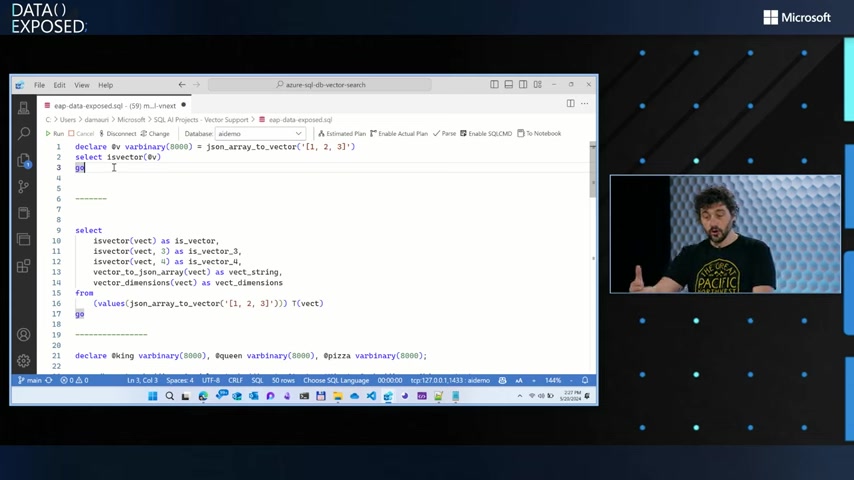
First, you need to create vectors using the JSON_ARRAY_TO_VECTOR function. This function transforms a JSON array into an optimized binary format suitable for vector storage.
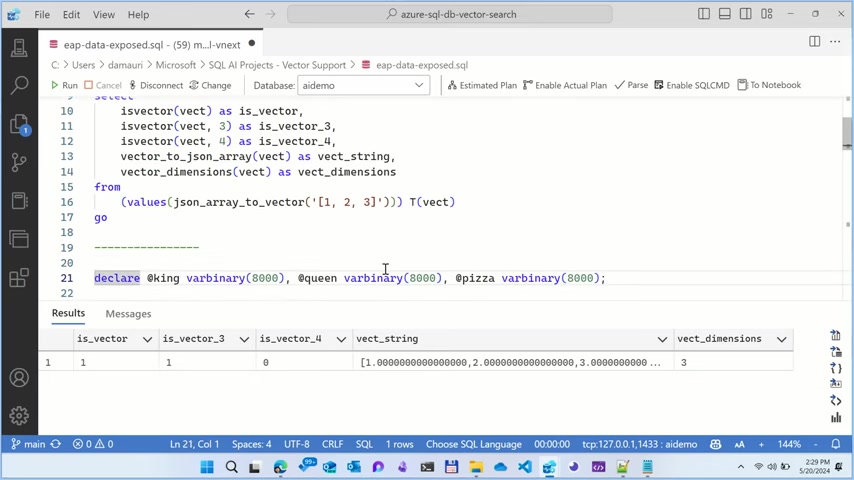
DECLARE @v varbinary(8000) = eap.JSON_ARRAY_TO_VECTOR('[1, 2, 3]');
SELECT isVector(@v);
Then, validate a vector to confirm it is a vector using isVector.
SELECT
 vect as is_vector,
 isVector(vect, 3) as is_vector_3,
 isVector(vect, 4) as is_vector_4,
 vector_to_JSON_array(vect) as vect_string,
 vector_dimensions(vect) as vect_dimensions
FROM (VALUES (eap.JSON_ARRAY_TO_VECTOR('[1, 2, 3]')) ) T(vect);
Next, the system should validate that the is ext_vector contains a binary format, to test its authenticity.
Finding Similarity Using Vector Distance
To calculate the distance between two vectors (determining their similarity), you can use functions like vector_distance. The new functionality is a simple query that allows you to search for a good gift.
DECLARE @king varbinary(8000), @queen varbinary(8000), @pizza varbinary(8000);
EXEC dbo.get_embeddings @model = 'embeddings', @text = 'King', @embedding = @king output;
EXEC dbo.get_embeddings @model = 'embeddings', @text = 'Queen', @embedding = @queen output;
EXEC dbo.get_embeddings @model = 'embeddings', @text = 'Pizza', @embedding = @pizza output;

SELECT
 v1.name,
 v2.name,
 vector_distance('cosine', v1.embedding, v2.embedding) as distance
FROM
 #t AS v1
CROSS JOIN
 #t AS v2
WHERE v1.name = 'Queen'
ORDER BY distance;
This allows AI to find connections between descriptions and parameters within your database. AI doesn't see the world in colors, but numbers! By using this function you are able to connect AI to numbers so that your database has meaning for the AI!





Most people like

































Report
Please select a reason for reporting
- 13 Reasons to Switch from Snapchat to Text Messaging
- 7 Powerful Speech to Text Apps to Boost Productivity
- 10 Best Speech to Text Tools for Effortless Transcription
- 13 Free Tools to Easily Transcribe Audio to Text
- 15 Surprising Ways Google's Speech-to-Text Boosts Productivity
- 7 Best Free Online Audio to Text Transcription Tools
- 9 Tips to Transcribe Speech to Text Faster and Better
- 13 Best Speech to Text Software for Windows 10 in 2023
- 7 Tips for Choosing the Best Transcriber for Audio to Text
- 11 Reasons Why Dragon Speech-to-Text Apps are Game-Changers
- 6 Secrets to Enhance Your Speech to Text Transcription
- 6 Brilliant Ways to Boost Productivity with Talk-to-Text on Your MacBook
- 6 Ways Transcription Software Converts Audio to Text
- 8 Tips to Transcribe Speech to Text Like a Pro
- 6 Reasons IBM Watson Speech to Text is a Game-Changer
- 14 Powerful Ways Talk-to-Text Improves Your Workflow
- 12 Top Windows Speech-to-Text Software for Efficient Transcription
- 12 Game-Changing Benefits of Apple's Speech to Text Technology
- 9 Powerful Use Cases for AWS Speech to Text Technology
- 10 Easy Steps to Transcribe YouTube Videos to Text
- transcription audio en texte
- online audio transcription
- free audio file transcription
- free ai audio transcription
- audio transcription service
- audio transcription online free
- audio transcription free online
- audio to transcription software
- audio and transcript
- ai audio transcription free
- voice recording to text converter
- translate voice recording to text
- record voice to text
- audio recording to text converter
- voice recording and transcription
- chatgpt voice to text
- gmail voice to text
- speech to text reader
- speech to text ai free
- speech to talk
- How to Use AI Tools to Find Internal Linking Opportunities Across a Business Website
- Discover Your Perfect Haircut with AI Hairstyle Apps
- Free Reputation Calculator Tools: How They're Adapting to Score AI Visibility, Not Just Rankings
- Design Professional Flyers for Free on Your Phone
- Best Free Flyer Maker Apps for Android: Design Like a Pro
- How to Know If Your Business Is Ready for an AI Customer Service Agent
- Revolutionizing Storytelling: From Novels to Screenplays with AI
- Create Engaging Animated Explainer Videos with a Free AI Tool
- Stop Multi-Subscribing: Benchmark Top AI Visual Models in One Canvas
- Best Seedance 2.5 API Provider: Every Price on the Market, Checked at Source
- Top AI Social Media Management Tools: Automate Your Content Strategy
- Free AI Text to Video Generator: Create Stunning Videos from Text
- Discover 17 ChatGPT Alternatives: A Comprehensive Comparison
- Character.AI vs. Janitor AI: Which AI Chat Platform Reigns Supreme?
- Top Virtual Assistant Companies in 2026: Reviews, Pricing, and Plans Compared
- Unveiling FaceCheck.ID: Revolutionizing Reverse Image Searches with AI
- 11 Best AI Dialers in 2026: Features, Pricing, Pros and Cons
- How I Direct Consistent AI Clips: A Hands-On Guide to Multi-Model Generation
- A Realistic Review of the Photo Generator Image Tool
- Playwright MCP Server: Automated Web Testing with Agent Mode

Copyright ©2026 toolify